Christian Heilmann

Author Archive

Generating charts from accessible data tables and vice versa using the Google Charts API

Tuesday, January 8th, 2008

Google have lately been praised for their chart API and my esteemed colleague Ed Eliot has a workaround for its restrictions in terms of caching and server hits.

I played around a bit with it and thought it very cool but it felt a bit clunky to add all these values to a URL when they could be in the document for those who cannot see pie charts. This is why I wrote a small script that converts data tables to charts using the API and a wee bit of JavaScript.

Using this script you can take a simple, valid and accessible data table like the following and it gets automatically converted to a pie chart.


Browsers
BrowserPercent
Firefox60
MSIE25
Opera10
Safari5

Simply add the script to the end of the body and it’ll convert all tables with a class called “tochart”. You can define the size (widthxheight) and the colour as a hexadecimal triplet as shown in this example. If you leave size and colour out, the script will use presets you can alter as variables in the script itself.

What about data tables from charts?

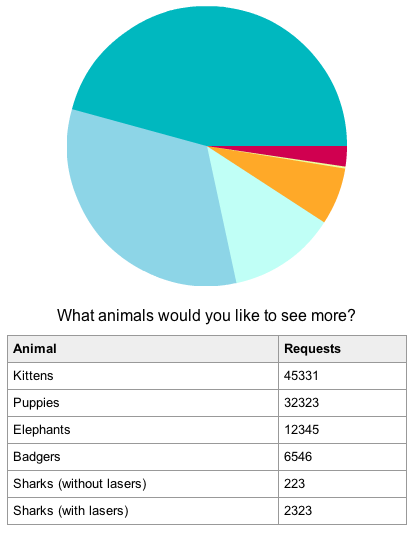
As Victor of the Yahoo! Accessibility group asked for the other way around, this is now also possible. When you use the verbose data mode for the charts and add the class “totable” to the image the script will generate a data table preceeding the image and null out the alternative text. For example:


Fruit Consumption of under 15 year olds, March 2007

The tables have a class called “generatedfromchart” which you can use to move them off-left if needed.

Check out the demo page and download the script with the demo page and CSS to have a go with it yourself. Of course, all is licensed creative commons, so go nuts.

Useful? Please comment if you want something extra or wonder how the script works.

[tags]accessibility,charts,api,google,tables,javascript[/tags]

An attempt for a more accessible edit-in-place solution

Friday, January 4th, 2008

Today I will try to find a more accessible way to provide an edit-in-place script. The solution described here is probably not ready for real life yet, please test it in different environments and provide fixes. It is licenced with creative commons share-alike, so go nuts!

I really like the idea of edit-in-place. Probably the most used example of edit-in-place is flickr which allows you to click any heading or description when you are logged in to directly edit it. The reason I like edit-in-place is that it makes it a lot easier for users to describe things, which hopefully results in more accessible and easier to find web sites (after all text is what gets indexed and what is available to everybody). The drawback of edit-in-place is that a lot of solutions are not very accessible. They add a click handler to elements that are not necessarily available to assistive technology and are not at all accessible with a keyboard.

A non-scripting solution attempt

Technically the easiest solution to create an accessible edit-in-place would be to use input fields with labels and use CSS to make them look like the other elements. The code could be the following:

<h1 class="editable">
  <label for="mainheading">Heading:</label>
  <input type="text" id="mainheading" 
         value="Otters in eastern Europe">
</h1>

And the CSS:

.editable label{
  position:absolute;
  top:0;
  left:-9999px;
}
.editable input{
  border:none;
  font-family:arial,sans-serif;
}

But alas! Is it more accessible? I am not sure, as the semantic goodness of a heading is disturbed. I am quite sure search engines will frown upon it and as screen readers work differently in forms mode than in reading mode it might even be more confusing. So let’s scratch that.

Making it work unobtrusively

The next step would be to use a normal heading and somehow connect it with a form field somewhere else in the document. The cool thing about this is that we have something like that in plain HTML: targeted links. For example:

<form id="editform" action="servermagic.php">
<h1 class="editable">
  <a href="#editheader">Edit me, wuss!</a>
</h1>
<p class="editable">
  <a href="#editdescription">Me as well, do it!</a>
</p>
<div id="editingsection">
  <p>
    <label for="editheader">Content of main heading:</label>
    <input type="text" id="editheader" name="editheader">
  </p>
  <p>
    <label for="editdescription">Content of description:</label>
    <input type="text" 
           id="editdescription" 
           name="editdescription">
  </p>
  <p><input type="submit" value="Save Changes"></p>
</div>
</form>

This works without JavaScript (but somehow my Firefox does not highlight the form field when you hit the link, does anyone know why? Please comment!). All it needs to turn it into a working version of edit-in-place is a JavaScript. What the script does is:

  • find the section with the ID “editsection” and hide it from view
  • find all elements with the class “editable” and add a click handler pointing to an edit function
  • override the submit event of the form to point to a store function

The edit function should do the following:

  • check if another element is already being edited and focus that if there is one
  • Get the ID of the form element from the href of the targeted link
  • set the value of the form element to the content of the element
  • set an “edited” style to the original element to hide it
  • show the form field where the original link was
  • focus the form field
  • tell the main script what element is currently being edited

The store function should:

  • check if there is an element edited (to avoid overriding normal form submission)
  • set the content of the targeted link to the value of the field
  • move the form field back to where it came from
  • set the focus back to the link
  • store the content asynchronously (not implemented here)
  • stop the normal form submission
  • reset the edit state of the script to none

Following is the script that does exactly that. I am using the YUI in this example as I like to concentrate on writing scripts rather than worrying about browser problems. That said, notice that you need to wrap form field focus in a timeout in Firefox, what’s with that?

YAHOO.namespace('ch');
YAHOO.ch.editinplace = function(){
 
  /* Names and IDs used */
  var namesandids = {
    editsection:'editingsection',
    edited:'edited',
    hidden:'hidden',
    editable:'editable',
    form:'editform'
  };
 
  var YE = YAHOO.util.Event,YD = YAHOO.util.Dom;
 
  var edit = {};
  var editingsection = YD.get(namesandids.editsection);
  if(editingsection){
    YD.addClass(editingsection,namesandids.hidden);
 
    function doedit(e){
      if(!edit.target){
        var t = YE.getTarget(e);
        if(t.href){
          var fieldid = t.getAttribute('href').split('#')[1];
          var field = YD.get(fieldid);
          this.appendChild(field);
          field.value = t.innerHTML;
          YD.addClass(t,namesandids.edited);
          setTimeout(function(){field.focus();},10)
          edit = {target:t,field:field,id:fieldid};
        };
      } else {
        setTimeout(function(){edit.field.focus();},10)
      }
      YE.preventDefault(e);
    };
 
    function store(e){
      if(edit.target){
        edit.target.innerHTML = edit.field.value;
        YD.removeClass(edit.target,namesandids.edited);
        editingsection.appendChild(edit.field);
        edit.target.focus();
        // Ajax Magic here, you can used edit.id as the id 
        YE.preventDefault(e);
        edit = {};
      };
    };
 
    var edits = YD.getElementsByClassName(namesandids.editable);
    YE.on(edits,'click',doedit);
    YE.on(YD.get(namesandids.form),'submit',store);
 
  }
}();

Try out the solution and Download the example page with the script as a zip and tell me what you think!

Tested in Firefox, IE7 and Opera 9 on PC, please get me some more feedback on other systems and browsers.

[tags]unobtrusive,accessibility,editinplace,interface[/tags]

Let’s make 2008 the year of embracing the server side with Ajax

Sunday, December 30th, 2007

I am always fascinated by the amount of Ajax tutorials and examples out there that totally ignore the backend part of an Ajax app. A lot of times you’ll find page-long ravings about the 6-7 lines of JavaScript that allow the client to make an HTTP request but when it comes to talking about the proxy script needed to allow for cross-domain requests a lot is glossed over as “you don’t need to know this, just use this script”.

That would not really be an issue if the scripts offered weren’t that bad. Unsanitized URLs are the main attacking point for cross-server-scripting attacks. If you use a PHP_SELF as the action of your forms you shouldn’t be too confused about a lot of mail traffic from your server or text links on your site you didn’t sign off and get money for.

The other thing about Ajax information on the web that amazes me is that people keep complaining about the slowness and problems with converting data from one format to another on the client side. Let us not kid ourselves: even after all the articles, books and podcasts about Ajax we still have no clue whatsoever what a visitor uses to look at our products. We cannot tell for sure what browser is used, if there is assistive technology involved or anything about the specs of the computer the browser runs on. This to me makes the client side the least preferable place to do heavy calculation and conversion.

The server side, on the other hand, is in your control and you know what it can do. Complex regular expressions, XSLT conversion, all of this is much easier to do on the backend – and you know that the text encoding will work to boot. A lot of complexity of Ajax apps is based on bad architecture and design decisions and on relying on the client side to provide necessary functionality.

So if you ask me what the ratio of client-to-server code of a good Ajax app is I’d say 30% client and 70% server. The 70% on the server should be used to provide security, non-JavaScript fallback functionality (yay accessibility) and conversion of data to small, easy-to-digest chunks for the client (think HTML and JSON). The 30% client side code should mainly be used up to enhance the usability of the product and make it easier for your visitors to reach their goals.

So here’s my plan for 2008: whenever I talk Ajax I will try to cover as much backend as frontend. I’ll do this by partnering with other experts as I myself created some terrible PHP in the past. I hope that others will follow that example as Ajax is a wonderful opportunity to bridge the gap between frontend and backend engineering – and we have to talk to each other to create a good app.

[tags]ajax,development,php,security,xss,architecture,tutorials[/tags]

But this is only for beginners, it doesn’t have to be that detailed…

Wednesday, December 19th, 2007

One of the most annoying things to me on the web is new tutorials that are full of assumptions, bad practices and generally outdated. The irony is that when you tell the authors about the issues their excuse in a lot of cases is that the pieces are mainly targeted at beginners.

How does that make sense? Surely when you want to cater something for beginners nowadays you’d want to make it work for them today, and not base it on old technology and practices.

Catered for the audience

Back when I still had a television there was one public service ad in Germany I really liked: it was a man talking in baby talk and acting terribly silly. He then bowed down below the camera, you heard a slapping sound and he re-emerged with sticky tape over his mouth. The announcer then said “we need programs for children, not childish programs”.

This is exactly what we need for beginners: tutorials that are up-to-date, easy to understand and are based on best practices and proven concepts. Not tutorials that cover easy to explain concepts that actually don’t apply any longer or have to be un-learnt as soon as you become professional developers.

Web competence?

The main reason is that it is hard enough for adults to learn things, but even harder to un-learn them. It is hard work to go through the four stages of competence and once you are at the last you don’t want to start again. However, in a fast paced environment as the web becoming unconsciously competent can also mean that you just don’t realize any longer that there are changes you should be covering.

Lowering the barrier

The main reason people write tutorials that promise a lot and don’t deliver is that they want to lower the barrier of entry for new developers. This is a nice enough idea as web development with all its loosely defined standards and unknowns can be quite daunting at first. However, this to me robs beginners of the chance to become great developers.

My personal idea of a good developer is showing the urge to understand and apply – showing the dedication, interest and stamina to learn about the environment you apply your work, not only the technicalities of it. This comes with experience but it also needs to be based on a good foundation.

Leaving them hungry for more

A good beginner’s tutorial should actually not give beginners solutions but make them understand concepts and point to information they can use to learn things for themselves. There is no greater way of learning than finding it out by yourself, on your own terms and in your own time. Anything else is just repetition.

The why of beginner’s tutorials

There are several reasons why people write beginner’s tutorials:

  • They want to genuinely help other developers to come in and start learning the right way
  • They want to avoid people being scared of learning the job
  • They want a quick win – write about the easy stuff
  • They want to show off their skills to lesser skilled developers
  • They want to have a big audience – promising easy solutions makes for a lot of readers (think of tabloid journalism)

Not as easy as it seems

Now here is the tricky bit: writing a tutorial for beginners is actually a lot harder than writing about a more complex subject for a competent audience. The reasons are:

  • you can cause much more damage with bad information – people trust you to be an expert and will believe and repeat what you said
  • you will not get much constructive negative feedback – people will not dare to say you are wrong and the ones that could will not read what you wrote – as it is for beginners.
  • it is easy to start with a preconception of what a beginner is – however beginners could be people that are just coming from another area of expertise they are very competent in.
  • you don’t have a passion to work with – beginners are mostly scared or try to find a fast solution rather than true understanding

The last point is exactly what a lot of bad beginner’s tutorials work with and writing those will actually make it easy for you to get published. However, it will not make you a good trainer or writer, no matter how good the short term feedback and success is.

Danger signs

I know there will always be a lot of tutorials like this, as the number of hits / diggs and quick fame is important to people to make a name of themselves quickly, but I sincerely hope that this quick rant at least makes you reconsider doing another tutorial that starts with some of the classics like “XYZ in 10 minutes”, “quick solution for XYZ”, “ABC makes XYZ easy and fast!”, “You don’t need to understand XYZ when you do it the ABC way” or “XYZ in one line of code”.

[tags]writing,tutorials,beginners,teaching,training,misconceptions[/tags]

My 24ways/webkrauts article about Keeping JavaScript Dependencies at bay

Tuesday, December 18th, 2007

Jetlagged like hell and confused I just arrived back from my holiday in Hong Kong, fired up my computer at home and realized that today it was my turn to say something on the advent calendar sites of the web:

The article describes a small and easy framework to create a modular JavaScript application that loads dependencies on demand and still gives you full control over what has already been loaded.

This is heavily inspired by the YUI config object and my talk at ajaxWorld East in March will deal with a similar topic.