Christian Heilmann

Author Archive

Wow, so that is how memes happen – #songsincode

Friday, August 21st, 2009

Update: I did not start the songsincode meme, I just inspired and was a catalyst of it. The guys in Frogtrade started the craziness and the full story is available here

I am quite amazed just how much the #songsincode thing is mushrooming right now on twitter. Some months ago I had posted this one:

{
'name':'Lola',
'occupation':'showgirl',
'fashion':['music','passion'],
'location':[-22.970834, -43.191665]
}

To me this retweet by Adam Hepton kicked the thing off but other people have disputed that. It would be interesting to see if mine was really the first and if Adam was the first to use the hashtag (full story is now available here).

In any case, this is more geeky fun than I had ever imagined and it is interesting to see just how many people are utterly confused by it. It is also sad to see how spammers work Twitter hard.

If you don’t get it: songsincode tries to display either a title of a song or part of its lyrics (as some songs are more known by the refrain than their title – for example there is no such thing as “all the lonely people” by The Beatles) in code. This could be PHP, JavaScript or any other language. For this, sad geeksclever people use code constructs like if statements and loops to describe conditions and repetition. If you don’t get it, don’t feel left behind, it is hard core geek.

Here are some more #songsincode from me:

Bob Marley: I shot the sheriff:

var i = {shot:{sheriff:true,deputy:false}}

The Ramones: Sheena is a punk rocker

while(Sheena.type=='punk rocker'){Riff.repeat();}

Reel2Reel: I like to move it

x=0;while(x<100){it.style.left=x+'px';x++};i.likeTo=true;

Procol Harum: A whiter shade of Pale

for(i in dance){if(i=='light fandango'){continue;}};cartwheels.turn({floor);me.feeling='seasick';crowd.call('more');

Queen: Bohemian Rhapsody

if(man.silhouetto.size=='small'){scaramouche.do(fandango);if(thunderbolt&&lightning){me.frightened=true}}

Sisters of Mercy: If you don’t see me

if(!u.see('me')||u.loc!=me.loc){me.exist=false;you.makeBelieve=1;}if(eye.see==0){heart.break=0};if(you.leave){me.disappear()}

Blood Hound Gang: The bad touch

do{if(!(you+me) >= mammals){ doit('like they do on the discovery channel') }while(theTouch == 'bad')}

Leonard Cohen: Everybody Knows

{'everybodyKnows':true,'facts':{'boat':'sinking','captain':'lied'},'co':'hen'}

Simon and Garfunkel: Sound of Silence

oldfriend='#000';talk++;while(vision<100){vision++;};sleep.seed();brain.vision=vision;r.mains='still;volume=0; #songsincode

And of course the rick roll:

if(we!=strangersToLove){u.knowRules=1;i.knowRules=1;me.think{committment:'full'};otherGuy:{type:'any',delivery:'false'};}

Keep them coming!

Developing *with* the web, eh? Speaking at the domain convergence in Toronto, Canada

Tuesday, August 18th, 2009

I have just returned from Toronto, Canada where I spoke at the second Domain Convergence conference about web development with distributed data and about using the social web.

First of all I have to say that this was an eye-opening experience for me as I never even knew that there is a whole community of “Domainers” – people who buy, sell and “develop” internet domains much like other people do with real estate.

The organisers (an old friend of mine hailing back from the time when we created C64 demos together) wanted me to talk about web development with APIs and the social web as the current state of this in the domain market is very much random. The common way of creating some content for a domain is to hire a developer on rent-a-coder, get a $99 logo, write some content and put it live. The main goal for the site thus created is to make people click the ads on it – selling the domain is secondary step.

This is totally the opposite of what I consider web development but instead of condemning it I loved to get the opportunity to show another way of building web sites on a very small budget and without much technical know how. This is what I had to say:

The presentation SlideCast

Notes

Following are the notes that I was meant to say during the presentation. I ad-lib a lot though. Can’t help it, eh?

Developing with the web

The current financial crisis is reported to have its toll on the web business as well. Whilst that is true to a degree (declining ad sales show that) there might be a different reason though: the web moves on and so do the habits of our users.

Build it and they will come doesn’t cut it any more

Anybody who builds a web product and wonders why there are less and less comments, visits and clicks must realise that they are part of a massive network of sites and offers. People use the web and multi-task their social interactions.

Back when this was all fields

I remember that back when I started as a web developer you had one browser window. If you wanted to have several pages open you needed several windows. All of these used up memory of which we didn’t have much. As computers were slow we maybe had another chat client open or an IRC client and an email client. In any case, working and surfing were two different tasks.

The web 2.0 revolution

With web 2.0 this changed. Computers became more powerful, browsers started supporting multiple tabs and software moved from bulky desktop to lighter web-based interfaces. The web turned from a read to a read/write media and its users started actively defining their web experience by altering it rather than just reading online content.

Bring the noise!

The next wave was more and more social networks, blogging, micro-blogging and messaging systems. As humans we are hard-wired to communicate and tell the world about everything we do. Only our social standards and learned manners changed that. As neither seems to be of much significance on the web we are happy to tell the world what we do – no matter if the world is interested or not. After all, once we found something out and told the world about it it is time to go back and find the next big thing.

Oh, shiny object!

This wealth of real-time information causes an overload and makes people easily distracted. It also cheapens communication and forces us to give more and more information in shorter and more to-the-point formats.

If you can’t fight them…

Enough complaining though. The funny thing is that the distributed web we have right now is exactly what the web should be like. Web sites are not radio or TV channels – they are small data sets that tie in with a much larger network of data. So in order to be part of this we need to distribute our content.

Spreading and collecting

The way to have fun with the web of data is to distribute ourselves around the web and bring the data back to our sites.

The first step is to spread our content on the web:

The benefits of this approach are the following:

  • The data is distributed over multiple servers – even if your own web site is offline (for example for maintenance) the data lives on
  • You reach users and tap into communities that would never have ended up on your web site.
  • You get tags and comments about your content from these sites. These can become keywords and guidelines for you to write very relevant copy on your main site in the future. You know what people want to hear about rather than guessing it.
  • Comments on these sites also mean you start a channel of communication with users of the web that happens naturally instead of sending them to a complex contact form.
  • You don’t need to worry about converting image or video materials into web formats – the sites that were built exactly for that purpose automatically do that for you.
  • You allow other people to embed your content into their products and can thus piggy-back on their success and integrity.

If you want to more about this approach, check out the Developer Evangelism Handbook where I cover this in detail in the “Using the (social) web” chapter.

Bringing the web to the site

The other thing to think about is to bring the web to the site and allow people to use the services they are happy to use right in your interface.

One of the main things I found to be terribly useful there is Chat Catcher. Chat Catcher is a wordpress plug-in or PHP script that checks various social networks for updates that link to your web site. That way you can get for example Twitter updates with links to your site as comments on your blog. This showed me just how much people talk about my posts although I didn’t get many comments. The only small annoyance is that re-tweets show up but that can be tweaked.

Another interesting small tool is Yahoo Sideline which allows you to define searches for the Twitter network, get automatic updates and answer the tweets.

Cotweet does the same thing but on a much more professional level. Cotweet was build for corporations to manage their Twitter outreach and it helps you not only to track people talking about certain topics but also to define “shifts” for several people to monitor Twitter during a certain time period. Using this in a company with offices in various parts of the world you can have a 24 hour Twitter coverage without having to log in from several locations to Twitter itself.

Another way to take advantage of the social web is to allow visitors of your web site to update their status on various social networks directly from your site. This could be as easy as adding a “tweet this” or “bookmark this in delicious” button or as complex as implementing third party widgets like on the new Yahoo homepage.

Digging into the web of data.

Bringing the social web to your site is the first step. Using information of the “web of data” in your site is much more powerful, but also a bit more complex to accomplish.

Getting to the juicy, yummy data

The web is full of nice and juicy data and there is a lot of it around. Our attempts to get to it can be quite clumsy though. What we need is a simple way to access that data. One classic way of doing that is Yahoo Pipes.

Yahoo Pipes is a visual interface to remix information from various data sources like web sites and RSS feeds. The interface reminds the user of visio or database organising tools and is very easy to use. The issue with pipes is that it is a high tech interface (users who can’t see or cannot use a mouse have no way of using it) and it is hard to change a pipe. Any change means that you need to get back to the pipes interface and visually change the structure of the pipe. The good news is that you can clone other people’s pipes and learn from that.

A much easier and more flexible way of mixing the web is YQL. The Yahoo Query Language, or short YQL is a unified interface language to the web. The syntax is as easy as very plain SQL:

select {what} from {service} where {condition}

Say for example you want kittens on your site (who doesn’t?) the following YQL statement would grab photos with the word “kitten” in the description, title or tags from Flickr.

select * from flickr.photos.search where text="kitten"

Say you only want 5 kittens – all you need to do is add a limit command:

select * from flickr.photos.search where text="kitten" limit 5

Nice, but where can you get this? YQL is an API in itself and has a URL endpoint:

http://query.yahooapis.com/v1/public/yql?q={query}&format={format}

Output formats are either XML or JSON. If you choose JSON you can use use the data immediately in JavaScript.

Re-mixing the web.

You can nest several YQL queries to do complex web lookups. Guess what this does:

select * from flickr.photos.info where photo_id in (
select id from flickr.photos.search where woe_id in (
select woeid from geo.places where text='london,uk'
) and license=4
)

What this does is:

  • Find London, England using the places API of the Yahoo Geo platform. This is needed to make sure you really find photos that were taken in London, England and not for example of a band called London. The Geo places API returns a place as a where on earth or short woe ID.
  • Search Flickr photos that have this where on earth ID
  • Get detailed information for each photo found in Flickr.
  • Only return photos that have a license of 4 as this means the photos are creative commons and you are allowed to use them. This is extremely important as Flickr users can be very protective about their photos.

Display them using free widgets!

You can use systems like the Yahoo User Interface Library to display the photos you found easily in a nice interface.

Using several APIs via YQL and the YUI CSS grids you can show for example information about a certain location without having to maintain any of the content yourself. This example about Frankfurt,Germany shows what this might look like. This page automatically updates itself every time the wikipedia entry of frankfurt is changed or somebody uploads a new photo of Frankfurt, the weather changes in the Yahoo weather API or somebody adds a new event happening in Frankfurt.

All of this works using APIs

The driver behind all these things are Application Programming Interfaces or short APIs. An API is a way to get to the information that drives a web site on a programmatic level and a chance to remix that information. Say for example you want the currently trending topics on Twitter. You can either go to the Twitter homepage or you can open the following URL in a browser:

This will give you the currently trending topics in JSON format – something you can easily convert and use.

API issues

There are of course a few issues with APIs. First of all, there are a lot of them out there. Programmable Web, a portal trying to keep up with the release and demise of APIs currently lists over 1400 different APIs. This is great but the issue is that most of them don’t follow any of the structure of others. Authentication, input and output parameters and access limitations vary from API to API and can make it hard for us to use them. This is where YQL comes in as an easy way out.

The other issue with APIs is that they might only be experimental and can get shut down or change even without warning. Therefore you need to write very defensive code to read out APIs. Expect everything to fail and keep local copies of the data to display should for example Twitter be offline again for a day.

Conjuring content?

The generation of content-rich web products without having to write the content yourself sounds like a dream come true. It is important though to keep reminding us that we use other people’s content and that we are relying on them to deliver it.

Content issues

Whilst you can automate a lot it remains a very good idea to have a human check third party content before putting it live. All kind of things can go wrong – bad encoding can make the text look terrible, a hickup in the CMS can seed wrong content into the category you chose, texts can bee too large to display and many other factors. Therefore it is a good idea to write a validation tool to shorten text and resize images in the data you pull.

Lack of context

One usability issue is that there might be a lack of context. Earlier we showed that it is important to distinguish between a geographical location like Paris, France and a person like Paris Hilton. The same applies to content you get from the web. People are happy to share their content but can get very cross when you display it next to things they do not approve of. Remember that people publish data on the web out of the good of their heart. Don’t cheapen this by displaying information out of context.

UGC issues

One thing professional journalists and writers have been critising for a long time is that while there is a lot of immediacy in user generated content there is also a lack of quality control. Sadly enough in a lot of cases the people that are most driven to state their opinion are the least appropriate ones to do so. Comments can be harsh and make people stop believing in web2.0 as a means of telling people your thoughts. The trick is to take the good with the bad. For you this means once again that the amount of UGC data is not what you should measure – the quality is what you need to care about.

Placement

Bad placement can cheapen the whole idea of the web of data. If you for example show photos of laptops of a certain brand next to news that these models are prone to explode or die one day after warranty expiration you won’t do yourself any favour. Again, showing people’s reviews and blog posts next to bad news might also get them cross.

Legal issues

Which brings us to legal issues. Just because data is available on the web doesn’t naturally mean that you can use it. You can have a lot of free data on the web and use it to make the now more or less useless parking sites for domains more valuable to the reader. You do however also need to make sure that you are allowed to use that content and that you display it with the right attribution.

Demos and resources

Here are a few things to look at that any developer can use and build with a bit of effort.

  • My portfolio page is completely driven by YQL and maintained outside the server. If I want to upgrade it, I either post something on my blog, change some of the blog pages, add new bookmarks to delicious or upload new slides to SlideShare
  • Keyword Finder uses the Yahoo BOSS API to find related keywords to any item you enter. The keywords are the keywords that real users entered to reach the top 20 results in a Yahoo search
  • YSlow is a Firefox add-on that allows you to analyse why your web site is slow and what can be done to make it more nimble and thus create happier visitors.
  • GeoMaker is a tool build on Yahoo Placemaker to find geographical locations in texts and turn them into maps or embeddable microformats.
  • Blindsearch is a side-by-side comparison of Yahoo, Bing and Google search results and thus a fast way to find out how you rank on all three.
  • Correlator is an experiment in alternative search interfaces. Instead of getting a catch-all search result page you can filter the results by interests, locations or people.
  • The developer evangelism handbook is a free online book I’ve written and in this chapter I go into more detail about the subjects covered here.
  • Web Development Solutions is a book I’ve published with Friends of Ed dealing with the subject of web development using distributed data.

Play nice!

As one of the last things I want to remind you that it is important to play nice on the social web. It is all about giving, sharing and connecting and if you abuse the system people will complain about you and cause a stir that is very hard to counter with PR or marketing. If you however embrace the social aspect of the web you can have quite an impact as the following example shows.

Colalife.org

Colalife is a great example how using the social web can have an impact on the life of people. The organisers of colalife used the social web (Facebook and Twitter) to persuade Coca Cola to ship free medication with their drinks into third world countries. Coca Cola has world-wide distribution channels with chilled storage and the Colalife people designed a special device that would allow to store contraceptives and rehydration medication in bottle crates without taking up extra space. Coca Cola agreed and now medication is delivered to those who need it for free and the company creates a ton of good will. It was one person with an idea and a network of millions to freely tell a corporation about it that made it happen.

Thanks!

That’s all I wanted to talk about, thanks.

Extra achivement

As an extra, I am happy to announce that because of my inventiveness in ordering drinks the Radisson Hotel in Toronto now offers a new cocktail of my invention called “keylime pie” which consists of Smirnoff Vanilla, Sour Mix and Soda. This was another first for me – I never had any of my inventions featured on a cocktail bar menu!

TTMMHTM: Barcamps, datasets, social mentions and Python in JavaScript

Sunday, August 16th, 2009

Things that made me happy this morning:

Fantastic voyage into the web of data – my talk at the Webmontag in Frankfurt, Germany

Tuesday, August 11th, 2009

Yesterday I gave a talk at the Webmontag in Frankfurt, Germany about using APIs to build web sites from distributed data using YQL. Here are the slides of the talk followed by my notes.

Transcript / Notes

Fantastic voyage into the web of data

Web development has changed drastically in the last few years. Sadly enough not all of the options that are open to us are common practice though.

Developing the web vs. developing for the web

The main issue is that instead of using the web to develop our products we still develop products for the web. Instead of embracing the fact that there is no “offline” when it comes to web sites we still build products that keep all the content and media on one server and write mediocre solutions for people to deal with images, video content or outbound links whilst there are already great products in place that were built for exactly those use cases.

Instead of concentrating our energies on improving the content of the web – using proper textual structures, providing alternative content, adding semantic meaning and geospatial context and so on – we spend most of our days bickering on forums, mailing lists, blogs and really any other platform about the technologies that drive the web.

There are dozens of solutions on how to make rounded corners work with any old browser out there; we keep re-inventing new ways to use custom fonts on web sites yet the documentation on proper localisation and real accessibility of web products that benefit everybody are rare.

Decentralised Data

The biggest mistake in web development to me is building a single point of entry for our users and then hope that people will come. This is why we spend more time and money on SEO, link-building, newsletters and other ways of promoting our domain and brand instead of embracing the idea of the web.

The web is an interlinked structure of data – media, documents and URL endpoints. By spreading ourselves all over it we make our domain less important but we also weave ourselves into the fabric of the web.

There is a different approach to web development. About two years ago I wrote this book. In it I explained that you can build an easy to maintain and successful web site without needing to know much about programming. The lack of success of the book to me is related to the title which is far too complex. “Web Development Solutions: Ajax, APIs, Libraries, and Hosted Services Made Easy” originally was meant to be “No Bullshit Web Design”.

The trick that I explained in the book and want to re-iterate here is the following: instead of trying to bring the web to our site we are much better off bringing our site to the web.

The main core of the site should be a CMS and it doesn’t really matter which one. This could be as easy as a blogging system like WordPress or as complex as a full-blown enterprise level system like Vignette, Tridion or RedDot. The main feature should be that it is modular and that we can write our own extensions for it to retrieve data from the web.

The next step is to spread our content on the web:

The benefits of this approach are the following:

  • The data is distributed over multiple servers – even if your own web site is offline (for example for maintenance) the data lives on
  • You reach users and tap into communities that would never have ended up on your web site.
  • You get tags and comments about your content from these sites. These can become keywords and guidelines for you to write very relevant copy on your main site in the future. You know what people want to hear about rather than guessing it.
  • Comments on these sites also mean you start a channel of communication with users of the web that happens naturally instead of sending them to a complex contact form.
  • You don’t need to worry about converting image or video materials into web formats – the sites that were built exactly for that purpose automatically do that for you.
  • You allow other people to embed your content into their products and can thus piggy-back on their success and integrity.

If you want to more about this approach, check out the Developer Evangelism Handbook where I cover this in detail in the “Using the (social) web” chapter.

APIs are the key

The main key to this kind of development are Application Development Interfaces or for short APIs. Using APIs you get programmatic access to the content of the API provider. There are hundreds of APIs available for you and one site that lists them is programmable web.

Using an API can be as easy as opening an address like http://search.twitter.com/trends/current.json in a browser. In this case this will get you the currently trending topics on Twitter in JSON format.

API issues

Of course there are also problems with APIs. The main one is inconsistency. Each API has its own ways of authenticating, needs different input parameters and has different output formats and structures. That means that you have to spend a lot of time reading API documentation or – if that one doesn’t exist which happens a lot – trial and error development. The other big problem with APIs is that a lot of providers underestimate the performance the API needs and the amount of traffic it will have to deal with. Therefore you will find APIs being unavailable or constantly changing to work around traffic issues.

No need for rock stars

Whilst development using third party APIs used to be an exclusive skill set of experts this is very much over. Newer products and meta APIs allow everyone to simply put together a product using several APIs. There is no need any longer to call in a “rock star developer”

YQL - making it really easy

YQL is a meta API that allows you to mix, match, convert and filter API output in a very simple format:

select {what} from {where} where {condition(s)}

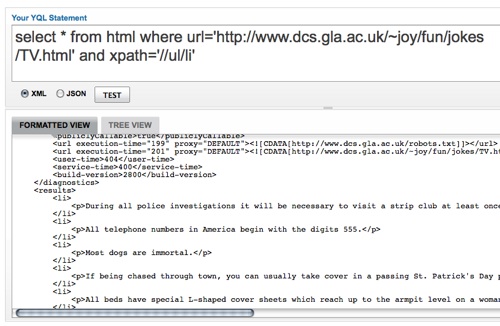
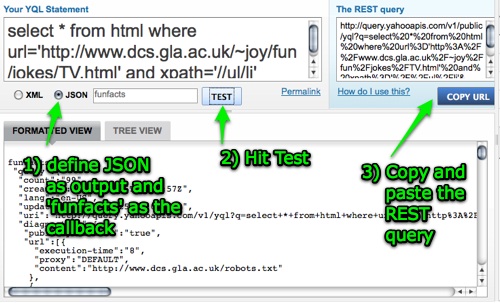
The easiest way to start playing with YQL is by using the console. This is a simulation of a call to the YQL web service and allows you to enter your query and define the output format (XML or JSON or JSON-P or JSON-PX). You then run the query and will see the results either as raw data format or as a tree to drill into. If you’re happy with the result you can copy and paste the URL to use either in a browser or your script.
You have a list of your recent queries, some demo queries to get you going and a list of all the available data tables. Data tables are the definitions that point to the third party API and they come with demo queries and a description which tells you what parameters are expected to make the request work.

For example: Frankfurt

As an example, let’s build an interface that shows information about Frankfurt.

The main piece of code that you need is a function that uses cURL to get data from the web:

function getstuff($url){
$curl_handle = curl_init();
curl_setopt($curl_handle, CURLOPT_URL, $url);
curl_setopt($curl_handle, CURLOPT_CONNECTTIMEOUT, 2);
curl_setopt($curl_handle, CURLOPT_RETURNTRANSFER, 1);
$buffer = curl_exec($curl_handle);
curl_close($curl_handle);
if (empty($buffer)){
return 'Error retrieving data, please try later.';
} else {
return $buffer;
}
}

Then you can get a description of Frankfurt from Wikipedia via YQL and the HTML table:

$root = 'http://query.yahooapis.com/v1/public/yql?q=';
$city = 'Frankfurt';
$loc = 'Frankfurt';

$yql = 'select * from html where url = 'http://en.wikipedia.org/wiki/'.$city.'' and xpath="//div[@id='bodyContent']/p" limit 3';
$url = $root . urlencode($yql) . '&format=xml';
$info = getstuff($url);
$info = preg_replace("/.*|.*/",'',$info);
$info = preg_replace("//",'',$info);
$info = preg_replace("/"/wiki/",'"http://en.wikipedia.org/wiki',$info);

Newest events from upcoming:

$yql = 'select * from upcoming.events.bestinplace(4) where woeid in (select woeid from geo.places where text="'.$loc.'") | unique(field="description")';
$url = $root . urlencode($yql) . '&format=json';
$events = getstuff($url);
$events = json_decode($events);
foreach($events->query->results->event as $e){
$evHTML.='
  • '.$e->name.'

    '.substr($e->description,0,100).'…

  • '; }

    Newest photos from Flickr:

    $yql = 'select * from flickr.photos.info where photo_id in (select id from flickr.photos.search where woe_id in (select woeid from geo.places where text="'.$loc.'") and license=6) limit 16';
    $url = $root . urlencode($yql) . '&format=json';
    $photos = getstuff($url);
    $photos = json_decode($photos);
    foreach($photos->query->results->photo as $s){
    $src = "http://farm{$s->farm}.static.flickr.com/{$s->server}/{$s->id}_{$s->secret}_s.jpg";
    $phHTML.='
  • '.$s->title.'
  • '; }

    And the weather forecast from Yahoo Weather:

    $yql='select description from rss where url="http://weather.yahooapis.com/forecastrss?p=GMXX0040&u=c"';
    $url = $root . urlencode($yql) . '&format=json';
    $weather = getstuff($url);
    $weather = json_decode($weather);
    $weHTML = $weather->query->results->item->description;

    Kobayashi Maru

    Kobayashi Maru is a fictional test that graduates of Star Fleet Academy in Star Trek have to pass in order to get their first commission. The interesting part about the test is that it cannot be solved and its purpose is to confront people with the idea of failure and death and see how they cope with it. The only person to ever successfully pass the test is James Tiberius Kirk because a) he is the definition of awesome and b) he cheated by modifying the computer program.

    YQL can be used the same way to create an API where none exists. For example by scraping the headlines of a newspaper web site using the HTML table and an xpath:

    select * from html where url="http://faz.de" and xpath="//h2"

    See it here or try it in the console.

    You can then go even further and translate the headlines using Google’s translation API:

    select * from google.translate where q in (select a from html where url="http://faz.de" and xpath="//h2") and target="en";

    See it here or try it in the console.

    You can also use an API to filter cleverly to get information that normally is not readily available. For example getting all twitter updates from two different users but only when they posted a link:

    select title from twitter.user.timeline where title like "%@%" and id="codepo8" or id="ydn"

    See it here or try it in the console.

    Benefits of using YQL

    YQL gives you a lot of flexibility when it comes to remixing the web and filtering the results. You can:

    • mix and match APIs
    • filter results
    • simplify authentication
    • use in console or from code
    • minimal research of documentation
    • caching of results
    • proxied on Yahoos servers

    Join the web of data!

    Using YQL you can not only read and mix API data but you can also make your own data available to the world. By defining a simple XML schema as an Open Table you give YQL data access to your API endpoint. The really useful part of this is that YQL limits to the outside access to 100000 hits a day and 1000 hits an hour and caches your data for you. Thus you can have the world use your data without having to buy an own server park.

    Thanks

    I hope I got you interested in YQL - now it is up to you to have a go using it!

    Die Reise zum Mittelpunkt der Daten – Vortrag am Webmontag in Frankfurt

    Monday, August 10th, 2009


    Vor ein paar Wochen hat mich Darren Cooper gefragt am heutigen Web Montag in Frankfurt einen kurzen Vortrag ueber APIs zu halten. Hier sind die Slides und die Notizen zum Vortrag.

    Notizen

    Die Reise zum Mittelpunkt der Daten

    In den letzten Jahren hat sich Webentwicklung drastisch veraendert. Leider haben die Moeglichkeiten die wir heute haben sich noch nicht wirklich rumgesprochen.

    Villabajo und Villariba Webdesign.

    Wer sich noch erinnert, Villabajo und Villariba waren die fiktiven Doerfer in einer Fairy Werbung. Nach einer Paella-Party musste Villabajo nachher ihre Zeit mit Pfannenschrubben verbringen waehrend Villariba durch die Verwendung von Fairy schon feiern konnte.

    Das gleiche findet im Webentwicklungsbereich statt. Waehrend viele noch (mental) an ihren CSS Loesungen rumschrubben und sich stundenlang darueber ereifern koennen ob denn XHTML jetzt tot ist oder nicht kann man schnell und einfach Webloesungen erstellen die einfach abzuaendern und staendig aktuell sind.

    Dezentralisierung der Daten

    Das groesste Missverstaendnis im Webdesign ist es das wir immer noch glauben das wir etwas basteln und dann die Kunden kommen. Die Webseite ist das wichtigste und wir verbringen die meiste Zeit damit sie zu erstellen, zu re-designen und dann einen SEO Spezialisten dafuer bezahlen uns doch bitte Endnutzer zu finden.

    Dabei geht es auch anders. Vor ein paar Jahren habe ich dieses Buch rausgebracht. Darin wird beschrieben wie man das Netz und seine Angebote nutzen kann um ganz einfach Webseiten zu gestalten. Leider blieb der grosse Erfolg warscheinlich wegen des Titels aus. “Web Development Solutions: Ajax, APIs, Libraries, and Hosted Services Made Easy” ist dann doch etwas laenger als “No Bullshit Web Design”.

    Der Trick, den ich im Buch erklaerte und auch hier nochmal anbringen will ist der folgende: anstatt das Web zur Seite zu bringen kann man auch die Seite ins web bringen.

    Zentral ist ein CMS, was ein einfaches blog system sein kann (WordPress, Expression engine, was immer…).
    Dann kann man die Daten die man fuer die Seite benoetigt im Web verteilen:

    Die Vorteile von dieser Vorgangsweise sind die folgenden:

    • Die Daten sind auf Servern verteilt, was bedeutet das die eigene Seite auch mal offline sein kann.
    • Man erreicht Nutzer dieser Seiten die niemals auf die eigene Seite gekommen waeren.
    • Man bekommt Kommentare und Tags von diesen Seite was bedeutet das man eine Kommunikation beginnt und man sinnvolle Schluesselworte fuer SEO bekommt.
    • Man muss Inhalte nicht selbst in Webinhalte umwandeln (Bilder, Videos).
    • Man erlaubt Besuchern und Lesern die Daten auch in ihre eigenen Seiten einzubinden

    Wer nachlesen will warum es Sinn macht diesen Weg einzuschlagen, kann auch in meinem Developer Evangelism Handbuch nachschlagen wo das nochmal im Detail erklaert wird.

    APIs sind der Schluessel

    Der Schluessel zu alle diesen Daten sind Application Development Interfaces oder kurz APIs. Das sind Programme die Firmen anbieten die einen Datenzugriff auf die Inhalte ihrer Webseiten erlauben.

    Das kann so einfach sein wie die Adresse http://search.twitter.com/trends/current.json in einem Browser aufzurufen und dann die neuesten Twittertrends als JSON Datei zu bekommen.

    Probleme mit APIs

    Das Hauptproblem von APIs ist allerdings das jede Firma ihre API anders gestaltet. Unterschiedliche Zugangsmethoden, Eingabeparamater, Ausgabeformate und fehlende Dokumentation machen es nicht einfach, mehrere APIs in einem Produkt zu verwenden. Ein weiteres Problem ist, das die API nicht erreichbar sein kann, da nicht jede Firma die Resourcen und das Kapital hat einen dedizierten Server aufrecht zu erhalten.

    Man braucht keine Rockstars

    Waehrend die Verwendung von APIs noch vor ein paar Jahren ein Fachgebiet von Spezialisten war braucht man heutzutage kein “Rockstar” zu sein um ganz einfach Daten aus dem Netz zu mischen.

    Einfacher mit YQL

    YQL ist eine Meta-API mit der man andere APIs in einem einfachen Format verwenden kann.

    select {was} from {wo} where {konditionen}

    In der YQL Konsole kann man diese Anfrage in das Eingabefeld eingeben und bestimmen ob man XML oder JSON als Rueckgabeformat bekommt. Am Ende steht dann eine Webadresse die man sofort in einem Browser oder Programm verwenden kann. Die resultierenden Daten kann man entweder als formatierte Daten oder als Baum angezeigt bekommen. Die letzten paar Anfragen sowie Beispielsanfragen werden angezeigt. Die Auflistung der Datentabellen zeigt alle APIs auf, die durch YQL erreicht werden koennen. Jede einzelne dieser Tabellen kommt mit einer Beschreibung.

    Beispiel: Frankfurt

    Nehmen wir als Beispiel eine Seite die Informationen ueber Frankfurt anzeigen soll.

    Der Haupttrick ist es, cURL dazu zu verwenden um Daten von YQL zu holen und weiterzuverarbeiten:

    function getstuff($url){
    $curl_handle = curl_init();
    curl_setopt($curl_handle, CURLOPT_URL, $url);
    curl_setopt($curl_handle, CURLOPT_CONNECTTIMEOUT, 2);
    curl_setopt($curl_handle, CURLOPT_RETURNTRANSFER, 1);
    $buffer = curl_exec($curl_handle);
    curl_close($curl_handle);
    if (empty($buffer)){
    return 'Error retrieving data, please try later.';
    } else {
    return $buffer;
    }
    }

    Dann kann man beispielsweise die Beschreibung von Frankfurt von Wikipedia ziehen:

    $root = 'http://query.yahooapis.com/v1/public/yql?q=';
    $city = 'Frankfurt';
    $loc = 'Frankfurt';
    
    $yql = 'select * from html where url = 'http://en.wikipedia.org/wiki/'.$city.'' and xpath="//div[@id='bodyContent']/p" limit 3';
    $url = $root . urlencode($yql) . '&format=xml';
    $info = getstuff($url);
    $info = preg_replace("/.*|.*/",'',$info);
    $info = preg_replace("//",'',$info);
    $info = preg_replace("//",'',$info);
    $info = preg_replace("/"/wiki/",'"http://en.wikipedia.org/wiki',$info);

    Neueste Veranstaltungen aus Upcoming:

    $yql = 'select * from upcoming.events.bestinplace(4) where woeid in (select woeid from geo.places where text="'.$loc.'") | unique(field="description")';
    $url = $root . urlencode($yql) . '&format=json';
    $events = getstuff($url);
    $events = json_decode($events);
    foreach($events->query->results->event as $e){
    $evHTML.='
  • '.$e->name.'

    '.substr($e->description,0,100).'…

  • '; }

    Neueste Photos von Flickr:

    $yql = 'select * from flickr.photos.info where photo_id in (select id from flickr.photos.search where woe_id in (select woeid from geo.places where text="'.$loc.'") and license=6) limit 16';
    $url = $root . urlencode($yql) . '&format=json';
    $photos = getstuff($url);
    $photos = json_decode($photos);
    foreach($photos->query->results->photo as $s){
    $src = "http://farm{$s->farm}.static.flickr.com/{$s->server}/{$s->id}_{$s->secret}_s.jpg";
    $phHTML.='
  • '.$s->title.'
  • '; }

    Und das Wetter von Yahoo:

    $yql='select description from rss where url="http://weather.yahooapis.com/forecastrss?p=GMXX0040&u=c"';
    $url = $root . urlencode($yql) . '&format=json';
    $weather = getstuff($url);
    $weather = json_decode($weather);
    $weHTML = $weather->query->results->item->description;

    Kobayashi Maru

    Kobayashi Maru ist ein fiktiver Test in Star Trek der unmoeglich zu loesen ist. Captain Kirk allerdings schaffte es ihn zu loesen indem er den Testcomputer manipulierte. Genauso kann man YQL dazu verwenden APIs zu erstellen, wo keine vorhanden sind. Zum Beispiel indem man HTML Daten von einer Seite liest:

    select * from html where url="http://faz.de" and xpath="//h2"

    Hier ausprobieren oder in der Konsole anzeigen.

    Und diese dann auf englisch uebersetzt.

    select * from google.translate where q in (select a from html where url="http://faz.de" and xpath="//h2") and target="en";

    Hier ausprobieren oder in der Konsole anzeigen.

    Man kann auch mehrere Datenquellen mischen um Probleme zu loesen fuer die es bisher keine Loesungen gab:

    select title from twitter.user.timeline where title like "%@%" and id="codepo8" or id="ydn"

    Gib mir twitter updates bei denen entweder der nutzer “codepo8” oder “ydn” einen link getweetet hat.

    Hier ausprobieren oder in der Konsole anzeigen.

    Vorteile von YQL

    YQL ermoeglicht es einem ganz einfach APIs zu verwenden um eigene Loesungen zu erstellen:

    • APIs einfach mischen
    • Resultate ausfiltern
    • Einfache API Anmeldung
    • Als Konsole oder Kode
    • Dokumentation inklusive
    • Yahoos server als proxy und Zugang.

    Ab ins Netz der Daten

    YQL ermoeglicht es nicht nur Daten auszulesen sondern auch eigene Daten anzubieten. Mittels Open Tables kann man seine eigenen Daten als Tabelle in YQL anbieten. YQL erlaubt es damit Endnutzern die Daten einfach zu erreichen und fungiert als Firewall da nur 100000 Anfragen pro Tag und 1000 Anfragen pro Stunde erlaubt sind.

    Danke

    Ich hoffe das Interesse fuer YQL erweckt zu haben und kann nur noch empfehlen einfach mal damit loszulegen.

    Das ist alles wofuer uns Zeit bleibt. Ich bin heute abend hier um auch weiterhin Frage und Antwort zu stehen.