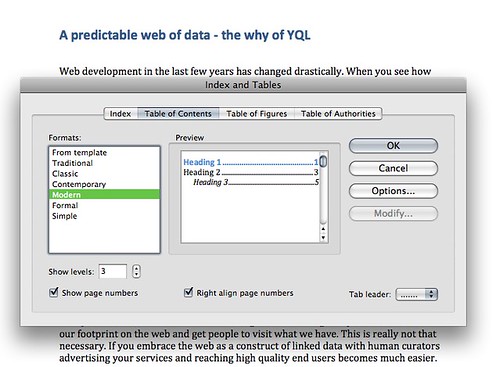
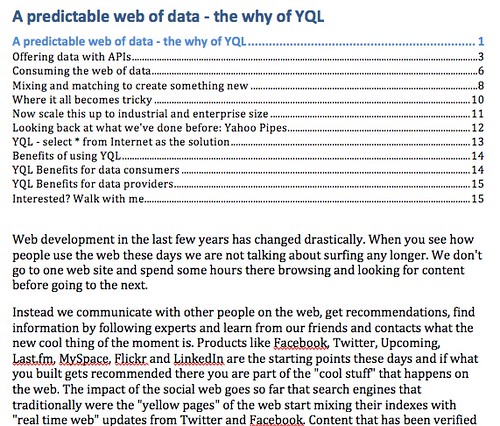
One thing I like about – let me rephrase that – one of the amazingly few things that I like about Microsoft Word is that you can generate a Table of Contents from a document. Word would go through the headings and create a nested TOC from them for you:
Now, I always like to do that for documents I write in HTML, too, but maintaining them by hand is a pain. I normally write my document outline first:
<h1 id="cute">Cute things on the Interwebs</h1>
<h2 id="rabbits">Rabbits</h2>
<h2 id="puppies">Puppies</h2>
<h3 id="labs">Labradors</h3>
<h3 id="alsatians">Alsatians</h3>
<h3 id="corgies">Corgies</h3>
<h3 id="retrievers">Retrievers</h3>
<h2 id="kittens">Kittens</h2>
<h2 id="gerbils">Gerbils</h2>
<h2 id="ducklings">Ducklings</h2> |
<h1 id="cute">Cute things on the Interwebs</h1>
<h2 id="rabbits">Rabbits</h2>
<h2 id="puppies">Puppies</h2>
<h3 id="labs">Labradors</h3>
<h3 id="alsatians">Alsatians</h3>
<h3 id="corgies">Corgies</h3>
<h3 id="retrievers">Retrievers</h3>
<h2 id="kittens">Kittens</h2>
<h2 id="gerbils">Gerbils</h2>
<h2 id="ducklings">Ducklings</h2>
I then collect those, copy and paste them and use search and replace to turn all the hn to links and the IDs to fragment identifiers:
<li><a href="#cute">Cute things on the Interwebs</a></li>
<li><a href="#rabbits">Rabbits</a></li>
<li><a href="#puppies">Puppies</a></li>
<li><a href="#labs">Labradors</a></li>
<li><a href="#alsatians">Alsatians</a></li>
<li><a href="#corgies">Corgies</a></li>
<li><a href="#retrievers">Retrievers</a></li>
<li><a href="#kittens">Kittens</a></li>
<li><a href="#gerbils">Gerbils</a></li>
<li><a href="#ducklings">Ducklings</a></li>

<h1 id="cute">Cute things on the Interwebs</h1>
<h2 id="rabbits">Rabbits</h2>
<h2 id="puppies">Puppies</h2>
<h3 id="labs">Labradors</h3>
<h3 id="alsatians">Alsatians</h3>
<h3 id="corgies">Corgies</h3>
<h3 id="retrievers">Retrievers</h3>
<h2 id="kittens">Kittens</h2>
<h2 id="gerbils">Gerbils</h2>
<h2 id="ducklings">Ducklings</h2> |
<li><a href="#cute">Cute things on the Interwebs</a></li>
<li><a href="#rabbits">Rabbits</a></li>
<li><a href="#puppies">Puppies</a></li>
<li><a href="#labs">Labradors</a></li>
<li><a href="#alsatians">Alsatians</a></li>
<li><a href="#corgies">Corgies</a></li>
<li><a href="#retrievers">Retrievers</a></li>
<li><a href="#kittens">Kittens</a></li>
<li><a href="#gerbils">Gerbils</a></li>
<li><a href="#ducklings">Ducklings</a></li>
<h1 id="cute">Cute things on the Interwebs</h1>
<h2 id="rabbits">Rabbits</h2>
<h2 id="puppies">Puppies</h2>
<h3 id="labs">Labradors</h3>
<h3 id="alsatians">Alsatians</h3>
<h3 id="corgies">Corgies</h3>
<h3 id="retrievers">Retrievers</h3>
<h2 id="kittens">Kittens</h2>
<h2 id="gerbils">Gerbils</h2>
<h2 id="ducklings">Ducklings</h2>
Then I need to look at the weight and order of the headings and add the nesting of the TOC list accordingly.
<ul>
  <li><a href="#cute">Cute things on the Interwebs</a>
    <ul>
      <li><a href="#rabbits">Rabbits</a></li>
      <li><a href="#puppies">Puppies</a>
        <ul>
          <li><a href="#labs">Labradors</a></li>
          <li><a href="#alsatians">Alsatians</a></li>
          <li><a href="#corgies">Corgies</a></li>
          <li><a href="#retrievers">Retrievers</a></li>
        </ul>
      </li>
      <li><a href="#kittens">Kittens</a></li>
      <li><a href="#gerbils">Gerbils</a></li>
      <li><a href="#ducklings">Ducklings</a></li>
    </ul>
  </li>
</ul>

<h1 id="cute">Cute things on the Interwebs</h1>
<h2 id="rabbits">Rabbits</h2>
<h2 id="puppies">Puppies</h2>
<h3 id="labs">Labradors</h3>
<h3 id="alsatians">Alsatians</h3>
<h3 id="corgies">Corgies</h3>
<h3 id="retrievers">Retrievers</h3>
<h2 id="kittens">Kittens</h2>
<h2 id="gerbils">Gerbils</h2>
<h2 id="ducklings">Ducklings</h2> |
<ul>
<li><a href="#cute">Cute things on the Interwebs</a>
<ul>
<li><a href="#rabbits">Rabbits</a></li>
<li><a href="#puppies">Puppies</a>
<ul>
<li><a href="#labs">Labradors</a></li>
<li><a href="#alsatians">Alsatians</a></li>
<li><a href="#corgies">Corgies</a></li>
<li><a href="#retrievers">Retrievers</a></li>
</ul>
</li>
<li><a href="#kittens">Kittens</a></li>
<li><a href="#gerbils">Gerbils</a></li>
<li><a href="#ducklings">Ducklings</a></li>
</ul>
</li>
</ul>
<h1 id="cute">Cute things on the Interwebs</h1>
<h2 id="rabbits">Rabbits</h2>
<h2 id="puppies">Puppies</h2>
<h3 id="labs">Labradors</h3>
<h3 id="alsatians">Alsatians</h3>
<h3 id="corgies">Corgies</h3>
<h3 id="retrievers">Retrievers</h3>
<h2 id="kittens">Kittens</h2>
<h2 id="gerbils">Gerbils</h2>
<h2 id="ducklings">Ducklings</h2>
Now, wouldn’t it be nice to have that done automatically for me? The way to do that in JavaScript and DOM is actually a much trickier problem than it looks like at first sight (I always love to ask this as an interview question or in DOM scripting workshops).
Here are some of the issues to consider:
- You can easily get elements with
getElementsByTagName() but you can’t do a getElementsByTagName('h*') sadly enough.
- Headings in XHTML and HTML 4 do not have the elements they apply to as child elements (XHTML2 was proposing that and HTML5 has it to a degree – Bruce Lawson write a nice post about this and there’s also a pretty nifty HTML5 outliner available).
- You can do a
getElementsByTagName() for each of the heading levels and then concatenate a collection of all of them. However, that does not give you their order in the source of the document.
- To this end PPK wrote an infamous TOC script used on his site a long time ago using his getElementsByTagNames() function which works with things not every browser supports. Therefore it doesn’t quite do the job either. He also “cheats” at the assembly of the TOC list as he adds classes to indent them visually rather than really nesting lists.
- It seems that the only way to achieve this for all the browsers using the DOM is painful: do a
getElementsByTagName('*') and walk the whole DOM tree, comparing nodeName and getting the headings that way.
- Another solution I thought of reads the
innerHTML of the document body and then uses regular expressions to match the headings.
- As you cannot assume that every heading has an ID we need to add one if needed.
So here are some solutions to that problem:
Using the DOM:
(function(){
  var headings = [];
  var herxp = /h\d/i;
  var count = 0;
  var elms = document.getElementsByTagName('*');
  for(var i=0,j=elms.length;i<j;i++){
    var cur = elms[i];
    var id = cur.id;
    if(herxp.test(cur.nodeName)){
      if(cur.id===''){
        id = 'head'+count;
        cur.id = id;
        count++;
      }
      headings.push(cur);
    }
  }
  var out = '<ul>';
  for(i=0,j=headings.length;i<j;i++){
    var weight = headings[i].nodeName.substr(1,1);
    if(weight > oldweight){
      out += '<ul>';
    }
    out += '<li><a href="#'+headings[i].id+'">'+
           headings[i].innerHTML+'</a>';
    if(headings[i+1]){
      var nextweight = headings[i+1].nodeName.substr(1,1);
      if(weight > nextweight){
        out+='</li></ul></li>';
      }
      if(weight == nextweight){
        out+='</li>';
      }
    }
    var oldweight = weight;
  }
  out += '</li></ul>';
  document.getElementById('toc').innerHTML = out;
})(); |
(function(){
var headings = [];
var herxp = /h\d/i;
var count = 0;
var elms = document.getElementsByTagName('*');
for(var i=0,j=elms.length;i<j;i++){
var cur = elms[i];
var id = cur.id;
if(herxp.test(cur.nodeName)){
if(cur.id===''){
id = 'head'+count;
cur.id = id;
count++;
}
headings.push(cur);
}
}
var out = '<ul>';
for(i=0,j=headings.length;i<j;i++){
var weight = headings[i].nodeName.substr(1,1);
if(weight > oldweight){
out += '<ul>';
}
out += '<li><a href="#'+headings[i].id+'">'+
headings[i].innerHTML+'</a>';
if(headings[i+1]){
var nextweight = headings[i+1].nodeName.substr(1,1);
if(weight > nextweight){
out+='</li></ul></li>';
}
if(weight == nextweight){
out+='</li>';
}
}
var oldweight = weight;
}
out += '</li></ul>';
document.getElementById('toc').innerHTML = out;
})();
You can see the DOM solution in action here. The problem with it is that it can become very slow on large documents and in MSIE6.
The regular expressions solution
To work around the need to traverse the whole DOM, I thought it might be a good idea to use regular expressions on the innerHTML of the DOM and write it back once I added the IDs and assembled the TOC:
(function(){
  var bd = document.body,
      x = bd.innerHTML,
      headings = x.match(/<h\d[^>]*>[\S\s]*?<\/h\d>$/mg),
      r1 = />/,
      r2 = /<(\/)?h(\d)/g,
      toc = document.createElement('div'),
      out = '<ul>',
      i = 0,
      j = headings.length,
      cur = '',
      weight = 0,
      nextweight = 0,
      oldweight = 2,
      container = bd;
  for(i=0;i<j;i++){
    if(headings[i].indexOf('id=')==-1){
      cur = headings[i].replace(r1,' id="h'+i+'">');
      x = x.replace(headings[i],cur);
    } else {
      cur = headings[i];
    }
    weight = cur.substr(2,1);
    if(i<j-1){
      nextweight = headings[i+1].substr(2,1);
    }
    var a = cur.replace(r2,'<$1a');
    a = a.replace('id="','href="#');
    if(weight>oldweight){ out+='<ul>'; }
    out+='<li>'+a;
    if(nextweight<weight){ out+='</li></ul></li>'; }
    if(nextweight==weight){ out+='</li>'; }
    oldweight = weight;
  }
  bd.innerHTML = x;
  toc.innerHTML = out +'</li></ul>';
  container = document.getElementById('toc') || bd;
  container.appendChild(toc);
})(); |
(function(){
var bd = document.body,
x = bd.innerHTML,
headings = x.match(/<h\d[^>]*>[\S\s]*?<\/h\d>$/mg),
r1 = />/,
r2 = /<(\/)?h(\d)/g,
toc = document.createElement('div'),
out = '<ul>',
i = 0,
j = headings.length,
cur = '',
weight = 0,
nextweight = 0,
oldweight = 2,
container = bd;
for(i=0;i<j;i++){
if(headings[i].indexOf('id=')==-1){
cur = headings[i].replace(r1,' id="h'+i+'">');
x = x.replace(headings[i],cur);
} else {
cur = headings[i];
}
weight = cur.substr(2,1);
if(i<j-1){
nextweight = headings[i+1].substr(2,1);
}
var a = cur.replace(r2,'<$1a');
a = a.replace('id="','href="#');
if(weight>oldweight){ out+='<ul>'; }
out+='<li>'+a;
if(nextweight<weight){ out+='</li></ul></li>'; }
if(nextweight==weight){ out+='</li>'; }
oldweight = weight;
}
bd.innerHTML = x;
toc.innerHTML = out +'</li></ul>';
container = document.getElementById('toc') || bd;
container.appendChild(toc);
})();
You can see the regular expressions solution in action here. The problem with it is that reading innerHTML and then writing it out might be expensive (this needs testing) and if you have event handling attached to elements it might leak memory as my colleage Matt Jones pointed out (again, this needs testing). Ara Pehlivavian also mentioned that a mix of both approaches might be better – match the headings but don’t write back the innerHTML – instead use DOM to add the IDs.
Libraries to the rescue – a YUI3 example
Talking to another colleague – Dav Glass – about the TOC problem he pointed out that the YUI3 selector engine happily takes a list of elements and returns them in the right order. This makes things very easy:
<script type="text/javascript" src="http://yui.yahooapis.com/3.0.0/build/yui/yui-min.js"></script>
<script>
YUI({combine: true, timeout: 10000}).use("node", function(Y) {
  var nodes = Y.all('h1,h2,h3,h4,h5,h6');
  var out = '<ul>';
  var weight = 0,nextweight = 0,oldweight;
  nodes.each(function(o,k){
    var id = o.get('id');
    if(id === ''){
      id = 'head' + k;
      o.set('id',id);
    };
    weight = o.get('nodeName').substr(1,1);
    if(weight > oldweight){ out+='<ul>'; }
    out+='<li><a href="#'+o.get('id')+'">'+o.get('innerHTML')+'</a>';
    if(nodes.item(k+1)){
      nextweight = nodes.item(k+1).get('nodeName').substr(1,1);
      if(weight > nextweight){ out+='</li></ul></li>'; }
      if(weight == nextweight){ out+='</li>'; }
    }
    oldweight = weight;
  });
  out+='</li></ul>';
  Y.one('#toc').set('innerHTML',out);
});</script> |
<script type="text/javascript" src="http://yui.yahooapis.com/3.0.0/build/yui/yui-min.js"></script>
<script>
YUI({combine: true, timeout: 10000}).use("node", function(Y) {
var nodes = Y.all('h1,h2,h3,h4,h5,h6');
var out = '<ul>';
var weight = 0,nextweight = 0,oldweight;
nodes.each(function(o,k){
var id = o.get('id');
if(id === ''){
id = 'head' + k;
o.set('id',id);
};
weight = o.get('nodeName').substr(1,1);
if(weight > oldweight){ out+='<ul>'; }
out+='<li><a href="#'+o.get('id')+'">'+o.get('innerHTML')+'</a>';
if(nodes.item(k+1)){
nextweight = nodes.item(k+1).get('nodeName').substr(1,1);
if(weight > nextweight){ out+='</li></ul></li>'; }
if(weight == nextweight){ out+='</li>'; }
}
oldweight = weight;
});
out+='</li></ul>';
Y.one('#toc').set('innerHTML',out);
});</script>
There is probably a cleaner way to assemble the TOC list.
Performance considerations
There is more to life than simply increasing its speed. – Gandhi
Some of the code above can be very slow. That said, whenever we talk about performance and JavaScript, it is important to consider the context of the implementation: a table of contents script would normally be used on a text-heavy, but simple, document. There is no point in measuring and judging these scripts running them over gmail or the Yahoo homepage. That said, faster and less memory consuming is always better, but I am always a bit sceptic about performance tests that consider edge cases rather than the one the solution was meant to be applied to.
Moving server side.
The other thing I am getting more and more sceptic about are client side solutions for things that actually also make sense on the server. Therefore I thought I could use the regular expressions approach above and move it server side.
The first version is a PHP script you can loop an HTML document through. You can see the outcome of tocit.php here:
<?php
$file = $_GET['file'];
if(preg_match('/^[a-z0-9\-_\.]+$/i',$file)){
$content = file_get_contents($file);
preg_match_all("/<h([1-6])[^>]*>.*<\/h.>/Us",$content,$headlines);
$out = '<ul>';
foreach($headlines[0] as $k=>$h){
 if(strstr($h,'id')===false){
   $x = preg_replace('/>/',' id="head'.$k.'">',$h,1);
   $content = str_replace($h,$x,$content);
   $h = $x;
 };
 $link = preg_replace('/<(\/)?h\d/','<$1a',$h);
 $link = str_replace('id="','href="#',$link);
 if($k>0 && $headlines[1][$k-1]<$headlines[1][$k]){
   $out.='<ul>';
 }
 $out .= '<li>'.$link.'';
 if($headlines[1][$k+1] && $headlines[1][$k+1]<$headlines[1][$k]){
   $out.='</li></ul></li>';
 }
 if($headlines[1][$k+1] && $headlines[1][$k+1] == $headlines[1][$k]){
   $out.='</li>';
 }
}
$out.='</li></ul>';
echo str_replace('<div id="toc"></div>',$out,$content);
}else{
  die('only files like text.html please!');
}
?> |
<?php
$file = $_GET['file'];
if(preg_match('/^[a-z0-9\-_\.]+$/i',$file)){
$content = file_get_contents($file);
preg_match_all("/<h([1-6])[^>]*>.*<\/h.>/Us",$content,$headlines);
$out = '<ul>';
foreach($headlines[0] as $k=>$h){
if(strstr($h,'id')===false){
$x = preg_replace('/>/',' id="head'.$k.'">',$h,1);
$content = str_replace($h,$x,$content);
$h = $x;
};
$link = preg_replace('/<(\/)?h\d/','<$1a',$h);
$link = str_replace('id="','href="#',$link);
if($k>0 && $headlines[1][$k-1]<$headlines[1][$k]){
$out.='<ul>';
}
$out .= '<li>'.$link.'';
if($headlines[1][$k+1] && $headlines[1][$k+1]<$headlines[1][$k]){
$out.='</li></ul></li>';
}
if($headlines[1][$k+1] && $headlines[1][$k+1] == $headlines[1][$k]){
$out.='</li>';
}
}
$out.='</li></ul>';
echo str_replace('<div id="toc"></div>',$out,$content);
}else{
die('only files like text.html please!');
}
?>
This is nice, but instead of having another file to loop through, we can also use the output buffer of PHP:
<?php
function tocit($content){
  preg_match_all("/<h([1-6])[^>]*>.*<\/h.>/Us",$content,$headlines);
  $out = '<ul>';
  foreach($headlines[0] as $k=>$h){
   if(strstr($h,'id')===false){
     $x = preg_replace('/>/',' id="head'.$k.'">',$h,1);
     $content = str_replace($h,$x,$content);
     $h = $x;
   };
   $link = preg_replace('/<(\/)?h\d/','<$1a',$h);
   $link = str_replace('id="','href="#',$link);
   if($k>0 && $headlines[1][$k-1]<$headlines[1][$k]){
     $out.='<ul>';
   }
   $out .= '<li>'.$link.'';
   if($headlines[1][$k+1] && $headlines[1][$k+1]<$headlines[1][$k]){
     $out.='</li></ul></li>';
   }
   if($headlines[1][$k+1] && $headlines[1][$k+1] == $headlines[1][$k]){
     $out.='</li>';
   }
  }
  $out.='</li></ul>';
  return str_replace('<div id="toc"></div>',$out,$content);
}
ob_start("tocit");
?>
[... the document ...]
<?php ob_end_flush();?> |
<?php
function tocit($content){
preg_match_all("/<h([1-6])[^>]*>.*<\/h.>/Us",$content,$headlines);
$out = '<ul>';
foreach($headlines[0] as $k=>$h){
if(strstr($h,'id')===false){
$x = preg_replace('/>/',' id="head'.$k.'">',$h,1);
$content = str_replace($h,$x,$content);
$h = $x;
};
$link = preg_replace('/<(\/)?h\d/','<$1a',$h);
$link = str_replace('id="','href="#',$link);
if($k>0 && $headlines[1][$k-1]<$headlines[1][$k]){
$out.='<ul>';
}
$out .= '<li>'.$link.'';
if($headlines[1][$k+1] && $headlines[1][$k+1]<$headlines[1][$k]){
$out.='</li></ul></li>';
}
if($headlines[1][$k+1] && $headlines[1][$k+1] == $headlines[1][$k]){
$out.='</li>';
}
}
$out.='</li></ul>';
return str_replace('<div id="toc"></div>',$out,$content);
}
ob_start("tocit");
?>
[... the document ...]
<?php ob_end_flush();?>
The server side solutions have a few benefits: they always work, and you can also cache the result if needed for a while. I am sure the PHP can be sped up, though.
See all the solutions and get the source code
I showed you mine, now show me yours!
All of these solutions are pretty much rough and ready. What do you think how they can be improved? How about doing a version for different libraries? Go ahead, fork the project on GitHub and show me what you can do.