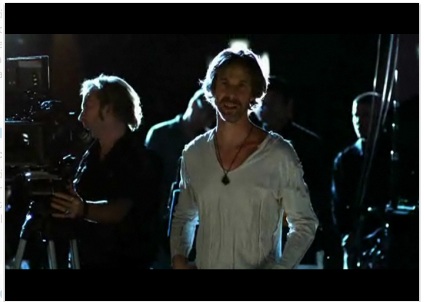
One of the, oh heck, the only really good thing about flying Delta was their Fly-in-Movie competition. This is a section of their entertainment program where they show short movies of budding movie makers who compete to be shown at the Tribeca Film Festival in New York this coming April.
The green film
One of the movies in there is The Green Film and I loved it (“Cold call” was also very good).
In this 6 minute movie a self-righteous film director proclaims pompously and full of enthusiasm that they are producing the greenest movie ever. All the food is organic, everything gets recycled, all the make-up is free of animal testing and there is not a single thing that is not in the correct order and would cause a frown on the faces of the friends of the earth.
The wrong doers and how they should be lectured
When the main actress arrives she rolls up in a stretch limo and asks for her trailer. The director tells her off for not cycling or using a bus and shows her a deck chair and an umbrella which is to be her “trailer”. He goes on to explain all the bad things that do not happen on his set and especially goes into a detailed sermon over plywood used on other sets and that it actually is based on rainforest wood. He also is very insightful about using the right light bulbs on the whole set.
Getting caught out
The actress on the other hand starts wondering about the professionalism of the whole setup – which culminates in her wondering if the movie is shot on film rather than digital. The director then goes nuts on the mere idea of movies being shot in digital and that digital film is just “TV on big screens”. His rant goes so far as to proclaim that art could never be done with digital cameras. To the arguments of the actress about film processing involving toxic chemicals and shipment of reels all over the world the only thing the director comes up with is “but we recycle – a lot!”.
The movie ends with the actress filming herself in the woods using her mobile (cellphone for Americans).
You know what? We’re wasting time and energy in these discussions and we are so immersed in our own “doing the right thing” that we forgot to care about what we wanted to achieve in the first place. We get into meticulous details of explaining certain technologies and invent idea after idea based on the same technologies we tried to make people understand by force years and years ago and failed.
Standards and best practices are there for a single reason: make our work predictable and easy to work with other developers. This only works if everybody is on board and understands these best practices – in essence, following them needs to make their job easier. If following a “best practice” doesn’t make our lives easier but produces extra overhead it will not catch on.
Instead of concentrating on showing the benefits of working in a predictable manner we concentrate on ticking all the right boxes and telling everybody who is unfortunate enough to listen about all the details we had to think about to get where we are. We know all about the plywood and the right light bulbs but we forgot to talk in the language of the people we want to reach with our ideas. We are not concentrating on how we deliver the message and that there might be better techniques and technologies available nowadays than the great problem solvers of the past.
Web development is evolving and changing to new channels of distribution and re-use. Widget frameworks allow re-use of the same little application across the web, mobile devices and now even Television sets. These things is what we should have our sights on and not if a certain document passes a dumb validation test or not. Validation is the beginning of a quality control process, not the end of it. Semantic value cannot be validated by a dumb machine but needs a human to check. Zeldman did point this out in his introduction to the test, but this message always gets forgotten in the uproar of indignation over and unencoded ampersand.
As you probably know, I am spending a lot of time speaking and mentoring at hack days for Yahoo. I go to open hack days, university hack days and even organized my own hackday revolving around accessibility last year.
One of the main questions I get is about technologies to use. People are happy to find content on the web, but getting it and mixing it with other sources is still a bit of an enigma.
Following I will go through a hack I prepared at the Georgia Tech University hack day. I am using PHP to retrieve information of the web, YQL to filter it to what I need and YUI to do the CSS layout and add extra functionality.
The main ingredient of a good hack – the idea
I give a lot of presentations and every time I do people ask me where I get the pictures I use from. The answer is Flickr and some other resources on the internet. The next question is how much time I spend finding them and that made me think about building a small tool to make this easier for me.
The next thing I could have done is deep-dive into the Flick API to get photos that I am allowed to use. Instead I am happy to say that using YQL gives you a wonderful shortcut to do this without brooding over documentation for hours on end.
Using YQL I can get photos from flickr with the right license and easily display them. The YQL statement to search photos with the correct license is the following:
select id from flickr.photos.search(10) where text='donkey' and license=4
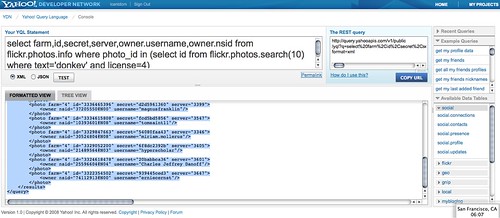
You can try the flickr YQL query here and you’ll see that the result (once you’ve chosen JSON as the output format) is a JSON object with photo results:
The problem with this is that the user name is not provided anywhere, just their Flickr ID. As I wanted to get the user name, too, I needed to nest a YQL query for that:
select farm,id,secret,server,owner.username,owner.nsid from flickr.photos.info where photo_id in (select id from flickr.photos.search(10) where text='donkey' and license=4)
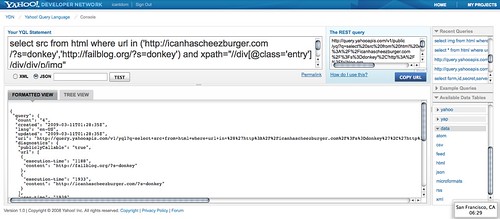
The next step was getting the data from the other resources I am normally tapping into: Fail blog and I can has cheezburger. As neither of them have an API I need to scrape the HTML data of the page. Luckily this is also possible with YQL, all you need to do is select the data from html and give it an XPATH. I found the XPATH by analysing the page source in Firebug:
This gave me the following YQL statement to get images from both blogs. You can list several sources as an array inside the in() statement:
select src from html where url in ('http://icanhascheezburger.com/?s=donkey','http://failblog.org/?s=donkey') and xpath="//div[@class='entry']/div/div/p/img"
The result of this query is again a JSON object with the src values of photos matching this search:
The next thing I wanted to do was writing a small script to get the data and give it back to me as HTML. I could have used the JSON output in JavaScript directly but wanted to be independent of scripting. The script (or API if you will) takes a search term, filters it and executes both of the YQL statements above before returning a list of HTML items with photos in them. You can try it out for yourself: search for the term donkey or search for the term donkey and give it back as a JavaScript call
I use cURL to get the data as my server has external pulling of data via PHP disabled. This should work for most servers, actually.
I call cURL to retrieve the data from the flickr yql query, do a json_decode and loop over the results. Notice the rather annoying way of having to assemble the flickr url and image source. I found this by clicking around flickr and checking the src attribute of images rendered on the page. The images with the “ico” class should tell me where the photo was from.
I close the list and – if JavaScript was desired – the JavaScript object and function call.
} else {
echo ($_GET['js']!=='yes') ?
'
Invalid search term.
' :
'seed({html:"Invalid search Term!"})';
}
}
?>
If there was an invalid term entered I return an error message.
Setting up the display
Next I went to the YUI grids builder and created a shell for my hack. Using the generated code, I added a form, my yql api, an extra stylesheet for some colouring and two IDs for easy access for my JavaScript:
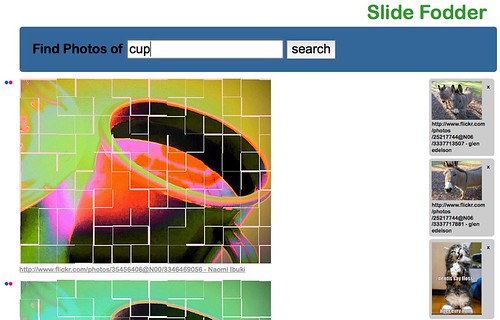
Slide Fodder - find CC licensed photos and funpics for your slides
Slide Fodder
Slide Fodder by Christian Heilmann, hacked live at Georgia Tech University Hack day using YUI and YQL.
The last thing I wanted to add was a “basket” functionality which would allow me to do several searches and then copy and paste all the photos in one go once I am happy with the result. For this I’d either have to do a persistent storage somewhere (DB or cookies) or use JavaScript. I opted for the latter.
The JavaScript uses YUI and is no rocket science whatsoever:
function seed(o){
YAHOO.util.Dom.get('content').innerHTML = o.html;
}
YAHOO.util.Event.on('f','submit',function(e){
var s = document.createElement('script');
s.src = 'yql.php?js=yes&s='+ YAHOO.util.Dom.get('s').value;
document.getElementsByTagName('head')[0].appendChild(s);
YAHOO.util.Dom.get('content').innerHTML = '';
YAHOO.util.Event.preventDefault(e);
});
YAHOO.util.Event.on('content','click',function(e){
var t = YAHOO.util.Event.getTarget(e);
if(t.nodeName.toLowerCase()==='img'){
var str = '
';
YAHOO.util.Dom.get('basket').innerHTML+=str;
}
YAHOO.util.Event.preventDefault(e);
});
YAHOO.util.Event.on('basket','click',function(e){
var t = YAHOO.util.Event.getTarget(e);
if(t.nodeName.toLowerCase()==='a'){
t.parentNode.parentNode.removeChild(t.parentNode);
}
YAHOO.util.Event.preventDefault(e);
});
Again, let’s check it bit by bit:
function seed(o){
YAHOO.util.Dom.get('content').innerHTML = o.html;
}
This is the method called by the “API” when JavaScript was desired as the output format. All it does is change the HTML content of the DIV with the id “content” to the one returned by the “API”.
YAHOO.util.Event.on('f','submit',function(e){
var s = document.createElement('script');
s.src = 'yql.php?js=yes&s='+ YAHOO.util.Dom.get('s').value;
document.getElementsByTagName('head')[0].appendChild(s);
YAHOO.util.Dom.get('content').innerHTML = '';
YAHOO.util.Event.preventDefault(e);
});
When the form (the element with th ID “f”) is submitted, I create a new script element,give it the right src attribute pointing to the API and getting the search term and append it to the head of the document. I add a loading image to the content section and stop the browser from submitting the form.
YAHOO.util.Event.on('content','click',function(e){
var t = YAHOO.util.Event.getTarget(e);
if(t.nodeName.toLowerCase()==='img'){
var str = '
I am using Event Delegation to check when a user has clicked on an image in the content section and create a new DIV with the image to add to the basket. When the image was from flickr (I am checking the src attribute) I also add the url of the image source and the user name to use in my slides later on. I add an “x” link to remove the image from the basket and again stop the browser from doing its default behaviour.
YAHOO.util.Event.on('basket','click',function(e){
var t = YAHOO.util.Event.getTarget(e);
if(t.nodeName.toLowerCase()==='a'){
t.parentNode.parentNode.removeChild(t.parentNode);
}
YAHOO.util.Event.preventDefault(e);
});
In the basket I remove the DIV when the user clicks on the “x” link.
That’s it
This concludes the hack. It works, it helps me get photo material faster and it took me about half an hour to build all in all. Yes, it could be improved in terms of accessibility, but this is enough for me and my idea was to show how to quickly use YQL and YUI with a few lines of PHP to deliver something that does a job :)
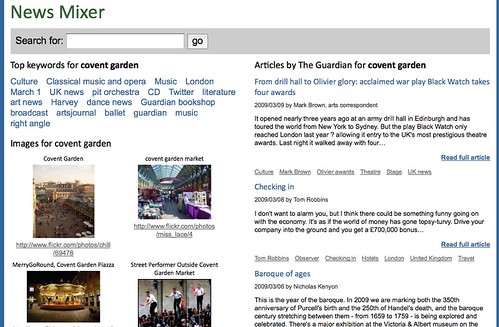
I am a very happy bunny at the moment. First of all because there is more yummy data on the web to play with as The Guardian just released a brand new API to access their archives and secondly as I was invited to play with it before it was public. The announce of the API was today and I’ve spent a few hours yesterday in my hotel room before checking out to build news mixer
The API is simple enough to use and once you got your developer key you can search for content and request the more detailed data using a content ID. The next problem to tackle was what to build.
Access of data and tags is easy
I love that we turned the web from yet another information channel into a read/write web and that user generated content allows us to get information from everybody and not just from dedicated journalists. I also love that you can tag information and make it easier to find that way. Lastly I love that with products like BOSS you can now get access to information of search engines and use that in your own sites.
Relevancy of tags?
The tagging bit has me a bit annoyed though. While a few years ago when the idea was still fresh people tagged like mad and with high quality keywords this seemed to be on the decline a bit and as faster connections allow us to upload more and more data in bulk people stopped tagging sensibly and rely more on automated tags like geolocation or exif data in images.
Mixing user tags and professional categories
I wanted to show a news site that allows you to find keywords that match your search term that make sense and used two different APIs for that. BOSS allows you to search for news items and images and the BOSS web search also offers keyterms for certain web sites. These keyterms are to a degree user generated as this is what people entered into Yahoo to find the sites. I then used the new Guardian Data API to pull relevant articles and as these are professionally tagged by journalists this makes for more relevant keywords. Putting the two together means a good mix of professional and up-to-date information.
It was amazingly straight forward to build, the only snags I hit were the following:
Whilst BOSS provides keyterms for web searches, it does not do so for news searches. Therefore I used YQL to get the keyterms of each of the urls returned by news search in a nested loop. This is a bit hacky and I would love for that to change.
The Guardian API returns articles by relevancy and not by date. You can specify though that you want articles before or after a certain date, which is why all I had to do is get the current date and go back one month from that.
The content body of the Guardian API does not provide any paragraph or list information. This is very annoying as it results in terrible display (a massive chunk of text). I’ve worked around the issue by splitting the content at full stops and then injecting paragraphs after every third of them but that is just guesswork and not real structure of text.
In any case I am happy to have such a cool new archive of information to play with and we’re working on open table definitions for YQL to make it easy for you to get to the goodies the Guardian offers us.
Tags: api, BOSS, guardian, mashup, yql Posted in General | Comments Off on News Mixer – my first attempt at using the Guardian’s open platform content API
Dasher is an interesting concept of an interface to quickly enter text without using a keyboard:
Dasher is an information-efficient text-entry interface, driven by natural continuous pointing gestures. Dasher is a competitive text-entry system wherever a full-size keyboard cannot be used – for example, when operating a computer one-handed, by joystick, touchscreen, trackball, or mouse; when operating a computer with zero hands (i.e., by head-mouse or by eyetracker); on a palmtop computer; on a wearable computer.
The eyetracking version of Dasher allows an experienced user to write text as fast as normal handwriting – 29 words per minute; using a mouse, experienced users can write at 39 words per minute.
Dasher can be used to write efficiently in any language.

 ';
$href = 'http://www.flickr.com/photos/'.$o->nsid.'/'.$a->id;
$out.= '
';
$href = 'http://www.flickr.com/photos/'.$o->nsid.'/'.$a->id;
$out.= ' ';
} else {
$out.= '
';
} else {
$out.= ' ';
}
$out.= '
';
}
$out.= ' ';
YAHOO.util.Event.preventDefault(e);
});
YAHOO.util.Event.on('content','click',function(e){
var t = YAHOO.util.Event.getTarget(e);
if(t.nodeName.toLowerCase()==='img'){
var str = '
';
YAHOO.util.Event.preventDefault(e);
});
YAHOO.util.Event.on('content','click',function(e){
var t = YAHOO.util.Event.getTarget(e);
if(t.nodeName.toLowerCase()==='img'){
var str = '