Christian Heilmann

You are currently browsing the archives for the General category.

Archive for the ‘General’ Category

Analysing the history of Winter Olympics medals with YQL

Thursday, February 18th, 2010

I am a big fan of the Guardian Data Blog which releases all kind of cool datasets used in their research for people to mash up. One of the recent data sets was the Statistics of Winter Olympics medals over the years.

I’ve taken the Excel sheet and exported it as a CSV. Then I created a YQL open table to make it easier to use and filter the information.

Using this table you can now get the statistics of the Winter Olympics in terms of medals from 1924 up to 2006 (the 2010 data is of course not in there yet). Try it out for yourself:

Get all medal information:

use "http://isithackday.com/wintermedals.xml" as medals;
select * from medals

see it as XML or in the YQL console

UK Gold medals (small dataset):

use "http://isithackday.com/wintermedals.xml" as medals;
select * from medals where country="gbr" and type="gold"

see it as XML or in the YQL console

All Skating medals in the Speed Skating discipline won by men

use "http://isithackday.com/wintermedals.xml" as medals;
select * from medals where sport="skating"
and discipline="speed skating"
and gender="m"

see it as XML or in the YQL console

All US, Canadian and French Medals in the Games before 2000

use "http://isithackday.com/wintermedals.xml" as medals;
select * from medals where country in
('usa','can','fra') and year="19"

see it as XML or in the YQL console

All the things you can filter with

Basically you can get the medal information and you can filter your research with the following criteria:

  • year – the year of the olympics
  • city – the city it was held in, like “Lillehammer” or “Sarajevo”
  • sport – the sport
  • discipline – the sub-discipline
  • country – the country as an NOC code
  • event – the event, like “alpine combined” or “two-man”
  • gender – the athlete’s gender, X is for pair sports
  • type – the medal type (Gold, Silver, Bronze)

Any of these could also be used as a wildcard, so country="g" would find GBR, FRG, GDR, YUG and GER.

Have fun!

Diving into the web of data – the YQL talk at boagworld live 200

Friday, February 12th, 2010

I just finished a quick podcast demo for the 200th podcast of Boagworld, streamed live on ustream. I thought I had an hour but it turned out to be half an hour. My topic was YQL and I wanted to actually do something like shown in the video that was just released (click through to watch or download the video in English or German):

YQl and YUI video

The story of this is:

  • We spend a lot of time thinking about building the interface and using the right semantic markup and trying to make browsers work (or expect certain browsers in certain settings as we gave up on that idea)
  • What we should be concentrating on more is the data that drives our web sites – it is boring to have to copy and paste texts from Word documents or get a CMS to generate something that is almost but not quite like useful HTML.
  • You could say that once published as HTML the data is available but for starters HTML4 is bad as a data format to store information. Furthermore too many pieces of software can access web sites and the cleanest HTML you release somewhere can be messed up by somebody else with a CMS or any other mean of access further down the line. Sadly enough most content editing software still produces HTML that is tied with its presentation rather than what it should structure and define.
  • Having worked on the datasets provided by the UK government at data.gov.uk I’ve realised that we are nowhere near as a market to provide re-usable and easily convertible data to each other. XML was meant to be that but got lost in complexities of dictionaries, taxonomies and other things that you can spend days on to define English content but have to re-think anyway once you go multilingual. Most content – let’s face it – is maintained in Excel sheets and Word documents – which is OK cause people should not be forced to use a system they don’t like.
  • If you really think about the web as a platform and as a media then we should have simple ways to provide textual data or binary information (for videos and images) instead of getting bogged down in how to please the current generation of browsers.
  • If you really want to be accessible to any web user – and that is anyone who can get content over HTTP - you should think about making your content available as an API. This allows people to build interfaces necessary for edge cases that you didn’t even think existed.
  • YQL is a simple way to use the web as a database and mix and match data and also a very simple way to provide data in easy to digest formats – give it a go.

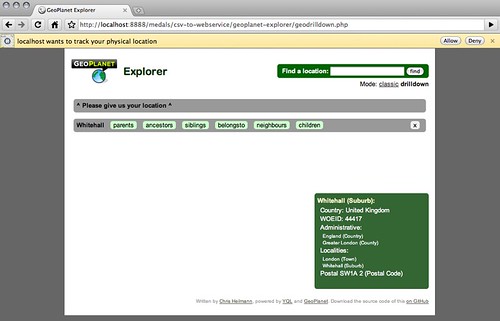
In any case, after the 2 o’clock podcast where most of my questions were eloquently answered by Jeremy Keith and the Skype connection died in the last 5 minutes I spent the afternoon putting together some demos for this YQL talk as YQL is really easiest to explain with examples and to have something for the people on flaky connections to play with. So if you go to:

You can see what I talked about during the podcast. People in the chat asked if this will be open source. Yes it is, the passcode is pressing cmd+u in Firefox or whatever other way you choose to “view source” in your browser of choice.

Normally I would not do any of these calls purely in JavaScript (as explained in the video) but this was the quickest solution and it can give you an insight just how easy it is to use information you requested, filtered and converted with YQL.

Speaking out – public speaking made easy (for women) was an amazing success!

Thursday, February 11th, 2010

Yesterday night was the first Speaking out – public speaking made easy event in London and I was lucky enough to be one of the speakers. Speaking Out was the idea of my friend Laura North who hates public speaking and has been pestering me for a while for private tutoring on the matter. Instead, I told her we should organise a bigger event and this was it.

Speaking Out - Public speaking made easy by  you.

With help from Imagination and the Soho location of Sense Worldwide we successfully pulled off the first event of this kind.

Our not-too-hidden agenda was that we encourage more women to get out there and do more public speaking – be it in a meeting room or at conferences in front of hundreds of people.

The event is open to all, but women are especially encouraged to attend and subjects include speaking in public from a woman’s perspective.
Speakers include Katie Streten, Head of Digital Strategy at design agency Imagination, Christian Heilmann from Yahoo!, and Dave Bell from Merrill Lynch, who has been helping young women in Tower Hamlets make public presentations. All the speakers share the same aim of helping participants to communicate in a more relaxed and informal way.

On the day about 45 attendees (5 of which were men) got up the 4(!) flights of stairs to see what this is all about.

The introduction

The first surprise was that Katie made Laura do the introduction talk and thus put the money where her mouth is and take the plunge into her first public speaking appearance (and if you wonder, she mastered it brilliantly).

Dave Bell: Focus on presentation styles & contexts

Speaking Out - Public speaking made easy by  you.

Right after this was Dave Bell who talked about dealing with public speaking in smaller groups, boardrooms and in pitches.

Dave’s main conclusions were:

  • Connecting with your audience is vital
  • Preparation is the key to being relaxed
  • Be selective with your material – think big picture!
  • Your style will develop over time and comes with practice
  • Presentations are performances – sometimes they go better than others.
  • And please remember: Everyone gets nervous – you aren’t the only one!

Katie Streten: Reasons not to like public speaking and some suggestions for dealing with them

Speaking Out - Public speaking made easy by  you.

Katie Streten delivered a very engaging talk with a much better focus on the women’s perspective to public speaking than Dave or me (strange, that). She listed a bunch of reasons why people are afraid of public speaking and gave tips how to work around them. The reasons Katie managed to debunk during her talk were:

  • No one will be interested in what I’ve got to say
  • I will start speaking and go completely blank
  • I’m afraid that everyone will find out that I’m a fraud
  • I will look out over the crowd, see their faces and go blank
  • I will lose my place and just stall!
  • I will ask something that everyone else understands. I will look like a complete idiot.
  • It feels artificial. It should feel like a conversation, I hate the awkward feeling.

Katie’s slides are below and the audio recording will be available soon and I encourage you to check them out – there is some very good detail in there and I loved the way she kept it personal by introducing the people she got the above reasons from instead of quoting them as de facto truths.

After loosening up the crowd with free drinks and food, Laura thought it safe to let them hear what I had to say.

Christian Heilmann – How to inspire as a speaker

Speaking Out - Public speaking made easy by  you.

My talk was all about finding peace with yourself about doing a public speech. There is a lot of information out there about being a great public speaker but most of it is hokum and no matter how trained and well dressed you are – in the end it is you on stage. If you are not happy with being the speaker or if you are forced to be someone else or talk about things you don’t believe in you will do a terrible job. If you are yourself – with all your flaws and problems – then you will be believable and go off stage with a smile on your face.

Here are the slides of my talk on SlideShare synced with the audio:

I also did an audio recording of the whole thing:

Photos

There are some photos on Flickr:

What now?

This was a great little get-together and I hope we managed to relax some of the people who came. I think we should do this much more often – maybe next time do some PowerPoint Karaoke, lightning talks and only one talk one a more detailed sub-topic. I am very happy that we ran this event and can only hope that there will be more of those. Thanks to everyone involved and thanks for coming!

Update: Suw Charman-Anderson has taken some very detailed notes of the event, cheers Suw!

TTMMHTM: Scuba attacks in Norway,safer internet, mouse tracking and SMS API

Wednesday, February 10th, 2010

Things that made me happy this morning:

Rotating maps with CSS3 and jQuery

Tuesday, February 9th, 2010

One thing that annoys the heck out of me with maps you see on a screen is that you can’t rotate them. When I look at a real map I constantly turn it around so that I face in the right direction. Google maps lately added this feature in the hybrid and satellite maps but I wanted to do that with the simple maps and also other map providers.

The solution was CSS3. With the rotation transformations you can arbitarily turn elements. Of course this differs again from browser to browser which is why it made sense to me to find a library plugin that does that. Zachary Johnson build one of those and using this together with the Google Maps API it was pretty easy to build a rotating map:

Rotating a map with CSS3 and jQuery by  you.

The code itself is very easy – thanks to the transformation work already done in Zach’s code:

google.load("maps", "2.x");
   function initialize() {
     var mapcontainer = $('#mapcontainer');
     var mapdiv = $('#map');
     var geocoder = new GClientGeocoder();
     var map = new google.maps.Map2(mapdiv);
     map.addControl(new GSmallMapControl());
     map.addControl(new GMapTypeControl());
     map.setCenter(new google.maps.LatLng(37.4419, -122.1419), 13);
     mapcontainer.after('<div id="buttons">'+
                        '<form id="f"><label for="loc">Location:</label>'+
                        '<input type="text" id="loc">'+
                        '<input type="submit" value="go"></form>'+
                        '<p>Press R and L to rotate map, = to reset.</p>'+
                        '<p>Use cursor keys to move.</p>'+
                        '<p>Zoom with + and -.</p>'+
                        '</div>');
     mapcontainer.attr('tabIndex','-1');
     mapcontainer.focus();
     $('#f').submit(function(event){
       var value = $('#loc').attr('value');
       if (geocoder) {
          geocoder.getLatLng(
            value,
            function(point) {
              if (!point) {
                alert(value + " not found");
              } else {
                map.setCenter(point, 13);
                var marker = new GMarker(point);
                map.addOverlay(marker);
                mapcontainer.focus();
              }
            }
          );
        }
       return false;
     });
     mapcontainer.keydown(function(event){
       switch(event.keyCode){
         case 82: mapdiv.animate({rotate: '+=5deg'}, 0); break;
         case 76: mapdiv.animate({rotate: '-=5deg'}, 0); break;
         case 40: map.panDirection(0,-1); break;
         case 38: map.panDirection(0,1); break;
         case 39: map.panDirection(-1,0); break;
         case 37: map.panDirection(1,0); break;
         case 107: map.setZoom(map.getZoom()+1); break;
         case 109: map.setZoom(map.getZoom()-1); break;
         case 61: mapdiv.animate({rotate: '0'}, 0); break;
       }
     });
   }
   google.setOnLoadCallback(initialize);

Of course I was not the first with this. The StreetView Fun demo by Lim Chee Aun (@cheeaun) has a similar implementation (click “maps” in the demo to see it):

StreetView Fun by  you.

Things to fix

  • Map navigation: as you might have already experienced, dragging the map is becoming very confusing. This cannot really be solved as it would require Google Maps to know the rotation. Right now I am using the panDirection method to move the map with the cursor keys – a cleaner way would be to use PanTo and really calculate the next place to pan to taking into consideration the angle of the map. Any volunteers?
  • I am quite sure I am violating Google’s terms and conditions with this as I am cropping off the copyright.I found a way to display the copyright and Google branding:

GEvent.addListener(map, "tilesloaded", function() {
 var logo = $('#logocontrol');
 logo.attr('style','');
 var copyright = $('#map div[dir=ltr]');
 copyright.attr('style','');
 $('#mapinfo').append(logo);
 $('#mapinfo').append(copyright);
});