What follows here is a quick introduction to the magic of cURL. This was inspired by the comment of Bruce Lawson on my 24 ways article:
Seems very cool and will help me with a small Xmas project. Unfortunately, you lost me at “Do the curl call”. Care to explain what’s happening there?
What is cURL?
OK, here goes. cURL is your “view source” tool for the web. In essence it is a program that allows you to make HTTP requests from the command line or different language implementations.
The cURL homepage has all the information about it but here is where it gets interesting.
If you are on a Mac or on Linux, you are in luck – for you already have cURL. If you are operation system challenged, you can download cURL in different packages.
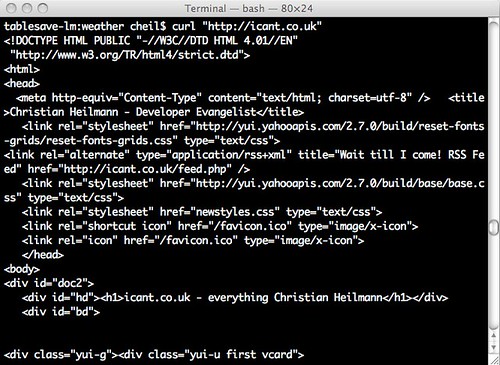
On aforementioned systems you can simply go to the terminal and do your first cURL thing, load a web site and see the source. To do this, simply enter
curl "http://icant.co.uk"
And hit enter – you will get the source of icant.co.uk (that is the rendered source, like a browser would get it – not the PHP source code of course):
If you want the code in a file you can add a > filename.html at the end:
curl "http://icant.co.uk" > myicantcouk.html

( The speed will vary of course – this is the Yahoo UK pipe :) )
That is basically what cURL does – it allows you to do any HTTP request from the command line. This includes simple things like loading a document, but also allows for clever stuff like submitting forms, setting cookies, authenticating over HTTP, uploading files, faking the referer and user agent set the content type and following redirects. In short, anything you can do with a browser.
I could explain all of that here, but this is tedious as it is well explained (if not nicely presented) on the cURL homepage.
How is that useful for me?
Now, where this becomes really cool is when you use it inside another language that you use to build web sites. PHP is my weapon of choice for a few reasons:
- It is easy to learn for anybody who knows HTML and JavaScript
- It comes with almost every web hosting package
The latter is also where the problem is. As a lot of people write terribly shoddy PHP the web is full of insecure web sites. This is why a lot of hosters disallow some of the useful things PHP comes with. For example you can load and display a file from the web with readfile():
<?php
  readfile('http://project64.c64.org/misc/assembler.txt');
?> |
<?php
readfile('http://project64.c64.org/misc/assembler.txt');
?>
Actually, as this is a text file, it needs the right header:
<?php
  header('content-type: text/plain');
  readfile('http://project64.c64.org/misc/assembler.txt');
?> |
<?php
header('content-type: text/plain');
readfile('http://project64.c64.org/misc/assembler.txt');
?>
You will find, however, that a lot of file hosters will not allow you to read files from other servers with readfile(), or fopen() or include(). Mine for example:

And this is where cURL comes in:
<?php
header('content-type:text/plain');
// define the URL to load
$url = 'http://project64.c64.org/misc/assembler.txt';
// start cURL
$ch = curl_init();
// tell cURL what the URL is
curl_setopt($ch, CURLOPT_URL, $url);
// tell cURL that you want the data back from that URL
curl_setopt($ch, CURLOPT_RETURNTRANSFER, 1);
// run cURL
$output = curl_exec($ch);
// end the cURL call (this also cleans up memory so it is
// important)
curl_close($ch);
// display the output
echo $output;
?> |
<?php
header('content-type:text/plain');
// define the URL to load
$url = 'http://project64.c64.org/misc/assembler.txt';
// start cURL
$ch = curl_init();
// tell cURL what the URL is
curl_setopt($ch, CURLOPT_URL, $url);
// tell cURL that you want the data back from that URL
curl_setopt($ch, CURLOPT_RETURNTRANSFER, 1);
// run cURL
$output = curl_exec($ch);
// end the cURL call (this also cleans up memory so it is
// important)
curl_close($ch);
// display the output
echo $output;
?>
As you can see the options is where things get interesting and the ones you can set are legion.
So, instead of just including or loading a file, you can now alter the output in any way you want. Say you want for example to get some Twitter stuff without using the API. This will get the profile badge from my Twitter homepage:
<?php
$url = 'http://twitter.com/codepo8';
$ch = curl_init();
curl_setopt($ch, CURLOPT_URL, $url);
curl_setopt($ch, CURLOPT_RETURNTRANSFER, 1);
$output = curl_exec($ch);
curl_close($ch);
$output = preg_replace('/.*(<div id="profile"[^>]+>)/msi','$1',$output);
$output = preg_replace('/<hr.>.*/msi','',$output);
echo $output;
?> |
<?php
$url = 'http://twitter.com/codepo8';
$ch = curl_init();
curl_setopt($ch, CURLOPT_URL, $url);
curl_setopt($ch, CURLOPT_RETURNTRANSFER, 1);
$output = curl_exec($ch);
curl_close($ch);
$output = preg_replace('/.*(<div id="profile"[^>]+>)/msi','$1',$output);
$output = preg_replace('/<hr.>.*/msi','',$output);
echo $output;
?>
Notice that the HTML of Twitter has a table as the stats, where a list would have done the trick. Let’s rectify that:
<?php
$url = 'http://twitter.com/codepo8';
$ch = curl_init();
curl_setopt($ch, CURLOPT_URL, $url);
curl_setopt($ch, CURLOPT_RETURNTRANSFER, 1);
$output = curl_exec($ch);
curl_close($ch);
$output = preg_replace('/.*(<div id="profile"[^>]+>)/msi','$1',$output);
$output = preg_replace('/<hr.>.*/msi','',$output);
$output = preg_replace('/<?table>/','',$output);
$output = preg_replace('/<(?)tr>/','<$1ul>',$output);
$output = preg_replace('/<(?)td>/','<$1li>',$output);
echo $output;
?> |
<?php
$url = 'http://twitter.com/codepo8';
$ch = curl_init();
curl_setopt($ch, CURLOPT_URL, $url);
curl_setopt($ch, CURLOPT_RETURNTRANSFER, 1);
$output = curl_exec($ch);
curl_close($ch);
$output = preg_replace('/.*(<div id="profile"[^>]+>)/msi','$1',$output);
$output = preg_replace('/<hr.>.*/msi','',$output);
$output = preg_replace('/<?table>/','',$output);
$output = preg_replace('/<(?)tr>/','<$1ul>',$output);
$output = preg_replace('/<(?)td>/','<$1li>',$output);
echo $output;
?>
Scraping stuff of the web is but one thing you can do with cURL. Most of the time what you will be doing is calling web services.
Say you want to search the web for donkeys, you can do that with Yahoo BOSS:
<?php
$search = 'donkeys';
$appid = 'appid=TX6b4XHV34EnPXW0sYEr51hP1pn5O8KAGs'.
         '.LQSXer1Z7RmmVrZouz5SvyXkWsVk-';
$url = 'http://boss.yahooapis.com/ysearch/web/v1/'.
       $search.'?format=xml&'.$appid;
$ch = curl_init();
curl_setopt($ch, CURLOPT_URL, $url);
curl_setopt($ch, CURLOPT_RETURNTRANSFER, 1);
$output = curl_exec($ch);
curl_close($ch);
$data = simplexml_load_string($output);
foreach($data->resultset_web->result as $r){
  echo "<h3><a href=\"{$r->clickurl}\">{$r->title}</a></h3>";
  echo "<p>{$r->abstract} <span>({$r->url})</span></p>";
}
?> |
<?php
$search = 'donkeys';
$appid = 'appid=TX6b4XHV34EnPXW0sYEr51hP1pn5O8KAGs'.
'.LQSXer1Z7RmmVrZouz5SvyXkWsVk-';
$url = 'http://boss.yahooapis.com/ysearch/web/v1/'.
$search.'?format=xml&'.$appid;
$ch = curl_init();
curl_setopt($ch, CURLOPT_URL, $url);
curl_setopt($ch, CURLOPT_RETURNTRANSFER, 1);
$output = curl_exec($ch);
curl_close($ch);
$data = simplexml_load_string($output);
foreach($data->resultset_web->result as $r){
echo "<h3><a href=\"{$r->clickurl}\">{$r->title}</a></h3>";
echo "<p>{$r->abstract} <span>({$r->url})</span></p>";
}
?>
You can also do that for APIs that need POST or other authentication. Say for example to use Placemaker to find locations in a text:
$content = 'Hey, I live in London, England and on Monday '.
           'I fly to Nuremberg via Zurich,Switzerland (sadly enough).';
$key = 'C8meDB7V34EYPVngbIRigCC5caaIMO2scfS2t'.
       '.HVsLK56BQfuQOopavckAaIjJ8-';
$ch = curl_init();
define('POSTURL',  'http://wherein.yahooapis.com/v1/document');
define('POSTVARS', 'appid='.$key.'&documentContent='.
                    urlencode($content).
                   '&documentType=text/plain&outputType=xml');
$ch = curl_init(POSTURL);
curl_setopt($ch, CURLOPT_POST, 1);
curl_setopt($ch, CURLOPT_POSTFIELDS, POSTVARS);
curl_setopt($ch, CURLOPT_RETURNTRANSFER, 1);
$x = curl_exec($ch);
$places = simplexml_load_string($x, 'SimpleXMLElement',
                                LIBXML_NOCDATA);
echo "<p>$content</p>";
echo "<ul>";
foreach($places->document->placeDetails as $p){
  $now = $p->place;
  echo "<li>{$now->name}, {$now->type} ";
  echo "({$now->centroid->latitude},{$now->centroid->longitude})</li>";
};
echo "</ul>";
?> |
$content = 'Hey, I live in London, England and on Monday '.
'I fly to Nuremberg via Zurich,Switzerland (sadly enough).';
$key = 'C8meDB7V34EYPVngbIRigCC5caaIMO2scfS2t'.
'.HVsLK56BQfuQOopavckAaIjJ8-';
$ch = curl_init();
define('POSTURL', 'http://wherein.yahooapis.com/v1/document');
define('POSTVARS', 'appid='.$key.'&documentContent='.
urlencode($content).
'&documentType=text/plain&outputType=xml');
$ch = curl_init(POSTURL);
curl_setopt($ch, CURLOPT_POST, 1);
curl_setopt($ch, CURLOPT_POSTFIELDS, POSTVARS);
curl_setopt($ch, CURLOPT_RETURNTRANSFER, 1);
$x = curl_exec($ch);
$places = simplexml_load_string($x, 'SimpleXMLElement',
LIBXML_NOCDATA);
echo "<p>$content</p>";
echo "<ul>";
foreach($places->document->placeDetails as $p){
$now = $p->place;
echo "<li>{$now->name}, {$now->type} ";
echo "({$now->centroid->latitude},{$now->centroid->longitude})</li>";
};
echo "</ul>";
?>
Why is all that necessary? I can do that with jQuery and Ajax!
Yes, you can, but can your users? Also, can you afford to have a page that is not indexed by search engines? Can you be sure that none of the other JavaScript on the page will not cause an error and all of your functionality is gone?
By sticking to your server to do the hard work, you can rely on things working, if you use web resources in JavaScript you are first of all hoping that the user’s computer and browser understands what you want and you also open yourself to all kind of dangerous injections. JavaScript is not secure – every script executed in your page has the same right. If you load third party content with JavaScript and you don’t filter it very cleverly the maintainers of the third party code can inject malicious code that will allow them to steal information from your server and log in as your users or as you.
And why the C64 thing?
Well, the lads behind cURL actually used to do demos on C64 (as did I). Just look at the difference:


 Ok, using YQL and playing around with the console can make you go a bit too far.
 ';
} else {
if(items[i].description.indexOf('src')!=-1){
var thumb = items[i].description.split('src="')[1];
thumb = thumb.split('"')[0];
out += '
';
} else {
if(items[i].description.indexOf('src')!=-1){
var thumb = items[i].description.split('src="')[1];
thumb = thumb.split('"')[0];
out += ' ';
}
}
out += '';
if((items[i+1] && items[i+1].link.substr(0,20) !=
items[i].link.substr(0,20))){
containers[c].innerHTML+='
';
}
}
out += '';
if((items[i+1] && items[i+1].link.substr(0,20) !=
items[i].link.substr(0,20))){
containers[c].innerHTML+='