Christian Heilmann

Author Archive

Showing off your upcoming Lanyrd events as a badge with YQL

Wednesday, September 15th, 2010

Lanyrd is a cool new web site to organise the events you go to and speak at. The thing that is missing right now is a badge to show off your upcoming events on your own web site as requested by Dan Rubin:

Twitter / Dan Rubin: @lanyrd: Any plans to add ... by photo

The team is working on it but in the meantime you can easily use YQL to do that. In YQL you can get any HTML of a page and scrape it. You then can get it back as XML and if you provide a callback method name it returns it as JSON-P-X which is HTML as a string inside a JSON callback.

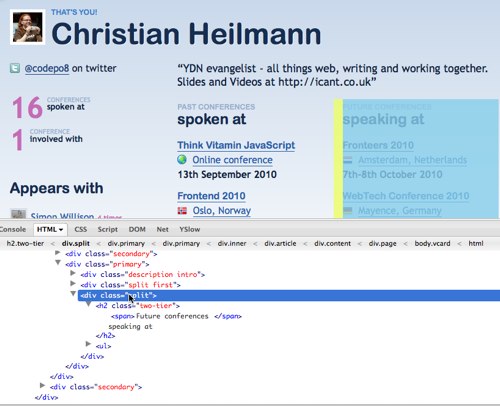
The first thing you need to do is to find the HTML you want. If I look at my own Lanyrd page then I can do that in Firebug:

grabbing the speaking events in lanyrd by photo

What I want is the DIV that contains the H2 element with the word “Future” in it. In the utterly painfulincredibly flexible and elegant XPATH syntax this is //h2[contains(.,'Future')]/.. or “get all the h2 elements where the text node contains the word Future and then go up one level in the DOM hierarchy”.

In YQL this means you can get the content in the following format:

select * from html where
url="http://lanyrd.com/people/codepo8/" and xpath="//h2[contains(.,'Future')]/.."

You can Try this in the YQL console or see the results as XML.

To turn this into a badge, all you have to do is to enhance a link to the profile with a JSON-P call to YQL. The JavaScript for that is very easy:

You test if there is an element with the ID “lanyrd” and if it is a link. If it is, you add a loading message to its text and read its URL. You then assemble the URL to the YQL command shown above and create a new SCRIPT element pointing to it. Once this has been executed it will call the method lanyrdbadge.seed(). All the seed message needs to do is to replace the class of the DIV with the ID of “lanyrd” and remove the “speaking at” message. This then allows you to write some CSS to style the badge:

The HTML is a link to the profile and a SCRIPT node pointing to the JavaScript:

You can see the result here.

Lanyrd Badge example by photo

If JavaScript is not supported all you have in your document is a link to your profile on Lanyrd. If JavaScript is supported you can style the badge any way you want. The full code is on GitHub.

Maintainable JavaScript at the ThinkVitamin JavaScript online conference

Monday, September 13th, 2010

Today I spoke at the ThinkVitamin JavaScript online conference alongside Simon Willison, Stuart Landgridge and Drew McLellan.

Topic and slides

My topic was “Maintainable JavaScript” and I managed to pack 150 slides into the 50 minutes of my talk. The Slides are available on Slideshare.

Maintainable Javascript carsonified

View more presentations from Christian Heilmann.

What I covered

I went through a few of the tricks you should apply when you want to write maintainable JavaScript:

  • Using, not abusing libraries
  • Separation of concerns
  • Building for extensibility
  • Documenting your work
  • Planning for performance
  • Avoiding double maintenance
  • Live code vs. development code

A few of the topics got repeated by the other speakers but frankly I am always fascinated just how many people do not know about the X-requested-with header JavaScript libraries add to Ajax requests and how you can use it to render different content for Ajax requests and for include() requests. This allows you to maintain your whole content and HTML on the server and have all the Ajax goodness rendering out a simple HTML string.

The code example for the validation is available on GitHub.

Another thing that is missing a lot in people’s approach to JS is a proper build process. That’s why a lot of people try to optimise for performance during development and leave hard to maintain, specialist code behind.

In essence, I showed that by building logical backend code you can save yourself a lot of JavaScript and you build things that work instead of things you hope will work.

The conference experience

Speaking at pure online conferences is weird. For starters we had to change the order as Simon Willison is on his honeymoon world-tour and currently in Marrakesh, which meant his connection was flaky. The audio during his talk was not the best and he didn’t even bother with video.

It is a strange experience to sit there with a headset and talking to your desktop as you cannot see the audience. Talks get much better when you can interact with the audience, ask questions, see them falling asleep or seething with rage – that kind of thing. In an online conference this is missing and you cannot read the chat whilst you present as this is too distracting. Drew was suffering the most from this lack of interaction and I had my audio drop out once which meant I had to repeat some slides.

All in all I find these things work better when there is a discussion going on – like a moderator interviewing a speaker over Skype and people asking questions. The other option of course would be to record the talks beforehand and play them instead of hoping all works out fine live – it never does. Recording the talks and then having a pure Q&A session with the speaker on skype afterwards seems to me a better way to work with these issues.

The benefits of these conferences are quite cool. People do not have to travel, you can pay one ticket and let a whole office watch, speakers don’t need to wear trousers and the liver of the speakers doesn’t need to suffer as much as it does at normal conferences. I am not quite convinced about the “green” argument of these events as they do use up energy, too but hey, at least it helps people thinking “green”.

Online conferences are a good idea as an add-on but I don’t think they’ll replace conferences as the networking and “meeting in the flesh” aspect is lost and that makes them feel a bit clinical and cold. That said, Carsonified are doing a good job with these right now and are lovely people when you interact with them as a speaker.

Google goes bubbly – interactive logo today on the UK homepage (plus source)

Tuesday, September 7th, 2010

The Google UK logo today is a mass of bouncing colourful balls that flee the mouse (screencast):

Google Doodle by codepo8

This is another example how Google are happy to play with their brand to show off some cool new browser technology (the other of course being the Pac Man logo a few weeks back). This, and the Pac Man is meant to show off what you can do with JavaScript and HTML5 and how smooth it can look on Chrome. My screenshot was taken with Firefox, so there is no racism in this code either – another plus in my book.

If you reverse engineer the code you will find that the bubbles are actually DIV elements that have a huge border radius. You can find the whole code of the effect in the source code when you look for google.doodle() or in this gist (beautified):

As you can see there is not much magic to it. The CSS is even easier:

Yes, all of this is pointless bells and whistles, but I have to say I like it that a company puts technology and showing it off just for a day on their agenda.

Update: the fact that the DOCTYPE of the site is HTML5 does not make this effect HTML5 though. It is simply a JavaScript that moves DIVs around and resizes them. This could be done in HTML4 and for IE6, too. The upgrade from classic DHTML animation is that it uses CSS3 to create the round bubbles and that nowadays this animation looks smooth on faster computers. In the time when IE6 was hot this would have looked terrible. Notice Google blocks IE from getting the effect (and sadly enough Opera, too, although it would work just fine with their JS engine).

Another Update: Rob Hawkes used the code here to port the effect to Canvas to make it HTML5 (well Canvas) driven.

Last update Robin Berjon ported the code to SVG as another open technology in the new stack.

Going snappy at conferences? Where are your results?

Monday, September 6th, 2010

Whenever I go to conferences I see lots of people running around with impressive SLR cameras snapping away furiously at everything that moves. When I get back from the conference and check the normal sources for these photos (Flickr, Facebook, heck even Picasa…) I get almost nothing. This wasn’t the case a few years ago – almost every conference was well documented by amateur photographers and yielded lots of great comments and conversations on Flickr.

I am not alone in my analysis – @yaili complained on Twitter:

@yaili: Flickr needs more @dConstruct 2010 photos. How am I supposed to feed my post-conference blues?

And I agreed:

@yaili over the last year less and less people upload photos from conferences. annoying. Everybody runs around with SLRs and shoots a lot.

I did talk to people with impressive photo gear and a lot of them agreed never to upload much. There might be a few reasons for that:

  • People take photos in high resolutions – and wireless at conferences is not able to cope
  • People who spent a lot of money on massive cameras aspire to be a real photographer and are reluctant to upload photos that haven’t been perfected in Aperture or Lightroom
  • People just forget as by the time one event is over the next is on.

This aim for perfection leads to a lot of people missing out. Why not upload lower resolution photos as “raw” or “live” to Flickr and at least allow people to join the fun. It sounds to me like Worth1000 vs. B3TA – both had the same goal – funny photoshop manipulations. Whilst Worth1000 had strict quality control and only the most impressive stuff got released b3ta is all about the joke, then the technique. B3ta left its mark on mainstream media with magazines republishing content and some TV ads being made by artists who started at b3ta. Worth1000 is still a web community and seems to dwindle down to another “make better photos” resource. Allow yourself to release non-perfect products – and more people will find you.

Interestingly enough the post-conference follow-up fail goes even further. As Stuart Robson pointed out it takes too long to get the slides:

StuRobson @codepo8 I wonder what they’re doing with these photos at home. I’m just forever waiting for the slides to go up. #Iwillgettoaconference1day

Both of this is a real shame, as organisers, speakers and the amateur photographers miss out a massive opportunity to create more buzz about the conference and themselves.

  • Conferences create a lot of buzz on Twitter – your photo could give that a visual add-on. If you license your photo with CC large blogs and newspapers could use them and have to mention your name.
  • Slideshare is a large community and your slides being featured as part of a conference channel or even on the homepage has quite an impact. This could be as simple as your presentation being the first to be uploaded for a large BarCamp
  • Speakers who do publish their presentations and blog about the conference always look for good photos of themselves. As it is hard to shoot those whilst you speak (I normally give my camera to a friend) I for example troll Flickr immediately when I get back from a conference. If you shot a cool photo of me, I will use that and link your name.
  • People who missed the conference will get an idea of what was covered and how much fun people had – and will get a ticket next time.

So, please share, folks – the web needs you!

Enjoying the full stack – my talk at Frontend2010 in Oslo, Norway

Friday, September 3rd, 2010

I just got back from Frontend 2010 in Oslo, Norway. Two days of excessive drinkinggreat information about designing and building the web of tomorrow.. I was invited as a speaker alongside a lot of great people and my task was to give the last presentation of the conference to sum up a bit what we had heard about and what to do with it when we get back home. And this is what I did. Here are the slides. More to come later when the video is out and I am not using my almost empty Nexus as a hotspot as the British Airways wireless is FAIL again.

Chris Heilmann the mild mannered speakerChris Heilmann the revengeful norse god