Christian Heilmann

Author Archive

Keywordfinder.org is live

Monday, November 24th, 2008

It’s been a while since I released a full web app (no, shouldiusetablesforlayout doesn’t count), so I thought I spend a few hours and created keywordfinder.org:

Screenshot of Keywordfinder.org

It is a service that returns the 20 most successful keywords for a search term you enter and the first 20 sites that come up when you do a search online.

Hopefully this is useful to some, I just had fun playing with BOSS and some YUI CSS to create the whole thing from scratch in one morning :)

Show the world your Twitter type (using PHP and Google Charts)

Sunday, November 23rd, 2008

I just had a bit of fun with Twitter and the Google charts API. You can now add an image to your blog, web site or wherever and show a picture of what kind of a twitter user you are. All you need to do is embed an image and give it the right source:

For example my user name is codepo8, which would be:

And the resulting image is:

For John Hicks for example it is:

And the resulting image is:

How it is done and how to “change stuff”

You can download the source code and have a play with this (I hope this will not spike my traffic :) so it might go offline if that is the case). There’s really not much magic to this:

First I get the user name and filter out nasties:

$user = $_GET['user'];
$isjs = "/^[a-z|A-Z|_|-|$|0-9|.]+$/";
if(preg_match($isjs,$user)){
Then I set the content type to show the image and use cURL to get the information from the user’s twitter page.

header('Content-type:image/png');
$info = array();
$cont = get('http://twitter.com/'.$user);
I get the information using regular expressions and put them in an associative array:

preg_match_all('/([^>]+)/msi',$cont,$follow);
$info['follower'] = convert($follow[1][0]);
preg_match_all('/([^>]+)/msi',$cont,$follower);
$info['followed'] = convert($follower[1][0]);
preg_match_all('/([^>]+)/msi',$cont,$updates);
$info['updater'] = convert($updates[1][0]);
The convert function removes the comma punctuation added by twitter and makes sure the values are integers. I then need to determine which of the three values is the highest and define a scaling factor as the Google API only allows values up to 100. I then check what the type of the user is by getting the right array key and change the values for displaying.

$max = max($info);
$convert = 100 / $max ;
foreach($info as $k=>$f){
if($f = $max){
$type = $k;
}
$disp[$k] = $f * $convert;
}
I check the type and assemble the display string accordingly:

if($type = ‘updater’){
$t = ’ is an ‘;
}
	

if($type = 'follower'){
$t = ' is a ';
}

if($type = ‘followed’){
$t = ’ is being ‘;
}

$title = $user . $t . $type;
I assemble the labels array and the values array and add all up to the correct Google charts API url. I use cURL to get the image and echo it out.

$out = array();
foreach($info as $k=>$i){
$out[] = $k.'+('.$i.')';
}
	

$labels = join($out,'|');
$values = join($disp,',');
$img = get('http://chart.apis.google.com/chart?cht=p3&chco=336699&'.
'chtt='.urlencode($title).'&chd=t:'.$values.
'&chs=350x100&chl='.$labels);
echo $img;
}

The rest are the cURL and convert helper functions.

function get($url){
$ch = curl_init();
curl_setopt($ch, CURLOPT_URL, $url);
curl_setopt($ch, CURLOPT_RETURNTRANSFER, 1);
$feed = curl_exec($ch);
curl_close($ch);
return $feed;
}
	

function convert($x){
$x = str_replace(',','',$x);
$x = (int)$x;
return $x;
}

You like?

Faster version (one cURL, instead of two)

Instead of setting the PNG header and echoing out the image you can also just set a location header at the end and redirect the URL request to Google’s servers. I guess they have more bandwidth. :)

Liberated Accessibility at A-Tag in Vienna

Sunday, November 23rd, 2008

I’m just looking out of the window at the snow on my balcony (in London! ZOMG!) and try to wrap up my quick trip to Vienna to attend the A-Tag conference which was an accessibility event sponsored by both Austrian government organizations and commercial partners.

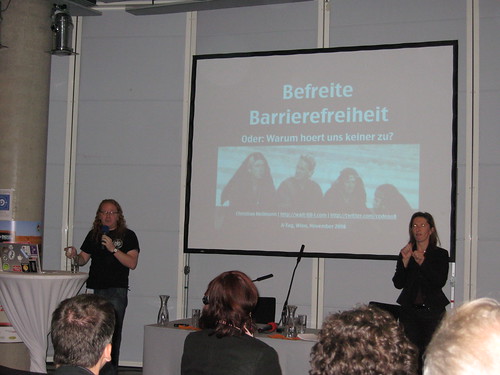
me presenting and having live sign language translation
Photo by Markus Ladstaetter

The motto of the conference was “The Future is now” and thus the main sponsor was the organization in the Austrian government dealing with youth matters. This is a great idea as it meant that first of all the accessibility argument is taken outside of the disability camp but into the area that we have to deal with much more – the youth of today and its education but it also meant that people are more likely to listen to a government body than just bloggers or IT company representatives. The conference had two tracks and here’s a quick roundup of the talks I attended.

  • The conference started with Eva Pabst, a blind presenter from accessible media welcoming everybody and setting the scene.
  • Following was Robert Lender talking about the idea of bringing accessibility and youth work together and doing an admirable job in presenting the plea for collaboration. My hat is off to Robert (and he did the opposite by putting on the blue beanie after stating it’ll look silly) and I am helping him right now to create a youth oriented search engine using Yahoo BOSS.
  • After this I saw my colleague Artur Ortega giving an overview on how JavaScript solutions can increase the accessibility of web products if used correctly showing Yahoo Video, Finance (using a very clever currency converter) and other “real life” examples. Artur is a geek and hard-core well of knowledge when it comes to screen readers, great stuff.
  • Shadi Abou-Zahra of the W3C was next explaining all about WCAG2. This was a bit on the dry side, but there is not much you can do when talking about a massive topic like this and Shadi is great to ask all kind of detailed questions when you cornered him in the breaks. Good to have people telling how to convert from a WCAG1 based testing methodology to the more human WCAG2.
  • I then skipped two presentations to chat with people outside and discussing the idea of an Austrian Scripting Enabled with some of the people.
  • I got back on the tracks after lunch to see Martin Kliehm talk about WAI-ARIA and how to use it now. Despite the rather creepy factor that most of his slides featured my name or photo in one way or another Martin did a great job explaining the technical details of WAI-ARIA and showed his code solutions for it. One thing that is a bit of a shame is that him showing how complex it can get to write your own keyboard access solutions might have spooked the audience, so I made sure to explain that all the large widget libraries I know are working on ARIA implementations already, so you don’t have to be a Martin to use it.
  • Eric Eggert filled in for Tomas Caspers who couldn’t come because of company demands and was sadly missed talked about the seven deadly sins of accessible webdesign mapping the bible sins to bad examples of accessible solutions. These ranged from terrible solutions like contrast widgets that only changed the contrast of the widget itself up to 1000 character table summaries that didn’t explain what the table was about. Eric also segwayed nicely to my presentation by telling people off for discussing things for hours instead of just doing them.

The conference presentations ended with my own plea for better communication between the accessibility world and the web development world out there. The slides are available on slideshare (this is the English version, but there is also a German one. If you don’t want to sign up for slideshare to download the slides, get them from S3: German, English.

Here are the slides translated into English:

[slideshare id=778833&doc=atagenglish-1227392313529781-9&w=425]

I will write more about this topic soon and hopefully give some talk on it in the anglophone world, too :)

The organization of the conference was flawless and went without a hitch. The catering was marvelous and Vienna itself is a beautiful, easy to navigate town full of coffee houses and bakeries. Please London, take these on!

I have to thank the organizers, Eric Eggert, Accessible media and the dynamic duo of Markus and Martin Ladstaetter of Bizeps for a great conference. I was also very impressed with the live transcription to sign language and the professionalism this was done with (I had a good talking to before my talk to speak much slower and hope I pulled it off).

On a personal note one of my highlights was being able to have a long chat (with aid of the sign language translators) with several hard-of-hearing attendees (including the terribly inspiring Manfred Schuetz) which helped me to understand their concerns and give them some ideas how to get the need for proper captioning and transcription to sign language out there.

It was a good time and if you speak German and you care about accessibility, give A-Tag a go next time, it is well worth it.

WordPress Plugin to add Yahoo Keywords to your posts

Friday, November 14th, 2008

Continuing my playing around with Yahoo BOSS, I’ve put together a quick WordPress plugin to add keywords to any of your blog posts.

Simply Download the plugin unpack it to your plugin directory and activate it.

Once activated you can use two commands in your blog posts:

[ yahookeywords:parisweb]

This will be replaced by a list of keywords – an HTML list of 10 terms with a CSS class called “yahoo-keywords”.

[ yahootags:parisweb]

This will be replaced by the same list, but each of the terms will be linked as a tag back to your blog.

Live examples:

[yahookeywords:parisweb]
[yahootags:parisweb]

Paris Web – Working in the now

Friday, November 14th, 2008

Yesterday I was one of the speakers at Paris Web and my talk was “Working in the now”:
[slideshare id=749394&doc=workinginthenow-1226584706289320-9&w=425]

me showing the slimming benefits of crowded trains. Photo by Xavier Borderie
Originally I meant to talk about HTML5 goodies and how to simulate them with Flash and DHTML right now (writing a small abstraction library) but seeing the latest rounds of crashes and layoffs I changed my stance and talked about things that we could be doing now to both secure our jobs and not lose all the momentum the standards movement got in the last few years.

I’ve explained the reasons and my thoughts on the subject in detail in another post here. In the talk I advocated re-using components and systems we already have to work faster, deliver better and have less hardware and software overhead in doing so.

These are:

The feedback so far was great, but there was also a lot of “yeah this is open source, but what if the company running it goes down and how can I trust it” questions. I will write something longer abut this soon, it is just very interesting to see that there is a big problem with free things and trust.