Christian Heilmann

You are currently browsing the archives for the General category.

Archive for the ‘General’ Category

New Twitter exploit about goats – how it works.

Sunday, September 26th, 2010

OK, in the last few minutes you will have gotten a few tweets of people explaining that they like to have intercourse through the backdoor with goats. This is a Twitter exploit – probably initiated by someone doing a security talk (I know some people who would be devious enough).

The exploit is actually easy – the main ingredients are:

  • Twitter allowing updates through the API via IFRAMES and GET thus being vulnerable to CSRF attacks
  • PasteHTML.com being vulnerable to render code without a secure site around it and executing it
  • Clients or Twitter automatically applying the t.co link shortener

The code to execute the “worm” is hosted at http://pastehtml.com/view/1b7xk3b.html so Twitter should contact them – (I just did):


Nothing magical there – all you do is create two SCRIPT files that point to the twitter update API and send a request to do an post. As the user who clicked on the malicious link is authenticated with twitter you can send them on his behalf. It is the same trick that worked for the “Don’t click this button” exploit or my demo at Paris Web last year how to get the updates of a protected Twitter user.

The effects of this are a mixed bag

  • Bad: People stop trusting the t.co shortener after it was actually installed to be a trustworthy link shortener. The link shortening service is not compromised – this is one thing that can’t be blamed on Twitter
  • Bad: There is a flood of wrong messages on Twitter
  • Good: people talk about the exploit and how it was done
  • Good: people get more conscious about clicking links
  • Good: Twitter have to harden their API agains CSRF
  • Bad: this will break some implementations

There is no real defense against CSRF from a user’s point of view other than not clicking links you don’t trust and turning off JavaScript. As this is a wide definition, we will get those over and over again unless API providers disallow for requests without tokens. This, on the flipside means that implementing one click solutions to tweet or like will be a lot harder.

I fell for the trick, too – especially as I didn’t expect PasteHTML to render code instead of sanitizing it.

Update: As some clever clogs just pointed out in the comments, JSBin is also vulnerable to hosting code that will be executed. One thing I do to check malicious links is to use curl in the terminal:
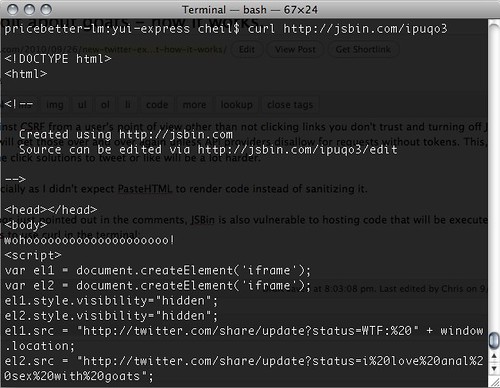
Terminal — bash — 67×24 by photo

If you don’t know JS, that doesn’t help you but if you do you can warn the world.

The annoying thing about YQL’s JSON output and the reason for it

Wednesday, September 22nd, 2010

A few days ago, Simon Willison vented on Twitter about one of the things that annoyed me about YQL, too:

Battling YQL's utterly horrible JSON output, where a response with one result is represented completely differently from a response with two

The interesting thing about this is that it is not a YQL bug – instead it is simply a problem of generic code and data conversion.

The problem with YQL JSON results

Let’s have an example. If you use YQL to get for example the geo information about “London” you get several results in XML:

select * from geo.places where text=”london”:

XML output with multiple places

If you use JSON as the output format this becomes an array:

JSON output with multiple places

Cool, so you can loop over query.results.place, right? No, cause when there is only one result, we have a different situation. Instead of being an array, place becomes an object:

select * from geo.places where text=”london,uk”:

Single results in JSON become an object instead of an array

This is what ailed Simon as it means you need to write a function that works around that issue. For example in the Geoplanet Explorer, I use a render() function to show each place result and I use the following to work around the JSON output issue:

function renderlist($p){
if(sizeof($p)>1){
foreach($p as $pp){
$o .= render($pp);
}
} else{
$o = render($p);
}
return $o;
}

In JavaScript you’d have to check the length and either show the results directly or loop over the results.

Generic conversion vs. creating a single API

This is a problem when you convert XML to JSON - as the resulting XML from the GeoPlanet API doesn’t have a places element with place in it but instead repeats the place element for every result the JSON parser must make a decision: if it is only one element, this becomes a property of the results object. If there are more than one place element it becomes a property that is an array (as you cannot repeat the same property name).

If you build your own API and you know the format of the different results you can force this to be an array even when there is only one result. If you do not know the XML schema there is no way of assuming what should be an array and what should not be an array. So the generic solution for XML to JSON conversion of an unknown XML with 1 to n results would be to always create an array. That way you couldn’t get to place.admin1.code for example but you’d always have to do place[0].admin1[0].code[0] – not really a sensible thing to do.

As YQL is an open system and the XML results are provided by anyone in their open table definition the only way around I could think of is to tell YQL in the table that some elements should always be forced to become arrays.

Do you have a solution?

A research interface for the social web – fork it now and find what people are talking about

Wednesday, September 22nd, 2010

Researching something on the web can be pretty annoying. Search engines get better every year, but there is a whole world of social sites that are not indexed. For example if I search for a nice photo of a red panda I use Google image search. If I want to use this photo later on I am better off using Flickr or Picasa and see what license the photo is.

Yahoo’s researchers had the same problem which is why they assembled all the social updates in one XML feed – the Yahoo! Firehose. This, in contrast to other Yahoo APIs also comes with commercial terms and conditions and is available through YQL. In terms of data, the Firehose aggregates a lot of different sources:

Yahoo! 360, AOL, Bebo, Blogger, Bloglines, Digg, Diigo, Goodreads, Google, Google Reader, Last.fm, Ma.gnolia, Movable Type, Netflix, Pandora, Picasa, Pownce, Seesmic, Slideshare, SmugMug, StumbleUpon, ThisNext, TravelPod, Tumblr, Twitter, TypePad, Vimeo, Vox, Webshots, Xanga, Yelp, YouTube, Zooomr, Yahoo! Avatars, Yahoo! Buzz, Yahoo! Profiles, Wisteria, Yahoo! Answers, Yahoo! Shopping, Yahoo! Autos, Bix for Yahoo!, Yahoo! Bookmarks, Yahoo! Briefcase, Yahoo! Calendar, Yahoo! Classifieds, Delicious, Yahoo! Family, Yahoo! Sports, Yahoo! Finance, Flickr, Yahoo! Food, Yahoo! Games, Yahoo! Geocities, Yahoo! Green, Yahoo! Greetings, Yahoo! Groups, Yahoo! Health, Yahoo! Hotjobs, Yahoo! Kids, Yahoo! Local, Yahoo! Movies, Yahoo! Music, MyBlogLog, Yahoo! News, OMG! from Yahoo!, Yahoo! Personals, Yahoo! Pets, Yahoo! Status Updates, Yahoo! Guestbook Comments, SearchMonkey from Yahoo!, Yahoo! Shopping, Yahoo! Sports, Yahoo! Tech, Yahoo! Travel, Yahoo! TV, Yahoo! Video.

You can do the data junkie part and use it in the YQL console:

This can be annoying though, especially as you cannot see the photos and videos. This is why I put together a research interface on top of the Yahoo Firehose:

You can see the research interface in action here but more importantly, the source code of the interface is available on GitHub which means that you can host it yourself – for example behind a firewall or make it part of your Intranet.

For a local install you need to sign up for a developer key, edit the keys.php file, put all the files up on your PHP enabled server and you are done. If you get stuck you can get help on the YDN Forums.

Notice that I am keeping the state of your last search by storing it in local storage when your browser supports it – this can be useful for larger searches.

Bloat is bloat – even when you can’t see it (lettering.js and fooling ourselves)

Saturday, September 18th, 2010

There were some interesting conversations around the lettering.js jQuery plugin on Twitter today. The thing that lettering.js does for you is to turn a text into a series of SPANS with automatically numbered classes to give you a handle to style them:

Some Title


S o m e T i t l e

Now there are a few questions I have about this:

  • Would you write that by hand?
  • Would that be your first idea of marking up a piece of text to add to an HTML document?
  • Is it worth to add that many classes to be able to fix kerning and styling?
  • How would you use that with several replacements?

To style this you’d either use h1.char#{} for each character or .fancy-title.char1{} the latter not being supported by IE6. Simply using .char#{} would mean that if you use the lettering.js again you need to override it for another element or up the specificity in other ways – in essence adding more and more to your CSS file.

The answer I got to the first question was that no, people would not write that by hand and this is why this plugin is awesome as it does this thankless task for you. The question though remains – is this a sensible use of HTML or is this painting with HTML?

When we use tables for layout this is considered inefficient, outdated and not intelligent web development. We limit ourselves to a defined look and feel – we mix presentation with structure. If we add a SPAN around each character of a word we mix presentation with content. Even worse, if the text changes, the numbering changes and the kerning fixes will be applied to the wrong characters.

To me, text on the web should be editable. We don’t use an image for headlines as we want to make it easy for people to edit them, translate them or add to them. Maintenance is why we opt for HTML over other techniques to add a headline to a document – techniques that would give us full control over the look and feel.

Using something like lettering.js is not more sensible, clever or logical than writing the SPANs by hand – it is just less work. In the end, the browser will get the same questionable HTML construct – we just make it dependent on a technology that might not be available and write it out after the page has already loaded. So in essence it is less reliable and slower than writing the SPANs by hand but fulfills the same premise. And the premise is that we want control over something that we chose to create in a technology we like using as it gives us flexibility. In essence we’re un-doing what the browser and HTML does for us for the sake of simulating a stricter environment.

Yes, CSS has not enough typographical handles. Yes, a trick like that gives us more control. But it also means that we fix the state of the headline by mixing content with presentation. If you edit the text – you need to edit the CSS. It is the same mistake that developers make when they make functionality dependent on the text value of a button rather than its class or ID - if an editor changes that text in the future your application breaks.

Typography in the granularity of what lettering.js promises comes at the cost of fixing the visual state of an HTML element. We use HTML instead of creating an image as we want people to be able to edit it. It is a proper Catch-22.

Showing off your upcoming Lanyrd events as a badge with YQL

Wednesday, September 15th, 2010

Lanyrd is a cool new web site to organise the events you go to and speak at. The thing that is missing right now is a badge to show off your upcoming events on your own web site as requested by Dan Rubin:

Twitter / Dan Rubin: @lanyrd: Any plans to add ... by photo

The team is working on it but in the meantime you can easily use YQL to do that. In YQL you can get any HTML of a page and scrape it. You then can get it back as XML and if you provide a callback method name it returns it as JSON-P-X which is HTML as a string inside a JSON callback.

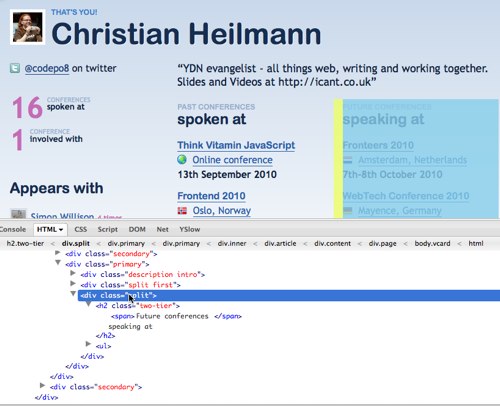
The first thing you need to do is to find the HTML you want. If I look at my own Lanyrd page then I can do that in Firebug:

grabbing the speaking events in lanyrd by photo

What I want is the DIV that contains the H2 element with the word “Future” in it. In the utterly painfulincredibly flexible and elegant XPATH syntax this is //h2[contains(.,'Future')]/.. or “get all the h2 elements where the text node contains the word Future and then go up one level in the DOM hierarchy”.

In YQL this means you can get the content in the following format:

select * from html where
url="http://lanyrd.com/people/codepo8/" and xpath="//h2[contains(.,'Future')]/.."

You can Try this in the YQL console or see the results as XML.

To turn this into a badge, all you have to do is to enhance a link to the profile with a JSON-P call to YQL. The JavaScript for that is very easy:

You test if there is an element with the ID “lanyrd” and if it is a link. If it is, you add a loading message to its text and read its URL. You then assemble the URL to the YQL command shown above and create a new SCRIPT element pointing to it. Once this has been executed it will call the method lanyrdbadge.seed(). All the seed message needs to do is to replace the class of the DIV with the ID of “lanyrd” and remove the “speaking at” message. This then allows you to write some CSS to style the badge:

The HTML is a link to the profile and a SCRIPT node pointing to the JavaScript:

You can see the result here.

Lanyrd Badge example by photo

If JavaScript is not supported all you have in your document is a link to your profile on Lanyrd. If JavaScript is supported you can style the badge any way you want. The full code is on GitHub.