Christian Heilmann

You are currently browsing the archives for the General category.

Archive for the ‘General’ Category

Hot new web technologies and how to promote them – a presentation blueprint

Thursday, September 15th, 2011

I am currently at the Mozilla all Hands in San Jose, California and decided to give a talk explaining a lot of open technologies to my colleagues so they can go out to conferences and get people excited about them. We have a lot of people and volunteers, and everybody should feel empowered to speak in public. A lot of times what is missing is a simple way to tell people about the things you want to cover.

To this end I put together not yet another slide deck on SlideShare, but a way to see a presentation and then pick and mix what you want to show yourself.

You can see and present the presentation here (use cursor keys to navigate the slides and press ‘N’ to show ):

The audio recording of the talk (raw, unedited) is available on archive.org.

The slides and screencasts are available on GitHub and we are also keeping a repository of the explanations and screencasts on the Mozilla Wiki.

The idea is that when you want to do a quick show and tell of new technologies you can go to the slides, uncheck the ones you don’t want to have in your presentation, hit the “start presentation” button and go for it.

Enjoy!

Animating with canvas and creating CSS3 animations with JavaScript

Monday, September 5th, 2011

Yesterday we went to a cool park in Krakow, Poland where they have all kind of physics experiments for kids (and me):
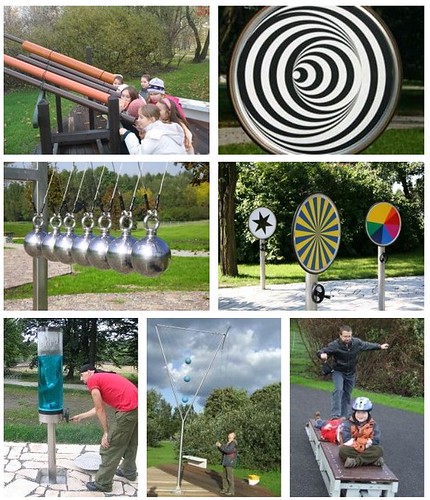
Physics Park exhibits

One of the things that always fascinated me was the optical illusion of non-concentric circles turning into a 3D cone. Take the following picture:

non-concentric circles

And then rotate it and you see what I mean (video on screenr).

Now, coming back (like any other kid) I wanted to recreate this for myself, and it is actually pretty easy in HTML5 canvas. If you get the embed below, then click the play button to see the result.

Check the source code. In essence all you do is paint a number of concentric circles with alternating black and white colouring and you decrease their radius. Instead of keeping the centre of the circles the same you move it back forth with a sine wave.

The animation works simply by rotating the canvas around the centre – no need to calculate the rotation in the loop.

This is what also ailed me about this: as the main image doesn’t change and we simply rotate the canvas, there is no need for the painting loop in the animation. Although the performance seems to be fine (at least here on this Macbook Air), I am pretty sure that the animation without the calculated circles will be smoother and less resource hungry. That’s why I painted the circles in one canvas and copy it into the animated one as an image. You can see the two canvases (the painting one in lighter grey) in this demo. Again, if you get the embed below, then click the play button to see the result.

The next step was to take the advice that everybody tells you right now and think about CSS animation as it is hardware accelerated and much better (citation needed, but that is the impression that I get). As all I am doing is to rotate a canvas around itself, it seems to be a good idea to do that. So, in the next example I animate with CSS and only use canvas for painting:

Smooth! I like it. What I don’t like is that now it does nothing in Opera for example. The other thing that annoys me is that the CSS is ridiculously verbose as I have to repeat all the animation information and keyframes for each browser with different prefixes.

That’s why I wanted to see if I can use CSS animation when it is supported and create the animation on the fly. That can be done but it is not that easy. Check out the result.

This seems to work nicely, try it in Opera and in other browsers to see the differences and get information what kind of animation was used. If I used transformation instead of animation it would even be easier. As it stands now, you can’t access, create and change keyframes that easily. this post has some more info on the issue and Joe Lambert did another showcase. Makes you wonder if we shouldn’t create an easier bridge between JS and CSS animations.
Browserfountain – playing with Canvas particles

Wednesday, August 24th, 2011

Last week I attended the great Creative JavaScript training by Seb Lee Delisle. One of the things we talked about were simple particle systems using canvas with simulated physics. I was pretty blown away to see how easy that is, especially when you fake the physics rather than using the real formulas.

One of my experiments I just uploaded to Mozilla’s Demo Studio, the Browser fountain (source code on GitHub).

Here’s what it looks like on YouTube:

The performance is pretty amazing, although I am doing a few things that make me cringe while writing them if you approach something like that like you approach building production web sites. Sometimes it makes sense to let go, I guess.

I am currently in discussion with Seb if he is OK for me to write a simple tutorial on particles, so let’s see if that goes ahead.

Recording talks on a shoestring – a session at encampment 2011 in London

Monday, August 22nd, 2011

Today I spent a thoroughly enjoyable day at Encampment London and held a quick impromptu session on “recording talks on a shoestring”. There weren’t any slides but – to prove my point – I recorded the audio of my presentation and published it on the web:

Here are the main things I talked about:

  • You can easily record audio with the in-built microphone of computers these days using Audacity. As it does not need installing, this could even be run from a memory stick
  • VLC does not only play almost anything on this planet, but it can also record the screen as a video (screencast here). This is incredibly handy when you have speakers who don’t have slides but actually jump around in different programs for live demos
  • Once you recorded your audio or video you need to convert it to web formats and host them somewhere. You can either do that inside the tools (Audacity allows for ogg and mp3 saving) but you would still need to upload them somehere. As I am releasing my talks as creative commons I normally use Archive.org for hosting and converting.
    • If you recorded your video you can use MPEGStreamclip to simply chop off the start and end and Miro video converter to convert it to WebM
    • Audio files I normally tend to convert in iTunes as I can tag them there and add cover art (as I am listening to them on my iPod)
    • Once uploaded, archive.org will give you the video as MPEG4, OGV and animated GIF (demo here). Audio gets converted to OGG (like this talk)
  • If you want to have your videos converted and hosted without the publicity or licensing of archive.org I normally tend to use Vid.ly which converts your videos on the fly to lots and lots of formats and provides you with a short link to send the right video format to the right device when you call it. It is an incredible service
  • The next step would be to allow for subtitling and captioning. This is incredibly useful to allow people to jump to the part of the talk they are really interested in and give search engines a chance to find your content. Captioning and subtitling is expensive. If you see however how cool it is at TED (for example at the excellent Roger Ebert – remaking my voice) you can see the benefits. To do this on the cheap there is Universal Subtitles, a JavaScript that adds a subtitle interface and a subtitling and translation interface to all the videos in a document. Universal Subtitles is based on the Popcorn.js library. Some people already use this one to allow for transcripts to be linked with the audio as you can see in this demo of the minnesota public radio. If you don’t want to do all that by hand there is also the Butter App project
  • One last thing I mentioned was Screenr, a free tool where you log in with Twitter and you get a screencasting app that allows you to record 5 minutes of your screen and actions and converts and hosts the final video for you. You can also save the MP4 or send it to YouTube.

This was just a quick introduction as to what you can use that is free to provide simple recordings of your event. Nothing of that replaces a professional recording, but it also doesn’t replace a few thousand pounds in your pocket with air.

What I didn’t mention was that Keynote and Quicktime both have presentation and screen recording facilities. But as they are not free, I skipped that.

CSS challenge: 90 degree turned headings in CSS3 with a fallback?

Wednesday, August 17th, 2011

OK, during an IRC session the benevolent overlord of the MDN documentation, Sheppy asked me to help him with making the MDN docs look more awesome with breakouts where the heading is turned 90 degrees.

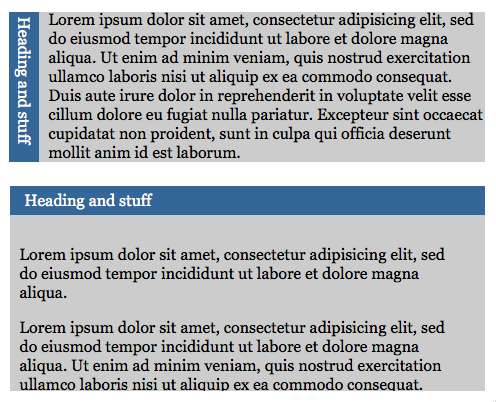
In essence, what we want is this:

rotating headlines

The above version should be for browsers that support CSS rotation and the one below should be the fallback version. Now, with my efforts, and the ever amazing Chris Coyier we got quite far down the line (on JSFiddle):

However, not quite yet. As you can see with the fallback (the first example) still covers the text and is not the full width. Chris of course proposes using Modernizr to check for CSS support, but that is something we don’t want. And, let’s face it, shouldn’t have to use.

I think this is a fundamental flaw of CSS - it offers us a lot of design opportunities but there is no “if this is possible, do this” (other than mediaqueries). You almost always need JS to test before you can apply a CSS effect – or disappoint people who do not use your cool new browser.

In the past, this was easier. We had CSS hacks and filters that targeted certain browsers. All of them were hacks exploiting issues in the rendering engine of the browser (sometimes in bizarre ways (remember the Box Model Hack’s use of voice CSS?).

Isn’t it time that with the power CSS gives us we also get a checking statement to apply transforms only if they can be used? And even then, there is no real graceful degradation.

So, who can make this work without Modernizr?