Christian Heilmann

You are currently browsing the archives for the General category.

Archive for the ‘General’ Category

The myth of the “portable presentation” in slide form

Thursday, August 9th, 2012

During our Evangelism Reps training in Brazil I got asked a few times what the best format for presentations is. Of course this was related to creating your slides in HTML5 vs. closed formats.

HTML5 slide systems are all the rage. Everybody and their dog creates one. I’ve blogged about them in the past and the limitations they have and a lot of the requests I had went into some of them. Probably the most feature complete is DZSlides. However, when you think about it – a lot of them are based on the false assumption that speakers preparing their slides want to write them rather than design or create them. In other words, slide systems are fun, but if they don’t come with a visual editor, they are also a geek toy to keep us busy doing another clever thing with web standards rather than solving a problem people have. You should concentrate on making the slides aid your talk, and not on coding them and spending a lot of time resizing images, uploading lots of files and positioning elements in CSS.

Slides are only a nice to have

Slides are there to help the flow of your presentation as a speaker. They are a backdrop. Not more, not less. If your slides have all the content and you are reading from them you are redundant as a speaker. If you rely on transitions and shiny animations in your slides you are a showman, not a presenter. The best presenters out there don’t need slides – they only use them to add flair to an already engaging presentation. That said, slides can help a lot in environments where your message may not easily come across – for example when the audience speaks another language and your native speed and idioms might be too much for them.

Distributing slides without any context doesn’t make any sense – it actually can cause more confusion than help. You have to ask yourself what you want to achieve with your talk.

Presentations for presenting

If all you want to do is give a keynote, the format of your slides is irrelevant. You need to make sure that the slides will work in the resolution and quality of the projector at the venue you speak at. Maybe make sure you have a copy on a stick in case your computer craps out on you or doesn’t connect to the projector. Test that your slides work (especially embedded videos in Powerpoint have an annoying way of not showing up on projectors) and be ready to not have the slides available if anything goes wrong. You should have a talk ready, remember the slides are a backdrop.

Presentations for distribution

So what if you want to distribute your slides after your talk? Well, here are the things that make sense to distribute as they give out the information of your presentation and keep them in context:

  • Video recordings of the talk and slides are by far the best way of distributing a talk. It shows people who you are, how you present and the content. It also allows people to skip parts they don’t care about. Add a transcript or at least timestamp jumps and a list of web resources to it for extra brownie points
  • Screencasts of your talks work OK, too. Having your slides and audio in sync shows what you said about them and has similar merits to the video. It lacks your body language and what makes you a speaker, but it also has the skip-ability of a video recording.
  • Your slides and notes about what each of them mean is the last sensible way to distribute a talk. The notes give a bit of context, but lack of course all the things that made it a good talk: intonation, jokes, reaction of the audience, stories to give a real-life context and many more.

Everything else is pointless distribution. Yes, people will ask for your slide deck and you will get a lot of clicks on Slideshare or Speakerdeck, but you expect a lot from people to check your slides a week after the event and still know what you were on about. Also, if you see the amount of clicks on your slides as a means of success compare them to the amount of clicks “cutest puppies and kittens” slide decks on Slideshare get – I am sure you will lose.

Presentations for re-use

Any corporation sooner or later starts hoarding presentations and will come up to you to “give a talk on product X” and “re-use the slides of the great talk that Y gave last month”. This normally is also an excuse to have you give that talk tomorrow or on the same day as all is already prepared, right? Wrong.

The talk that Y gave was great as he or she gave it – in his or her way of presenting. If all you get is the slides you have no chance of repeating that.

Slides are reusable in part: you can take a great screenshot or illustration or code example and re-use them, mixing them with new content. The “portable presentation”,however, the one that anyone can give and be awesome is a myth and a dangerous one at that. It is like giving someone a pair of trainers people at the olympics wear and then expecting them to be as fast. Not likely.

If you don’t own the presentation and you have no history in creating it you will do a bad job. Successful, yes, but not great. You are not a voice or stage actor that interprets other people’s writings – you are a presenter and you should have your own style.

In order to make presentations re-usable you need the slides and notes on what should be covered when presenting them. It also helps to have some information as to how to spice the presentation up with comparisons, stories around the products and events and to coach the speaker about products that are similar and will come as a question from the audience. You know the “this is great, but company Y has product X. How do they compare?”

In other words: handover materials. Slides and notes are the bare minimum, better to also have a recording to compare with and some face time with the original presenter to talk the next speaker through the slides.

My personal “content first” approach

Covering all the use cases can be tough, but I am lucky to have this as my job. So my approach to writing presentations doesn’t start with keynote or any slide system. It starts with the handover materials. Here is what I do:

  • I write my presentation as an article – headings and 1-2 paragraphs explaining what I want to bring across.
  • I make sure to add a lot of links to the article pointing to resources that back up what I am saying and that people can read at their own leisure.
  • I use the headings as slides and the paragraphs in a shorter form as notes to remind myself what I want to cover
  • I take screenshots and screencasts of the resources to distribute and re-use (as you can never expect to be online on stage)
  • I put together the slides, add imagery and that’s it

Of course this is overkill for a keynote, but for technical talks this works wonders. And it provides you with all the things you need: you can give the talk, release the article as a blog post with the slides and/or the video or audio recordings and you have a neat little package to hand over to the person who wants to give a similar talk.

There is much more to be said about re-use of presentations and using them as training material, but for now I hope that the “here are the slides you don’t know, go!” approach will be a thing of the past soon enough. We should not prepare slides, we should prepare presentations. One is much more than the other.
#canyouscroll – or: How to keep the internets busy

Wednesday, August 8th, 2012

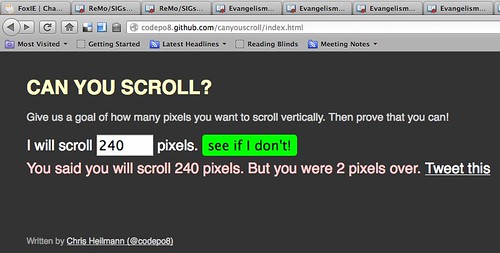
Reviewing my upcoming article on events for Smashing Magazine for the umpteenth time I came across a short code example I ended up not using but being fun all the same. Can you scroll? is a very simple small game that asks you to predict the amount of pixels you will scroll and then tells you by how many you are off. You can then share your success or failure on Twitter.

Can you scroll?

Much like Time yourself released earlier, this game works with some very simple event handlers and a few lines of code. The source of can you scroll and source of time yourself are on GitHub for you to play with.

The functionality is simple – when you submit the form I hide it and when you click the document I read the scrollTop of the current document and compare it with the value you entered. The only snag I ran into was that Chrome/Safari and Firefox/Opera read different properties, so you need to check for both with end = document.body.scrollTop || document.documentElement.scrollTop.

My favourite about these things is though how people start gaming the game and find solutions to get good results:

Stefan Asemota uses the keyboard:

Cheatsheet: Chrome, keyboard arrow-down once = 40px | Firefox: keyboard arrow-down once = 48px #canyouscroll :)

I use JavaScript:

#canyouscroll for cheaters: window.scrollTo(0,document.querySelector(‘#amount’).value);document.body.click();

Michaël Duerinckx counts mouse notches:

@codepo8 Or count the notches on your scroll wheel and try again with the correct number ;) Neat little game!

Mehdi Kabab matched notches to pixels:

.@codepo8 or use that scrolls by steps of 16px :D — http://bit.ly/NCUJFa

I am sure more people will find clever ways to cheat. I love that about web games.

The myth of the “modern browser”

Friday, August 3rd, 2012

When I wrote my JavaScript book in 2005 one of the things my editor called out was that using the term “modern browsers” needs definition. I think it is time to go further and call it a myth.

An article of mine coming out soon just came back from the editor. One thing I mention in the article is that a very simple JavaScript test around your code can make sure that you don’t give any of your JavaScript to Internet Explorer older than version 9:

if (document.addEventListener) {
   document.addEventListener('DOMContentLoaded', function(ev) {
   	// your code
   }, false);  
}

My exact wording was:

Come to think of it, one simple addEventListener() on DOMContentLoaded is a great way of making sure your script is not executed in browsers that would choke on what you are trying to achieve. Maybe it is time not to pester IE6, 7 and 8 with a lot of code – they deserve to have a quiet time considering their age.

As you may guess, the rest of the article is a deep-dive into events in the browser. Now, I was asked by the editor to remove this part. Instead I was asked to add a disclaimer:

At the top, these sentences should be removed. They do not add anything to the article, and are a little hard to read. [...] Instead, it might be better to just put a short disclaimer saying “The examples in this article will only work on modern browsers like …”

My beef with this is “modern browsers” which can become immensely outdated very quickly – especially in a world of “evergreen” browsers or others being released every few weeks. The “modern browsers” of today could be an embarassment of a very near future.

The web is full of outdated tutorials and bad advice and the largest part of those happened because a snapshot of browser functionality at that time was considered state of the art and “modern browser” stuff. Instead of using the feature as the test for the code writers explained that you need a certain browser version. This is limiting and confusing.

I think it is time we stopped thinking in browser versions and instead check for availability of features. The browser market moves at a breakneck speed. In a discussion with friends the other day at Google we all agreed that in a not far away future all browsers should update in a silent fashion. End users should always have the newest browser without having to work on it and thus get new features when they are ready and hotfixes and security fixes in the fastest way possible. End users do not care about feature support, they just benefit once it is available and wrapped in a sensible UX.

For us developers it means we can free ourselves from the endless discussion of “what version of browser x are we saying we’ll support”. Sure, not all browsers will upgrade in a silent fashion. Our job, however, is to build solutions that are independent of browser and future facing rather than stick with a concept of quality assurance that is simply outdated and holds us back. If a feature is not available, let’s not use it. Try to surf with IE6 for a day and see how much fun it is. Then think how OK it would be to surf these sites without getting a lot of JavaScript that fails or gets loaded without executing. What is the better experience?

A “modern browser” is a moving target, you can not define it and you can not tell people to get one as they have no idea what that is. Let’s stop using the term and stop writing tutorials that are doomed to be old-fashioned by the time they get released.

Reaching the audience vs. puerile purity

Saturday, July 28th, 2012

With the release of the videos of Rey Bango and me talking about web standards I once again found a pavlovian reaction of developers and people of the internet to publishing. Here is what happened:

  • Microsoft funded a series of videos talking about sensible use of web standards and embracing cross-browser development
  • Microsoft took on the production, editing, hosting, conversion and publishing of these videos
  • Never once in these videos is a Microsoft product promoted as better than others or the right choice

Microsoft releases these videos on their channel 9 platform which shows videos as an HTML5 embed and Silverlight. Silverlight proved to be an interesting video platform, which has features that HTML5 can not support at the moment, and of course is endorsed by Microsoft as their own product.

So, predictably – and something that saddens me – people who had Silverlight installed got a Silverlight version of the movies and went “neener neener, how IRONIC that you do HTML5 videos and release them as Silverlight”. I myself don’t have it, so both the Microsoft page and the embed are just an HTML5 video for me. I also very much enjoyed seeing the download links next to the video embed – I used them as I am on a bad hotel connection and streaming is not fun here.

People who had an outdated Silverlight plugin saw an upgrade message instead of the video and immediately complained about the video being broken – although the message said clearly that they can switch to an HTML5 player instead. This messsage had nothing to do with the video – instead it complains about outdated software. It makes sense to me to not allowed outdated plugins to run.

So here are the things that annoy me about this:

  • People complaining about the purity of HTML5 being attacked are the ones who installed a plugin in the first place and failed to keep it up to date. You never needed Silverlight to watch these videos.
  • Instead of using the very obvious fallbacks, or even reading the information the not-running plugin gives you it is more important to point out a non-existent irony

Now I am – being the HTML5 advocate and open web tree hugger that I am – going to shock you even more: I really don’t care if the videos are published in Silverlight or not – as long as I get a version I can use without a plugin, too.

One of the comments of the site admins made the point very clear:

@spoonfood: Site dev here… thought I’d reply to explain a few things. So, first off… Rey/Chris have nothing to do with how we choose to implement our video player, but having said that I don’t think we are doing anything wrong here. We have access to an adaptive streaming version of these videos, which is a technology that is not yet standardized across HTML 5 implementations, so by giving Silverlight to those that have it installed we don’t force anyone to install anything, but if they already have it they get a better experience in the Silverlight plug-in. If the experience was equal we would likely start with HTML 5 and fallback on non HTML 5 browsers.

I have encountered the same in the past: when embedding videos in my blog as HTML5 videos using vid.ly for conversion I felt like doing exactly the right thing. And I did. I saw it as someone living in the Western world with good connections though who might have trouble streaming but is very much OK to download a movie.

I got quite a lot of feedback from countries with flaky and slow connections who’d much more prefer that I post my videos on YouTube as they also have adaptive streaming that allows people to watch things in internet cafes in lesser quality but at least available to them.

So the learning here for me and all of us should be: getting the message out is the most important part.

I knew for a fact that on Channel 9 a lot of the audience will be Microsoft developers who have Silverlight and will use that. I am fine with that – these are the people I wanted to reach and why I agreed to this cooperation.

Getting our content out to people is the most important part in this. In the past, companies like Microsoft would have released this as a DVD or as a download in proprietary formats instead of making it available for free to the world. Instead of celebrating this change and enjoying that the content and the good messages about the open web get out to an audience struggling with embracing them we go for the childish and quick success of pointing out that someone is seemingly wrong on the internet.

This is exactly the same behaviour that keeps accessibility a subject that experts care about or people pay lip service to rather than understanding it. Years in that community made me give up on it to a large degree as incredibly good presentations and talks with information for developers never got released outside of the conference. The reasons were that transcribing and captioning the videos or even converting the slides to “accessible” formats was too much work or too expensive for the speakers and organisers.

Instead of getting important information out to a targetted audience of developers who are not differently abled great content remained mothballed to avoid a backlash of a puristic audience poised on calling out the lack of extra effort needed to bring the information to those who already knew it.

Information not getting out is a sad thing. You want to be heard, so think of who you consider the most important group to hear your message and make it available to them in the most convenient format. Don’t fall for the fake success of creating content in the most pure format but failing to reach those who need to hear what you have to say.

Videos of “modern web development” series with Microsoft now live

Friday, July 27th, 2012

About a month ago you might remember that I released the slides and code examples for a video training I recorded with Rey Bango of Microsoft.

It took a bit longer than we wanted to (the pink flamingo rendering algorhithm for the intro sequence is probably to blame) but now these videos are available on Microsoft’s Channel9 as the FoxIE training series.

Rey and me are covering quite a lot of topics in a very “free discussion” format:

If you want to present my talks yourself, the slides in various formats and the code examples with lots of explanations on how to present them are on GitHub.

All the videos are available in HTML5 format and to download as MP4 and WMV for offline viewing.