I am a trainer and I love to give trainings to “crowd-source” my knowledge. I take training seriously, having suffered far too many boring and bad trainings myself and swearing myself back then I will do better if I ever get the chance.
Training is treated as a nice to have
There is, however, a certain laxness in IT when it comes to trainings, and it makes me sad. Trainings are not to have a jolly off work, they are also not a nice to have. They should be the most efficient way to learn new things and get ahead in your career and should be treated as such. Instead of having bright and bushy-tailed training attendees many a time you find yourself in front of a tired group after an event half of whom didn’t show up, others are delayed, not prepared or people interrupt halfway through trying to “just join in”. This is a waste of time and bizarre considering how much training costs.
Training is expensive and precious – treat it as such
Sending engineers or managers to a training is a high cost. Not that I charge a lot (I should, most other trainers do!) but you are going to be out of the normal work flow for quite some time. For myself preparing a training means 8 hours of research, preparation and planing for every hour I am in the room. This is a large chunk of my life – professionally and personally – and it should be worth my while. I judge the success of my trainings by how much people learned and what they did afterwards, how they used the knowledge gained. If I don’t get the chance to learn any of that I wasted my and probably your time. Success of trainings should not be accidentally, it should be measurable and obvious. This is why from now on I will not take on any trainings any longer unless the following points are met.
My training manifesto
We don’t start as strangers – the overall number and each attendee of the training should be known to me. This involves a quick email by attendees telling me about the training:
Who they are
What they expect from the training
Relevant knowledge they have with examples (“here are talks I gave, I want to be better”)
Special treatment that is needed (Proficiency in English, Disabilities, Materials)
We are on time – or we don’t take part – my trainings are planned minute by minute to make the best out of the short time we have. If you are late, you delay everybody and disrupt an ongoing part of the training which will impact the rest and leave you without prior knowledge needed for the advanced lessons later on
The door is closed – there will be breaks for human issues and there will be drinks and snacks (healthy ones, nuts and fruit, no point getting you sugared up and sleepy). So no leaving halfway through and no interruptions from the outside. This is our time and we use it as such.
Laptops are closed, phones are on silent and in the pockets – for the most part you won’t need your computer in my trainings and it is just rude to be distracted by your emails, tweets or kittens. You are in a training, you are not available. Nothing your boss or colleagues need is more important, your attendance is very expensive, and should mean you are incommunicado to those not in it
The group is responsible for the documentation
I will only give out very few materials about the training (mostly links to learn more from)
You are much more likely to really learn when you document yourself in the way you understand the most
There will be no binder at the end to collect dust on a shelf, keep your own notes
There will be times allocated to documenting in the training
There will be a test and homework – I want to know what you learned and if you need to know more. The only way of doing that is to make you use the things we talk about
If these things can’t be met by the training I am not giving it. I don’t want to be a person collecting money or spending people’s time without making sure they get a lot of out it.
Compliance with this means you need to put more dedication into the training than you probably are used to. It also means though you will get much more out of it. I promise that.
Posted in General | Comments Off on The Chris Heilmann training manifesto
I am currently at MozCamp Asia in Singapore and just gave a quick presentation on blogging comparing a good technical blog post to rock songs. When you think about it, they have a lot in common:
No intro – just straight to the point
Memorable hooks and riffs
One message per post
Simple language
An easily repeatable main message (something to scream along to no matter how drunk)
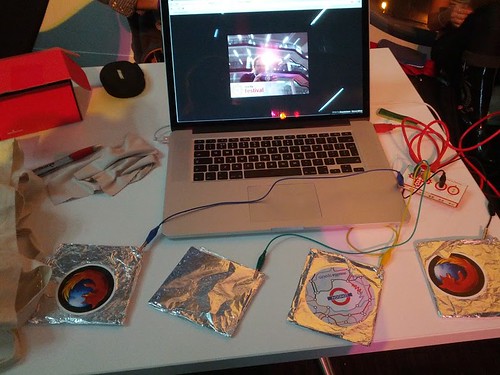
If you’ve been at Mozfest in London, you might have seen me stand next to a weird contraption of cables, tinfoil-covered squares and my computer. Here is what it looked like in action:
This was the so-called Interaction cam and here are the photos people took with it. This is how it works:
You put your hand on the pad on the left – this should stay there the whole time
You shoot a photo of yourself touching the pad on the right
If you like it, you touch the second pad from the right
Or you can discard it by touching the second pad to the left
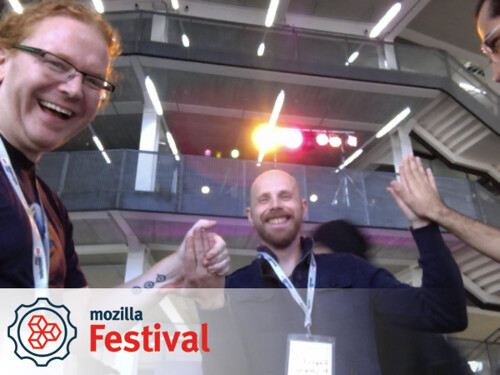
You can also use the camera with more than one person. If one of you puts his hand on the left pad and the other on the right shaking hands, high-fiving or hugging would trigger the camera:
The camera stores the photos on the hard drive if you are offline or you can upload them to imgur.com immediately.
You can have the Interaction Cam for your event. All you need is a computer with a camera and one of the new browsers (Chrome, Firefox Nightly – Opera coming soon). Out-of-the box you can use the Space bar to take a photo, and the arrow right and left keys to upload or take another photo.
In order to make the pads work (and you can use anything that is an electrical conductor – fruit, water, vegetabless…) you need a MaKey MaKey and connect the appropriate parts of the MaKey MaKey (left, right, space and grounding) to the pads.
Your own cam – step by step
Here’s the step by step to have the camera for your event:
Have a laptop with a camera and Chrome or Firefox Nightly
Make sure to enable WebRTC in Firefox by typing “about:config”, saying yes that you want to make changes, finding the “media.navigator.enabled” entry and setting it to true
Make sure you have a PHP enabled local server if you want to keep the photos offline and not rely on uploading to the web (MAMP for Mac or XAMPP for Window – Linux folk know what to do)
Replace the mozfest.png file with your own event logo – this should be 600×104 pixels and use some transparency for more awesome (for other sizes you can alter the settings in interactioncam.js around “/* Branding */”
Go to your browser and open your install of the camera app – in my case http://localhost:8888/interaction-cam/
Grant the browser access to the camera – you should see it playing.
Press space to take a photo and store it by hitting the right arrow
On your hard drive, you should now have a file in the “copies” folder that is your photo
When all that works, add the MaKey MaKey:
Connect the MaKey MaKey via USB
Go through the recognition process of MaKey MaKey (like any other USB keyboard)
Lay out your pads/connectors and connect the cables to the appropriate parts of the MaKey MaKey (make sure they don’t touch)
Go back to your browser
Reload the Interaction Cam
Profit
That should do it – just upload the photos in your copies folder at your leisure later on and when you are connected to the web with a non-flaky connection.
Things that can go bump
Electricity, cables, computers and software are not natural and therefore hate humans. So things can go wrong. Here are a few things I found:
If the camera doesn’t start running make sure you have the latest Chrome or Firefox Nightly and have WebRTC turned on
If it still does nothing, you might need to reboot the computer (I had to a lot with the MacBook Pro)
If your computer has the power cable connected to it (which is a good idea as WebRTC is hungry to the battery) it can happen that just touching the “take photo” pad already triggers that. Just hide the leftmost pad then as it is not needed any longer. If someone doesn’t trigger the shooting, tell them to touch the left one, too.
Happy shooting! I am off to MozCamp Asia where I will put up the cam. And my friend Marc Thiele is planning on setting it up at Beyond Tellerrand, too.
Posted in General | Comments Off on A $40 photobooth for your event – powered by WebRTC and MaKey MaKey
Today I went to the Spotify office in Stockholm to test-run a training I’ll give at the MozCamp in Singapore next month. The topic was turning geeks into presenters, how to foster a culture of speaking and presenting in a company and tricks how to become a better speaker.
This is a quick introductory talk on how to foster a culture of presenting and speaking and a few tips on how to become a better speaker yourself.
Why present?
The first question to ask yourself is why you’d want to start presenting. There has to be a reason for it.
Geek barriers
It is not easy for geeks to start becoming a presenter. In a lot of cases our nature doesn’t lend itself to being an outgoing person that other people understand. There is a reason why we chose IT as a profession and not something where we primarily deal with people.Furthermore years of bad experiences with company presentations and boring lectures have us conditioned to dislike them. The other issue is that speaking and presenting is considered a task people do who do not code any longer. You know, those managers and the suits and the like. It seems we are more excited about people who write amazing code that never gets released than people sharing what they want to do and get input before we create it. And complaining that people don’t care about our issues without reaching out to tell them about it doesn’t sound too logical either.
Presenting is translating, not selling
The best presenters I know don’t sell with their presentations.They explain, share their excitement and point people in the right direction to find things out for themselves.
People listen if you talk to them!
Giving a presentation internally is a great way to get people up to speed with what is happening. We can have all the documentation and emails in the world – if we don’t know that people read them we can not assume people know what we are on about. Scheduling an internal presentation means people hear at least once about it. External presentations are of course even better, not only make they learn people about what you and your company does, they also give you internal leverage. You are known on the outside for knowing your stuff and the company can benefit from you being associated with it.
Starting a speaking culture
Many companies already do have a culture of presenting but in many this privilege is given to only a few people. Those are coached to be perfect pitch presenters and drive an even larger gap between the people who do things in the company and those who talk about it. Of course we need good professional presenters (and every manager should have some training) but the real success comes by sharing the fame and the responsibilities with everyone in the company.
A few tools
Just in terms to break down barriers and to get people out of the woodwork and start speaking there are a few things companies can do that proved effective in the past.
Powerpoint Karaoke
Powerpoint Karaoke is a great way to get the fear out of presenting. Here is how it works:
Download random powerpoints of the interweb
Pick a random person
The person should present the deck for 5 minutes
Seemingly just a silly thing, powerpoint karaoke can have a lot of positive effects.
It teaches you to not be a slave to your deck
It breaks down the initial barrier – everybody can look the fool for five minutes
You get to know what to avoid in your own slides
You start to learn speaking, not just re-iterating (you are not in your subject matter)
Lightning talks
Lightning talks are a great opportunity to discuss issues and solutions and get people to do their first talks.
15 minutes each week
5 minutes: a problem we encountered
5 minutes: a solution we found and applied
5 minutes: discussion if this is a good solution and should become a best practice
I’ve found lightning talks in the past a very good solution for people to get their first speaking experience. They are not scary and they give you a chance to say what you want to say. The reasons are:
The speaker knows his stuff
The speaker talks about a positive experience – fixing something
A Fixed time and duration means predictability which is less scary
Everybody gets to have a go
Content repos beat a slide repository
Instead of archiving slide decks and sending them around the company to present over and over again create a content repository much like a pattern library. This allows people to get information they need and assemble their talks from it rather than repeating someone else’s talk flow and fail at that.
Preliminaries – what to do yourself
There are a few things you can do before you start even thinking about speaking. These may sound weird, but they will save you a lot of time in the future and make you a much more focused and better presenter.
Forget about the slide deck
The first thing to consider is forgetting about your slide deck. Your slides are the backdrop to your talk, if you read them out you are redundant. Furthermore everything you can think of can go wrong about your presentation – be safe, don’t rely on them.
Find excitement
In order to really give good presentations, you need to be excited about what you present. If that naturally happens, good. Move on. If not, find an angle that makes the subject matter exciting for you and then tell a story around that angle.
Share pain and excitement
One big obstacle for a lot of new speakers is to move from human to expert that needs to inspire. This step is much less hard to take when you stay human and think of human ways to interact with the audience. Share that you are excited and/or afraid of being on stage and talking about this. Be human, be honest. Good stories on how you reached conclusions, how you bettered your ways and how a failure got turned into a success are a great way to give an inspiring talk. Use them.
Learn to endure and adore yourself
One big step to becoming a good speaker is to get used to yourself, to the sound of your voice and the person you appear to be. How other people see us is very different to how we see ourselves and this very much starts with the voice. Our heads vibrate when we speak which means we hear ourselves muchdeeper than we really sound.
Speak loud, clear and proud
Being understandable on stage is incredibly important. A lot of this is about breathing technique and timing yourself the right way. This takes practice and gets better the more you do it. A great little but also very goofy trick is to put a cork in your mouth and speak at the same time. Try to become as understandable as possible – that way you learn how to breathe correctly.
Record and playback
Watching videos of yourself is awkward but a very important partto becoming a speaker. This is how you come across, and this is the person you are – get used to it. You are your worst critic and that is good. Also have good friends watch you and tell you what can be improved.
Projection
Body language is a massive part of presenting or communication over all. There are many studies on the subject with at times scary findings. People do judge you by how you project, not by who you are. This takes time and effort and not many people are happy to go that far. Therefore you need to be aware of what body language works and what doesn’t. What you give the audience is how they react. You need to lead not only with your words but also with your body.
Practice your stage voice and manners
If you have kids – lucky you. If you don’t, get access to some. Then take a good children’s book and read to them. Loud and with lots of gestures and different voices for the different characters. The kid will love it and you break out of your shell and get more confident in projecting and speaking clear and loud.
An incredibly simple solution
Amy Cuddy’s “Your body language shapes who you are” is not only an amazing talk, but gives you a very simple solution to your projection issues. It turns out that you can make yourself more confident and outgoing by just using the same body language as confident and powerful people do. Sounds too simple, but our body chemistry shows proof.Amy Cuddy: Your body language shapes who you are
Learn from others
The first step to being a good speaker is to get inspired and learn by watching other people do it. A lot of conference videos are available on the web, so check them out there. TED is a great resource for seeing amazing talks – but be aware that this is the master class, don’t feel bad about these talks. A lot of rehearsal and work went into them and they only look very easy to deliver.
Go to (un)conferences and share afterwards
Going to conferences is a very good step, even better are unconferences as it means you have to speak, too. Whenever the company allows people to go to conferences it should be on the condition to give a talk (or at least send an email report) about the event afterwards. That way there is no jealousy amongst people and you can set up an archive of what conferences are worth while and which aren’t.
Do not copy!
The danger there though is to copy verbatim what other people are doing. This will not make you or the audience happy as it is a lie to yourself and them. You can find things that you like and start using them but it needs to be natural – don’t force it.
Would you like to know more?
There are a few online resources you can check out.
I right now feel the itch to write a book again. I see a lot of people buying books and making a living selling them and I feel that there is a space for what I have in mind. I also don’t see how I could cover all the things I want to cover right now in talks or blog posts. It is presumptuous to think you’d follow a series of them so using a book form with code and possibly a series of screencasts seems to be the right format.
I have a few outstanding offers by publishers but having my first publisher just hand over a second edition of my first book to someone else without waiting for my yay or nay makes it less interesting to me to go through the traditional publishing route. Whilst I am pondering other distribution offers (and if you have some, talk to me) here is what I am planning to write about:
The web needs a diet
Web development as we know it has gone leaps and bounds lately. With HTML5 we have a massive opportunity based on a predictable rendering algorithm across browsers. CSS has evolved from removing the underline of links and re-adding it on hover to a language to define layout, animation and transformations. The JavaScript parts of HTML5 give us a much simpler way to access the DOM and manipulate content than traditional DHTML and DOMScripting allows us to.
Regardless of that, we still clog the web with lots and lots of unnecessary code. The average web site is well beyond a megabyte of data with lots of HTTP requests as our desktop machines and connections allow us to add more and more – in case we need it later.
On mobile the whole thing looks different though and connectivity is more flaky and each byte counts. In any case we should be thinking about slimming down our output as we put more and more code that is not needed out, adding to a landfill or quickly dating solutions that will not get updated and fixed for future environments and browsers. We litter the web right now, and the reasons are:
A wrong sense of duty to support outdated technology (yes, OLDIE) without really testing if our support really helps users of it
A wrong sense of thinking that everything needs to be extensible and architected on a enterprise level instead of embracing the fleeting nature of web products and using a YAGNI approach.
An unwarranted excitement about technology that looks shiny but is not to be trusted to be around for long
Shed those kilobytes with the fat-free vanilla approach
In the book I’d like to outline a pragmatic and backwards compatible way of thinking and developing for the web:
We start with standards-compliant code that works without relying on hacks and temporary solutions
We improve when and if the environment our code is consumed in supports what we want to do
Instead of shoe-horning functionality into outdated environments, we don’t leave promises of functionality when it can not be applied
We write the right amount of code to be understandable and maintainable instead of abstracting code to write the least amount without knowing what the final outcome is
The book will be opinionated and challenge a few ideas that we started to love because of their perceived usefulness for developers. In the end though I want to make people aware of our duty to produce the best products for our end users and to write code for the person who will take over from us when we want to move on to other things.
The book will teach you a few things:
How to build with instead of just for the web
How to use what browsers can do to build without writing much code
How to avoid writing code that will fail in the near future
How to not make yourself dependent on code you don’t control
How to learn to let go of “best practices” that made a lot of sense in the past but are not applicable any longer
How to have fun with what we have as web developers these days without repeating mistakes of the past
How to embrace the nature of the web – where everybody is invited, regardless of ability, location or technology