Christian Heilmann

Author Archive

The myth of the “modern browser”

Friday, August 3rd, 2012

When I wrote my JavaScript book in 2005 one of the things my editor called out was that using the term “modern browsers” needs definition. I think it is time to go further and call it a myth.

An article of mine coming out soon just came back from the editor. One thing I mention in the article is that a very simple JavaScript test around your code can make sure that you don’t give any of your JavaScript to Internet Explorer older than version 9:

if (document.addEventListener) {
   document.addEventListener('DOMContentLoaded', function(ev) {
   	// your code
   }, false);  
}

My exact wording was:

Come to think of it, one simple addEventListener() on DOMContentLoaded is a great way of making sure your script is not executed in browsers that would choke on what you are trying to achieve. Maybe it is time not to pester IE6, 7 and 8 with a lot of code – they deserve to have a quiet time considering their age.

As you may guess, the rest of the article is a deep-dive into events in the browser. Now, I was asked by the editor to remove this part. Instead I was asked to add a disclaimer:

At the top, these sentences should be removed. They do not add anything to the article, and are a little hard to read. [...] Instead, it might be better to just put a short disclaimer saying “The examples in this article will only work on modern browsers like …”

My beef with this is “modern browsers” which can become immensely outdated very quickly – especially in a world of “evergreen” browsers or others being released every few weeks. The “modern browsers” of today could be an embarassment of a very near future.

The web is full of outdated tutorials and bad advice and the largest part of those happened because a snapshot of browser functionality at that time was considered state of the art and “modern browser” stuff. Instead of using the feature as the test for the code writers explained that you need a certain browser version. This is limiting and confusing.

I think it is time we stopped thinking in browser versions and instead check for availability of features. The browser market moves at a breakneck speed. In a discussion with friends the other day at Google we all agreed that in a not far away future all browsers should update in a silent fashion. End users should always have the newest browser without having to work on it and thus get new features when they are ready and hotfixes and security fixes in the fastest way possible. End users do not care about feature support, they just benefit once it is available and wrapped in a sensible UX.

For us developers it means we can free ourselves from the endless discussion of “what version of browser x are we saying we’ll support”. Sure, not all browsers will upgrade in a silent fashion. Our job, however, is to build solutions that are independent of browser and future facing rather than stick with a concept of quality assurance that is simply outdated and holds us back. If a feature is not available, let’s not use it. Try to surf with IE6 for a day and see how much fun it is. Then think how OK it would be to surf these sites without getting a lot of JavaScript that fails or gets loaded without executing. What is the better experience?

A “modern browser” is a moving target, you can not define it and you can not tell people to get one as they have no idea what that is. Let’s stop using the term and stop writing tutorials that are doomed to be old-fashioned by the time they get released.

Alcance by CPQD – an accessible and simple interface for smartphones

Tuesday, July 31st, 2012

Accessibility and mobile devices is still and issue that needs solving. Sure, there were solutions for phones around for quite a while that would for example allow a blind person to listen to their phone (a friend I know uses a Nokia N95 for that) and the iPhone is considered by many a really good solution for people with disabilities but the price of the iPhone makes it less accessible for a lot of people.

At Campus Party Recife I gave a talk about Mozilla and the Open web device and got introduced by Felipe Cunha of Telefonicá Brazil to a product called Alcance by CPQD. Here is a quick interview with Felipe about it:

Here are the main points:

  • CPQD built this prototype after doing user testing and research with blind users, the elderly and people with learning disabilities and low literacy
  • The software runs on mid-range Android phones and uses private access to boot directly into the interface circumventing the main Android OS interface
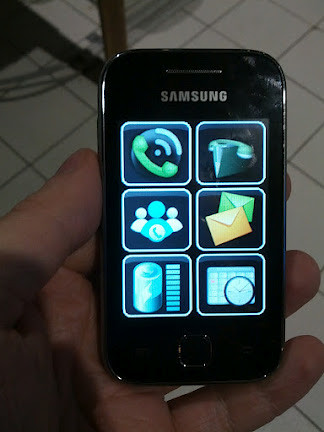
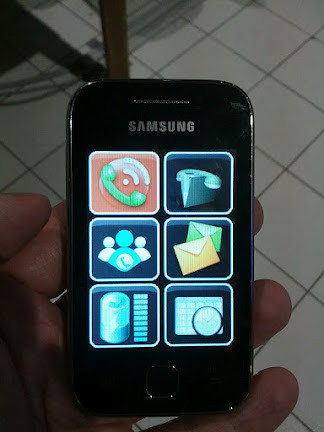
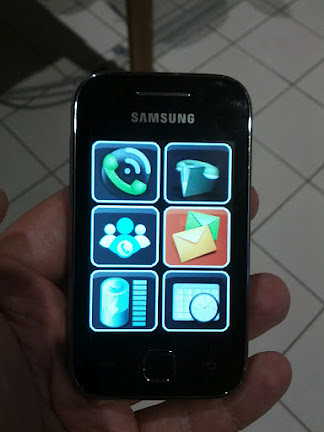
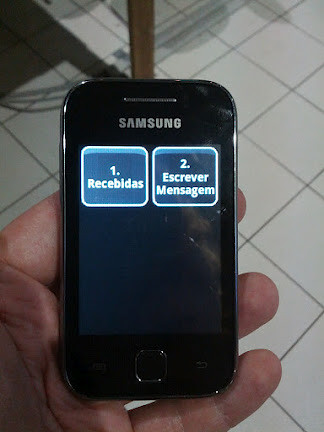
  • Users can swipe on the screen and a voice reads out what app they are currently touching. Double-clicking opens that app with more voice information. Subsequent screens then all are the same size icons (6 per screen)

Here are some screenshots of the device in action:


Alcance by CPQD - start screen
Alcance start screen – no app selected


Alcance by CPQD - selected app
Alcance selected app screen


Alcance by CPQD - another selected app
Alcance another selected app screen


Alcance by CPQD - secondary menu
Alcance secondary app screen

Of course this will not replace a full-on smart phone with all its possibilities but I like the idea and the simplicity of it a lot. Telefonicá is very interested in seeing where this can go and I am pretty sure this could be easily converted to Firefox OS and in HTML5.

What I like most about it is that it was built after doing research with the intended audience rather than yet another protoype that assumes a lot and lands in the “innovation” bin in the company a few weeks later.

It will be interesting to see what else happens with this product. Especially in a market like Brazil where low literacy is an issue this could be a good way to bring connectivity to those who can benefit from it.

Reaching the audience vs. puerile purity

Saturday, July 28th, 2012

With the release of the videos of Rey Bango and me talking about web standards I once again found a pavlovian reaction of developers and people of the internet to publishing. Here is what happened:

  • Microsoft funded a series of videos talking about sensible use of web standards and embracing cross-browser development
  • Microsoft took on the production, editing, hosting, conversion and publishing of these videos
  • Never once in these videos is a Microsoft product promoted as better than others or the right choice

Microsoft releases these videos on their channel 9 platform which shows videos as an HTML5 embed and Silverlight. Silverlight proved to be an interesting video platform, which has features that HTML5 can not support at the moment, and of course is endorsed by Microsoft as their own product.

So, predictably – and something that saddens me – people who had Silverlight installed got a Silverlight version of the movies and went “neener neener, how IRONIC that you do HTML5 videos and release them as Silverlight”. I myself don’t have it, so both the Microsoft page and the embed are just an HTML5 video for me. I also very much enjoyed seeing the download links next to the video embed – I used them as I am on a bad hotel connection and streaming is not fun here.

People who had an outdated Silverlight plugin saw an upgrade message instead of the video and immediately complained about the video being broken – although the message said clearly that they can switch to an HTML5 player instead. This messsage had nothing to do with the video – instead it complains about outdated software. It makes sense to me to not allowed outdated plugins to run.

So here are the things that annoy me about this:

  • People complaining about the purity of HTML5 being attacked are the ones who installed a plugin in the first place and failed to keep it up to date. You never needed Silverlight to watch these videos.
  • Instead of using the very obvious fallbacks, or even reading the information the not-running plugin gives you it is more important to point out a non-existent irony

Now I am – being the HTML5 advocate and open web tree hugger that I am – going to shock you even more: I really don’t care if the videos are published in Silverlight or not – as long as I get a version I can use without a plugin, too.

One of the comments of the site admins made the point very clear:

@spoonfood: Site dev here… thought I’d reply to explain a few things. So, first off… Rey/Chris have nothing to do with how we choose to implement our video player, but having said that I don’t think we are doing anything wrong here. We have access to an adaptive streaming version of these videos, which is a technology that is not yet standardized across HTML 5 implementations, so by giving Silverlight to those that have it installed we don’t force anyone to install anything, but if they already have it they get a better experience in the Silverlight plug-in. If the experience was equal we would likely start with HTML 5 and fallback on non HTML 5 browsers.

I have encountered the same in the past: when embedding videos in my blog as HTML5 videos using vid.ly for conversion I felt like doing exactly the right thing. And I did. I saw it as someone living in the Western world with good connections though who might have trouble streaming but is very much OK to download a movie.

I got quite a lot of feedback from countries with flaky and slow connections who’d much more prefer that I post my videos on YouTube as they also have adaptive streaming that allows people to watch things in internet cafes in lesser quality but at least available to them.

So the learning here for me and all of us should be: getting the message out is the most important part.

I knew for a fact that on Channel 9 a lot of the audience will be Microsoft developers who have Silverlight and will use that. I am fine with that – these are the people I wanted to reach and why I agreed to this cooperation.

Getting our content out to people is the most important part in this. In the past, companies like Microsoft would have released this as a DVD or as a download in proprietary formats instead of making it available for free to the world. Instead of celebrating this change and enjoying that the content and the good messages about the open web get out to an audience struggling with embracing them we go for the childish and quick success of pointing out that someone is seemingly wrong on the internet.

This is exactly the same behaviour that keeps accessibility a subject that experts care about or people pay lip service to rather than understanding it. Years in that community made me give up on it to a large degree as incredibly good presentations and talks with information for developers never got released outside of the conference. The reasons were that transcribing and captioning the videos or even converting the slides to “accessible” formats was too much work or too expensive for the speakers and organisers.

Instead of getting important information out to a targetted audience of developers who are not differently abled great content remained mothballed to avoid a backlash of a puristic audience poised on calling out the lack of extra effort needed to bring the information to those who already knew it.

Information not getting out is a sad thing. You want to be heard, so think of who you consider the most important group to hear your message and make it available to them in the most convenient format. Don’t fall for the fake success of creating content in the most pure format but failing to reach those who need to hear what you have to say.

Videos of “modern web development” series with Microsoft now live

Friday, July 27th, 2012

About a month ago you might remember that I released the slides and code examples for a video training I recorded with Rey Bango of Microsoft.

It took a bit longer than we wanted to (the pink flamingo rendering algorhithm for the intro sequence is probably to blame) but now these videos are available on Microsoft’s Channel9 as the FoxIE training series.

Rey and me are covering quite a lot of topics in a very “free discussion” format:

If you want to present my talks yourself, the slides in various formats and the code examples with lots of explanations on how to present them are on GitHub.

All the videos are available in HTML5 format and to download as MP4 and WMV for offline viewing.

Developer evangelism tasks: pre-emptive writing

Saturday, July 21st, 2012

Looking around I am amazed how big the whole “developer evangelism” thing has become since we started it and I wrote the developer evangelism handbook (now updated with a new section on pre-emptive writing). I am also humbled by how many people cite it and mention it to me as a source of inspiration.

I find, however, that there is still a lot of confusion as to what developer evangelists do, and I also find lately that a lot of very obvious marketing and PR messages get sold as developer evangelism.

What we do as developer evangelists

Developer evangelism for me started out of the necessity to have an unbiased, sane voice for developers out there. We don’t sell products, we explain them and let developers make their own decisions about using them. Our main goal is word of mouth and people using the materials we provide. This means first and foremost one thing: being honest and real about what a product does and how it is useful for developers.

We also need to be the spokespeople for developers in our companies. We should know what people use out there and what they want, what excites them and how our products match those needs.

And this is where a skill comes in that can rub people with traditional marketing and PR tasks and skills the wrong way which I call pre-emptive writing.

What is pre-emptive writing?

What I mean by pre-emptive writing is that when you for example blog about a product you do not only praise its usefulness and show what it does for people but you also slip out of your role as a salesperson. Instead think of how you as a developer would read this were you a fan of a competing technology or other products.

Then you include and answer the arguments that you would write as comments to your own post playing that devil’s advocate. Instead of taking the traditional route of not mentioning flaws that might go undetected or obvious similarities to other products you mention them with the arguments that make them interesting for you. For example:

  • If your product has a flaw that needs ironing out you mention what can happen and how to recover or fix the issue. You also list the obvious feedback channels people can use should that problem happen to them. As developers we know that stuff breaks – it is ridiculous to claim otherwise and let people find out the hard way
  • If your product is very close to a competitor’s you explain that this is the case as the other product is a very useful thing and it wouldn’t make sense to reinvent the wheel if it runs smoothly. You point out the differences and benefits your product has – for example that it ties into a larger set of products or that it is available open source or performs better in a head-to-head comparison. People make these comparisons in any case – if you anticipate and do them in their stead they see that you are one of them and that you are not blinded by your own advertising. If the similarities are very obvious it would make you look like a very uninformed person or not very skilful liar not mentioning them

Why is this important?

Three words: de-trolling your feedback. Right now our jobs can be incredibly frustrating as the feedback we get (and marketing and PR also looks at) is largely polarised. You either have fans praising what you do over the moon or fans of your competitors pointing out that they already did the same and you are catching up.

Of course you also have comments full of vitriol by people who just hate what your company does and want to repeatedly tell you that, but that is a thing you can happily ignore.

By pointing out the obvious pros and cons of your product to people you prevent a lot of obvious hateful or overly excited comments. Yes, this will cut down on the number of comments you will get but it will also start a more interesting conversation.

Another effect of pre-emptive writing is that you don’t have to prepare a counter-statement – you already did that. In a traditional marketing world this is what you do. You don’t say what’s wrong but you prepare a statement for the press when things go wrong. In most cases you prepare this statement after things went wrong with a lot of stress, phone calls and “we need to deal with this now, people are re-tweeting and re-posting the bad messages all over the place”. This is stress we can avoid.

Getting pre-emptive writing out can be tricky as it is against a lot of basic beliefs of sales and marketing. But you are a developer evangelist – this is your job. Pre-emptive writing and constantly questioning your own products makes you one of your audience and keeps you their spokesman – a developer evangelist.

Comment on Facebook, Google+ or LinkedIn.