Learn Coding & Web Design at Treehouse

Posts Tagged ‘accessibility’

WebmaKey MaKey? – here is something to start from

Sunday, September 23rd, 2012

MaKey MaKey is amazingly cool. It is a very simple Arduino based board with a USB cable and Alligator Clips to simulate keys pressed by touching a cable and closing the circuit by holding the other cable. This would be boring though, so you can connect the second clip to anything that can transmit a current – fruit, play-doh, graphite pen drawings, you name it. Check out the video to see the idea behind it and some examples.

More than a toy

On first glance this is cool, but seems like a toy for children to do their first steps with computing. And yes, it is magic for that as the Night Zoo teacher experiment shows. But there is more to this.

A great accessibility opportunity

I’ve almost given up on trying to get the accessibility web world excited about affordable and open solutions, but using a MaKey MaKey you could create switch interfaces for people who can not handle a keyboard on a shoestring and have fun at the same time as it can be customised in any way you want to. The beachball interface for Flabbyphysics is a great example of that.

There is a whole section on the MaKey MaKey forums dedicated to accessibility called Hackcess. In general it is a good idea to check the forums for inspiration as people build a lot of wonderfully crazy things with it.

WebmaKey?

The thing I was missing a bit on the site was the web component, as a lot of the demos used Flash or native code of sorts. As I thought it a good idea to mix MaKey MaKey with Webmaking I put together a very simple blueprint to use MaKey MaKey input in an HTML page called Testy Testy.

All it is are event handlers for the right keys showing and hiding different sections in the page. There is also a demo for moving a Foxkeh around with the cursor keys.

Here’s what the README explains:

As MaKey MaKey simulates various keystrokes and click events you can interact with the computer. Testy Testy is a simple start for doing something with this.
The HTML contains sections linked to the keys simulated by MaKey MaKey. When you activate one, the appropriate section is shown, when you release the key (or the cable) it gets hidden.

<section id="right" class="reactors">
  <p>Right</p>		
</section>

So, if you want to for example connect your MaKey MaKey to a Banana and show a picture of a banana, all you need to do is alter the HTML:

<section id="right" class="reactors">
  <a href="http://www.flickr.com/photos/robin24/5129712590/" 
     title="Banana - Isolated by robin_24, on Flickr">
    <img 
      src="http://farm5.staticflickr.com/4059/5129712590_98642c5ebf_n.jpg"
      width="320" 
      height="213" 
      alt="Banana - Isolated">
  </a>		
</section>

Hopefully this will get some people started to mix HTML learning and MaKey MaKey hacking.

Mozilla Festival

At this year’s Mozilla Festival we’ll have a MaKey MaKey session. and I am actually working on a hug/kiss/high-five camera booth using MaKey MaKey and WebRTC. Let’s see how that works out :)

In any case I can only recommend to get a kit yourself as it is incredibly fun to play with!

The discussion happens on Google+ (maybe).
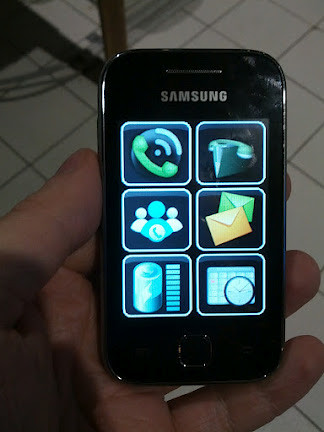
Alcance by CPQD – an accessible and simple interface for smartphones

Tuesday, July 31st, 2012

Accessibility and mobile devices is still and issue that needs solving. Sure, there were solutions for phones around for quite a while that would for example allow a blind person to listen to their phone (a friend I know uses a Nokia N95 for that) and the iPhone is considered by many a really good solution for people with disabilities but the price of the iPhone makes it less accessible for a lot of people.

At Campus Party Recife I gave a talk about Mozilla and the Open web device and got introduced by Felipe Cunha of Telefonicá Brazil to a product called Alcance by CPQD. Here is a quick interview with Felipe about it:

Here are the main points:

  • CPQD built this prototype after doing user testing and research with blind users, the elderly and people with learning disabilities and low literacy
  • The software runs on mid-range Android phones and uses private access to boot directly into the interface circumventing the main Android OS interface
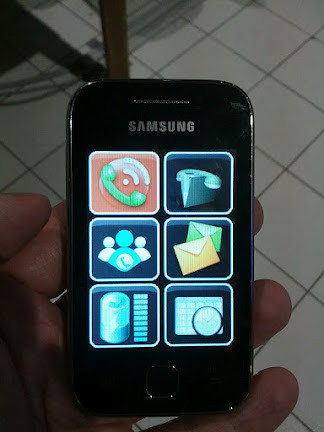
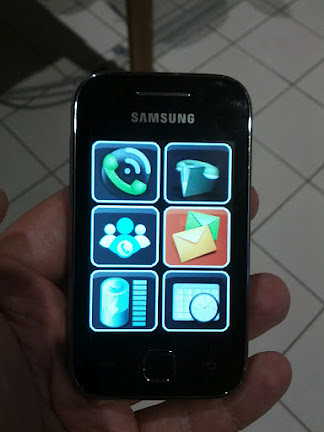
  • Users can swipe on the screen and a voice reads out what app they are currently touching. Double-clicking opens that app with more voice information. Subsequent screens then all are the same size icons (6 per screen)

Here are some screenshots of the device in action:


Alcance by CPQD - start screen
Alcance start screen – no app selected


Alcance by CPQD - selected app
Alcance selected app screen


Alcance by CPQD - another selected app
Alcance another selected app screen


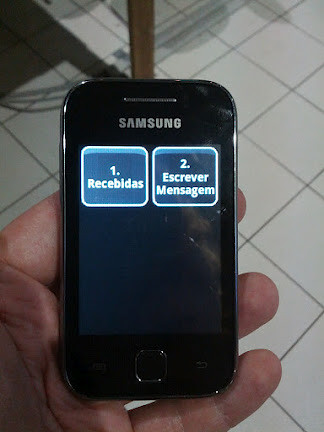
Alcance by CPQD - secondary menu
Alcance secondary app screen

Of course this will not replace a full-on smart phone with all its possibilities but I like the idea and the simplicity of it a lot. Telefonicá is very interested in seeing where this can go and I am pretty sure this could be easily converted to Firefox OS and in HTML5.

What I like most about it is that it was built after doing research with the intended audience rather than yet another protoype that assumes a lot and lands in the “innovation” bin in the company a few weeks later.

It will be interesting to see what else happens with this product. Especially in a market like Brazil where low literacy is an issue this could be a good way to bring connectivity to those who can benefit from it.

TTMMHTM: Scaling and redesigns, iPad for access, old games, HTML5 polyfills and unicorns

Tuesday, September 28th, 2010

Things that made me happy this morning:

TTMMHTM: Swinging, Darkroom, iPad accessibility and AI in PacMan

Monday, May 24th, 2010

Things that made me happy this morning:

Chasing the shiny – HTML5, CSS3, transitions – oh my!

Friday, May 14th, 2010
Subscribe to RSSGet the feed