Christian Heilmann

You are currently browsing the archives for the General category.

Archive for the ‘General’ Category

My Ajax Experience presentation – YUI for control freaks

Saturday, October 4th, 2008

I just spent several splendid days at the Ajax Experience in Boston, MA and was asked to deliver a talk about the YUI. Here’s what I went for: I wanted to make very clear that while YUI is a library much like the others, the real power of it lies in the control it gives you over the whole frontend development process from start to end.

  • The CSS components make sure that creating CSS based layouts and typography are as easy cross-browser as libraries make JavaScript development
  • The YUI DOM control allows you to monitor the size of the browser window, the position of the document in the window and the dimensions of any element. You can use this power to control things like fixed positioning and element overlap and even monitor font resizing.
  • I explained the concept of Custom Events and how the -debug versions of YUI will notify you as a developer at any moment of execution about the internal happenings.
  • I showed the development tools – the YUI logger, profiler and test suite and how they make your development process much less random.

The slides are available on slideshare and here are the code examples mentioned in the slides for browsing and to download as a zip.

[slideshare id=631005&doc=yui-for-control-freaks-a-presentation-at-the-ajax-experience-631005-1473&w=425]

YUI3 meetup in London on 16th of October

Friday, October 3rd, 2008

If you are curious to get the know the upcoming changes in YUI3 straight from the horse’s mouth and you are in lovely England, come down to London on the 16th of October to meet with the YUI team in the Yahoo offices over video conference.

The Yahoo offices are located bang in the tourist centre of town, 125 Shaftesbury Avenue, WC2H 8AD London, which is next to the cinema on Shaftesbury Avenue. If you come from Leicester Square, just walk up towards Tottenham Court Road and go right when you see the Spamalot musical theatre. The office is on the left of the road right next to the Cafe Milano.

Hope to see you there!

Chris

Image Optimization made easy with smushit.com

Tuesday, September 30th, 2008

Dedication is a really nice thing. Esteemed Yahoo colleagues Stoyan Stefanov and Nicole Sullivan of the exceptional performance team are two people who are dedicated to making the web a faster place.

Both Nicole and Stoyan have been talking about performance of CSS, JavaScript, HTML and also image optimization. Images can be optimized in two ways: visually (what is the quality) and file size. The latter is quite a corker, though as image editing tools leave a lot of information in files that we don’t really need – EXIF information, to be precise. If you open an image in a hex editor you will find a lot of things that can be safely removed without a change in the image quality.

There are a lot of open source tools to optimize images that way – amost one for each image format. Working through all of them can be a drag. This is why Stoyan and Nicole took their knowledge, dedication and all of these tools and built one application that does all the optimizations for you in one go:

Smushit Screenshot

You can upload a bunch of images, give it a URL or use it as a Firefox extension or bookmarklet. Smushit will show you how many bytes you can save by removing cruft from the images and gives you all the images as a zip file to replace them on your site. How cool and easy is that?

Here’s a video of Stoyan and Nicole presenting Smushit.com at The Ajax Experience in Boston (sorry about the audio):

Useful tweets widget using Yahoo Pipes and some JavaScript

Sunday, September 28th, 2008

If you look on the right side of this blog (and you can see) and you have JavaScript enabled you’ll spy a little “Useful tweets” widget (list). This is done with Yahoo Pipes and some JavaScript. As people asked me how it is done, here goes:

The idea

I use twitter a lot. Some of what I write is very relevant to the blog here, some is not fit for publication and some is just personal. So publishing all the tweets here would have been disruptive, hence I tried to find a way to filter things down.

What I do is that I end every tweet that I want to show up here with a § symbol, thus giving me a handle to filter out the good ones.

Playing nice with twitter and not summoning the fail whale

As twitter is probably the most hit API out there I didn’t want to go through the API and all the authentication malarkey. Instead I am using the ATOM feed and pipes to get the information and to filter it down.

Yahoo pipes is still full of win when it comes to filtering, mashing and converting data, and the pipe in question that I am using is available here: Useful tweets pipe

It takes the atom feed of a twitter user of a certain ID, removes all tweets but the ones ending in a § and removes the user name of the output.

Using the pipe and displaying the content

In order to display the pipe all you need is a small JavaScript and the right HTML in your page (or in my case WordPress template):


The link means the thing still makes sense when JavaScript is not available and the script does the rest. One thing you need to do to show your useful tweets instead of mine is to change the class on the DIV! You get the number from your twitter page:

  • Go to your twitter page, f.e.: http://twitter.com/codepo8
  • Click the RSS link at the bottom
  • Check the URL of the feed, your ID is the number in between the slash and ‘.rss’, f.e.: http://twitter.com/statuses/user_timeline/13567.rss

The JavaScript for display of the badge is no rocket science whatsoever:


var tweets = function(){
var x = document.getElementById('mytweet');
if(x){
var twitterUserId = x.className.replace('user-','');
var s = document.createElement('script');
s.type = 'text/javascript';
s.src = 'http://pipes.yahoo.com/pipes/pipe.run?' +
'_id=f7229d01b79e508d543fb84e8a0abb0d&_render=json' +
'&id=' + twitterUserId + '&_callback=tweets.tweet';
document.getElementsByTagName('head')[0].appendChild(s);
};
function tweet(data){
if(data && data.value && data.value.items){
if(typeof data.value.items.length !== 'undefined'){
var ul = document.createElement('ul');
var all = data.value.items.length;
var end = all > 5 ? 5 : all;
for(var i=0;i < end;i++){
var now = data.value.items[i];
var li = document.createElement('li');
var a = document.createElement('a');
a.href = now.link;
a.appendChild(document.createTextNode(now.title));
li.appendChild(a);
ul.appendChild(li);
}
x.appendChild(ul);
}
}
};
return{
tweet:tweet
}
}();
  • We check if the element with the ID mytweet exists
  • We then extract the user ID from the class name and create a new JavaScript pointing to the JSON output of the pipe. This, once loaded, will call tweets.tweet() and send the data as JSON
  • The tweet() method checks if data was retrieved, creates a list of links and appends it to the DIV.

Hope this is useful to someone else, too.

Reading blinds – a bookmarklet to help me read easier

Wednesday, September 24th, 2008

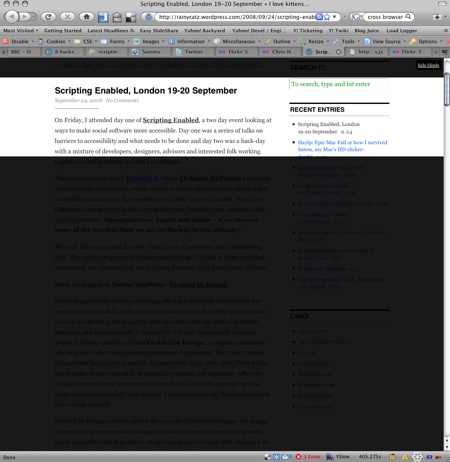
I am now a proud user of a 24 inch monitor at work and I realized that when I read large texts, the amount of white on the screen starts to hurt my eyes. Therefore I’ve written a small bookmarklet to black out part of the screen on demand and have a link top left to show and hide the blinds that cover the rest of the content. The blinds are fixed position so that I can scroll the content behind them. I also add padding to the bottom of the document to have enough scrolling space.

Here’s a blog without reading blinds:

A blog without reading blinds

The same blog with reading blinds on:

A blog with reading blinds

The bookmarklet is hosted on my server, to install it simply drag the following link to your links toolbar: Reading Blinds