Today is Blog action day and bloggers around the globe are asked to write about poverty. Well, as the invitation to the day already says, there are no easy solutions for a problem like this, but here are some things that have been bothering me for a while when it comes to thinking about poverty.
Poverty is not that far away from us than we think
When it comes to world poverty we always get the mass media pictures of children starving and people not having any shelter and it makes us feel uneasy as it is something we just don’t want to consider when we have to decide wether to buy the new macbook or get a good home theatre.
Fact is though that poverty is not that far from us in our own surroundings. Part of why I left my old job and moved to where I am now is that we started doing IT projects for mortgage and debt consolidation companies. Despite the IT work being boring I also felt dirty every single day I had to deal with this.
Emails came in of people asking for debt consolidation (as the company was too stingy to set up a database but wanted an unencrypted form mailer instead) and they ranged from “I bought too many things” to “my wife has cancer and the operation and medication bills are piling up”. What really got me though was that for the system all these people were numbers and pre-defined decision trees – how you got into debt was of no consequence.
A friend of mine just last week had to rustle up 8000 Euros for her father’s operation. The father lives in southern Europe and it seems there is no way to get a proper hospital service without bribing the nurses and doctors as they get underpaid, too. These are expenses that come out of the blue and you can’t prepare for them. What would you do? Hope that dad is OK even with bad service? (I am not judging here, I am just reporting what has been said).
Try to disrupt the cycle of consumption as often as possible
One thing that really ticks me off is that Aldous Huxley’s Brave New World is becoming more and more reality. One thing described in this amazing book is that it is a sin to repair things – buy new ones instead.
If you look into our market now then you come to realize that this is where we already are. Trying to get a camera or a personal media player repaired is more expensive than getting the newer version. I remember that when I bought something as a teenager it was an investment – you could re-sell the Vinyl, walkman, CDs, cool jacket or shoes to your mates when you wanted. Nowadays this is not the case any longer. Yes, you can put things on ebay and battle the myriads of power sellers with automated bidding or – and I find myself doing this increasingly – give the things you don’t want any longer to a charity shop.
With the credit crunch and all coming I am sure there’ll be a renaissance of shops that repair things for you. I am lucky to live in a part of London that still has those and make sure to have them have a go at repairing things that broke before replacing them. We will have to do that sooner or later anyways.
One of the coolest things I’ve seen in this regard was when I was in India in 2004 and saw this man:
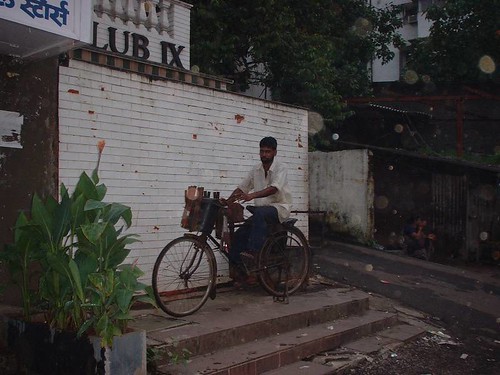
He cycles from village to village and sharpens and repairs people’s knifes and kitchen scissors with this modified bicycle. This is entrepreneurship, not showing another cool app to calculate your carbon footprint and ask for $$$ of VC funding.
Stop believing the hype about money
One last thing I am just not getting is that everybody in the west is wealthy by living off borrowed money. I’ve never had a loan and I never had an overdraft on my account – I just can’t do it. I was brought up by parents who scratch the magnetic stripe on their bank cards as they don’t trust computers or don’t want to be able to spend money they don’t have. Both grew up during the second world war and learnt the hard way how to get on with what they have.
When I wanted to have some superfluous stuff as a teenager or kid I was asked to do some chores and later on my dad got me little jobs (bricklaying, packing in a chainsaw factory, sorting out recycleable materials from people’s rubbish) to make the money myself to be able to afford them. I hated them for this – now I am very happy that they brought me up this way.
Money does not grow on trees, and by now we are so far into a world of virtual richness that the figures we play with are not even backed up any longer by real valuables – gold for example. The biggest losers of the whole credit crunch and recession will be the people who helped us get to where we are now – pensioners.
So what’s my conclusion?
I don’t have any solution for poverty – otherwise I’d be much more famous and in politics (or assassinated as people hate solutions for problems that actually can be turned into a profit if you have no scruples). All I want to say is that in order to think about poverty it is a great idea to see how you live, what you spend money on and especially keep in contact with people who got you where you are now. Of course we need to battle world poverty, but first and foremost it is time to make sure that people we owe a lot to should not have to live below the standard they deserve because some other people love to play with numbers on the stock market. Giving money to the third world is a nice thing to do and gives us a warm, fuzzy feeling, but changing our immediate surrounding or really getting into helping on the ground has a much larger impact.
