Newsmap – using Placemaker to add geo location to a news feed
Friday, May 22nd, 2009I am right now very excited about the new Placemaker beta – a location extraction web service released at Where2.0. Using Placemaker you can find all the geographical locations in a feed or a text or a web url and you get them back as an array of places.
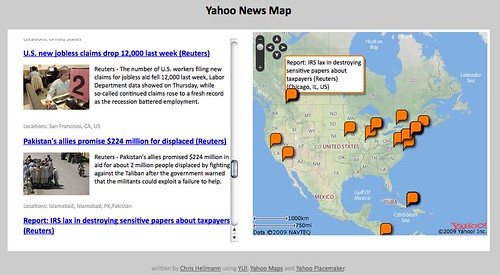
As a demo I took the Yahoo News feed and ran it through Placemaker. The resulting places are plotted on a map and the map moves from location to location when you hover over the news items.
The result is online at http://isithackday.com/hacks/placemaker/map.php
Getting the data from the data feed and running it through placemaker is very straight forward. I explained the basic principle in this blog post on the Yahoo Developer Network blog. The only thing to think about is to define the input and output types correctly:
If you look at the source of this example you will find that Placemaker injected contentlocation elements in the feed itself:
2514815

38.8913
-77.0337


23424793

21.511
-77.8068


23424977

48.8907
-116.982


55843872

19.9445
-75.1541
You’ll also notice that the elements are namespaced and the names of the locations in CDATA blocks, both things I hate with a passion. Not because they don’t make sense, but because simplexml can be drag to make understand them.
What I wanted to do with this data was twofold: create a JSON array of geo locations to plot on a map and a display of the news content. This is the PHP that does that:
$places = simplexml_load_string($results, 'SimpleXMLElement',
LIBXML_NOCDATA);
// if there are elements found
if($places->channel->item){
// start a JSON array
$output .= '[';
// start the HTML output
$html = '';
// set the counter - this will be needed to link news
// items and map markers
$count = 0;
// loop over RSS items
foreach($places->channel->item as $p){
// set inner counter (as there are more locations per news item)
$innercount = 0;
// start the HTML list item and give it an ID with the counter
// value
$html .= '- children('http://wherein.yahooapis.com/v1/cle');
// check that there is a location sub-element in this item
if($locs->contentlocation){
// if there is one, add a class to the LI
$html .= ' class="haslocation"';
// start an array for displaying of the locations under the
// news items
$dlocs = array();
// loop over all the places found for this item
foreach($locs->contentlocation->place as $pl){
// append a new JS object with the location data
// and a unique ID to the locations array
$locations[] = '{name.'","title" title="">name":"'.
preg_replace('/n+/','',addslashes($p->title)).
'",latitude" title="">lat.
'",longitude.'","id":"m" title="">lon'.
$count.'x'.$innercount.'"}';
// add the location name to the display locations array
$dlocs[] = $pl->name;
// increase the inner count to ensure that every marker has
// a unique ID
$innercount++;
}
}
// append the HTML for the news item
$html.='>
'.$p->title.'
'.
$p->description.'
';
// if locations were found, add them
if(sizeof($dlocs)>0){
$html.='Locations: '.join(',',$dlocs).'
';
}
// end the list item
$html.=' ';
// increase the counter
$count++;
}
// join the json object data with a comma and close the JSON array
$output .= join(',',$locations);
$output .= ']';
// if there are no items simply return nothing
} else {
$output = '';
}
// and this ends the HTML
$html.= '
';
?>
The result of this can be seen here http://isithackday.com/hacks/placemaker/map-2.php.
The JavaScript to show the map is pretty straight forward and more or less the demo example of the maps API:
// will be called with the array assembled in PHP
function placeonmap(o){
// if there are locations
if(o.length > 0){
// create a new geopoints array to hold all locations
// this is needed to determine the original zoom
// level of the map
var geopoints = [];
// add map with controls
var map = new YMap(document.getElementById('map'));
map.addZoomLong();
map.addPanControl();
// loop over locations
for(var i=0;i);
That’s pretty much it. I am sure it can be refined, but it is amazing how easy it is to get geo information into any text with Placemaker.