Christian Heilmann

You are currently browsing the archives for the General category.

Archive for the ‘General’ Category

#justcode

Friday, May 10th, 2013

As developers we are incredibly lucky. We work in a very growing and immensely well paid market, our companies shower us with benefits, companies offer us jobs rather than having to send out hundreds of CVs on the off-chance and even the mass media and politicians start talking about “coding” being a skill everybody needs.

Quite some part of this success is based on the stubbornness we showed in the past. When we got a task to build something we didn’t give up on it and said it is impossible. Instead we went back in our corner and tried and failed and tried again with sparks flying and code explosions happening until we achieved what we wanted. Think Dr. Bunsen Honedew’s laboratory instead of Statler and Waldorf.

This gave especially the web a strange “hack it together” reputation that many people keep bringing up when it comes to replacing JavaScript for example with “more organised and professional” languages. But you know what? I really think when it comes to the web, this is its main strength.

The fun of coding
whimsy

As explained earlier in my Flash is not the enemy post, whimsy and spontaneous ideas is what made the web a larger media outlet than it was. It wasn’t the large sites that got non-technical people excited. It was the funny animation and short-lived game that you could mail to your friends.

Therefore I think it is important to celebrate this for yourself from time to time. Personally I find myself extremely lucky to have been at the right time (and moving around to the right places) when the web exploded into an offering of amazingly cool things and while I am sure as hell not proud of the code I had to write to get things done in the past, I am happy that I did and that I didn’t give up or wait until someone else solves my problems for me.

Having just taught a workshop on HTML5 at Industryconf I found that we are losing a bit on that. Attendees were worried that they need to learn a lot of libraries and find the right plugins to get started and once shown that they have the power to do most of what they want using the things browsers come with out of the box got quickly into enjoying themselves reaching new levels.

One thing I did with the attendees is a To-Do List App in plain HTML/JS/CSS (No sound).

This is what the Mozilla Webmaker Project is about – to get non-programmers excited about building things for the web. And it is incredibly exciting to see some of these events as a “professional”.

I think it is very important to never forget about the wonder we experienced the first time we made something show up on screen or wrote our first condition that printed out “is amazing” when you entered your name or “is boring” when it was another one.

Be fearless

A lot of times being creative means being fearless. Watching Bret Victor’s talks and seeing his Learnable programming course and Seb Lee-Delisle’s training courses they consist of one main thing – play with things and worry about them breaking later. Amazing results happen when the outcome and the input get as close together as possible – not when things happen using dozens of abstractions.

This does not have to be visual from the get-go though. The MPEG-1 decoder in pure JavaScript for example is pure byte-shifting but blew me away in its fearlessness of what could go wrong.

Go, code!

Why not have a go? Take 10 minutes, half and hour, an hour out of your life right now and use it to #justcode something, anything. Just play with an idea, put it on JSFiddle, Codepen, JSBin, Dabblet, or whatever other amazing tool we have right now and share it.

Don’t build a perfect plugin, don’t build a solution dependent on preprocessors and libraries. Go vanilla and just play with what we have in browsers today. CSS Animations and Transitions, Canvas, Audio and Video, HTML5 and Friends – we have so many cool toys to play with. Don’t explore the main use case either. Yes, Canvas is for putting things on the screen, but it is also about reading image data.

We got where we are by playing with things. Never forget this and never stop playing.

#nobro

Wednesday, May 1st, 2013

Back in November my colleague Robert Nyman wrote about a word that annoys him. I like that. I think our day to day online conversations are full of little misunderstandings and knowing what ticks someone off or brings up weird connotations is a good thing. So I thought I should quickly write this bit here.

bro

There is a pretty bullet-proof way to make me feel uncomfortable and not react to requests that you have and that is by calling me “Bro”. There are two people on this planet that can call me “Bro” and that is my sister and my brother and both call me “Christian”.

I don’t like “Bro”. I understand that for some this is a very normal way to talk to each other but I don’t get it.

First of all, it assumes a relationship that we just don’t have. I have quite a lot of friends and I have some very good friends (you know the ones that helped you when you were sick or show up without any questions when there are things to be done like moving flat). Friendship is something that grows, that gets earned. A bond that would warrant calling someone else a brother (or sister for that matter) that is not related to some religious lingo is something that so does not happen by using the same social media channel or commenting on the same pull request thread. Someone calling me “Bro” out of the blue makes me twitch and reminds me of the fake friendliness the bazaar salesperson shows when asking you to “want to look at my carpets, friend?”.

Secondly when I hear “Bro”, I have in my head the caricature of a beercan-on-forehead-crushing frat boy jock who is boisterously shouting about how awesome all his bros are and that they come “before hos”. I never went through university and the mere concept of fraternities and sororities is beyond me. It seems so fake and artificial and with its initiation and hazing rituals flat out creepy. Where I grew up we used to have (and still have) student organisations that have sword-fighting as the initiation rites and you might have seen old German men of power with scars in their faces. That is where that came from. All of these smack of nationalism and old-school class systems, all of which things I don’t get and that make me feel uncomfortable.

So in short, every time someone calls me “Bro”, I lose a bit of respect – subconsciously. Maybe that is something I should work on. But seriously, I think the whole “Bro” culture is outdated and seeing the effects of it in mainstream media scandals and “Brogrammer culture” is something we shouldn’t support but actually move away from. So, sorry, but #nobro from me.

Geeksphones are developer tools

Monday, April 29th, 2013

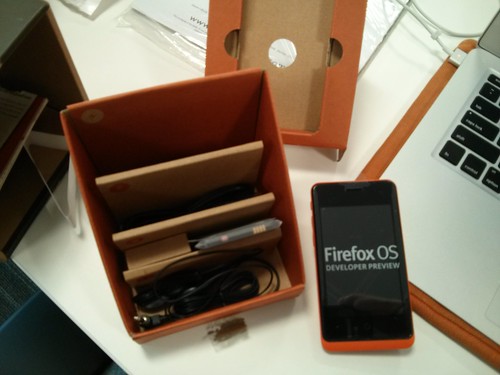
I am spending this week explaining lots of press folk what the Geeksphone is about. I just got excited like a puppy on sugar rush about unpacking mine, after waiting for a long time to get it internally at Mozilla. See the unpacking photo set on Flickr

Geeksphone unpacked

Posting this on Twitter and Facebook caused quite a stir and many people who bought a Geeksphone wondered about their delivery times. Here’s what I know about this: nothing. I also don’t have access to phones to give out or expedite delivery for you – nobody outside of Geeksphone or inside Mozilla can, so please don’t ask for any of this as it is impossible for us to help you.

I think it is very important to repeat what the Geeksphone Firefox OS preview device project means and stands for. So here it is, in a very clear fashion: the Geeksphone Firefox OS developer preview devices are developer tools for Firefox OS. They are not:

  • Firefox OS phones for day to day use
  • Swag to give out for free as prizes on conferences (so don’t ask)
  • A collector’s item to buy and put on a shelf

Firefox OS is meant to fill a gap in the mobile space and bring HTML5 capable devices in a very affordable fashion to markets that can not get handsets with great web capabilities. In other words, it replaces feature phones, not your high end Android or iPhone.

That’s why we found ourselves in a pickle: how do developers test on a platform that is not sold in their locale as it would be pointless to add to a saturated market with a lower-spec phone? The answer is developer tools like the Firefox OS simulator and affordable testing devices where you can really see how responsive the hardware with the OS is. And these are the Geeksphone Firefox OS preview devices.

Having a Geeksphone Firefox OS preview device means you should be working on an app, that is what we need developers to do. We need the marketplace to have a lot of good apps on launch of the phones to the end users. All you need to do is to build an HTML5 app (that also can be converted to native code with PhoneGap) – you can develop that one to 80% in the browser. To get all the Firefox specific goodies, you’d need a phone like the current one Geeksphone provides.

So while it is very exciting to see people go nuts over the phones, I think it is very important to remember that these are tools to build and test apps and not phones to have instead of the phone that our partners will release in the target markets. These will be very different but share the same hardware specs.
Consider the Geeksphone Firefox OS preview device a Nightly build of a browser. You are helping the browser to test out future features for normal end users but you shouldn’t be surprised about quirks and errors. On the contrary – we want you to find them and tell us what is broken, that’s why there are preview and beta versions of browsers.

I am terribly excited about being able to give real hardware to people who work on exciting apps that will make a massive difference for people who now only can play snake and send SMS on their phones. You could be part of the new wave of mobile internet entertainmment and access in countries that hunger for a better experience. That’s what you’d need a Geeksphone Firefox OS preview device for. If all you want to do is to play with a phone, drop by in any Mozilla location or any of our events.

Right now Firefox OS needs you to build stuff for the web, and if you do that already, the device can give you the final testing platform you need. You won’t need one for most smaller apps though, so don’t feel left out as there are not that many available and it may take some time for yours to arrive.

That doesn’t mean that in the future there might not be devices sold by Geeksphone that are targetted at end-users. It simply means that the Geeksphone Firefox OS preview device is what it is – a preview device for developers.

Helping or hurting? Video of my talk at Devslovebacon

Thursday, April 25th, 2013

The lovely people of Devs love bacon today released the video of my talk Helping or Hurting and I am blown away by the quality of it. Really TED style stuff.

Christian Heilmann – Helping or hurting? from BACON: things developers love on Vimeo.

I had given the talk slightly more focused before at the jQuery Europe conference (notes are available here) and thought it is important to bring the message out as a video. We are right now hurting the web of the very near future by building tools that seemingly make developers more effective but at the same time make them dependent on abstractions. And if we don’t make these abstractions not use the newest and most performance optimised technologies under the hood we are just adding more and more cruft to the web.

Showing multimedia fallback content when no supported source is found

Sunday, April 21st, 2013

There is nothing more frustrating than things going wrong without you knowing what happened. Things breaking with a very obvious reason are not as bad. Say you drop your phone and you see the display smashed – there is no question why the touch interface doesn’t work any more. But when nothing happens and everything should be OK, we get very cross very fast.

This is why code that isn’t defensive in testing for what it needs before accessing it annoys me. Worse even, when code just assumes everything is OK and doesn’t have an error clause that gives a fallback or at least tells me what is going on.

This is where HTML5 multimedia on a plain markup level is terrible. It is not easy to play sound or video on computers, not a trivial task indeed. However, I would still expect to get a fallback when things go wrong other than a grey box that does exactly nothing.

When I add an image to a document and specify an alternative text this text gets displayed when the image can’t be loaded (at least in Firefox). I can also add an “error” event handler to the image and it will get fired when the image fails to load. You can try it in this Demo on JSBin

  <img src="meh.jpg" alt="cute kitten photo">

var img = document.querySelector('img');
img.addEventListener('error', function(ev) {
  if (this.naturalWidth === 0 && 
      this.naturalHeight === 0) {
    console.log('Image ' + this.src + ' not loaded');
  }
}, false);

Not so with multimedia.

Say you add a video into the page and the browser can not play it because it can not be loaded or the browser does not support its type. All you get is a grey box that does not do anything. You don’t even get a “save as” link or anything like it. And to add to the annoyance, no error handler gets fired on the video element – although the video or audio element very much has one to use. What’s going on?

What if you offer a fallback?

Say we do the right thing and offer a sensible fallback for the video should it fail to load or the browser being incapable of playing video:

<video controls>
  <source src="dynamicsearch.mp4" type="video/mp4"></source>
  <a href="dynamicsearch.mp4">
    <img src="dynamicsearch.jpg" 
         alt="Dynamic app search in Firefox OS">
  </a>
  <p>Click image to play a video demo of 
     dynamic app search</p>
</video>

If your browser doesn’t support the video element at all you get a screenshot of the video and an explanation what to do – you can still download and watch the movie in any mediaplayer on your computer. This is great. It is also a beneficial thing to do as for example links on Facebook would get a thumbnail of the image next to them.

When the browser supports the video element but doesn’t support MP4 you are out of luck though. You get the broken grey box and not the fallback content. Wouldn’t it be great if the browser showed the fallback when the video can not be played? Not according to the standard. It is up to the implementer to develop a fallback for this. And here’s how that is done: you need to assign an error handler to the last source element in the video element. If the browser doesn’t find any playable source, this allows you to replace the video with its fallback content.

<video controls>
  <source src="dynamicsearch.mp4" type="video/mp4"></source>
  <a href="dynamicsearch.mp4">
    <img src="dynamicsearch.jpg" 
         alt="Dynamic app search in Firefox OS">
  </a>
  <p>Click image to play a video demo of 
     dynamic app search</p>
</video>

var v = document.querySelector('video'),
    sources = v.querySelectorAll('source'),
    lastsource = sources[sources.length-1];
lastsource.addEventListener('error', function(ev) {
  var d = document.createElement('div');
  d.innerHTML = v.innerHTML;
  v.parentNode.replaceChild(d, v);
}, false);

Not the most intuitive, but it works. Wouldn’t it be easier if the video element showed the fallback content when it can’t play a video or at least fire an error handler saying “no valid codec found”?