Christian Heilmann

You are currently browsing the archives for the General category.

Archive for the ‘General’ Category

Always bet on HTML – being misunderstood

Monday, July 6th, 2020

A few weeks ago Chris Ferdinandi wrote an ode to HTML called Always bet on HTML in which he once again praises the benefits of HTML as a base for your products on the web. He is correct and makes a lot of great points. However, we made these points for 20+ years and people keep underestimating the benefits of starting with a solid HTML base. Maybe it is time to look at the reasons why people might be less enthused about HTML than Chris (and me) are.

Greek pillars

HTML is not a programming language

HTML is dumb – which is a good thing and one of the cornerstones of its resilience and sturdiness.

Programming languages allow you to use logical constructs like loops and conditions. They also have a concept of variables and you can do calculations on them. You can react to input and convert it before you display results. They need some sort of runtime to execute all of that in.

HTML doesn’t have any of that. Which is OK - it was never meant to have that. But – for some – this makes it a less interesting skill to learn. That might irk us, but it is something we have dealt with since the arguments around the value of HTML started.

HTML is a markup language you use to describe what something is. Then you need to rely on another piece of software like a browser to do something with that information. You don’t install that browser or control it like you would control a runtime on your server. You have no way of knowing if it succeeded or not – all you can do is trust in the platform and your users’ unknown setup.

Support can be sketchy and HTML doesn’t tell you that

That’s why HTML comes with fallback options. Alternative text for images. The inner content of a canvas element to show when canvas isn’t available. There is a problem with that though – when it doesn’t work.

I wrote about a problem like this seven years ago . When you add an image to your HTML document things can go wrong. If the image isn’t avaible or in an unsupported format, the browser displays a broken image and the alternative text. You can even track that in JavaScript – as the image throws an error.

When you try to play a video with a non-existing codec the alternative content in the video element doesn’t show up – all you get is a broken interface. Content inside the video element only shows up in browsers that don’t support it (i.e. none these days). To give your users a great solution you need to progressively enhance. You show an image linked to the video, test in JavaScript if the video could play and then replace that image with a video element. Exactly the opposite that HTML should be about.

The problem goes deeper though. When it comes to budgets, the focus in most cases is on delivering a gorgeous product. That is much more important than resilience and fallback content. The product design shows a colour picker in the companies’ style. Your solution shows a different one or a form field as a fallback.

For us as lovers of the web and developers that’s great and clever. Those who sign off the product cheque think differently – they didn’t ask for that and it smells of extra work. This should be a problem we tackle – not developers who need to stay in their allotted time and deliver.

HTML and browsers are forgiving

One of the main strengths of HTML is that it is resilient. This wasn’t always the case and often you had to do weird things to make even HTML and CSS work in browsers.

Back in the days, for example, older browsers made the error of rendering whitespace in HTML. If you styled a list with background colour there were lines between the items. There were a few fixes for that, but a big and silly one was to use the following markup abomination :

HTML with each line break in an HTML comment

Nowadays, though, the parser is forgiving and will do its very best to guess what you meant with faulty HTML. It closes tags for you, it moves wrongly nested elements out of the parent element and it happily renders <​ilovebacon> as a <​div>.

This was a pragmatic move by browser makers as the web is full of horrible markup. The problem is that it also is a carte blanche for any developer not to give a hoot about the quality of their HTML. In my 20+ career as a web developer I kept running into people who learned HTML in 1998 and never bothered to keep up. Table layout works and browsers can’t break the web so they will keep showing them. Why bother changing my ways as a developer then?

I understand this is glib. But when you have a 9-5 job as the maintaining web developer of a legacy web site with thousands of pages you have a different view. You are happy to sit your time out, hope nothing breaks and not change the world.

So what I am saying is that as HTML can not fail, people don’t take it as serious. A stack that throws errors in your face making it obvious that you’ve done something wrong gets more attention. Semantic and clean HTML has numerous benefits, but many of them aren’t obvious if your goal is to “build things that don’t appear broken – as quickly as possible”.

HTML is “too open”

There is no doubt that we expect more from web products than we did in 1997. The web has become the mainstream platform for media distribution. This clashes with some of its ideas.

For example, when it comes to video display on the web the video element gives you a way to download the video in case it doesn’t show. As a video content provider you don’t want that. You want people to go to your product and consume the video there alongside your ads. To meet your business goals, you need to work around HTML’s idea of making everything available. Many video platforms offer video download as a carrot to sign up for a full account. And the business folk in your company rely on the developer to safeguard that. Is this good? Not in my book, but this is how our market works.

Only generated HTML scales

HTML is excellent for marking up a single document. It shines when you know what the content is that you’re turning into a web document.

But how often does that happen? Most of the time our products are CMS driven. The content comes either from editors or – in a social product – from our users. Even when we know the content there is the problem of scale. It is fun to create a valid, sensible menu in HTML:

an example of a site navigation in HTML

It is less fun though that you have to change it for every page in the site. And that multiplies when more pages and child pages come into play later down the line.

an example of a site navigation in HTML with a different entry changed than the last example

We invented a few things that helped solving that problem. IDEs with include functionality and clever search and replace were one of them.

The first solutions I used were frames and then server-side includes. The former allowed me to maintain one menu file but meant that you needed to set target attributes on each anchor. The latter had an absolutely bonkers syntax and needed Apache to run (so I couldn’t test my pages on my file system without installing it).

A much easier way is to use a scripting language that deals with the necessary logic and renders out HTML. Including this JavaScript in any document in the site laid out in pages renders the above HTML and automatically shows the current document without a link around it.

JavaScript generating an HTML menu automatically removing the link of the current document

Regardless of language you used for similar functionality, one thing cemented itself in the developer community mindset: HTML needs help to be useful and to scale to larger projects. It is something you generate using a “better” language.

Form styling is a mess

Traditionally the biggest thing people complained about in CSS (other than vertical centering) is that it is hard to style form elements. The purist in me is OK with that – why shouldn’t end users realise that something is a password field? But Flash allowed you to style forms any way you want to, so the web should, too. The problem was that form elements looked dated and in some cases even hard to use (example: scaling radio buttons for mobile). Furthermore, even in modern browsers it needs some in-depth CSS knowledge to reliably style form fields. Which is a shame as the new(ish) functionality of forms like error handling make a lot of basic JavaScript checking obsolete.

The good news is that things are happening. The Edge and Chrome team did a lot of work lately to clean up the UX of form elements of Chromium and even started the Open UI project to scale these efforts.

In any case, the problem of form styling results in many a <​div> with an event handler instead of a <​button>. Many complaints stem from legacy browsers and pains long forgotten, but why take the chance when frontend frameworks come with snazzy interaction components that even look “modern”?

JavaScript can patch anything

The biggest problem with making people understand the power of simplicity that is HTML is that JavaScript is too damn useful.

Ever since the days of DHTML, JavaScript gave developers a sense of control over the problems of HTML and CSS support in browsers. I remember writing scripts to test for document.layers or document.all support and render out different interfaces that way. JavaScript seems the perfect way to patch things and make them work independent of browser or support of new technologies. You could even argue that our practice of “polyfilling” was counterproductive. Polyfilling meant you use JavaScript to give functionality of upcoming standards to older browsers right now. If you already need JavaScript to make something work why not use it from the get-go as HTML/CSS support isn’t reliable? Of course polyfilling means you only use JavaScript in non-support environments. But the presence of JavaScript gives a message to those who only want to get things done that it is probably a safer bet to always use it.

We’ve always been impatient and when something cool that is a web standard wasn’t supported in all major browsers yet, JavaScript came to the rescue. Often by the time all browsers caught up the thing wasn’t even interesting any longer as we moved on to the next new thing to chase.

In summary

On the surface, the choice of HTML as the base of your web product should be blatantly obvious. There are a few valid and human things that make people not agree though.

  • A sense of wanting everything shiny and new right now.
  • A history of sketchy browser support.
  • A lack of simple customisability of the final result.
  • A false sense of being able to fix everything with JavaScript.

The biggest obstacle to embracing HTML is that people don’t want to give up control. JavaScript gives you a sense of control – code that you wrote naturally is perfect, right? In reality though, JavaScript support is flaky. Browsers not supporting features, flaky network conditions and blockers are just a few things that work against you. We’re working hard to make network issues not be a problem any longer. But in essence, relying on JavaScript always means to rely on your users’ environment – something you can’t control.

That said, to me the argument of HTML vs. JavaScript is boring and we’ve spent years running in circles around it. HTML has come leaps and bounds and every new functionality doesn’t only come as a “trust us, this works in browsers” but also with an API to react to non-support or problems and – more importantly – styling hooks.

JavaScript is immensely powerful and – used well – a boon to the experience of our end users. Storing content with service workers, lazy loading things with IntersectionObserver, there are numerous examples of things we can’t do in HTML, but are great customer experiences. Truly, the biggest plus of JavaScript solutions is that you can react to the environment and only deliver what is needed at the time. But that doesn’t mean you can’t render that on the server side in JavaScript after doing a simple test on the client.

The job we have now is to battle some of the old prejudices against HTML with facts and good examples. Not by telling people off for relying on JavaScript. Often the best way is to ask why they chose to do that. If there is a lack of education or HTML knowledge, we can follow up with good resources. I’m pretty sure the image of the “I don’t care about end users, the only thing I care about is developer convenience” code-Bro isn’t as common as we think it is.

How good IDEs help you do the right thing

Tuesday, June 30th, 2020

As someone who has been doing this web development thing for a long time I am amazed how cool our tooling is by now. The best development environments don’t only make it easy for you to develop. They also guide you to do things right.

Take this simple example of adding an image to an HTML document. In order for this to be an excellent experience for the end user the image should be:

  • Available
  • Have defined dimensions in the HTML to avoid reflow and the page layout jumping around once it loads
  • Have an alternative text that explains assistive technology, search engines and users who couldn’t load the image what it is about.

The syntax is pretty straight forward. You need the IMG tag, with an alt attribute and a width and height attribute. And yet this simple bit of HTML keeps getting done wrong.

Enter Visual Studio Code with its in-built Emmet engine and the Webhint plugin.

You type ‘img’ and you get a few options:

Emmet showing a few of its autocomplete options for images creating attributes like src, alt, sizes, and srcset for you

Selecting any of them (the first one is automatically selected) and hitting tab will write the rest of the tag for you and position the cursor.

But there is even more goodness in there. If you type <​img src=” VSCode autocomplete will show you all the files in the current folder. You can select the one you want to include by starting to type its name or use the cursor keys.

Img tag with all the files in the current folder to choose from as the src value

Once you have one, close the image tag with “>”. Then use CMD/Ctrl+Shift+P to open the command console and type “size” to get the emmet size options. Select “Emmet:update image size” to add the image dimensions as width and height attributes.

Visual Studio Command Palette showing the options for 'size'

Img with the correct values and width and height attributes

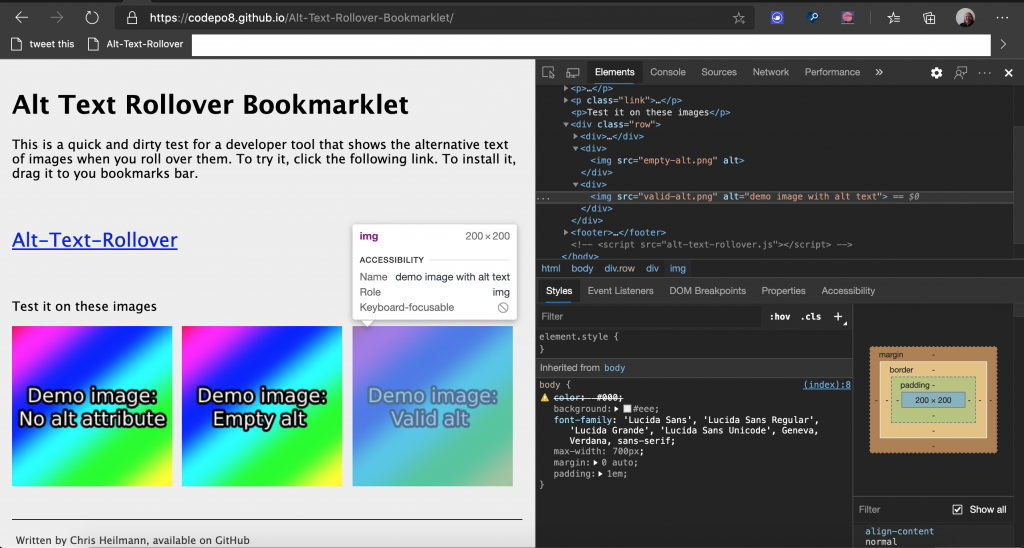
There’s still a red squiggly line under the img tag. This is Webhint complaining that something is wrong. Hovering over the element shows you what’s wrong. We are still missing an alt attribute with an alternative text.

Webhint complaining rightfully that every image needs an alt attribute

Here is the whole thing as a GIF animation:

Animation of the process of adding an image with width and height into VS Code

It has never been easier to do the right thing. Not only do we have code completion, but we also have explanations why something is wrong and how to fix it. And this – to me – is much better than any “best practice” documentation. We learn how to do the right thing by coding, not by reading and then coding.

Testing your animations for “prefers-reduced-motion” support

Friday, June 26th, 2020

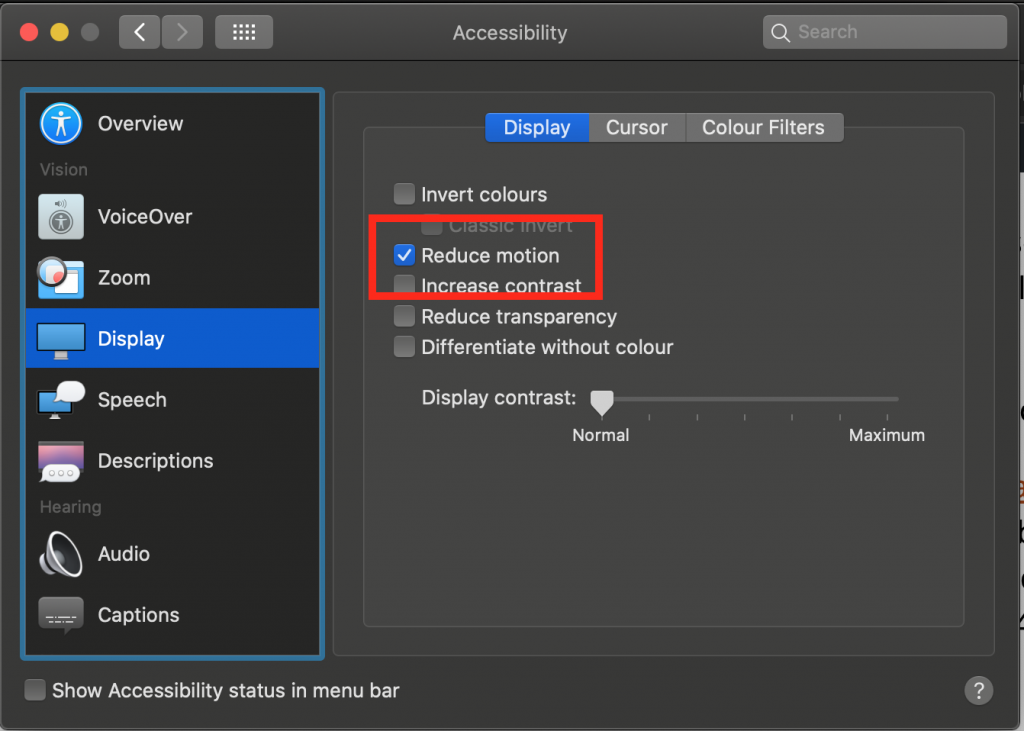
Motion turned off in MacOS

Animations and transitions are things that can make a product feel much more natural and welcoming. They can also be a great way to make slow processes feel faster. But not everybody is OK with seeing animations and they can overwhelm people or – when done wrongly – even cause nausea and seizures.

That’s why operating systems allow users to turn off animation and your web animations should comply with that decision.

Checking for animation support with ‘prefers-reduced-motion’

Luckily, this is not tough to do, as you have a CSS media query that fires when a user chose to turn off animations. In order to make your animations play nicely with that setting you can un-do any animation inside this media query.

You can see this example in this codepen.


See the Pen
Considerate animation using prefers-reduced-motion
by Christian Heilmann (@codepo8)
on CodePen.


.turtle {
  font-size: 50px;
  animation: move 1s infinite linear alternate;
}
@keyframes move {
  to { transform: translate(200px, 0);}
}
@media (prefers-reduced-motion: reduce) {
  .turtle { animation: none; }
}

Alternatively, you can also wrap any animation inside the positive media query:

.turtle { font-size: 50px; }
 
@media (prefers-reduced-motion: no-preference) {
  .turtle {
    animation: move 1s infinite linear alternate;
  }
  @keyframes move {
    to { transform: translate(200px, 0);}
  }
}

You can even use it in a link element to avoid any CSS related to animations to be loaded:

<link rel="stylesheet" href="animations.css"
      media="(prefers-reduced-motion: no-preference)">

For JavaScript animations, you can use matchMedia to test if animations are wanted.

const wantsanimation = window.matchMedia('(prefers-reduced-motion: reduce)');
wantsanimation.addEventListener('change', () => {
  console.log(mediaQuery.media, mediaQuery.matches);
  // Stop JavaScript based animations.
});

How to test your animations using developer tools

Testing your animations for compliance with your users’ settings can be annoying as you need to turn the setting on and off in your Operating System. There is, however, an easier way to do it, using Chromium developer tools.

As described in the Edge Developer Tools documentation, you can simulate the support for animations

You can see this in action in this video :

The steps are described in the documentation . You either use keyboard shortcuts CMD/CTRL+Shift+i to open devtools, CMD/CTRL+Shift+P to open the Command Menu and type “reduce” followed by enter to toggle the setting. Or you can use the menu, select the … menu up top and navigate to “More Tools” -> “Rendering” where you scroll down to the “Emulate CSS media feature prefers-reduced-motion” to toggle the setting.

If that is too complex, I’d love to hear where you’d expect this functionality to live in the developer tools! Reach out to me via Twitter at codepo8 or directly to EdgeDevTools.

Further reading

Talking about the fun I have with HTML canvas at “Programmed in Pencil” – Video, Slides and code examples

Thursday, June 25th, 2020

Yesterday I presented Images, pixels, canvas, tigers and bears… at an online meetup called Programmed in Pencil run by RVU.

I have to admit I misread the title of the event and thought it would be predominantly about creative coding, which is why I wrote this talk and not one about software planning or running teams. But there is an upside: I love working with canvas and showing people how you can use it to turn an image into something you can manipulate, convert and change with plain JavaScript.

The recording of the Zoom meeting is available on YouTube :

The slides are on noti.st :

View Images, pixels, canvas, tigers and bears… on Notist.

And as I had some time today I put together all the code examples I showed, documented them heavily and put them on GitHub. Click the image below to go and play.

demo page of how to count the colours in an image

You can get the source of all of them or play with the interactive version (that also shows the source inline).

That was Halfstack Online’s first edition (musings, and slides)

Monday, May 25th, 2020

Halfstack is a series of events that are very close to my heart. They are predominantly about connections and sharing some nerdy fun. The locations are pubs and cinemas and there is a lot less pressure on presenters and audience. They aren’t a “cool crowd” event where you need to deliver “the killer talk”. Instead they are a social gathering of, well, nerds. They also end in a ridiculously hard and geeky pub quiz and some musical performance.

There’s a beautiful irreverence about them and yet they are well organised and you learn a lot. Especially letting go and playing with technology rather than trying to “be awesome”. The main organiser, Dylan Schiemann spends a lot of time and effort to make these events easy to attend and present at.

I’ve been a supporter from day one of the events as they were easy to attend when I lived in London. I already signed up for the London, Tel Aviv and others when Covid-19 hit. I am now proud owner of flight vouchers and was sad that they won’t happen. When Dylan announced the online edition of Halfstack I wondered if the cozy vibe can survive.

Dylan Schiemann introducing Halfstack online

It did. Halfstack Online was a highly affordable, $19 conference with an excellent line-up. Most of the talks were pre-recorded, 30 minute presentations. This made sure that connectivity issues couldn’t ruin the party and it doesn’t get boring. After each talk there was a Skype interview with the presenter. Dylan, Jo and Tony asked prepared questions and those that people submitted in the chat during the presentations.

Dylan put a lot of effort into interspersing the presentations with breaks. There were also quite a few irreverent videos like out-takes of HalfStack conferences. All in all it gave a lovely vibe to the event and took the seriousness out of it.

Facial Mapping and transposing onto a puppet in JavaScript

The range of talks reflected the “hey, tell us about something cool people can play with” attitude. We had talks about detecting body movement with TensorFlow and use it as a control for web products. We had in-browser face mapping to control a puppet’s movements. We had a “how to build your own weather station” talk which bravely showed the UK weather. All in all it felt more like a variety show than an event. But one where you learn a lot.

I’ve been to a lot of conferences and many do a great job of skirting the line between inspirational and educational. In Halfstack, this came naturally, as the group running it picked a wild mix. There were no ego talks, no thinly veiled product advertising, just a lot of “here is why I found this interesting, what do you think?”. The divide between presenter and attendee was very low, and I enjoyed this a lot.

It was great to see presenters I’ve seen before on stage relaxing more in a recorded talk. It was funny to be on the Skype backchannel where all the presenters hung out to see them worry about how the video might go down with the audience. There were too many to mention, but the line-up had some immensely creative and inspiring people as well as some who clearly were there to talk about something that they had fun doing. All in all it felt very accessible. There were no “heroes” there, just a bunch of people showing some work – warts and all.

The conference also acts as a fundraiser for Covid-19 related charities. With a ticket price of $19 and first-time expenses on a streaming system there won’t be a six figure donation at the end. But it still is a great thing to support.

There will be another edition of this in August and I am looking forward to see what comes next. I have a few ideas what to do, and for once I feel utterly free to choose something that is not what people expect. And that’s one of the fun bits of Halfstack.

Imagine the creativity of Reasons.to, the creative/educational mix of Beyond Tellerrand and then give it a “jam session/MTV unplugged” kind of feel and you have Halfstack.

My recording setup - as it were

My submission this time was a talk that was a walk through the developer tools of Chromium. I showed some of the bits you may not use or never have seen but are in there. I did this more or less for myself, as I caught myself using only a small amount of what I could. I did that because of familiarity and “always having it done that way” which is not a good place to be in as a developer. And I learned a few bits along the way which hopefully inspired some people.

The slides are available on Noti.st with the resources I talked about.

View All tooled up and nowhere to go? on Notist.

The video should be available soon. Make sure to check HalfStack’s social media channels the next few weeks to see more videos cropping up. I saw most of them but also had to work, and will make sure to check some of them I missed out on.