Christian Heilmann

You are currently browsing the archives for the General category.

Archive for the ‘General’ Category

Running out of (Mac) Air

Monday, July 9th, 2012

Summary: my laptop broke, I needed a new one, and I am thoroughly disappointed by the new Macbook Air and Apple’s helpfulness when things really need quick solutions. First-world problems, I know, but it might be interesting for some.

I am writing this on my Mozilla 15” Macbook Pro, a machine that so far I only used for heavy lifting tasks at home. I was a happy user of the hefty version of the Macbook Air when it came out:
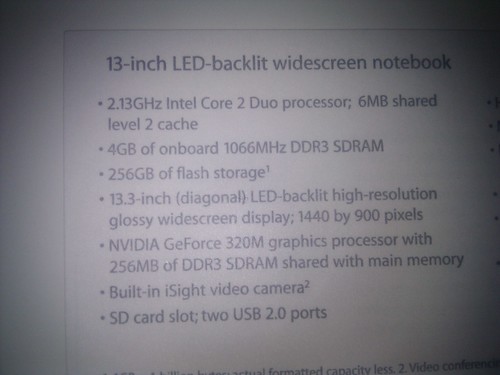
Specs of my new Macbook Air

Water and Air don’t mix

Now, on the flight over to Webvisions Barcelona, a glass of water succumbed to gravity and poured itself over the computer, leaving it as a slightly dripping black wedge to cut cheese with (anything else stopped working).

Meeting the genius (part one)

Right after landing, I went to the hotel, checked in and took a cab to the nearest Apple store to get the machine opened and hopefully saved.

After being told that the next appointment with a Genius is in 6 days time, I reminded the person of the urgency of the matter and that an expensive piece of hardware might be salvagable including my peace of mind and the keynote I have to give 2 days later.

We found a way to have a genius look at my machine, and look he did. He took it back to the lair of awesome where machines get to heal, opened it, took photos of the water damage, closed it and gave me the computer back – closed – showing me just how much water was in there. Foolishly I thought leaving the machine open and maybe next to a huge fan would be a good plan, but I am no genius (and I don’t want to sell hardware).

With the talk date looming I thought I bite and asked to buy a new Macbook Air. They didn’t have a 8 GB memory upgrade and only ones with Spanish keyboards, but hey – I can touch type and it would be cool to confuse people with it. So I forked over 1544 Euro and went back to the hotel to re-set my computer and install and download all the things I need.

Setup and first issue: WebGL and Chrome

The hotel wireless was free but also flaky so I ended up writing most of my talk in HTML in textedit and waited until the conference next day and a better connection to download all the things I needed.

The first thing I realised when I did the screencasts for my slides that WebGL and 3D transforms didn’t work on Chrome any longer. Seeing that a lot of the demos I wanted to show ironically ask you to use Chrome I had to hack my way in by spoofing the user agent string in Firefox which worked fine. Setting the “Override software rendering list” flag was proposed as a fix, but that lead to crashes of the Air – repeatedly.

This, I am sure, is a temporary issue until Apple get their act together and fix the drivers.

After setting up the machine for a day and grudgingly coming to terms with the non-upgraded RAM (I don’t care for harddisk size, I want 8GB of RAM) the morning came where I was supposed to give my talk.

Deal breaker: Macbook Air + long cable = no presentation

I set up on stage, opened the shiny new expensive laptop, connected my VGA cable and saw some blue bars – that’s it. The new Macbook Air does not connect to projectors via VGA with long cables. We verified that with mine, Matt May’s and some other speaker’s Macbook Air in two rooms, with different cables, different connectors, projectors and all the settings we can think of. It seems the great shiny new Thunderbolt connection is good for file transfer but underpowered for projection.

This was the final straw and after presenting from another computer I went back to the Apple store to return the computer. I bought an external harddrive to do a time machine backup not to lose all the stuff I set up and – receipt in hand – went to return the annoying machine.

After having to explain to 5 different geniuses that as a public speaker having a computer that does not project is a bit of a deal-breaker and that showing me that it does connect to a nearby monitor with a one foot cable is not a proof that it should work I got my money back.

Not sure what to pick – Apple might lose a customer

Now I am using my company machine for company work and I am pondering to give the chromebook a try for working in the cafe (using Cloud9IDE). Of course I will buy myself a new computer, but I have a hard time choosing what I want from Apple:

  • The Air is out of the equation with these bugs (the latter being a hardware fix I don’t see them doing any time soon)
  • The 13” MBP would be great for traveling, but it only goes up to 1280 resolution (how come the lesser specced Air goes up to 1440? – riddle me this)
  • Retina looks sexy, but I don’t see the point of it as it gives me a false sense of what people I work for would see
  • Seeing the Chrome issues I am not convinced at all about the Intel graphics chipset and I want NVIDIA
  • I want to have a beefy machine that is very portable which was the Air but the latest update really broke a lot of things I need.

Maybe it is time to go back to Windows or be a man and use Ubuntu.

HTML5 and the future of the web – Dr. Seuss style

Friday, July 6th, 2012

Update: there are now videos (screencasts) and audio of the talk available on the Mozilla blog.

I am currently at the Webvisions Event in Barcelona, Spain and tomorrow I will give a talk about “HTML5 and the future of the web”. To spice things up a bit, as I enjoyed watching The Lorax on the plane and seeing that a lot of people at the conference are parents, I thought it would be a good plan to write my whole slide deck in Dr.Seuss rhymes. This may go down immensely well, or fail horribly, but you got to take chances.

The talk (with a few extra slides) is available on Slideshare, as a PDF on Dropbox and as a styled HTML version on GitHub. Also thanks to Eric Shepherd for some rhyming help.

Enough of this – here we go:

  1. There’s a big web out there, 
    it’s huge – I tell you, 
    it spans the whole world
    but it was boring and blue
  2. Then change came about, 
    in the shape of a fox
    it was cunning and open
    and it broke all the locks.
  3. Others showed up,
    and joined the good fight
    a singer, an adventurer
    and a shiny new knight.
  4. These all played together
    and spoke the same tongue
    which brought back old players,
    to join them in song. 
  5. A standard was set, 
    and it changed a few things,
    a richer web for apps
    was the promise it brings.
  6. Bah, standards! Who needs them?
    Some flashy ones said, 
    till a phone that was smart,
    kicked them out of its bed.
  7. We moved past one standard, 
    as web work is richer,
    so HTML5 and friends,
    paints a much better .
  8. Things that are fun
    should be shiny and cool,
    that’s why the new standards
    bring many a new tool.
  9. Watching and hearing,
    are what people like to do.
    Using and is simple,
    and you can do it, too.
  10. Both of them are web-native,
    which is a reason to clap.
    They can interact with other content,
    and Mozilla Popcorn makes that a snap.
  11. If beats and frequencies are
    what you need to play,
    check the Web Audio API -
    it gives you just that – even today.
  12. To play nice with batteries,
    use requestAnimationFrame(),
    don’t let it stop you
    that it has such a long name.
  13. 3D graphics are thrilling,
    as gamers will tell,
    we now have that on the web
    and it is called WebGL.
  14. Water goes everywhere you pour it,
    just ask Chris about his Macbook Air :(
    MediaQueries allow you be as fluid
    and respond instead of despair.
  15. Natural movements are smooth,
    just open your eyes.
    With CSS animation, transforms and transition,
    you can mimic this – nice!
  16. “The web means you need to be online”,
    I hear smartypants gloat,
    well, we have offline storage,
    so there – take your coat.
  17. Got a cam and some friends,
    and do you want to chat?
    WebRTC is what you need,
    even to show off your cat.
  18. Rhymes sometimes don’t come easy,
    as you just became aware.
    So let’s just move ahead quickly,
    this was just too much to bear.
  19. An artist needs a ,
    and HTML5 gave us that.
    Read, write and convert pixels,
    All in the client, it’s mad!
  20. “We don’t have rich elements!”
    many people complain,
    Use Web Components with X-Tag
    and create them – easy to maintain.
  21. Passwords are tough, 
    it is easy to see, 
    so allow login with emails,
    using BrowserID.
  22. The web is a mess,
    with third party buttons abound.
    Web Intents make them pointless,
    let’s not have them around.
  23. By design HTML5 is forgiving,
    its parser is great.
    It didn’t want to break the web,
    so let’s not break it in its stead.
  24. Course you can write weird things,
    and they will work – there’s no doubt.
    But will they be readable by others?
    This is what it’s about.
  25. You don’t create for yourself,
    or your friends who are the same.
    You develop for the next guy,
    so make sure you’re not to blame.
  26. You don’t jump in a river,
    if you don’t know its depth.
    On the web using Modernizr,
    should be your first step.
  27. Give new stuff to new players,
    and use it to enhance.
    Don’t support when it’s not needed
    IE6 walks – it can’t dance!
  28. With a vendor prefix browsers tell you
    “this is not ready”.
    So by all means, give them a go,
    but don’t expect to go steady
  29. And those prefixes vanish,
    you mustn’t forget!
    End with a prefixless version,
    It’s your very best bet.
  30. So we ask you to help us,
    build a web that will last.
    Be future friendly and look forward,
    and stop building for the past.
  31. The web is on phones,
    tablets, computers, TVs.
    We have to move it forward.
    or else our existence will cease.
  32. Hardware that is locked up,
    is not what we are about,
    so check out Firefox OS,
    if you like the web – you will like it – no doubt.
  33. Last but not least,
    if you find something’s wrong
    please file a bug and tell us,
    this is how things get done.
  34. So there you have a lot to play with,
    check out and share.
    We really want you to do that,
    come on, show us you care.
  35. Unless someone like you
    cares a whole awful lot,
    nothing is going to get better.
    It’s not.
  36. So well done for reading and listening,
    and going great lengths,
    that’s all we got time for today,
    so good-bye and thanks!

Moving game data between two Android phones (Cut the rope, Temple Run)

Monday, July 2nd, 2012

I just got a new Galaxy Nexus at Google IO and installed all the apps I had on my old phone. The annoying thing, however, is that I would have to start from scratch again as the game data (which levels you completed, how many coins you got) isn’t stored in the Play store per device. To me, this is a real lack of functionality in Android and annoyed me. So here is a hack how to transfer both the game data of Cut The Rope and Temple run from one Android phone to another:

Here are the steps to take:

  1. Backup your old phone via USB to your harddrive, just create a folder and copy everything in there. In my case this was a ICS phone and you had to connect the phone, say yes to “turn off USB storage”, get the phone as a HD in OSX and go wild)
  2. Download Android Filetransfer and install it (on Windows, this is not needed)
  3. In Android File Transfer, create a folder called “Cut the Rope” and copy all the files from your hard drive backup there (remotesavefile and remotesavefile.experiments – if you also played Experiments)
  4. When you start Cut The Rope on the new phone, it will ask you to restore a previous state. Say yes.
  5. For Temple Run, go to Android/data in Filetransfer and create a folder called com.imangi.templerun
  6. In there, create a folder called files and copy both ALT_recordmanager.dat and recordmanager.dat from your hard drive into this folder
  7. Temple Run automatically detects the old state

This probably works for many other tools, too. Sadly not for Angry Birds – it seems.

Google IO 2012 Notes – lots of them

Monday, July 2nd, 2012

OK having fulfilled my tourist guide duties with my UK colleagues, I got time to write up a quick report about Google IO. So here goes:

Disclaimer: These are my personal views, I was fortunate enough to be invited for the event on an “influencer” ticket.

For the TL;DR folk:

Google did a tremendous job with the conference, the organisation was impressive, their messaging concerning the web less “use Chrome” and more “here is cool web tech Chrome supports” and they released all the things I hoped and feared about: Chrome for Android and IOs. There was a massive amount of great tech talks and most are available online. Big web announcements were Chrome for Android and IOs and lots of updates to Android, Google+ and search on Android.

Now, more detailed info for those not conditioned by 5 second cuts in music videos:

Event organisation

Overall I was very impressed with the conference organisation. But of course there are some snags. Here are what worked and what annoyed:

Worked well:

  • Value for money – on a very literal level – is ridiculously good. Just the hardware giveaways (more later) are giving your money back three-fold.
  • Before the keynotes they showed demos submitted to chromedemos on stage – this must have made quite some people proud
  • Lots of great content, a lot of it live streamed and already available on YouTube – I guess it helps owning that)
  • Amazing AV equipment in the rooms and especially in the big keynote hall (the three screens made me drool and want to talk there, but it also would mean I have to make prettier slides)
  • Food was adequate and ample, and drinks and coffee were available throughout the event
  • The staffing of the “business hours” tables was very good and it was no problem whatsoever to get your questions answered (this might be as I knew a lot of them though). The Chrome booth was stacked with all the people in the devrel team and Chrome engineers, no boothbabes in sight. Actually, none at all. This was a Google event with Google experts – an impressive feat to pull off.
  • Lots of places to charge your hardware – a lot of the rooms have rows and rows of outlets and there were massive Android figures standing around with all kind of cables to charge a plethora of devices.
  • Every talk had a cardboard box with “+1” cards to throw in at the exit of the talks to vote for it. I loved that idea as it was physical, showed the 1 character of Google and gave them a mechanism to measure the success of the talk (that a few speakers I talked to never saw people changing the boxes is a bit worrying though). There was no scanning of your badge on the way in to the room as it was last year – I guess they gave up on that.
  • Every talk was transcribed live on big screens for the hard of hearing – this is not cheap and hard to pull off, but a wonderful little touch.

Worked less well:

  • The insane amount of attendees (around 5500) lead to a lot of queuing up for the keynotes and swag pickup (which needed both the conference badge and a photo ID which lead to even more delays). The first day we did a loop-the-loop around the keynote room to get in and the second day we had a long and random queue in the foyer. Maybe letting people in earlier would have fixed some of the issues.
  • The repeat of the “amazing suprise” of the first keynote (people sky-diving onto the building wearing Google Glass) which was sold as a behind the scenes turned out to be probably the most boring Mythbusters episode ever. The reason for the repeat jump was that Google paid for two days of rights to fly over the Moscone centre to make sure the weather was good and as this is not a cheap feat they wanted to make the most out of it. They should have let me jump with the people on the second day – maybe in the Firefox costume (or as an Android, or just me).
  • The Google+ presentations were weird. Whilst presenting the new Events feature (which is much better than what Facebook offers) and trying it out at the afterparty went down well, the obviously non-impressive numbers of Google+’s growth compared to competitors seemed not needed to me. I guess the focus is on fact soundbites for the press, but when they are easy to be slashed, why bother? Maybe I am just sick of the numbers game
  • The official app for the event was laggy and didn’t get updated in time. I missed a few talks because of that. It also had the wrong hashtag when you tweeted from it (which I edited before sending off but I doubt a lot of people did which must have skewed the twitter numbers).
  • Schedule display was patchy at times and I found far too much going on in parallel. Maybe shorter sessions would have allowed a better experience.
  • The last day was very much empty and felt like an extra day for networking with not much organised content. Good idea but seeing that lots of people didn’t bother going defeated the networking purpose a bit.

Overall impressions

  • The technical messaging was fair and interesting. Whilst last year a lot smacked of “look at those numbers aren’t we awesome and you should use us” this year was much more about “look what is possible and how we support it”
  • Google released a lot of products and services in direct competition with smaller players (Tripit, Shazam, Turntable.fm) and released a few products blatantly aimed at Amazon (Kindle competition, offering Infrastructure as a service), Apple (Siri competition) and Microsoft Office (Docs upgrade to allow for collaborative writing and offline use – which only will work in Chrome).
  • There was quite some snark aimed at Microsoft in the keynotes (“try doing that with Sharepoint and spreadsheets”) and of course there were “and another thing” and “xyz isn’t cool abc is cool” sightings.
  • In comparison to last year the keynotes were more polished and seemed less “please use this”. There was more self-assurance on stage. However, quite some of it seemed too scripted for my taste and had a lot of “this is my favourite thing ever” which gets unbelievable after a while. I liked that the man showing Google Now and the lady presenting the design ideas behind Glass were scared as heck on stage and thus showed real emotions and were much more believable. The keynotes are online: Day1 Day 2
  • The after party was much simpler than last year – Train was a very fitting band for San Francisco and Paul Oakenfold can’t have been cheap (but I had to spend a lot of time explaining US folk who he is). The alcohol ran out rather quickly, but that might actually be a good thing. There were a lot of entertainment things but less of a “maker faire” flair than last year.
  • Google IO allowed for a lot of people to be in town, which meant that outside events cropped up, like a beer.js in the thirsty bear and some other quick meetings about Web Components with people from a lot of browsers and large companies.

Great releases

  • Google Hangouts are very much focused on using WebRTC now and seem to be quite a competitor to proprietary and installable solutions. The message that “WebRTC is available in IE via Chromeframe” made me spit coffee and laugh though – sadly it is not that easy.
  • Google Chrome for Android and IOs is great, shame that the former is as an opt-in for phone service providers and will not be backfilled to Android older than ICS. The slickness of the presentation of Chrome was impressive though – history syncing over devices is incredibly useful. Now I want that with my apps state on Android (a boy can dream)
  • Speaking about Android, the atomic app update in Jelly Bean is what was a benefit of web apps vs. native apps that is going away now – instead of needing to download the full APK you now download the changed parts. Time to change my presentations :/
  • Google Drive got some impressive new features including automatic OCR and face/sights detection in photos.
  • Google’s collaboration with Subatomic and Cirque de Soleil
    Movi.Kanti.Revo – (keynote section) is probably one of the coolest tech demos I have seen in the last year. It uses the camera and movement detection to navigate an interactive dance and performance experience.
  • Google compute engine could be a real threat to Amazon’s EC2. You can fire up lots of virtual machines for computation in a very simple manner

Talks I’ve seen and can recommend

  • The web can do that? is Eric Bidelman’s overview of cool new web technologies delivered in a very matter-of-fact way. Great talk!
  • GRITS: PvP Gaming with HTML5 was a very well delivered talk on HTML5 gaming and the GRITS blueprint game you can download and learn from.
  • The Web Platform’s Cutting Edge is a wonderful introduction to web components and the need for them (also mentions X-Tag, so, like, win!)
  • Turning the web up to 11 covers all the details of the Web Audio API - this has great demos and tools but can be a bit daunting
  • The Mobile Chrome summit was a great meeting with all the big names in mobile web development asking the Chrome team questions. Notes will be out soon, and I wish they’d implement my suggestion of building Chrome Frame for Android :)

Talks I will watch and sadly enough missed

Free stuff

  • Google once again showered the conference attendees with free hardware: a new Galaxy Nexus phone running Android Jelly Bean, a Nexus Seven (geek credit++ from me on that name) tablet, a Nexus Q (which I left as a present here as it is the approximate weight, shape and usefulness of a cannon ball in my hand luggage as most of the Google Play streaming content is not available in the UK), and a Chromebox. Google painted themselves in a corner a bit with that – there is no way IO can be a non-giveaway conference ever again.
  • Other swag was a lovely Google IO shirt, stitched HTML5 badges, Sticker sheets with the HTML5 logo and related technology icons and Android figures filled with Jelly Beans.

Was it worth it?

Expletive yeah! I will be back next year.

[Mozilla Evangelism Reps] Great talks – Pablo Defendini – Books in Browsers – Adaptive Web Design

Wednesday, June 20th, 2012

As part of the Mozilla Evangelism Reps program, I am right now preparing a training on how to learn from other talks. As a demo I went through a few talks showing what makes them interesting and pointing out good tricks the speaker (in most cases subconsciously) used and how you could use that for your own talks.

One of the first talks is Pablo Defendini with “Adaptive Web Design” explaining how he created a responsive online comic and why.

You can find the minute-by-minute analysis of the talk on the Mozilla Wiki.

I really enjoyed this talk as it shows that enthusiasm about a subject matter and just “having a go” can work out really well. It also shows that everything can go wrong when you present and that it isn’t the end of the world – you just need to move on swiftly.