Christian Heilmann

You are currently browsing the archives for the General category.

Archive for the ‘General’ Category

Quick tip: conditional form fields with CSS

Thursday, January 8th, 2015

As part of a tool I just wrote, I had the issue that one form field was dependent on another and I didn’t want to go the full way and create the field on demand with JavaScript but keep it to CSS. You can see the result here:

showing and hiding extra form fields when a checkbox is activated

A simple way to achieve this visually is to use the :checked pseudo and + selectors as you can see in this Fiddle:

The HTML is the following:

<form>
    <input type="checkbox" id="moo">
    <label for="moo">Condition</label>
    <label>
        value for condition: 
        <input type="text" value="20">
     </label>
</form>

And the important CSS are these few lines:

label + label {
    padding-left: 1em;
    opacity: 0.1;
    transition: 0.5s;
}
:checked + label + label {
    opacity: 1;
}

Questionable accessibility

Once you publish something like this, you will get a lot of tweets that this is not accessible. The same happened here, and it doesn’t matter that I wrote about the shortcomings in the first version of this post. The debate is interesting and relevant. So let’s break it down:

  1. The form field that is dependent on the activation of the checkbox is available at all times. It is not taken out of the tabindex or removed or deactivated – all CSS can do is change it visually. This can be an issue as users can access the field, change its value and more or less wasted their time as it’d never get applied unless they also activate the checkbox.
  2. The proper way of doing this would be to make the field unavailable until the checkbox is activated. This needs a JavaScript solution. You need to either change the tabindex dynamically or remove it from the DOM.
  3. It might be enough to change the visibility to hidden or the display to none (it is – see below). I feel not safe doing that though, as I rely on implementation details of assisstive technology that is not standardised. Should a screen reader not access an element that is visbility: hidden?
  4. Is a JavaScript solution really more accessible or could it be more fragile? If something happens and your JavaScript doesn’t run (a resource wasn’t loaded, an earlier script failed) end users will never get the extra field.
  5. Is this the better solution? Or does it mean we rely on a very complex solution because we are used to having to apply it? A lot of feedback I got to this was “Real dynamic forms are only possible with JavaScript”, which sounds cargo cultish to me – and I’ve been a JS advocate for a long time.

It is disappointing that a simple problem like this still needs a lot of DOM manipulation and/or ARIA to really be accessible. Maybe we think too complex – a different way of solving this issue would be to cut this problem into several steps and reload the page in between. Overkill for one field, but for very complex JS-driven forms this might be a much saner solution. And it could result in smaller forms as we don’t need a framework or lots of libraries.

In this – simple – case I wonder what harm there is in the extra form field to be accessible to non-visual users. The label could say what it is. Say the checkbox has a label of “convert to JPG”. A label of “JPG quality” on the text field would make things understandable enough. Your backend could also be intelligent enough to realise that when a JPG quality was set that the user wanted a JPG to be generated. We can be intelligent in our validation that way.

Update: Visibility fixes the issue

Turns out that adding visibility to the earlier example has the same visual presentation and fixes the tabbing issue:

The HTML is still the following:

<form>
    <input type="checkbox" id="moo">
    <label for="moo">Condition</label>
    <label>
        value for condition: 
        <input type="text" value="20">
     </label>
</form>

And the updated CSS:

label + label {
    padding-left: 1em;
    opacity: 0.1;
    visibility: hidden;
    transition: 0.5s;
}
:checked + label ~ label {
    opacity: 1;
    visibility: visible;
}

UPDATE: Safari fix.

As Safari doesn’t support multiple + selectors, replacing the second one with a ~ works. Get with it, Safari!

Tutorial: Canvas, images and pixels

Wednesday, January 7th, 2015

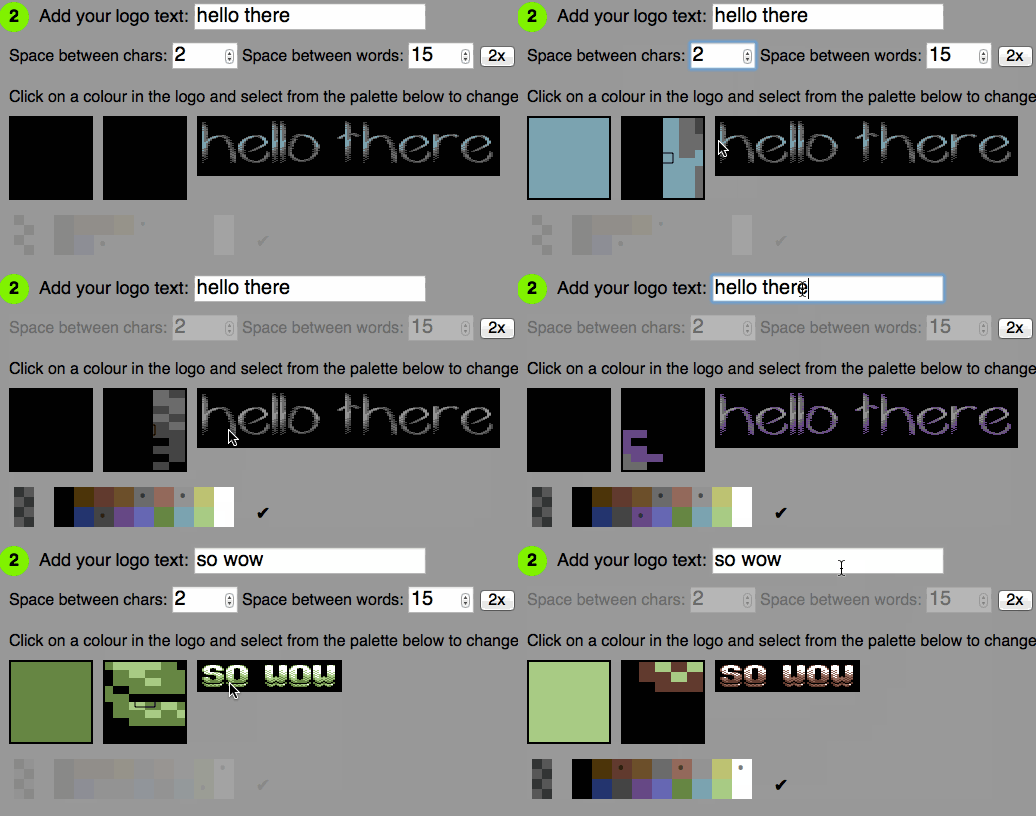
Using my time off work to #justcode, I tweaked the Pixel logo generator I did years ago quite a bit in the last few weeks.

Logo generator demo

To make that time a bit more worth-while, I now also wrote up a detailed tutorial on how to create a logo generator like this.

The tutorial is called Canvas, images and pixels and is available on GitHub for download.

In it, I explain a few things:

  • How to manipulate images in canvas
  • How to create a logo from a font that is in a bitmap
  • How to offer a zoom view for an image that is not blurry
  • How to save a canvas as an image
  • How to analyse and change the colours used in an image

All the demos are live in the page and are kept as simple as possible, using no libraries or abstractions.

Enjoy, and I hope you learn something from it!

Going IRL during the holidays can teach us to talk more, let’s do that.

Friday, December 26th, 2014

I am currently with my family celebrating Christmas in the middle of Germany. Just like the last years, I planned to do some reflection and write some deeper thinking posts, but now I keep getting challenged. Mostly to duels like these:

dog wanting to play

I find the visits to my family cleansing. Not because of a bonding thing or needing to re-visit my past, but as a reality check. I hear about work troubles. I hear about bills to keep the house in a state of non-repair. I hear about health issues. I hear about relationship problems.

What I don’t hear about is people with a lot of money, amazing freedoms at work and a challenging and creative job complaining. I also don’t hear hollow messages of having to save the world in 140 characters. I also don’t hear promises of amazing things being just around the corner.

I hear a lot of pessimism, I hear a lot of worry about a political shift to the right in every country. I hear worries about the future. I hear about issues I forgot existed, but are insurmountable by people outside our bubble. Not only technical issues, but communication ones and rigid levels of hierarchy.

And that makes me annoyed, so much that I wish for the coming time and year to be different. Working on the web, working for international companies we should feel grateful for what we have. I count international companies as those with a different language in the office than the one of the country. And those who practice outreach further than the country.

Let’s tackle communication in the coming year after we’ve come out refreshed and confused by the holidays. Let’s listen more, feel more, communicate more, forgive more and assume less. It is hard to fathom that in a world that connected and that communicative human interaction is terrible. We love to complain about big issues publicly to show that we care. We love to point fingers about who is to blame about a certain problem. We are concerned that people feel worried or unhappy but we fail to reach out and listen when they need us. We are too busy to complain that their problems exist. Not everybody who shares a lot online is happy and open. Sometimes there is a massive disconnect between that online person and the one doing the sharing. Talk more to another, be honest in your feedback. Forget likes, forget emoticons, forget stickers. Use your words. Use a simple “How are you”. We have a freedom not many people enjoy. We work in a communication medium where chatting with others and being online is seen as work. And we squander it away by being seclusive on one hand and overly sharing on another.

The corporate rat race of the 80s has been the topic of many a movie about burn-out and a lot of Christmas movies shown right now. A lot is about the seemingly successful business person finding that love and feeling and having friends matters. The 80s are over. The broken model of having to be successful and fast-moving in anything you do is still alive. And now, it is us. Let’s show that we can not only disrupt old and rigid business models. Let’s show that we can also be good people who talk to another and have careers without walking over others.

Have a happy few days off. I hope to talk to you soon and hear what you have to say.

The next UX challenge on the web: gaining offline trust

Monday, December 8th, 2014

you are offline - and that's bad.

A few weeks ago, I released http://removephotodata.com as a tool. It is a simple web app (well, a page) that allows you to remove the EXIF data of an image before sharing it online. I created it as a companion to my “Put social back in social media” talk at TEDx Linz. During this talk I pointed out the excellent exiftool. A command line tool to remove extra information embedded in images people might not want to share. As such, it is too hard to use for most users. So I thought this would be a good solution.

It had some success and people – including the press in Spain – talked about it. Without fail though, every thread of comments or Twitter conversation will have one person pointing out the “seemingly obvious”:

So you create a tool to remove personal data from images and to do that I need to send the photo to your server! FAIL! LOLZ0RZ (and similar)

Which is not true at all. The only server interaction needed is the first load of the page. All the JavaScript analysis and removal of EXIF data happens on your computer. I even added a appcache to ensure that the tool itself works offline. In essence, everything happens on your computer or smartphone. This makes a lot of sense – it would be nonsense to use a service on some machine to remove personal data for you.

I did explain this in the page:

Your photo does not get uploaded anywhere, all of this happens on your device, in your browser. It even works offline.

Nobody seems to read that, though and it is quicker to complain about a seemingly non-sensical security tool.

The web needs a connection, apps do not?

This is not the user’s fault, it is conditioning. We’ve so far have done a bad job advocating the need for offline functionality. The web is an online medium. It’s understandable that people don’t expect a browser to work without an internet connection.

Apps, on the other hand, are expected to work offline. This, of course, is nonsense. The sad state of affairs is that most apps do not work offline. Look around on a train when people are not connected. You see almost everyone on their phone either listening to local music, reading books or playing games. Games are the only things that work offline. All other apps are just sitting there until you connect. You can’t even write your posts as drafts in most of them – something any email client was able to do a long time ago.

The web is unsafe, apps are secure?

People also seem to trust native apps more as they are on your device. You have to go through an install and uninstall process to get them. You see them downloading and installing. Web Apps arrive by magic. This is less re-assuring.

This is security by obscurity and thus to me more dangerous. Of course it is good to know when something gets to your computer. But an install process gives the app more rights to do things, it doesn’t necessarily mean that software is more secure.

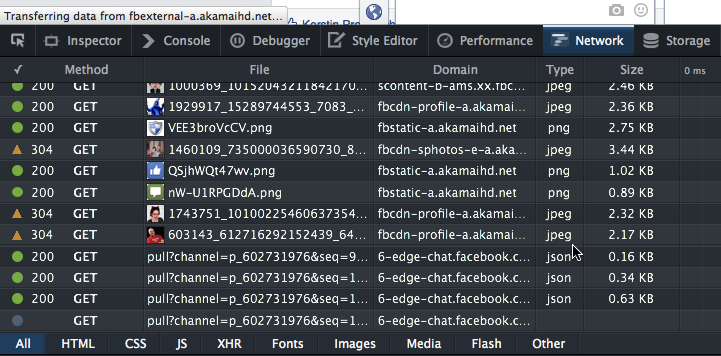
Native apps don’t give us more security or insight into what is going on – on the contrary. A packaged format with no indicator when the app is sending or receiving data from the web allows me to hide a lot more nasties than a web site could. It is pretty simple with developer tools in a browser to see what is going on:

Network Tab in Firefox

On my mobile, I have to hope that the Android game doesn’t call home in the background. And I should read the terms and conditions and understand the access the game has to my device. But, no, I didn’t read that and just skimmed through the access rights and ticked “yes” as I wanted to play that game.

There is no doubt that JavaScript in browsers has massive security issues. But it isn’t worse or better than any other of the newer languages. When Richard Stallman demonised JavaScript as a trap as you run code that might not be open on your computer he was right. He was also naive in thinking that people cared about that. We live in a world where we give away privacy and security for convenience. That’s the issue we need to address. Not if you could read all the code that is on your device. Only a small amount of people on this world can make sense of that anyways.

Geek mode on: offline web work in the making

There is great work in the making towards an offline web. Google’s and Mozilla’s ServiceWorker implementations are going places. The latest changes in Chrome give the browser on the device much more power to store things offline. IndexedDB, WebSQL and other local storage solutions are available across browsers. Web Cryptography is coming. Tim Taubert gave an interesting talk about this at JSConf called “Keeping secrets with JavaScript: An Introduction to the WebCrypto API“.

The problem is that we also need to create a craving in our users to have that kind of functionality. And that’s where we don’t do well.

Offline first needs UX love

There is no indicator in the browser that something works offline. We need to tell the user in our copy or with non-standardised icons. That’s not good. We assume a lot from our users when we do that.

When we started offering offline functionality with appcache we did an even worse job. We warned users that the site is trying to store information on their device. In essence we conditioned our users to not trust things that come from the web – even if they requested that data.

Offline functionality is a must. The wonderful world of constant, free and fast connectivity only exists in movies and advertisements for mobiles and smart devices. This is not going to happen any time soon as physics is not likely to change and replacing a lot of copper cable in the ground is quite a job.

We also need to advocate better that users have a right to use their devices offline. Mobile phones are multi-processor machines with a lot of RAM and storage. Why not use that? Why would I have to store my information in the cloud for everything I do? Can I trust the cloud? What is the cloud? To me, it is “someone else’s computer” and they have the right to analyse my data, read it and even cut me off from it once their first few rounds of funding money runs out. My phone I got, why can’t I do more with it when I am offline? Why can’t I sync data with a USB cable?

Of course, all of this is about convenience. It is easier to have my data synced across devices with a cloud service. That way I never lose anything – if the cloud provider is OK with me getting to my data.

Our devices are powerful machines and we should be able to create, encrypt and store information without someone online snooping on me doing it. For this to happen, we need to create users that are aware of these options and see them as a value-add. It is not an easy job – the marketing around the simplicity of closed systems with own cloud services is excellent. But so are we, aren’t we?

It is Blue Beanie Day – let’s reflect #bbd14

Sunday, November 30th, 2014

Today we celebrate once again blue beanie day. People who build things that are online don their blue hat and show their support for standards based web development. All this goes back to Jeffrey Zeldman’s book that outlined that idea and caused a massive change in the field of web design.

me, wearing my HTML beanie

Let’s celebrate – once again

It feels good to be part of this, it is a tradition and it reminds us of how far we’ve come as a community and as a professional environment. To me, it starts to feel a bit stale though. I get the feeling we are losing our touch to what happens these days and celebrate the same old successes over and over again.

This could be normal disillusionment of having worked in the same field for a long time. It also could be having heard the same messages over and over. I start to wonder if the message of “use web standards” is still having an impact in today’s world.

The web is a commodity

I am not saying they are unnecessary – far from it. I am saying that we lose a lot of new developers to other causes and that web development as a craft is becoming less important than it used to be.

The web is a thing that people use. It is there, it does things. Much like opening a tap gives you water in most places we live in. We don’t think about how the tap works, we just expect it to do so. And we don’t want to listen to anyone who tells us that we need to use a tap in a certain way or we’re “doing it wrong”. We just call someone in when the water doesn’t run.

Standards mattered most when browsers worked against them

When web standards based development became a thing it was an absolute necessity. Browser support was all over the shop and we had to find something we can rely on. That is a standard. You can dismantle and assemble things because there is a standard for screws and screwdrivers. You can also use a knife or a key for that and thus damage the screw and the knife. But who cares as long as the job’s done, right? You do – as soon as you need to disassemble the same thing again.

Far beyond view source

Nowadays our world has changed a lot. Browser support is excellent. Browsers are pretty amazing at displaying complex HTML, CSS and JavaScript. On top of that, browsers are development tools giving us insights into what is happening. This goes beyond the view-source of old which made the web what it is. You can now inspect JavaScript generated code. You an see browser internal structures. You see what loaded when and how the browser performs. You can inspect canvas, WebGL and WebAudio. You can inspect browsers on connected devices and simulate devices and various connectivity scenarios.

All this and the fact that the HTML5 parser is forgiving and fixes minor markup glitches makes our chant for web standards support seem redundant. We’ve won. The enemies of old – Flash and other non-standard technologies seem to be forgotten. What’s there to celebrate?

Our standards, right or wrong?

Well, the struggle for a standards based web is far from over and at times we need to do things we don’t like doing. An open source browser like Firefox having to support DRM in video playback is not good. But it is better than punishing its users by preventing them from using massively successful services like Netflix. Or is it? Should our goal to only support open and standardised technology be the final decision? Or is it still up to us to show that open and standardised means the solutions are better in the long run and let that one slip for now? I’m not sure, but I know that it is easier to influence something when you don’t condemn it.

A new, self-made struggle

All in all there is a new target for those of us who count themselves in the blue beanie camp: complexity and “de-facto standards”.

The web grew to what it is now as it was simple to create for it. Take a text editor, write some code, open it in a browser and you’re done. These days professional web development looks much different. We rely on package managers. We rely on resource managers. We use task runners and pre-processing to create HTML, CSS and JavaScript solutions. All these tools are useful and can make a massive difference in a big and complex site. They should not be a necessity and are often overkill for the final product though. Web standards based development means one thing: you know what you’re doing and what your code should do in a supported browser. Adding these layers adds a layer of dark magic to that. Instead of teaching newcomers how to create, we teach them to rely on things they don’t understand. This is a perfectly OK way to deliver products, but it sets a strange tone for those learning our craft. We don’t empower builders, we empower users of solutions to build bigger solutions. And with that, we create a lot of extra code that goes on the web.

A “de-facto standard” is nonsense. The argument that something becomes good and sensible because a lot of people use it assumes a lot. Do these people use it because they need it? Or because they like it? Or because it is fashionable to use? Or because it yields quick results? Results that in a few months time are “considered dangerous” but stick around for eternity as the product has been shipped.

Framing the new world of web development

We who don the blue hats live in a huge echo chamber. It is time to stop repeating the same messages and concentrate on educating again. The web is obese, solutions become formulaic (parallax scrollers, huge hero headers…). There is a whole new range of frameworks to replace HTML, CSS and JavaScript out there that people use. Our job as the fans of standards is to influence those. We should make sure we don’t go towards a web that is dependent on the decisions of a few companies. Promises of evergreen support for those frameworks ring hollow. It happened with YUI - a very important player in making web standards based work scale to huge company size. And it can happen to anything we now promote as “the easier way to apply standards”.