I spent this morning at a photoshoot. A photographer dragged me all over Berlin Mitte to take photos of me holding my phone and pretending to communicate. The reason is an essay about “Jobs of the Future” for a German finance magazine. Me, I am a “Developer Relations Person/Developer Evangelist/Developer Advocate” and this is baffling to people with “normal” jobs. I’ve done this for a long time and quite some time ago I wrote the Developer Evangelism handbook.
It is flattering to see how something that niche gets mainstream attention. It is also frightening to me. The explosion of DevRel opportunities in the last years is amazing. But often I am disappointed. The idea of companies hiring DevRel people in junior positions is odd. People with no company history or product involvement being DevRel is against everything I described.
DevRel is a great opportunity for engineers to move from delivering the product to helping it to become a bigger success. We’re not sales people and we’re not marketing. We’re communicators inside and outside the company and our main task is to make it easy for developers to do their job. That needs in-depth technical knowledge and company experience. That means dealing with the needs of marketing, management and recruiting and translating those to events and team communication. It also means – to a much larger degree – to ensure that the developer’s needs inside and outside the company are communicated in an understandable and actionable manner to the company.
What annoys me a lot more though is that by painting DevRel as a job disconnected from engineering, developers lose respect. And often people don’t get just how much stress, effort and unsatisfactory agreements working in DevRel is.
On the surface, DevRel sounds like a great job. Other people do the work, all you need to do is to present it in social media, at conferences and in blog posts. It also looks incredibly glamorous. You travel all over the world. You stay in hotels all the time. You get paid to go to conferences other people have to beg their managers to get tickets for. You hang out with higher-ups in the company. You always have the coolest new swag and inside information.
Now, I have been doing this job for quite some years now, and it is important to also explain the problems with this job. I don’t want to discourage people from pursuing this idea. But I also want to talk a bit about the things that frustrate, depress and endanger you when you work in DevRel . And I want to explain how some of these things that looks shiny and great can turn exhausting and drain a lot of energy. I’ve encountered burnout and frustration and depression and with every high comes a massive low. So, maybe this will help some of you avoid these.
Over the next few days I will cover a few of the concepts of DevRel and what dark and annoying things you should be prepared for:
I am chuffed to announce that my first Skillshare course is going live today! The course is online and comes with a free two month subscription to Skillshare. You can watch it by following this link: http://skl.sh/christian or tapping on my nose in this still:
Under the title “Introduction to Machine Learning: Using Artificial Intelligence” I have recorded about an hour of materials to get you familiar with the topic of AI.
This is not a hard-core Machine Learning and data science course and I invite anyone with an interest in the topic to participate.
You don’t need to be a developer or data scientist. Instead I wanted to create a series of videos for anyone interested in AI. Consider it a head-start without the hype or complexity other resources on the topic.
In about an hour of simple lessons, you’ll learn about a few of the use cases of Machine Learning and how to apply them to your day-to-day products.
The list of lessons is as follows (video length in parenthesis):
Introduction (1:44)
What is Machine Learning (5:25)
How We Teach Machines (5:48)
Machine Learning to Help Humans (5:28)
Tools for Machine Learning (3:44)
Visual Uses (7:54)
Speaking Human (6:07)
Audio & Video (6:32)
Personalizing Your Machine Learning (5:08)
Ethics of Machine Learning (5:32)
Machine Learning & Creativity (4:33)
Final Thoughts (0:32)
My big idea about this course is to entice you to be creative with the different machine learning/AI offerings out there. Artificial Intelligence is the next evolution in computers and human/machine interaction and I think it is high time to democratise it. For years online portals, personal mobile devices and microphones in our houses have recorded our data. A lot of good has come out of this, like virtual keyboards that learn from our usage patterns or voice recognition that isn’t guesswork.
However, only a few companies use this information to build intelligent, responsive interfaces for our users. In order to take the creepiness out of AI, we should all do this. Human interaction has been recorded for quite a while, isn’t it time we also get much better interaction across the board based on this data?
In this course, I will show how Machine Learning allows for automatic image detection and labelling, facial recognition and using it in an ethical fashion and how to provide interfaces that allow humans to type or say full sentences instead of learning interaction models that are outdated.
The course is available for all Skillshare users, or if you aren’t one yet, you can follow this link skl.sh/christian for two months of free access – more than enough time to finish this course and others.
Posted in General | Comments Off on New Skillshare course: Introduction to Machine Learning: Using Artificial Intelligence
Artificial intelligence is the hype we’re knee-deep in at the moment. Everybody says they use it. Some says it will make the world a better place, others worry that it is the first sign of the end of the world.
AI isn’t only for a few, big, technical players
And most are technically correct. Most also miss the mark. It isn’t abut delivering one killer product around AI. Instead we should consider integrating it into what we already do. In this article I want to point out some facts about the use of AI and what fuels it. And what we could do to make all interfaces better with these insights.
There is a limited space for personal assistants in our lives. We don’t need every system to be our J.A.R.V.I.S or Star Trek’s ubiquitous “Computer…”. I also doubt that every interface is replaceable by a “personal assistant”. But we can learn a lot from them. Simplification and making sensible assumptions, for starters.
I will offer quite a few resources in this post. If you don’t want to open them one by one and prefer them with a short explanation, I put together a notes section with all of them.
Flawed user input shouldn’t be the end
Wouldn’t it be great if the interfaces we use were be a bit more lenient with our mistakes? What we do on the web is often limited compared to what operating systems and native interfaces offer. How often do you get stuck because a search interface expects perfect keywords? How often are you lost in a navigation that Russian-doll-like opens more and more options – neither applicable to your query – the more you click it? How many passwords have you forgotten because the form requests it in a special format that doesn’t allow special characters?
We have the power with deep learning and already harvested information to create some very human friendly interfaces. Interfaces that add extra information to work around barriers people have.
Visually impaired people benefit from image descriptions. People with cognitive impairments benefit from being able to ask simple questions instead of clicking through an animated tree of options. Seeing someone who doesn’t like computers ask Siri a question and getting a result is great. So was seeing elderly people play Wii tennis. They played it because they swung a racket instead of pressing confusing buttons on a controller. The point is that we have the power to allow humans be humans and still interact with machines as we taught machines about our flaws. An erroneous entry in your product isn’t a dead end. It is an opportunity to teach an algorithm how things go wrong to help them out.
Interfaces can make sensible assumptions what we did wrong and fix it instead of telling us to use the correct words. Interfaces that don’t assume humans think in keywords and filters but in words and metaphors.
This already happens in the wild. Take Google Maps for example. Did you know you can enter “How far am I from the capital of France” and you get a map as the result?
The system found you on the planet, knows that the capital of France is Paris and gives you all the info how to get there.
Spotlight in OSX understands “my documents larger than 20 pages” and shows you exactly that. It parses documents where the owner is you and that are 20 pages or larger. No need to do Unix-style size flag, five click interactions or complex filtering interfaces.
The next users expect this to work
I never did this before I researched my talks and this post. But people who don’t have the burden of knowledge about IT systems that I have are using language like that. Especially in an environment where they talk to a computer instead of typing things.
Image catalogues are another great example. The amount of images we create these days is huge. And we stopped interacting with them right after we took the photo. Back in the days when it was harder to post online we uploaded photos to Flickr, gave them a title and tagged them. As the system was not clever enough to find information based on the image itself, this was the only means for us to find it weeks later.
Nowadays, we expect any photo search to be able to understand “dog” and find photos of dogs. They neither have alternative text saying “dog” nor tags, and yet search engines find them. This even works for more generic terms like “picnic” or “food”. And this is where Deep Learning worked its magic.
The problem is that only a few interfaces of well-known, big companies give this convenience. And that makes people wonder who owns information and where they know all these things from.
Unless we democratise this convenience and build interfaces everywhere that are that clever, we have a problem. Users will keep giving only a few players their information and in comparison less greedy systems will fall behind.
The other big worry I have is that this convenience is sold as “magic” and “under the hood” and not explained. There is a serious lack of transparency about what was needed to get there. I want people to enjoy the spoils but also know that it was paid for by our information and data. And that, of course ties in directly to security and privacy.
AI isn’t magic only a few players should offer and control.
AI is nothing new, the concepts go back to the 50ies. It is an umbrella term for a lot of math and science around repetition, pattern recognition and machine learning. Deep learning, the big breakthrough in making machines appear intelligent just became workable. Today’s chipsets and processors are powerful enough to plough iteratively through massive amounts of data. What took days in the past and a server farm the size of a house can now happen in a matter of minutes on a laptop.
If you want a very simple explanation what Machine Learning is, CGP Grey did a great job in his “How Machines Learn” video:
At the end of this video, he also explains one thing we all should be aware of.
Machines are constantly monitoring everything we do online and how we use hardware. There is no opt-out there.
As soon as something is free, you pay with your interactions and data you add to the system. This shouldn’t be a surprise – nothing is free – but people keep forgetting this. When Orwell predicted his total control state he got one thing wrong. The cameras that record all our actions aren’t installed by the state. Instead, we bought them and give our lives to corporations.
Just imagine if a few years ago i’d have asked you if it’ll be OK to put a microphone in your house. A microphone that records everything so a company can use that information. You’d have told me I’m crazy and there is no way I could wire-tap your house. Now we carry these devices in our pockets and we feel left out if our surveillance microphone isn’t the newest and coolest.
However, before we don our tinfoil hats, let’s not forget that we get a lot of good from that. When the first smartphones came out less enthusiastic people about the future sniggered. The idea of a system without a keyboard seemed ludicrous.
They were right to a degree: typing on a tiny screen isn’t fun, especially URLs were a pain. We built systems that learned from our behaviour and an amazing thing happened. We hardly type in full words any longer. Instead the machine completes our words and sentences. Not only by comparing them to a dictionary. no. Clever keyboards learn from our use and start to recognise our way of writing and slang terms we use. They can also deal with language changes – I use mine in English and German. A good virtual keyboard knows that “main train” most likely should get a “station” as the next word. It also knows that when you type a name it gives you the full name instead of having to type each letter.
Convenient, isn’t it? Sure, but in the wrong hands this information is also dangerous. Say you type in your passwords or personal information. Do you know if the keyboard you downloaded sends it to the person you intended exclusively? Or does it also log it in the background and sells that information on to a third party?
By using other people’s machines and infrastructure, we leave traces. This allows companies to recognise us, and accumulates a usage history. This leads to better results, but can also leak data. We should have more transparency about what digital legacy we left behind.
One blissfully naive stance I keep hearing is “I have nothing to hide, so I don’t care if I gets recorded”. Well, good for you, but the problem is that what gets recorded may be misunderstood or lacks context. A system that adds a “most likely context” to that can result in a wrong assumption. An assumption that makes you look terrible or even gets you on a watchlist. It then becomes your job then to explain yourself for something you never did. Algorithmic gossip you need to work with.
And that’s the big problem with AI. We are sold AI as this all-solving, intelligent system devoid of issues. But, no – computers can’t think.
AI can’t replace a thinking, creative human and can not magically fill gaps with perfect information. It can only compare and test. AI doesn’t learn in a creative fashion. It makes no assumptions. AI has no morals and ethics, but – used wrongly – it can amplify our biases.
In other words, AI accelerates how humans work. For better or worse. Machine Learning is all about returning guesses. We don’t get any definitive truth from algorithms, we get answers to our questions. AI can answer questions, but it is up to us to ask good questions – generic questions yield flawed results. Untrained and limited data leads to terrible and biased AI results. It is very easy to get either wrong deductions or false positives. AI is as intelligent and good as the people who apply it.
And this is where the rubber meets the road: what do we want AI to do and how do we use the information?
Any of these could be used for good or bad. It is great if I can unlock my computer or mobile by looking into a camera rather than typing yet another password. It is great if I can find all photos of certain friend in my photo collection searching by name. It is also important to know if the person I am interacting with is really who I think they are. Uber, for example, rolled out a system that face-verifies a driver and customer before they enter the car.
But where does it end? There is a service that detects the ethnicity of a person from a photo and as much as I wreck my brain, I can’t think of a non-nefarious, racist use case for this.
Many companies are right now starting programs about ethical AI or AI for good and that is superbly important. The great speed and ability to work through huge and messy datasets quickly with a deep learning algorithm has many beneficial applications. From cancer research, to crop analysis, fraud prevention and defensively driving vehicles, there is a lot to do.
But all this smacks a bit of either science fiction or a great press headline rather than production-ready solutions. I think that in order for them to work, we need to educate people about the day-to-day benefits of intelligent systems. And there is no better way to do that than to have machines work around the issues we have simply by being human.
Humans are an interesting lot:
We are messy and prone to mistakes
We forget things and filter them by their biases
We are bored when doing repetitive tasks
We make more mistakes when we are bored
We have a non-optimised communication, with lots of nuances and misunderstandings. Human communication is 60% not about the content. Our facial expressions, our body language, how much the other person knows about us, the current context and the intonation all can change the meaning of the same sentence. That’s why it is so hard to use sarcasm in a chat and we need to use emoji or similar crutches
Computers aren’t human and don’t have the same issues:
They make no mistakes, other than physical fatigue
They never forget and don’t judge
They are great at tedious, boring tasks
They are great at repeating things with minor changes on iterations till a result is met
They have a highly optimised, non-nuanced communication.
This is a great opportunity. By allowing humans to be human and machines to get the data, discover the patterns and return insights for humans to vet, we can solve a lot of issues.
The main thing to crack is to get humans to give us data without being creepy or them not knowing it. Building interfaces that harvest information and give people a benefit while they enter information is the goal. This could be a fun thing.
Quite some time ago, Google released Autodraw. It is a very useful tool that allows artistically challenged people like me to paint a rough outline and get a well-designed icon in return. I can draw two almost circles with a line in between and autodraw recognises that I want to paint some glasses.
How does it know that? Well, lots of work and shape recognition, but the really clever bit was that even earlier, Google released Quickdraw, a game to doodle things and teach a computer, what – for example – glasses look like.
Genius isn’t it? Create a fun interface, make it a game, let people enter lots of flawed solutions, point a deep learning algo at it and find the happy medium. Then give it back to the community as a tool that does the reverse job.
Recaptcha is another example. By offering people who have forms on their web sites a means to block out bots by asking users to do human things, Google train their AI bots to recognise outliers in their datasets. Recaptcha used to show hard to read words which were part of the Google Books scanning procedure. Later you saw blurry house numbers, effectively training the data of Google Streetview. These days it is mostly about street signs and vehicles, which points to the dataset being trained in Recaptcha that helps self-driving cars.
Re-using data captured by big players for good
Companies like Google, Facebook, Amazon, Microsoft and Twitter have a lot of data they harvest every second. Many of them offer APIs to use what they learned from that data. Much more data that we ourselves could ever accumulate to get good results. And this is just fair, after all, the information was recorded, it makes sense to allow the developer community to do some good with it.
These AI services offer us lots of data to compare our users’ input with. Thus our users don’t need to speak computer but can be human instead. We can prevent them from making mistakes and we can help getting around physical barriers, like being blind.
Our arsenal when it comes to building more human interfaces is the following:
Natural language processing
Computer Vision
Sentiment analysis
Speech conversion and analysis
Moderation
Understanding human language
Dealing with human language was one of the first issues of building interfaces for humans. Probably the oldest task on the web was translation. This moved deeper into Natural Language Processing and Language Detection. Using these, we can allow for human commands and finding out tasks by analyzing texts. Any search done one the web should allow for this.
Getting information from images
When text wasn’t cool enough, we added images to our web media. Often we forget that not everyone can see them, and we leave them without alternative text. This is where machine learning steps in to help turning an image into a dataset we can work with.
This happens under the hood a lot. Facebook adds alternative text to images without alternative text. When you see a “image may contain: xyz” alt attribute, this is what happened there. This is also a clever phrasing on their part not to be responsible about the quality. All Facebook claimed that it may contain something.
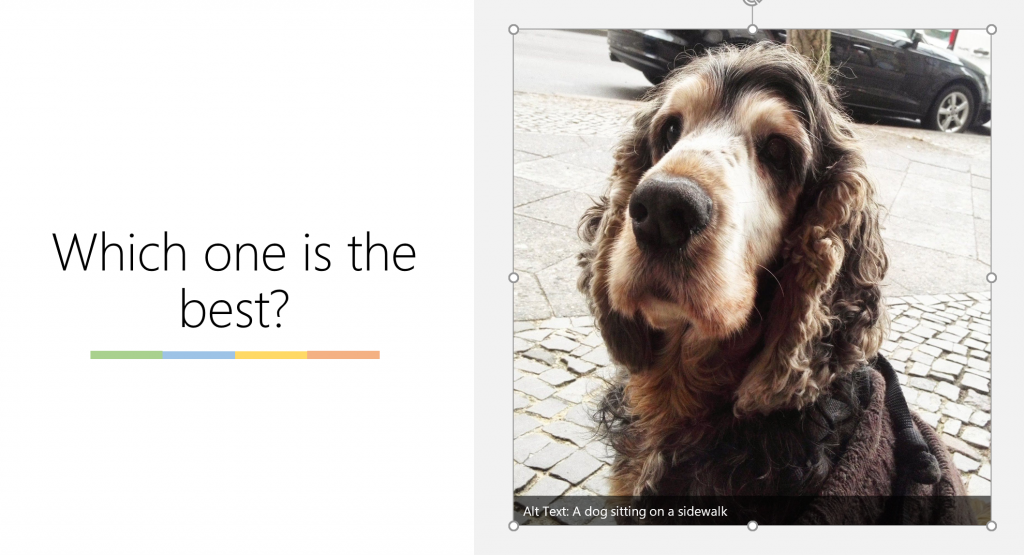
Powerpoint has the same. When you drag a photo into PowerPoint it creates an alternative text you can edit. In this case, the world’s best dog (ours) was recognised and described as “A dog sitting on a sidewalk”. And that he was.
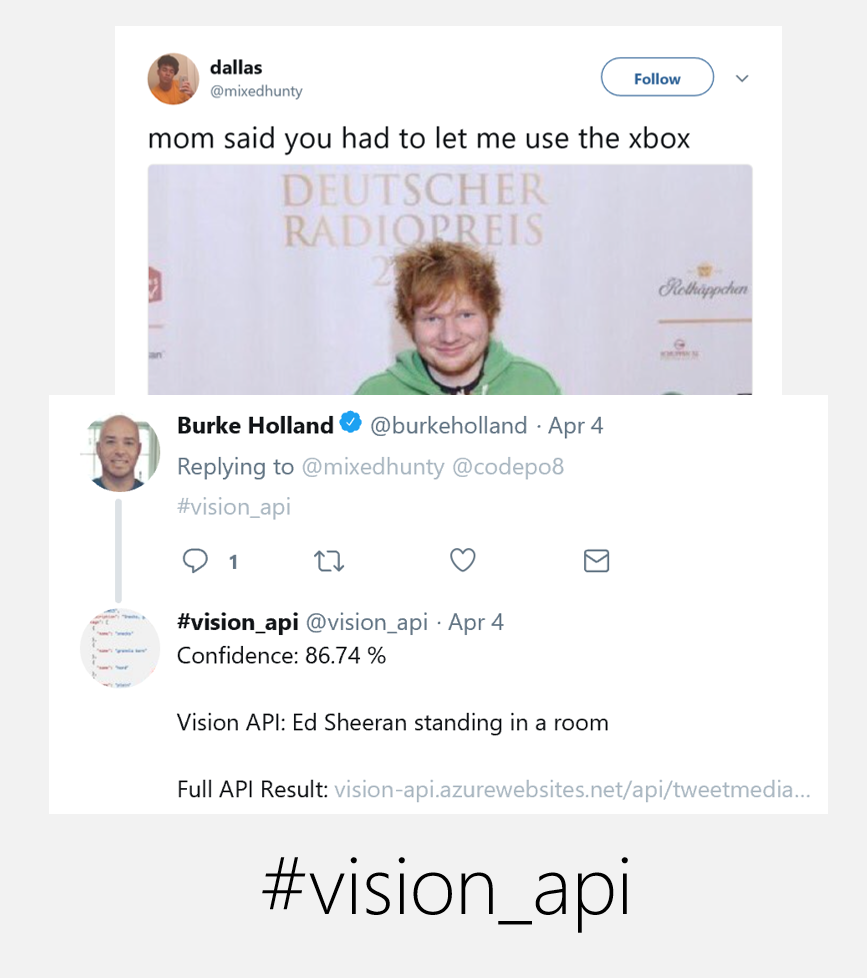
There is a fun way to play with this on Twitter using Microsoft’s services. The other day I saw this tweet and for the life of me I couldn’t remember the name of the celebrity.
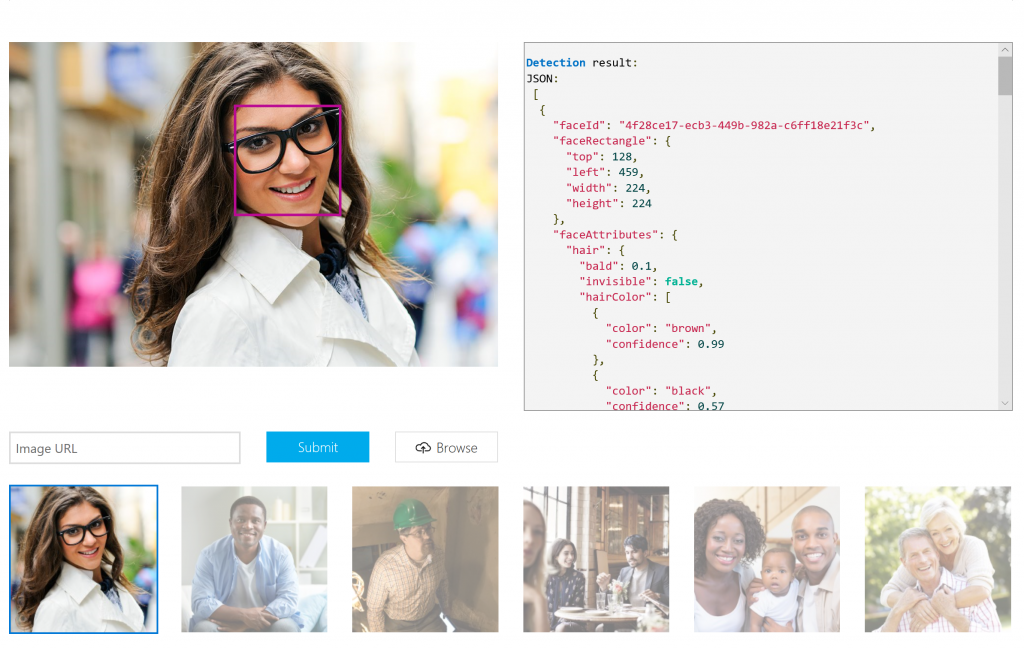
The API analyses images, converts text in images, recognises handwriting and finds celebrities and landmarks. All in a single REST call with a huge JSON object as the result. The object doesn’t only give you tags or keywords as a result. It also creates a human readable description. This one is a result of running the keywords through an NLP system comparing it to other descriptions.
Getting sentimental
Sentiment analysis is a very powerful, but also prone to wrong interpretation thing we can do. Finding out the sentiment of a text, image or video can help with a lot of things. You can navigate videos by only showing the happy parts. You can detect which comment should be answered first by a help desk (hint: annoyed people are less patient). You can predict when drivers of cars get tired and make the car slower. Granted, the latter is not for the web, but it shows that any facial change can have a great impact.
My colleague Suz Hinton created a nice small demo that shows how to do emotion recognition without any API overhead. You can check it out on GitHub.
Speak to me – I will understand
There’s no question that the Rolls Royce of AI driven interactions is audio interfaces. Audio interfaces are cool. You can talk to your computer in a hands-free environment like driving or cooking. It gives computers this Sci-Fi “genie on demand” feeling. There is no interface to learn – just say what you want.
Of course there are downsides to these kind of interfaces as error handling can be pretty frustrating. A magical computer that tells you over and over again that it couldn’t understand you isn’t quite the future we wanted. Also, there is a limitation. A web interface can list dozens of results, a voice reading them all out to you – as a sighted user – is a stressful and annoying experience. Visually, we are pretty good as humans to skim content and pick the relevant part out of a list. As audio is linear on a timeline that doesn’t work. Any search done with a personal assistant or chatbot that way returns a lot fewer results – in most cases one. In essence, using a voice interface is the same as hitting the “I feel lucky” button in Google. You hope the one true result returned is what you came for and not something paid for you to get.
That said, for accessibility reasons having voice recognition and a voice synthesizer in apps can be useful. Although it is much more useful on an OS level.
There are APIs you can use. For example, the Bing API set offers a “text to speech and speech to text”: API. This one can read out text with various synthesized voices or recognise what the user spoke into a microphone.
The big let-down of audio recognition is if the system isn’t clever and only reacts to a very strict set of commands. Another one is if you have an audio file that contains domain specific knowledge. When a web development talk covers tables we’re not talking about things to eat on. There are systems in place you can use to teach your system special terms and pronunciations, like LUIS. This one has a visual interface to define your commands and also an API to use the results.
There is much more to conversational UIs than this, and my colleague Burke Holland did a great job in explaining it in the Smashing Magazine article Rise of the conversational UI.
The last annoyance of audio recognition (other than it being disruptive to people around you) is when your accent or idioms are not understood. This is when training the machine for your own needs is necessary. There are Speaker recognition APIs that allow you to read to the machine and it learns what you sound like. You can use similar systems to filter out noises that interfere. For example, we worked on a voice recognition system at airports that had dismal results. After feeding the system eight hours of recorded background noise from the terminal and telling it to filter those the results got a lot better. Again, what we considered a showstopper, collected as a bunch of information and recognised by a machine became a quality filter.
Things people shouldn’t see
The last thing I want to cover for us to use in our interfaces are moderation systems. Some things are not meant to be consumed by people. Computers don’t need counselling once they saw them – people should. Known illegal and terrible content can be automatically removed right after upload without anyone being the wiser. Of course, this is a huge “who watches the watchmen” scenario, but there are things that are without a doubt not sensible to allow in your systems. Known hashes of imagery of child pornography or killings are part of moderation APIs and prevent you from ever hosting them or seeing them.
With great power…
There is to me no question that AI is the next iteration of computing and production. It is happening and we could allow people to abuse it and cry out, or we could be a good example of using it sensibly.
AI can be an amazing help for humans, but it does need transparency – if you use people as data sources, they need to know what and where it goes. When people get information filtered by an algorithm, it should be an opt-in, not a way to optimise your advertising. People need to have a chance to dispute when an algorithm tagged or disallowed them access.
I hope you found some inspiration here to create interfaces for humans, powered by machines. Which is the future I want, not machines empowered by humans as involuntary data sources.
More reading / Learning
Microsoft offers a full course resulting in a Microsoft Professional Program Certificate in Artificial Intelligence. In 10 courses, (8-16 hours each) you learn: The Math behind ML, The ethics of AI, Working with Data using Python, Machine Learning Models, Deep Learning Models
and Reinforcement Learning Models
A few days ago, I went to the We are developers congress in Vienna, Austria. The “Woodstock for developers” actually turned out to be a very well organized, but less wild event full of pretty amazing presenters and content. It was a developer conference, not as focused about all kind of web matters, but more holistically about development. Hence a lot of the topic revolved around DevOps, high level languages, Artificial Intelligence and Cloud matters.
My personal contributions were:
A two hour “workshop” on building intelligent, human interfaces using machine learning systems. You can look up the notes and links of this workshop. For bonus points, I got confused about the date of this workshop. As I just returned from Seattle there was a time-difference confusion and I arrived an hour before the workshop. I hadn’t slept for 30 hours and arrived 20 minutes late for it. However, people seemed to have enjoyed it and I got good feedback.
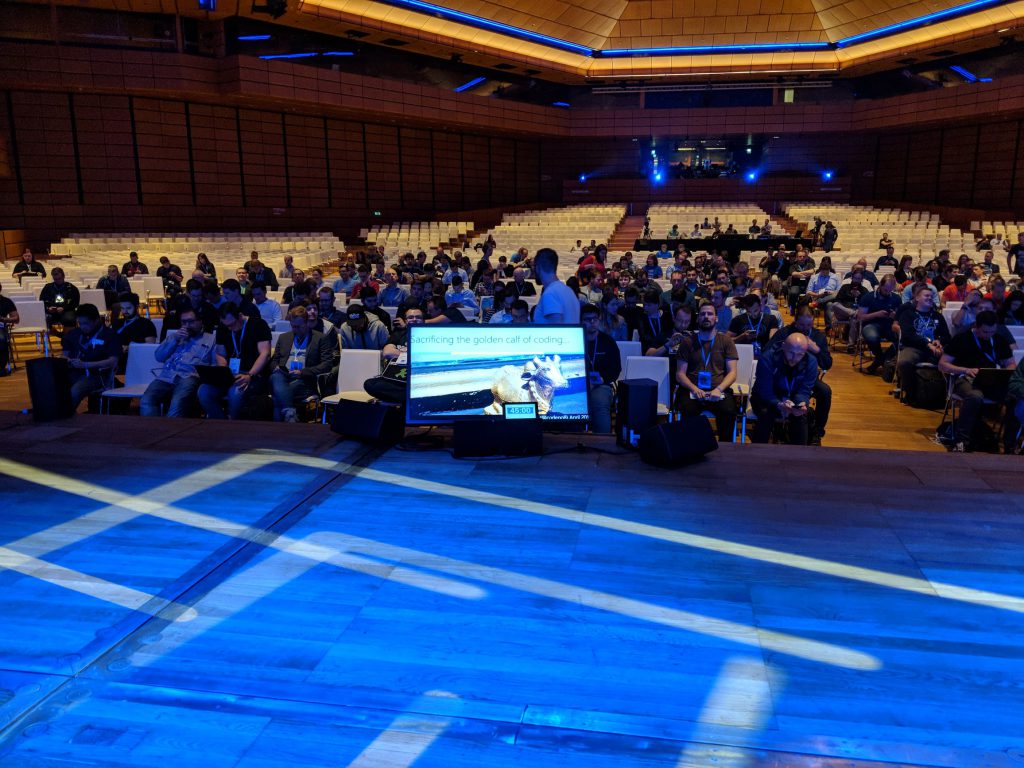
On the second day I gave one of the opening talks (“Killing the golden calf of coding”) and it was incredibly scary to be on a huge stage like that, were earlier Steve Wozniak worked his magic. The slides of the talk are on SlideShare:
On the third day I was the MC on the main stage, introducing and running the Q&A for Bitcoin expert Andreas Antonopulous, Ripple CTO Stefan Thomas, Google Angular expert Stephen Fluin, Futurist Martin Wezowski, Google iOS security expert Felix Krause, styled components inventor Max Stoiber and Stackoverflow/Fog Creek founder Joel Spolsky.
All in all, it was a very well organized event and it was great to meet some of my heroes (John and Brenda Romero of Wolfenstein/Doom fame) and many new ones.
I want to thank the organisers for having me and trusting me with so many things. I’m only sorry that I was pretty much shattered all the way as I had just come back from a few daunting days in Seattle the day before. I will come back to the event, as it is exciting and different at the same time.
Posted in General | Comments Off on So I went to “We are developers” in Vienna…
My handwriting sucks and I am hardly capable of painting a straight line. Hence, when I got my Surface I didn’t see much use for the pen other than signing things and maybe highlighting some things in presentations.
However, I now found out that you can use the pen as a PowerPoint remote, which is pretty cool:
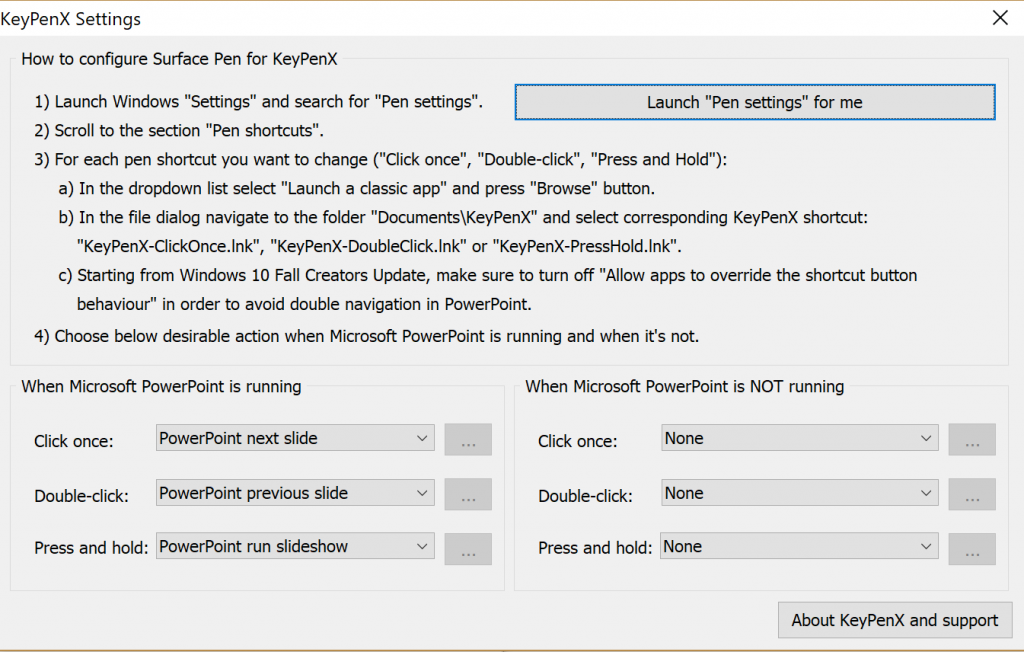
The trick is to buy (or in my case get a free key to) KeyPenX which is a $5.99 program that allows you granular access to what clicking the button of the pen should do.
It took me a while to get it to work, but here are the important bits:
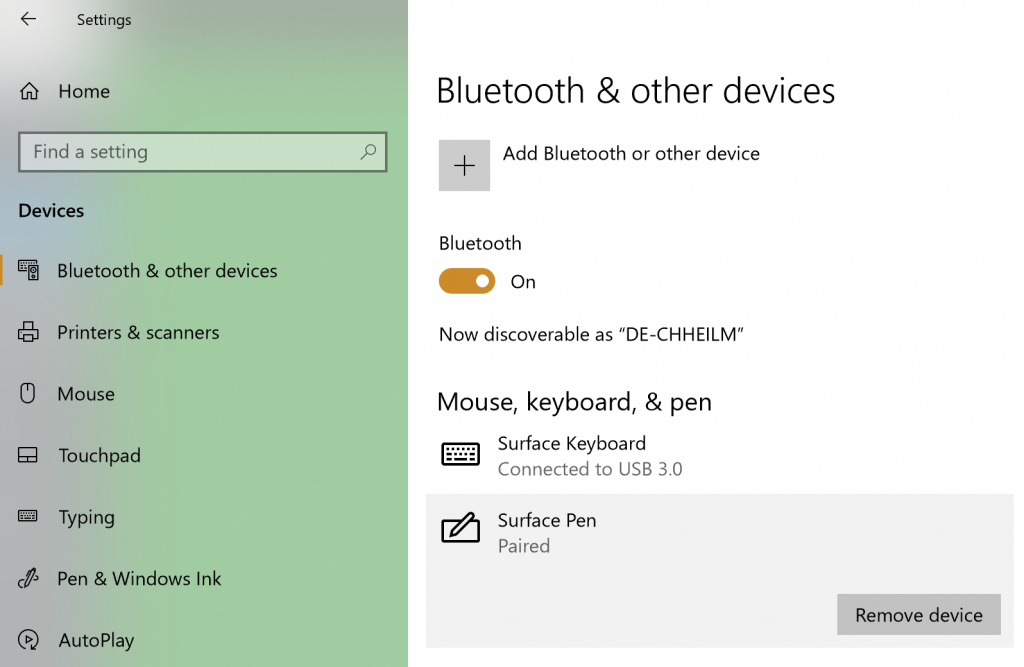
Pair your pen via Bluetooth – you do that in the settings by “add device”. My pen didn’t show up at first, so I pressed the button for 10 seconds for it to reset; then it showed up.
Go to the pen settings and tell it to start KeyPenX on click and double click.
Configure KeyPenX to do the PowerPoint things you want it to do:
All of these steps are also in the KeyPenX screen itself. The only thing remaining is not to start clicking the pen all the time like I do with normal ones.
Posted in General | Comments Off on Quick tip: Using your Surface pen as a PowerPoint remote