Christian Heilmann

Author Archive

Ad Blockers helped kill the open web

Wednesday, December 17th, 2025

The other day I found out that you can watch YouTube in Albania without ads.

Mullvad VPN setting myself to Albania and YouTube not showing any ads.

Personally I pay for YouTube and I think it is worth while, but I found that curious. Reasons might be that Google has no advertisement contracts in the country or it may just be too small a market to matter to them. Regardless, whenever you post something like that there will always be an army of smug people telling you that any service is ad free to them as they use an ad blocker, or other means not to show ads.

The experience for users who don’t employ these means is different, though, to the extend that the web is becoming unusable. I also do lament that on social media:

Web page of Merkur.de absolutely plastered in ads to a degree that it is unusable

Here’s the thing: I am 100% sure these things are connected. The more people block ads, the more aggressive advertising became. To the extend that a newspaper site of today reminds you of illegal download or porn sites of the early 2000s. This is not a matter of greed, but survival, as subscriptions don’t scale. I pay for a few newspapers, but I really can’t be bothered to subscribe to all that I want to read. The internet replaced paper, after all, and it should also have replaced the means of acquiring news and content.

“I use an ad blocker as I don’t want to be tracked”

People claim that using ad blockers is about privacy. It can be, but most people use this as a hypocritical defense. Often these are the same people that don’t have working SSL on their sites or plaster them with third party “like” buttons. Or log in with Facebook/Google/Microsoft into other services. Pick a lane!

I am a privacy advocate and it is important to defend ourselves from being tracked online. “I don’t have anything to hide, so I don’t care when people know what I do” only works until your actions become accidentally – or by design – part of a bad narrative.

But there is a difference between tracking prevention and blocking ads. Not every ad is predatory and designed to record your actions – yet. Tracking prevention is often baked into the OS - at least in Europe – or there are specialist browser extensions like Privacy Badger. By using a dedicated “Ad” blocker, what you do is trying to get access without paying. That feels like doing a clever thing, but it hurts the web as not many things are free.

The web isn’t free – it is open, and there’s a difference

When I started on the web, I was a radio journalist. I announced the news and I got faxes and later on emails every morning with what happened in the world and our local area. We paid for getting access to these services, so our radio station played ads to cover these costs and my salary.

When I got internet access at the radio station (around 1995), I got access to the news tickers of government and international news agencies. I got the news faster, less filtered and for free, as companies and service providers published the information for free to be part of the cool new thing called internet. This also involved excellent innovations like RSS. The BBC was great at that and Netscape even had a sidebar displaying news. The platform “web” doesn’t charge you for publishing – it is an open platform. That was a huge step forward in publishing, and I quit my job and started developing and writing for the open web.

Hosting isn’t free, but it was affordable to companies and many people published on platforms that had ads on them – Geocities and the like. Even back then there were “framebusting” scripts that would hide the ads, effectively violating the terms and conditions to publish there.

We created an open platform but failed to innovate monetisation

The big mistake we made is to treat the web like any other publishing platform. We cherished the reach to get to a 24/7 world-wide audience, but our genius idea of making money was to show ads. That worked in classic media, so why not here?

I remember that at the radio station this got ridiculous at times when – for example – someone sponsored the announcement of the time. I had to play a 20 second jingle and then tell the listeners that it is 9 o’clock followed by another 4 second jingle that this amazing piece of news was brought to you by company XYZ. These days, YouTube has similar things where a 10 second video has a long non-skippable ad beforehand.

This is what I hated about traditional television, too. Watching Mythbusters on a streaming service is fun. Watching it on tele with “after the break” and “before the break” vignettes repeating what I just saw is grating.

On the web, we distribute content and leave it to the user to make it consumable to them. We have to support mobiles, desktops, voice interfaces and many other things. We don’t distribute payment though. Instead, we show ads and hope people click them. Or we ask for people to subscribe to one service at a time. There were some efforts to allow for easier payment, like Flattr, but they never made it to the mainstream or got baked into an operating system. This is a shame, as I would love to say I pay a lump sum each month and distribute it to publishers once I consumed the content. I fail to see why I should pay upfront to get access. A physical paper I also skim at the store before purchasing it to see if it is worth it.

Showing ads was too easy and became predatory

When Google came around the whole ad thing exploded. This blog had banners at a time and I did make about 2K a month with them. I vetted the providers and made sure that relevant stuff was shown. But I also found that there were dozens of blogs that scraped my content and drowned it in ads, making more money than I did. Linkfarming, Black Hat SEO stuff was mushrooming and it all had the goal to show ads around content that wasn’t made by the people who tried to benefit from it. So, naturally, people were annoyed and started using Adblockers.

I very much realised that, too. My banner income went towards zero, so I just took them off – no point in causing more traffic that nobody benefits from. Other people got hit much harder. Publications like Smashing Magazine had to reconsider from scratch how to pay their writers.

But then something really messed up happened. Google itself turned from a place to get your stuff found to a place that gives you 90% ads and sponsored content, with the first web content showing up on page 4. I worked at Yahoo when Google really became a thing and our business model – buy content from news agencies and show ads around it – became the standard model. The more people blocked ads, the more needed to be shown to those who don’t.

So this is where we are now. Web search is a mess and becomes more or less useless. And companies stop publishing on the open web because there is no way to be found. Instead, we are pushed into closed environments that promise to use Artificial Intelligence to give us only what we really look for, until the money runs out. Even now ChatGPT and others consider displaying ad content which can’t be blocked.

So, yes, I do understand people who use Adblockers, but it also feels like finding and open fire escape at the back of the concert building. Sure, feel smug and clever getting in, but you’d better go and buy some merch to support the artist.

Shuffling a CSS grid using custom properties

Monday, November 24th, 2025

Recording of the grid shuffling in action

In his excellent talk Get the Core Right and the Resilient Code Will Follow at Beyond Tellerrand in Berlin this year, Andy Bell showed how to sensibly discuss a coding issue amongst your team. He also did a more in-depth write-up on his blog.

The problem that Andy described was having a CSS grid with columns of content next to another and then being asked by the client to randomise the order of the grid on every reload. So that each part of the company will get its 3 seconds in the limelight. Andy is a strong believer in resilient code and rightfully is critical of JavaScript solutions for issues like this. Moving a whole DOM construct like this around can be slow and writing out the whole grid as a component on each interaction can also be iffy.

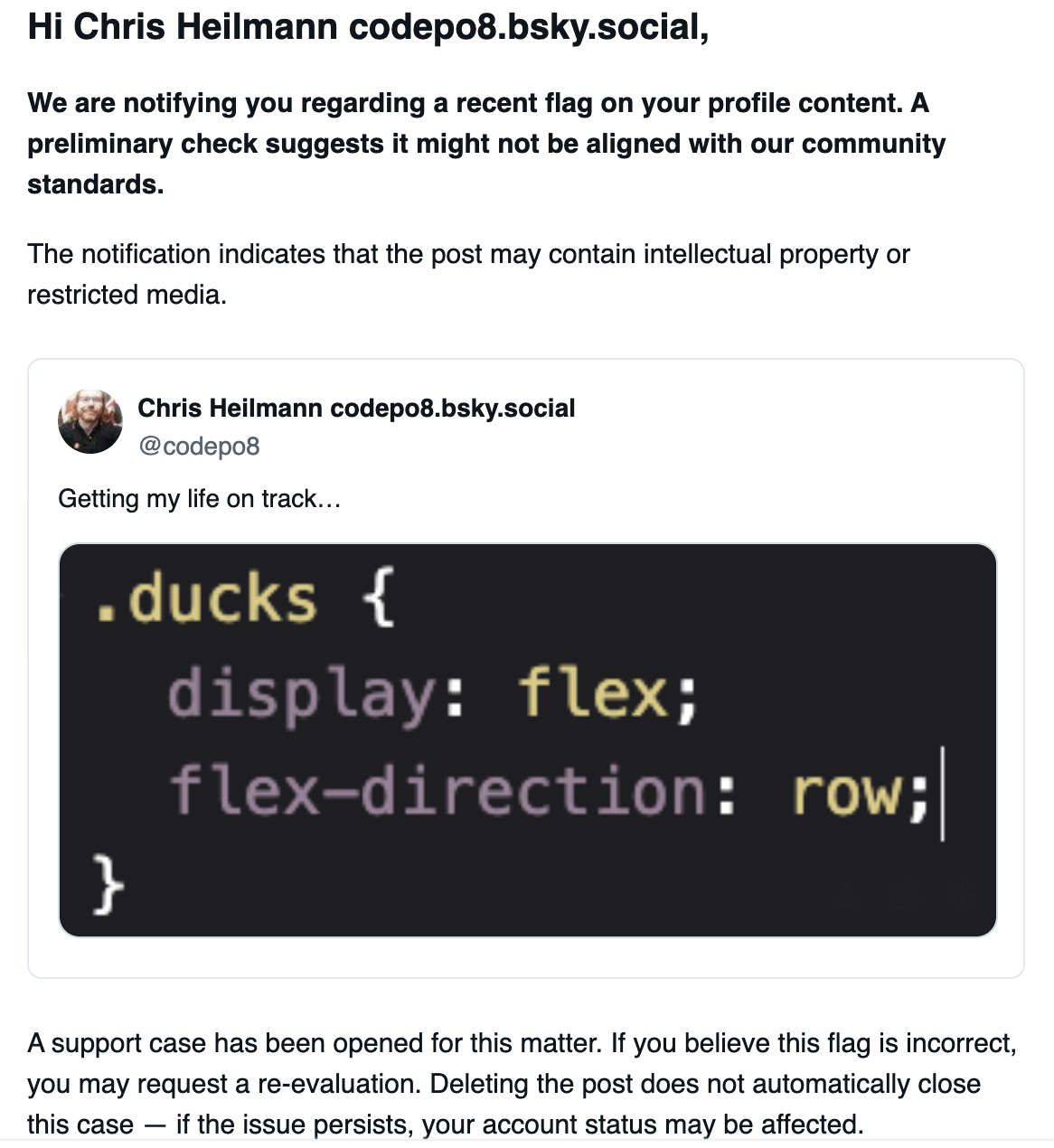
So I pondered what to do and remembered the CSS order property applying to flex and grid items. Using this one, you can re-order items visually.

<h1>Excellent bands you never heard about</h1>
<ul>
    <li>Irie Revoltes</li>
    <li>Streetlight Manifesto</li>
    <li>Dubioza Kolektiv</li>
    <li>Irish Moutarde</li>
</ul>

If you change the order of the third element to minus one, it shows up first:

ul {
  display: flex;
  flex-direction: column;
  gap: 1em;
}
#dk {
  order: -1;
}

CSS order example

This keeps all the re-ordering work in the CSS engine. But as you can’t as yet have random ordering in CSS, we need some JavaScript to create that functionality. The first idea was to add the order as inline styles, but that would be the same DOM manipulation and having to loop through all items. Instead, I thought about using CSS custom properties:

ul {
  --customorder: -1;
  display: flex;
  flex-direction: column;
}
#dk {
  order: var(--customorder);
}

That way I can access `customorder` on the parent element:

let ul = document.querySelector('ul');
ul.style.setProperty('--customorder',-1);

Putting all of this together, I give you GridShuffle and you can check the code on GitHub:

<div id="contentgrid">
    <div id="about">
        <h2>About</h2>
        This is the order.html file.
    </div>
    <div id="news">
        <h2>News</h2>
        Latest news will be displayed here.
    </div>
    <div id="contact">
        <h2>Contact</h2>
        Contact information will be displayed here.
    </div>  
    <div id="casestudies">
        <h2>Case Studies</h2>
        Case studies will be displayed here.
    </div>
</div>
<button>shuffle</button>

The grid above shuffles around on every reload or when you active `shuffle` button. There are many ways to achieve this effect, but this example uses only CSS properties to set the order of the grid items. The HTML is not altered and there is no DOM manipulation other than accessing the CSS properties of the parent element. This should make this highly performant. The JavaScript code rotates the order of the items in the grid by changing the CSS variables that define their order. Below is the relevant code used to set up the grid and shuffle the items:

#contentgrid {
    --items: 4;
    --item1-order: 1;
    --item2-order: 1;
    --item3-order: 1;
    --item4-order: 1;
    display: grid;
    gap: 20px;
    grid-template-columns: repeat(
        auto-fit, minmax(200px, 1fr)
    );
}
#about { order: var(--item1-order); }
#news { order: var(--item2-order); }
#contact { order: var(--item3-order); }
#casestudies { order: var(--item4-order); }

We define the order of each element as `1`, which means that if we set any of them to `0`, it will be displayed first in the grid. For example, if we did the following, the `Case Studies` section would be displayed first:

#contentgrid {
    --items: 4;
    --item1-order: 1;
    --item2-order: 1;
    --item3-order: 1;
    --item4-order: 0;
/* … */
}
#about { order: var(--item1-order); }
#news { order: var(--item2-order); }
#contact { order: var(--item3-order); }
#casestudies { order: var(--item4-order); }

This could be done on the server-side or with JavaScript as follows:

let root = document.querySelector('#contentgrid');
let itemcount = getComputedStyle(root).
    getPropertyValue('--items');
let old = 1;
const shuffleorder = () => {
    let random = Math.floor(Math.random() * itemcount) + 1;
    root.style.setProperty('--item' + old + '-order', 1);
    root.style.setProperty('--item' + random + '-order', 0);
    old = random;
};
shuffleorder();

We get the amount of items in the grid by reading the value of `—items` CSS property on the root element, and store the current first one in the `old` variable. We then pick a random number between `1` and the total number of items, and set the order of the old item to `1` and the new, random, item to `0`. We then re-define `old` as the new item.

This is the most basic way of doing this, and it is not a real shuffle, as it only rotates the items in a fixed order. You can see the Shuffle Grid example for a more advanced implementation as it randomised the array of all the items. You can also rotate the items by shifting the array of all orders as shown in the Rotate Grid example.

The other examples also don’t need any of the custom properties to be set, but create them instead. This means a tad more JS + DOM interaction but makes the process easier.

let root = document.querySelector('#contentgrid');
let cssvar = `--item$x-order`;
// Get the amount of items
let elms = root.querySelectorAll(
    root.firstElementChild.tagName
);
all = elms.length;
// Initialize the order array and 
// set the order on the items
let orders = [];
for (let i = 1; i &lt;= all; i++) {
    orders.push(i);
    elms[i - 1].style.setProperty(
        'order', 'var(' + cssvar.replace('$x', i) + ')'
    );
    root.style.setProperty(cssvar.replace('$x', i), i);
}

But what if you wanted to not use any JavaScript at all to achieve this? Andy’s solution he showed during the talk was to randomise the order server-side, which is easy to do in many languages. His solution using Jekyll was to generate the page every few minutes, using the sample filter which seems a bit wasteful, but is stable.

Current and future CSS-only solutions

Currently there is no way to randomise or shuffle items using only CSS. However, there are solutions involving Sass which requires pre-processing. Another nifty solution is this way but it requires the use of `@property` which is not widely supported yet.

The CSS spec defines a random() functionality that could be used to achieve this effect without JavaScript. However, as of now, only Safari Technology Preview 170 supports this feature.

Polyfilling CSS isn’t easy, so it might make sense for now to add a dash of JavaScript to your solution to achieve effects like this. This way seems to me a good compromise as it keeps the functionality in CSS instead of shuffling around whole DOM trees or re-writing the whole grid.

AI is Dunning-Kruger as a service

Thursday, October 30th, 2025

On January 6th, 1995 two bank robbers in Pittsburgh confused law enforcement by not making any attempts to conceal their faces but instead brazenly looking at security cameras as if they were invisible. The reason is that they actually thought they were.

Clifton Earl Johnson had convinced his fellow in crime, McArthur Wheeler that covering their faces in lime juice would make them invisible to cameras. Much like lime juice can be “invisible ink” until you heat the paper. As a test, Johnson had taken a polaroid of Wheeler that showed his face smudged. That a camera fault might be the cause, or doing a second test didn’t get to their mind.

This baffling over-confidence in their flawed approach inspired two psychologist, Justin Kruger and David Dunning to see if there is a common bias in people when it comes to assessing their skills and their actual performance in doing them. They found out that there is such a thing and it is now known as the Dunning-Kruger Effect.

A cognitive bias, where people with little expertise or ability assume they have superior expertise or ability. This overestimation occurs as a result of the fact that they don’t have enough knowledge to know they don’t have enough knowledge.

One could say that the Dunning-Kruger effect is the opposite of Impostor Syndrome. Instead of people not being able to interiorise their obvious successes, people declare themselves as great and experts at things they have no or just a rudimentary clue about.

Over the last few years we’ve been on a constant path to make this the standard mindset in the technology world. It started with a demand for everything to be released incredibly fast and to be a huge success in numbers from day one. Anything not growing exponentially is not a success.

Fakers instead of makers

“Fake it till you make it” is given as advice devoid of any irony. Instead, deception and inflation of numbers is seen as a smart move until you have the resources and knowledge to properly do the task. KPIs and OKRs are meant not to reflect delivery goals but aspirations. When you’re not gunning for a promotion every half year you’re not seen as a go-getter or having a growth mindset. In other words, we encourage bragadocious behaviour and language. Some of the things you hear from heads of states and other politicians in interviews sound like Muhammad Ali at press conferences before a fight in the 60s or old school rappers in the 70s and 80s.

AI bots excel at faking knowledge

But even worse, any interaction I have with AI chatbots gives me the same vibes. They give utter nonsense answers with high confidence and wrap errors in sycophantic language making me feel good for pointing out that they wasted my time. A correct answer is a lot less important than a good sounding one, a positive one or one that makes me interact more with the system. Time in product is the goal, not helping me find the right answer.

GenAI makes you a genius without any effort

The siren song of generative AI to turn anyone into an artist, wordsmith, composer or videographer by using “intelligent” tools is a push into Dunning Kruger territory. Vibe coding or vibe anything really focuses not on the craft, but the result. We’re not meant to create by learning the ropes and understanding the art. We’re much too clever and busy for that. Give it a prompt and create a product, an app or an agent that does your bidding. We’re continuously reminded that we all are capable of genius – if only we let the machines do the boring work for us. Our egos are fed, we are barraged by digital cheerleaders and confidence tricksters.

Stop wasting time learning the craft

Adding human effort into things, really creating and writing yourself is taunted as wasting your time and not embracing change and progress. But the cost is that we forget about the craft and we lose the joy of creating. Creativity of any kind is messy and fraught with error and drawbacks. But all of these make us human and who we are. As Leonard Cohen put it: “There is a crack in everything, that’s how the light gets in”. Sure, you might not be good at painting, composing, writing or shooting movies. But a terrible, human effort still is worth so much more than asking the machine to build you a boring solution focused on crowd pleasing more than being a thing in itself.

I am not happy about this, and I don’t see it as progress. If anything, it is deception and watering down craft and art. Politics have become an attack on intelligence, decency and research in favour of fairy tales of going back to “great values” of “the past when things were better”. Social media has become devoid of the social part and is a numbers game and addiction machine. But you know what? I don’t care. I keep doing what I do. I write down things I consider important at that time. I paint things although I suck at it. I publish on the web and my own blog because nobody stops me. Sure, I feel like a fraud when people applaud what I do more often that not. And yet – the joy of creation is something we should never give up on. Do you feel like what you do isn’t good enough or worth while? It is, and even if what you did isn’t amazing quality, you’ve created it and it is yours. And maybe, just maybe you are not the best judge to assess the quality of what you did anyways. One person’s disappointment may well be a joy to others. Keep creating and keep striving to improve and if others impressed you, tell them about it.

Abandonware of the web: do you know that there is an HTML tables API?

Wednesday, October 8th, 2025

The demo code further down as an image

When people turn data into HTML tables using JavaScript, they either use the DOM methods (createElement() and the likes), but most of the time just append a huge string and use innerHTML, which always is a security concern. However, did you know that HTML tables also have an old, forgotten API ? Using this one, you can loop over tables, create bodies, rows, cells, heads, footers, captions an summaries (yes, HTML tables have all of those) and access the table cells. Without having to re-render the whole table on each change. Check out the Codepen to see how you can create a table from a nested array:

let table = [
  ['one','two','three'],
  ['four','five','six']
];
let b = document.body;
let t = document.createElement('table');
b.appendChild(t);
table.forEach((row,ri) => {
  let r = t.insertRow(ri);
  row.forEach((l,i) => {
    let c = r.insertCell(i);
    c.innerText = l;  
  })
});

You can then access each table cell with an index (with t being a reference to the table):

console.log(t.rows[1].cells[1]);
// => <td>five</td>

You can also delete and create cells and rows, if you want to add a row to the end of the table with a cell, all you need to do is:

t.insertRow(-1);
t.rows[2].insertCell(0);
t.rows[2].cells[0].innerText = 'foo';

There are a few things here that are odd – adding a -1 to add a row at the end for example – and there seems to be no way to create a TH element instead of a TD. All table cells are just cells.

However, seeing how much of a pain it is to create tables, it would be fun to re-visit this API and add more functionality to it. We did add a lot of things to HTML forms, like formData and the change event, so why not add events and other features to tables. That way they’d finally get the status as data structures and not a hack to layout content on the web.

Call for Papers is open for the WeAreDevelopers Berlin and San Jose events 2026 – here’s what we’re looking for…

Wednesday, October 1st, 2025

Red rubber ducky with a megaphone stating call for papers

Alright folks, the call for papers is open for two of the WeAreDevelopers events 2026, so if you want to speak at any of them, activate the following links and enter your details and the ones of your session(s):

Here are some points on how to write a talk description that will be likely to be picked by us:

  • Talk titles we pick tell something about the topic – not just be open question clickbait
  • Good talks tell stories and describe experiences that can be repeated – not just show a solution
  • Great talks offer technology in context: “Intro to X” is good, “how we used X to achieve Y” is much better
  • Talks that are based on research are excellent, don’t just show a solution, share the journey how you got there
  • If you use ChatGPT to create your talk title and description, we invite ChatGPT and not you.
  • Avoid clichés: we had enough “from zero to hero” and “everything you know about x is wrong”
  • Describe your talk in the description, don’t describe the current landscape. “In the fast paced world of…” is a tired ChatGPT cliché.
  • Answer the WIIFM (What is in it for me) for the audience, explain what people will get away with
  • It is OK to recycle talks, it is not OK to bombard us with your backlog. Submit 2-3 talks, not your portfolio
  • Most talks are half an hour – try to focus on one topic and deliver this with context
  • Hands-on talks are great – a good code recording that works is better than live code that fails
  • Speak about what excites you – not what you think the market needs you to cover right now
  • Make it your talk – not a sales pitch for your product or service

Looking forward to your submissions!