Christian Heilmann

Author Archive

Playing the blame game?

Saturday, September 1st, 2012

I just recently started using the Nexus7 I got at Google IO in earnest and thought I have a go at some 3D games. After continuously failing to download the larger than 1GB racing game I bought on the Android market I thought I’d go lower and got myself Running Fred, a very addictive running game recommended for players of Cannabalt. I installed, started and almost instantly sucked at the game.

Must be bad developers

And then I did what every developer seems to be hardwired to do: I started blaming the game, well, actually the game developers. I blamed that the game crashes a lot. I blamed that Google Now! opens up when I swipe over the bottom of the screen and I get killed as soon as I go back to the game. I blamed that 3D objects don’t appear smoothly but as a surprise at times.

All of this made me think the developers of the game are bad, or – the more evil version – that this is yet another “free” Android game that only becomes playable when you fork out money to buy upgrades to your character or skills. It seemed to me that the prices of those things are ridiculously high to reach just by playing the game.

Dealing with it

What didn’t occur to me for a long time was the simple fact that I was bad at the game and that it will take some learning for me to improve. I was too impatient. Now that I gritted my teeth and played the game a few times I don’t open up Google Now any longer as I realised you tap to jump and not swipe up like you do in Temple Run. I also breeze through the lower levels and manage to collect money to get better skills as I remember where the traps are and I am more confident in my game character’s abilities. I learned when to jump and when to double jump, how to tilt my device to go left and right and not accidentally use up expensive special skills by tilting too much. In other words: I know how to play the game and the longer I do it the more fun it is.

Some great reward

Of course I could have bought the upgrades and all the stuff up-front, too, but I am sure that if I had “cheated” that way I’d have lost interest in the game much sooner. Making the rewards less attainable can be a great motivator to make you try harder. This article How We Use In-Game Purchases To Teach Our Son Personal Responsibility explains how that can work with kids.

Play the game, not the blame game

Now what did I learn today? That having knowledge about something can make you very much a grumpy bastard who starts pointing fingers instead of having a go.

So next time I get the “this should be so much better, I know how to do it” feeling about a web product or idea, I will hold myself back more and have a play with it rather than being the first to dismiss it. Being clever in hindsight is simple, rolling out the product in the first place much harder and comes with a lot of deterrents that a quick “meh this sucks” could not even know about.

I also learned that impatience and trying to find the simple way out does get you some satisfaction but robs you of the longer term fun experience.

This is harder and I think it is the main reason for a lot of abstraction taking place. “CSS has no variables and mixins? Damn the standards body, they will never get to grips with that! Let’s build a preprocessor and a library and call the problem solved instead!”

In the short term, yes, this will help us to deliver things. In the long run, not so much as we fill the heads of new developers with syntax of an abstraction layer rather than what comes with browsers. And no, “browsers just need to adopt that syntax then” doesn’t work as upon more advanced analysis a lot of “great and quick solutions” fail to cover a lot of use cases.

Let’s not allow the – in a lot of cases perceived rather than real – need to deliver quickly stop us from creating great products build from maintained and solid parts rather than a quick stop-gap that will never be replaced later on. We owe it to us to learn whilst we work and we owe it to our clients and their users to build products that show the love that went into them.

Comment on Google+ or Comment on Facebook

How to disable Java in all your browsers on OSX (screencast)

Wednesday, August 29th, 2012

disable java

OK, once again we have a massive security hole in browsers based on Java. As there are luckily not many things on the web that still need Java (and I pity you if you have to use applets still) here is a screencast how to turn it off in all your browsers on OSX. You can follow the screencast on YouTube:

Here are the quick instructions:

  • Chrome – enter “chrome://plugins/” in the URL bar, hit enter. You’ll see all the plugins enabled, disable the Java one.
  • Firefox – go to Tools > Add-Ons. In the page click Plugins and disable the Java one.
  • Safari – go to Safari > Preferences. Go to Security and uncheck “Enable Java”. This is the easiest, but Safari is also the most dangerous browser as it reaches deep into the OS
  • Opera – go to Opera > Preferences, select Advanced and uncheck “Enable plugins”. This will also kill Flash, but it seems there is no simple way to avoid this in Opera
  • Opera – type “about:plugins” in the URL bar and disable the Java one

Be safe out there, kids!

Mozilla, the web and you at Campus Party Europe

Saturday, August 25th, 2012

I just got to edit and upload the slides and screencast of my talk at campusparty europe, so here you go:

Campusparty are live streaming and recording the talks. Here is mine but sadly enough there is quite a chunk of audio missing and it seems To be out of sync later on.

I also recorded my own screencast on YouTube with audio that is a bit on the loud side so turn down your headphones:

The slides are available on SlideShare:

There is also a slide version with notes available on Slideshare.

Being a better web citizen: complain where things get fixed

Monday, August 20th, 2012

We like to complain. It feels good, it feels like we are doing something that will make things better. The problem is though, if we don’t complain where things can be changed we are not making things better. In a lot of cases we make them worse. In almost all cases where we don’t complain at the source we actually make people feel worse and share our frustration rather than initiate change.

The right to complain

I remember when that volcano in Iceland erupted and messed with all the flights in Europe. I was scheduled to come back from San Francisco and got sent to 3 different airports in the US. I was in Chicago in a totally rammed airport and queueing up to get a new ticket with about fifty people before me and two hundred or more behind me. A group of three people in front of me had their tickets already and yet were in the queue for the ticket counter. I asked them what they are doing here as they do have their tickets, wondering if I was in the right queue. I was. Their answer was “yeah, we want to complain about the delays!”. I handed them my phone to write an email to the airline and explained that complaining to the person behind the ticket counter about a thing that is incredibly obvious doesn’t help them or the already freaking out person who is faced with a line of 200+ people they probably can not help easily. I was unlucky. Logic doesn’t count when there is exercising the right to complain to be done. It is just another sense of entitlement people seem to need to excercise or else they don’t feel like they are being appreciated. Or something.

Complain where work is being done

In any case, on the web and when it comes to web development or web technology issues it is ridiculously easy to complain where a complaint makes sense and will result in a change that makes things better for everybody. If there is a GitHub repository and you have a problem with the code, file an issue. If you have something that bothers you with browsers, file a bug.

This is the only place where you should bring your worries. In a lot of cases you will find that other people had the same gripes and they have been fixed or need a certain trick to work. Anything else you do is add to the noise of the internet without causing any change. Actually, you might expect others to do work for you.

This is one thing I changed in my behaviour on Twitter and elsewhere lately – and so far it did me only good. We do not need conversations about seemingly broken issues of products without the people who create and maintain the product being involved. If they are hard to reach, then this is what should be fixed. Complaining about details to people who might be able to tell the people who should fix the issues doesn’t mean they will get them – it just means you frustrate even more people.

So next time you find yourself feeling the need to exercise the right to complain – or just feel like venting – spend some time finding the right person to complain to. A lot of times you find your anger is less than you initially think it is and many a time you will find that you did something wrong in the first place.

Got a comment? Add to the thread on Google+

Datatable to barchart without images, libraries or plugins

Thursday, August 16th, 2012

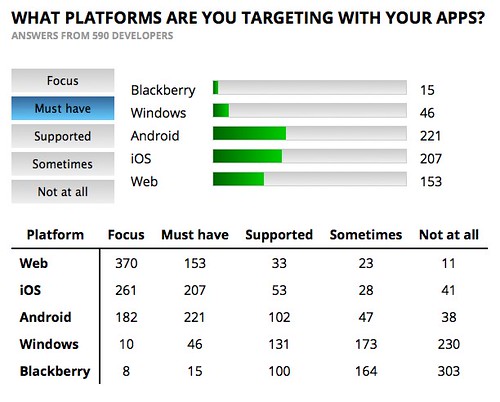
Following the results of a survey on library use by developers I was asked to make it easier to do a head to head comparison of the data of one of the questions. I thought it’d be interesting to start a dynamic bar chart from scratch and it is incredible just how easy these things are nowadays.

Animated barchart from datatable example

Here is the final result:

The code is available on GitHub and you can see it in action there, too.

Check the code comments to see what I did – there is no magic in there, just using what browsers give us these days.

There is a bit more to it as I explain in this Screencast on YouTube:

If you don’t want the barcharts to show up but check if meter or progress is supported instead, add a parameter to the URL:

This is an interesting little demo as you’d probably be tempted to use meter from the get-go, but thinking about the data here makes a data table the best starting point.