Christian Heilmann

You are currently browsing the archives for the General category.

Archive for the ‘General’ Category

badgr – dynamic photo badges with PHP and XHR (AJAX)

Thursday, May 4th, 2006

As part of my last but one chapter of the book (Yay!) I came up with the idea of a dynamic image badge – much like flickr’s badge but one that loads thumbnails from a folder instead of using the flickr REST API.

I christened the solution badgr and would welcome feedback:

What it does is turn a link like:

Animals

into a thumbnail gallery that displays the large photos lightbox style (but without the greying out of the whole page).

California uber alles

Monday, May 1st, 2006

If you wonder about not getting any answers to emails or a lack of postings here: I am currently on a 10 day trip to California working today in the Santa Clara office and from tomorrow onwards in Sunnyvale. I am staying in San Francisco, so if anyone wants to sponsor me some bagels and coffee, I’ll be there early in the mornings and at night time. I am taking the Caltrain in the mornings, hence not much in terms of partying I guess (still on UK time in my head).


Cutting down on loop iterations with labels

Friday, April 28th, 2006

Just a quick reminder that you can drastically cut down on loop iterations by using the break and continue commands, and that there is an option to label loops to allow nested loops to stop their parents from iterating.

The Muffin Man Stuart Colville asked me earlier today how supported labels are in loops and breaks and I was confused at first as I had not heard or – more likely – forgotten about that feature.
(more…)

A DOM scripting enhanced template for Picasa (updated)

Friday, April 28th, 2006

It took me a while to find a tool to put my pictures on the web that does not create horrible HTML code and isn’t clunky to use. Most picture packages have outgrown their usefulness over the years and have become bloated media browsers with proprietary formats.

Then I discovered Google’s Picasa and was instantly taken by its simplicity and slick interface.

I now discovered that you can “Pimp your Picasa” with own templates and created one myself.

You can download the template as a zip and unpack it to the template folder of your Picasa installation (on my PC this is c->Program Files->Picasa2->webtemplates). The template zip contains all the files in a folder called “dompreview”.

To export images, all you need to do is highlight them, press ctrl+w, choose the template and the image size and Picasa will do the rest.

The template features

  • HTML standard compliant output
  • Display of the big images in a layer above the thumbnails instead of a new page if the visitor has JavaScript enabled
  • Normal “new page” display when JavaScript is not available.

You can tweak the styles.css to your needs.

For a demo check the Santorini Picture Gallery .

The only thing I am missing a lot is that you cannot define alternative text for the images in Picasa, or am I missing something?

Update Following several requests, the large picture will now always stay in the visible area when you have to scroll the page, and not stay glued to the top. All you need to replace in already existing galleries in the dynpreview.js file.
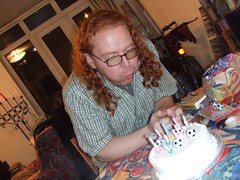
Thar he blows – 31 yesterday

Thursday, April 27th, 2006

Together with the Chernobyl disaster, I also celebrated my birthday yesterday. The cake and the candles were last minute buys and not planned to be what they are. We had fun though.