Christian Heilmann

You are currently browsing the archives for the General category.

Archive for the ‘General’ Category

Hello, it is me on Twitter!

Monday, February 11th, 2013

Hello and welcome. You might have come here from my Twitter profile or because of a tweet I sent you. Here I will quickly say and retain for re-use what my Twitter usage is about and how both you and I can enjoy what I do here. You could call it my Twitter manifesto, but that sounds too hoity-toity. So here goes:

Techsmas_049

What I do on Twitter

  1. I use Twitter as a channel out. I find something, I send a link/picture to share.
  2. This is me, so it is unfiltered. About 70% is technical web stuff (great resources, talks, videos, conference coverage), 25% is fluffy or awesome things on the web (hedgehogs, kittens, puppies…) and 5% is me doing stuff (trying restaurants, telling people I am meeting IRL where I am, wondering about things). I use naughty words, I find it hypocritical to add a * where an i or a u should be. I try to use them less though, but there might be things that make you blush.
  3. I tweet a lot – I know quite a few people who keep unfollowing and following me because of that reason.
  4. If you do not want the noise and just the meat, there is a way – I linked my Twitter to pinboard, so all the links I send out are here.
  5. I monitor Twitter for great things and see how you come across on it, too. This resulted in the past in people I liked becoming my colleagues or them starting to write for blogs I am editor at. It also resulted in people speaking at events. I like introducing people to each other. If you come across too aggressive, demanding or simply out of line, I will also take note of that and answer accordingly when people ask me about you.
  6. If I post something in quotes followed by a link, this is a quote, not my view. Don’t tell me your problems, tell the author, please.

What I don’t do on Twitter

  1. Advertise. I work for Microsoft, but I am not the marketing channel for Microsoft, there are other places for that. When I tweet about Microsoft stuff then it is because I think it is great, same way I tweet about Google, Mozilla, Adobe, Twitter, Facebook and many many more.
  2. I will not fix your problems. If you have an issue with a Microsoft product, there are official channels. If you have an issue with a Mozilla product (where I was for quite some time), the only – and let me repeat this – the only, best and fastest way to get something fixed is to file a bug in bugzilla about it. I don’t have a magic power over engineers to fix things faster or force them to do things. If your problem is a real, fixable issue and you are explaining the issue and what needs fixing, things happen. If you shout “this sucks, no wonder your competition is winning” then it is no wonder when busy engineers don’t really listen to you. You want your problem fixed, talk to the fixer. I will not fight your fights for you as I don’t feel your pain and can only guess the details.
  3. Plan and automate my tweets. This is all raw, nothing here is automated and yes it is only me. So when I am not in, I will not answer. Mostly this means I am on a plane.
  4. I will not retweet things you beg me to retweet*. I have quite some reach and I will retweet things I like and consider useful. If you tell me about something I might retweet it, I might not. This could mean I don’t like it but in many cases it just means I am too busy to do so. Nudge me again reminding me why something is cool. Begging or threatening to call me stuck-up and not helping struggling new people on the web will not get you anything though. If you look at what I do, you know that I am not the kind of guy to not support a great new thing or cause.
  5. Spread personal things. I have a real life and I will never share all the boring or sordid details about it. Both you and me are busy.
  6. Follow much and favourite. Both of these things are random in my case. My faves do not mean much – I found people favourite to read later. I never do that. I keep the tab open, read and then tweet about it. I have a full inbox, no need to also have a full faves list. Following is also not a sign of how much I like you or that I don’t appreciate you. I use Twitter mostly as a channel out. My information I get from RSS - I am oldschool like that.

Shit that can happen

  1. If you tell me once about something, I might miss it – this is a fast paced medium with a terrible search functionality. So email me about important things, too.
  2. I can be out of line – if you feel annoyed about something, please tell me. I am happy to follow you so you can DM me – I am always happy to improve.

Edgeconf – a thoroughly enjoyable day of bleeding edge web information

Monday, February 11th, 2013

Yesterday Edgeconf attracted about 150 (my guess) bleeding edge web technology enthusiasts to come to the Facebook offices in London, England and listen to seven panels of experts.

Over the day we covered Offline storage, Network detection and optimisation, Performance, Responsive Layout, Input formats, Privileged access to hardware and Testing and Tooling. The format was slightly different than other conferences. Each panel consisted of experts from various companies heavily involved in the subject matter and the audience and people not attending the conference could submit questions beforehand that were selected and collated by an expert moderator. The panels had a ten minute presentation easing the audience into the subject matter and then it was free Q&A using the submitted questions and audience participation.

Jake Archibald presenting

The weapon of choice for all this was Google Moderator, a tool built for that purpose and heavily used inside Google. All in all the message of the conference was to go deep and detailed on a subject matter and to stay as brief as possible – 30 to 60 seconds answers at the most.

The conference was jam-packed with very detailed information and the attendees had a good chance for the low price of 50 GBP to meet experts and get their questions answered. Break-out rooms also allowed for unconference-style impromptu sessions but I am not sure how much they were used.

All the sessions got video recorded, transcribed and the videos will be available with time-stamped transcription for easy access to the sections that interest you.

All the coverage of the event will be published on the conference hub page.

I was very impressed with how the conference was organised and run. Andrew Betts and team are incredibly detailed and there was no question from me how my session would go or how to contact the panelists. All the communication and collaboration happened painlessly over email and collaborative web tools and the day ran like clockwork. This is of course also very much thanks to Facebook offering the location and Google the filming and transcribing.

Shadow with her own nametag - she's a girl

A nice little touch was that at the end of the conference there was a full disclosure how much money was made and what it was spent on. The 3000 GBP extra were donated to Codeclub.

Edgeconf was very much value for money with the incoming funds going into recording and making the results of the show available to everyone, food and travel for the experts. There was no merchandise, no overly aggressive marketing or obvious sponsorship. Everybody involved was an expert who needed to be there. I very much enjoyed that and it was refreshingly different to bigger shows that run on more traditional concepts of marketing and sponsorship.

It was a very intense day of detailed information and there was no lull in the whole show. For a one day conference this is perfect and I am sure that there will be more sequels to come. I have to congratulate everyone involved for putting on an impressive show and getting everybody organised without much hassle.

Making HTML5 work with Firefox OS – an introduction talk at Appdays

Saturday, February 2nd, 2013

I am right now at the Firefox OS App Day Berlin and just delivered and introductory talk on how Firefox OS can empower HTML5 by being the platform to treat it as a first class citizen. I also commented on the declining hype about HTML5 and issues we are facing with it.

A screencast is up on YouTube and the slides are on the web.

Flash is not the enemy – our lack of focus on what is important is

Thursday, January 31st, 2013

Yesterday I tweeted about The Procatinator, a web site that loads a random cat gif and music every time you click a button. Most people very just happy to get some damn good internets but one reply to me was sadly predictable:

@janl: @codepo8 please don’t link to flash BS.

Burn the witch! I dared to link to something that uses Flash. The same Pavlovian response happens every single time I embed a YouTube video into a blog post about HTML5. Flash is the enemy! How dare I fraternise with it?

Well, in the case of YouTube embeds, there is a reason: I was asked by quite a few people not to include my own hosted video files as they live in areas with slow connectivity and using the Flash embed gives them videos that are terrible quality, but viewable and skip/scan-able on their connections instead of downloading a relatively massive file.

Furthermore, the joke is on the people complaining about Flash YouTube videos, as I am using the iframe embed, which gives HTML5 video to those who opted into the HTML5 trial of YouTube. That someone who loves HTML5 that much that they need to complain everywhere it is isn’t used didn’t do that is unlikely. Or, more likely – they are trolls.

There is nothing “ironic” about using a tool that is widely used to talk about another techology, as eloquently explained in Jeffrey Zeldman’s rant on the subject.

But back to Procatinator. Procatinator is “Internet Whimsy” at its best.

I am attending the shenanigans - I shall return presently

It is there to make people laugh, waste a few minutes not answering emails angrily and has kittens and music. It already skirts on the illegal by using YouTube videos without showing them but playing them as music instead and the code shows that it was done as a fun project and nothing more. And you know what? That is fine. Important is the end result here, nobody gives a hoot about the technology used or the code quality. Nobody but us self-appointed defenders of the open.

If you want to reach as many people as possible, you use whatever works. This is why imgur is full of texts in JPGs without alternative text or text equivalents. These are easy to create and style and can be redistributed in every environment, including those that do not allow HTML like Facebook or Google+. Professional whimsy providers of the web of course also put up a text equivalent to get Google to index their site as a resource as Blame it on the voices shows.

Animated GIFs had a massive comeback last year. The reason is not that they are amazing quality or small in file size – the opposite is the case unless you really know what you are doing (pro-tip: perceptual colours, no dither, 10% lossy, drop those tween frames). The reason is that they are simple to produce and work everywhere that can display images.

So, Flash. Why is it not the enemy? It is closed and alien to the web, after all!

Without Flash, the web as a content distribution platform wouldn’t be where it is. There, I said it. And the reason is the Internet Whimsy we like to scoff about as “waste of time” and “amateur work”. Without Flash we wouldn’t have had Homestar runner, we wouldn’t have had Joe Cartoon and the famous Gerbil in a microwave, we wouldn’t have Weebl and Bob, we wouldn’t have played all the games on Newgrounds and many more.

Techsmas_024Techsmas_049Techsmas_002Techsmas_089
Rob Manuel and me, notice he is wearing Griffindor colours as any Ginger should.

I talked with this the last time I visited Rob, founder of b3ta.com and we chatted about my job. Rob is a producer of content, most of it Internet Whimsy but with a background of doing it professionally for professional content. And his main point was that Flash makes it damn easy to get something out there and it is all about that. The half-life of content on the web for him is much shorter than it is for me, the guy who cares about code and content quality above all. Using Flash and its tooling it is simple to create a quick animation with music and get it out there.

And this is what it boils down to: tooling! We shouldn’t complain about Flash being used, we should make sure we build tools that allows content makers to publish their work in open formats. Mozilla’s Webmaker initiative is all about that and Popcorn can be a great tool to make your first interactive open technology video using the familiar time-line interface of Flash. Even better, Adobe, the people behind Flash are working on tools to allow content creators to render them out as HTML5. If anybody knows what people who choose Flash need, it is them! Why don’t we as a self-appointed spokespeople of open tech promote and support these efforts instead of complaining about the use of Flash?

So what about Procatinator, does it really need Flash to work? Yes and no. Yesterday night I spent half an hour to create an HTML5 version of Procatinator using much simpler, plain JavaScript, CSS (using background-size instead of stretching the GIFs with jQuery) and using the YouTube IFRAME API and the YouTube Data API. I yet have to put in the permalinking option the real one has and the syncing is not as smooth as I don’t wait for the GIF to be loaded.

So hooray, Chris saved the day and opened what was closed! Rejoicing all around. The question we have to ask ourselves though is what we gained by that? The main reason why people complain about the use of Flash are:

  • They have no Flash and don’t want it
  • Accessibility concerns (in a lot of cases based on old information about Flash and assistive technology)
  • It doesn’t work on iOS.

The latter being the real clincher. We are excited about our expensive Apple toys and are affronted if someone publishes their content in a format not digestible on our very closed platform. How dare they not support the thing “everybody has”?

Well, it turns out that the non-support in many cases is by design as iOS doesn’t make it easy to support it using open standards when it comes to audio and video.

In the case of Procatinator I told the makers that they could use the YouTube iframe API to ensure HTML5 support instead of a Flash dependency. Not so. The main issue is that Procatinator needs to start playing the song automatically, and in iOS any HTML5 media content needs to be activated by the user to start loading and playing. As the video in this case is not visible and just a background music provider and there is no “audio only” API for YouTube all my efforts didn’t make a difference. By design of the operating system our hands are tied. And, as developers, we should scream and complain about that – not about people using what works.

All in all, the big hurdles we need to jump when it comes to making the web open is not telling people off for using what they know. Our job is to provide the tools to make it the simple choice to use open technology and to create as many high-profile sites and products that point out that a lack of functionality is based on the platform not allowing it instead of the technology being insufficient.

What we have to avoid at all cost is bringing up a new dependency layer for end users. It is ridiculous to complain that Flash needs installing when we build “open HTML5 technology solutions” that only work in one browser or expect the end user to set a developer flag or download a nightly build. This is not about users being slow on the uptake, this is about us getting too excited about our toys. Let’s move our efforts and apply our knowledge to making it easy for people to use the open web. We are not in a position to demand anything from them, as if we do, we’ll lose them. Not to Flash, but to native technologies.

Discuss? Google+ thread and on Facebook

Zoom and Pick – an in-browser tool to pick colours from images

Monday, January 28th, 2013

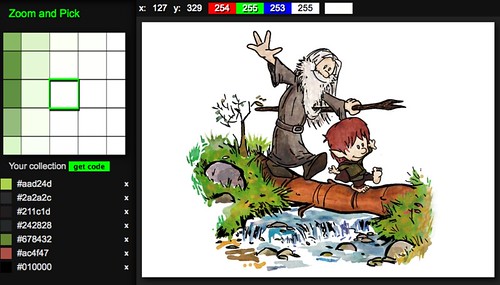
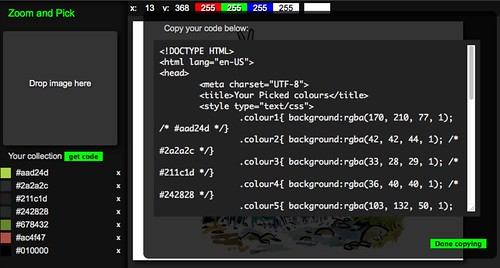
Today I played again with drag and drop and HTML5 canvas. The result is a tool to pick colours from images and create the corresponding CSS/HTML called Zoom and Pick

zoom-and-pick1
zoom-and-pick2

Here’s me explaining what it does in a screencast:

I will follow this up with smaller demos of parts of the whole on MDN soon. The biggest fun part was creating the zoom functionality.