One of my favourite parts of CSS is the !important exception. It is a wonderful metaphor of the oft cited problem between CSS and JavaScript developers.
- As a CSS developer, you know to avoid using it. It makes things too important and hard to overwrite.
- As a developer that has to write CSS and doesn’t want to look deeper, it is the way to make CSS do what you want it to.
- As a CSS developer finding it in a code base, it means someone wrote it that probably shouldn’t have.
- As someone who doesn’t know CSS as all, !important means “not important”.
And this is what I want to write about today. What is important and what isn’t? I feel we lost our ::focus.
I’ve spent the last 20 years on the web as a professional. I built products, contributed to libraries and tools. I wrote my blog, talks and recorded screencasts. I helped others do the same. Through all this time, I thought of my efforts worth-while as the open web is an amazing thing to support. I love the web. I love how it empowers people and gives them a voice. I love how it gives people a new chance for a second or third career when things didn’t go as planned.
But I am tired of the constant bickering and false sense of importance we still have as web developers. When you open any social media channel these days you encounter all kind of fights:
- JavaScript vs. CSS
- Frameworks vs. VanillaJS
- Brevity vs. maintainability
- Tooling vs. low barrier of entry
- Client vs. Server vs. Isomorphic
- Mac vs. PC
- Native vs. Web
- Mobile vs. Desktop
We love to bicker about what people use and how they build things. We discuss what colour scheme they have in their editor of choice and which one is the most professional. We stay in our bubble and poke at each other and its walls from the inside. Not realising how petty and weird this is. Sure, it is rewarding to talk to your peers and find flaws to improve. It is also easier than talking to people who aren’t us. Or doing a reality check on what people use the web, mobiles and computers for. What is driving people? What do they expect from our products? What is a real issue, and what is a straw-man we keep erecting to tell people off for not following “best practices”? And – even more important – how much of an impact do we as frontend developers still have? Are we trying to optimise our own little world to the n-th degree as we don’t want to admit that we are not running the show?
Let’s recap how amazing the frontend world has become:
- We have evergreen browsers, many based on the same open source engine
- We have evergreen web views that allow us to build apps with web technologies
- We have open sourced, customisable editors and IDEs
- We have spaces to share code examples when we get stuck
- We have live, collaborative coding experiences that help us fix issues without lots of emails back and forth
- We have a version control system that is not terrible (remember SVN, CVS, Mercurial, Bazaar, Visual Source Safe, StarTeam…) and comes with hosting and collaboration tools
- We have dozens of events each month, many of which release the videos of the talks for free
- We have hundreds of online learning resources and interactive workshops
- We have superb documentation on all the tech we use and we even have in-depth documentation if something is safe to use across browsers
- We have dozens of hosting options, much more affordable than in the past. Many even come with automated setup of tools and CMS
- We have best practice documentation, design systems, style guides and component libraries
We should be high-fiving and congratulating each other on how far we’ve come since we wrote in textpad and FTPed our files to a live server. We should be concentrating on making this community better, more inclusive and welcoming. We should improve the tools we use and contribute great ideas from the past. Sure, it is frustrating to seeing a repetition of old mistakes. But didn’t we also learn by trial and error? It seems presumptious to expect people to learn our wise ways before creating something. And it is downright deluded to think developers hired to create a product get the time to really learn the craft first.
Instead of celebrating how far we’ve come we seem to be still in some weird competitive mode. When people release the smallest amount of code they use, we rejoice in throwing out truisms at them:
- “This doesn’t work if the data you put in isn’t perfect!”
- “This doesn’t perform when you have a lot of data!”
- “This could be written much shorter!”
- “This doesn’t work in old browsers!”
- “This should be done in technology x and you use y!”
- “This is not accessible!”
These are all excellent points and a perfect product should have considered them. On closer inspection these are knee-jerk reactions designed to make us feel good. Do any of these stay applicable when you look at the context of the product? Or are they a perfect scenario we keep chasing as our end goal? Shorter code that is harder to read and maintain might not be the best idea. What does “this is not accessible” even mean? To whom? Under which circumstances? You can easily remove one barrier for a certain disability or condition and involuntarily create a barrier for others.
There are no winners
If you zoom out far enough, you can always make a true statement that makes the original creator look bad. And you look clever and caring about the web and people. You win. But who loses?
We all lose in the long run. The original creators lose as they get painted as people who don’t care or didn’t think it through. Spectators, especially people new to market, also lose. Their first impression is that anything public is ripped to shreds. That can discourage them to show their work – something we always cherished as a part of the open web.
I’d go as far as saying that even you don’t win anything. Yes, you appear the better person, but you also get discouraged by everything you see. You don’t feel like a part of a group of professionals that evolve over time. Instead you feel like you keep having to repeat the obvious as people don’t listen or try to get better.
The odd thing is that we don’t even realise how much time we spend complaining about the work of others. Time we could use to do things, to create things, to learn things. Time to encourage others and to give feedback to prevent mistakes from happening. It is a spiral of unhappiness and “it could be so much better” thinking. It is not fun being the person who knows better and sees mediocrity wherever you look. It is also called being a snob.
The web is a mess
There is no doubt that something, somewhere goes wrong. It is baffling to see that even with the amazing stack of tools and development products the web is a total mess.
The web is slow and big. According to a research by Katie Hempenius based on HTTPArchive, 90% of desktop web sites load 5.8MB of data.
To make matters worse, this is an upward trend.
It doesn’t look rosier when it comes to accessibility. A research by WebAim that the one million most visited sites have glaring accessibility issues.
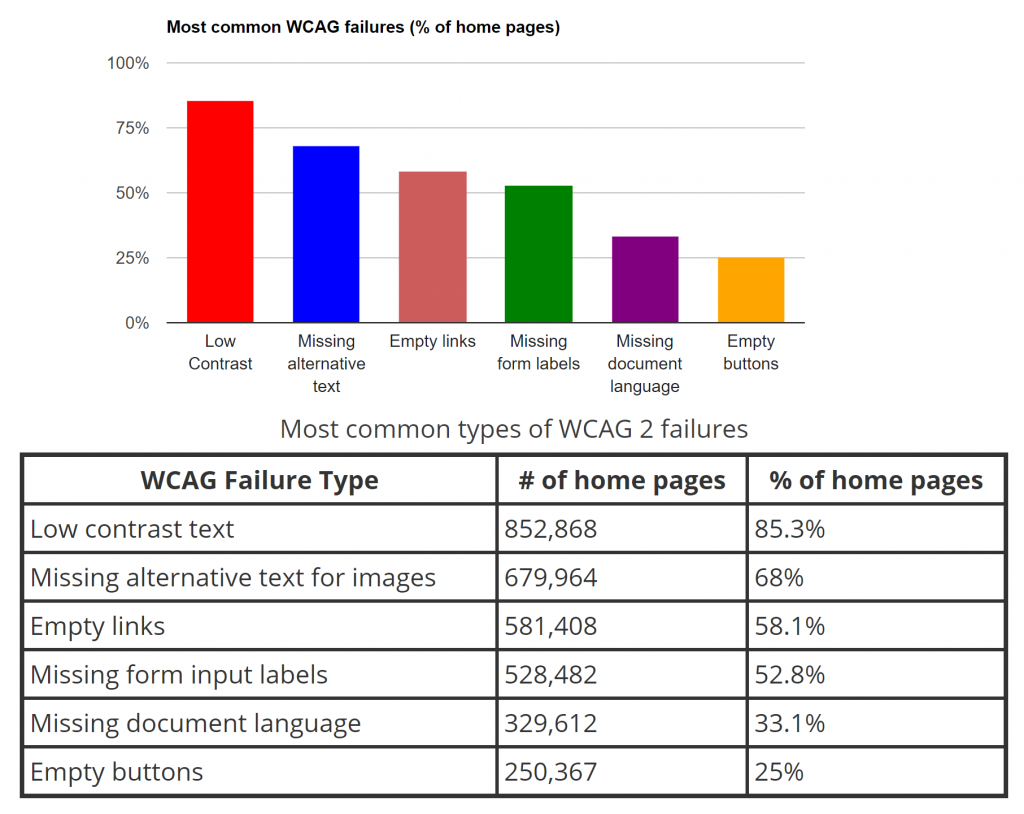
Add to this the almost weekly reports of data leaks and security problems on the web and we have something we should be pretty angry about. This is not the web we want. This is not the web we talk about when we bash “best practices” around each others’ heads.
Where do things go wrong?
A lot of talks and publications currently lament the over-use of frameworks. We talk about developer convenience overruling quality and performance of the final product. And there is of course something odd about using a 2MB JavaScript framework when the final product is a static page.
This is most of the time not the fault of the developers of these products, though. We love to paint the picture of the arrogant code-bro. A person who wants to always use the newest and coolest with plain disregard of the end user. But I am not sure that this group is as big as we make it out to be. Or maybe the few that are there are loud and annoying enough to become a distraction.
We actually don’t have much insight into what caused a product to be the way it is right now. And often we over-estimate the value we as web developers have in this. Yes, in 2001 it was up to the web developer to care about browser compat and clean markup. But even then we didn’t have full control over what ends up in the browser. Often we didn’t have to battle the browser, but the shortcomings of the CMS or framework used to render out HTML.
And this has not changed. When we talk about the web at events, in magazines and blog posts we often make the assumption that we control our stack.
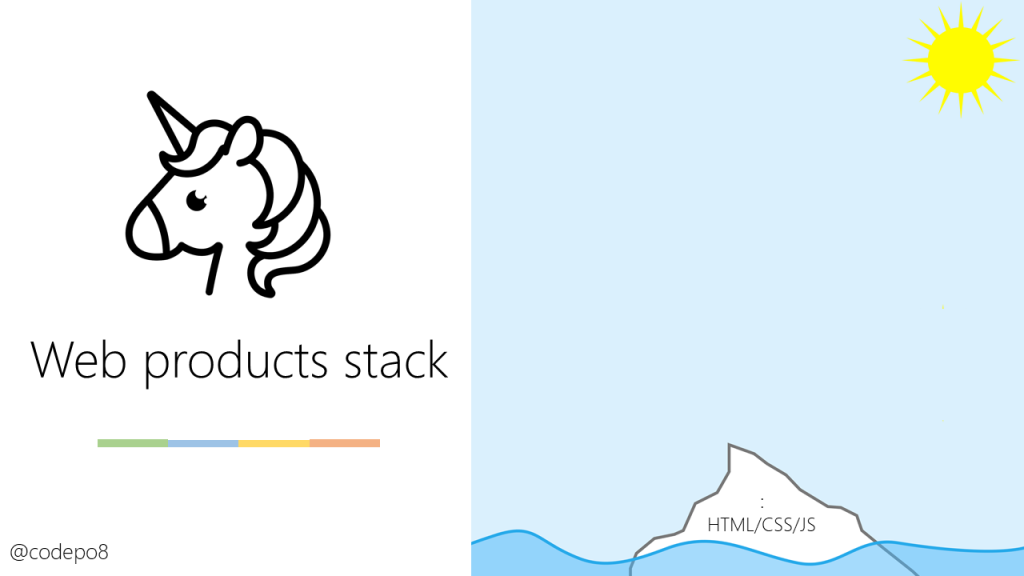
In almost all projects I worked on in my career things looked different though. Many other players are part for the creation, deployment, publication and maintenance of our products.
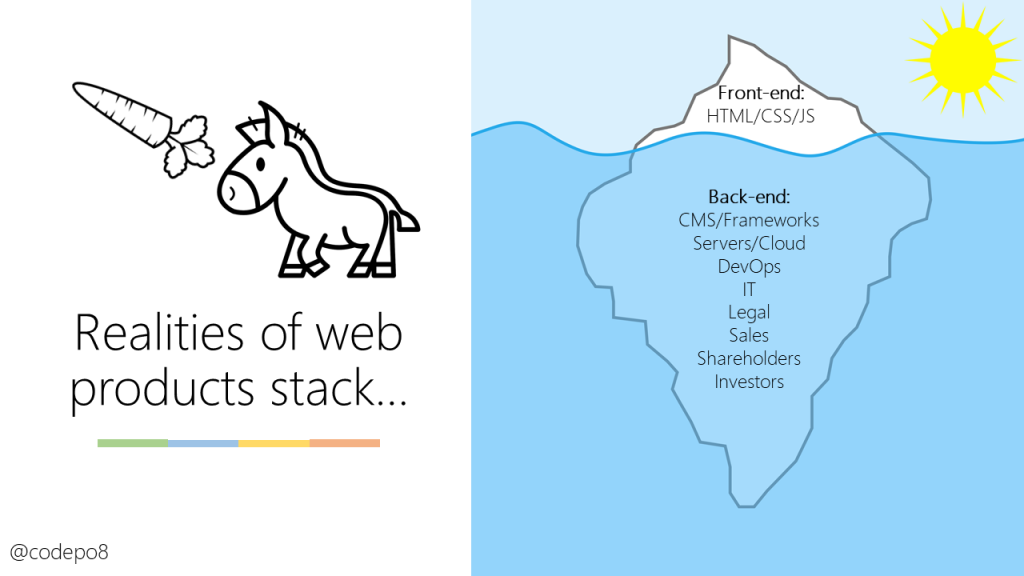
A third party web
This is obvious when we see that one of the biggest offenders when it comes to performance of web sites are third party services. Often these aren’t added by the original web developer, but by all kind of other players. Marketing, DevOps, SEO, everybody has a special toy to add to the page. As Paul Calvano of Akamai discovered 27% of web sites are 90-99% third party content.
Patrick Hulce has an excellent interactive visualisation of this data at third party web today.
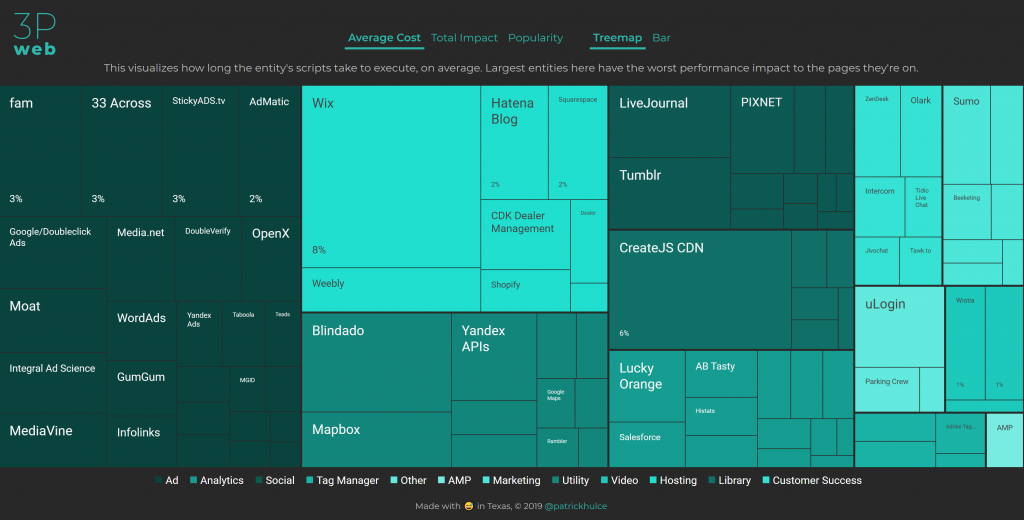
How much do different 3rd party scripts affect page performance? Based on HTTPArchive and Lighthouse data the median is 199ms extra, the minimum 47ms and in the worst cases third party code add up to 3 seconds of delay to the page rendering.
An assembled web
The web of today isn’t crafted by hand but assembled from existing building blocks. I’d go even further and say that this has always been the case, and many enterprise sites running on non-optimised framework and CMS output back me up there. Now have more sophisticated building blocks and they tend to get hungrier on resources year over year. If it runs on our fancy phones and laptops on fat connections, it is good enough to ship. This should worry us – and it does – but the market has moved on.
Sadly the focus of many a web product these days isn’t accessibility, performance, security and interoperability. It is getting the thing out as soon as possible. First to market beats quality and maintainablity on any ledger. As we assemble our products from building blocks, they become discardable and replaceable when the next cool toolchain comes around.
We have a plethora of packages, libraries and frameworks to choose from that make our lives easier. If your focus is to cut down on engineering cost and to roll out your product as quickly as possible, using them is a no-brainer.
A victim of it’s own design
The web is a great platform to not care about quality. It is defined as forgiving to developer error – it is one of the main design principles of HTML.
In case of conflict, consider users over authors over implementors over specifiers over theoretical purity.
Browsers aren’t allowed to break the web. We have decades of ill-advised browser competition on platform rather than UX features that created non-standard APIs live products rely on. That’s why browsers render non-standard code and will have to keep doing so. These are not only cruft, but also security attack vectors. Browser makers are busy keeping the web from breaking. And we can’t stop developers from being sloppy.
The dire state of the web, however, is affecting the business model of web based companies. And the solution, it seems, isn’t to ask the wise old sages of the web for advice. It is piling on more technology solutions. Most end users have some blocker running that gets rid of unwanted trackers and ads. Chrome is considering a never slow mode. Webkit has a similar idea considering limiting the amount of JavaScript a site can load. And, of course, there is AMP as the nuclear option to replace the slow web with a set of components.
Maybe the important thing is contributing to what people use?
I am not giving up on the web. It is too good a thing to waste. But it is time to face some realities that we’ve become disconnected from what the state of affairs is when it comes to the creation of web content. I love that we have fire and brimstone talks and publications about how horrible we are to the next users of the web with the things we create. But I want to see more sensible contribution and communication to the outside. I am currently working a lot with enterprise developers, people who have a 9-5 job and don’t have time to stay up-to-date. What they do, however, is build products millions of people rely on. It is pretty rewarding to introduce these people to simple tools and workflow optimisations. As Chris Coyier put it, we have a lot of tools in our editors and browsers to create a make it hard to screw up driven development flow. Most of the tools we blame for making the web horrible are open source. So let’s talk to the maintainers of these products and contribute a few small things that can make things better.
It is not anymore about knowing everything about the web and define best practices nobody follows. It is about understanding that the web is a rendering target and getting there as quickly as possible with the least effort is what sells it. I see the web as plumbing these days. We don’t care how the pipes in our houses work, as long as there is water when you open the tap. Only when things are utterly broken, we start wondering what happened. Then you call a plumber to fix it. Web developers are not the creators and drivers of the IT world. Maybe being a good plumber is a thing to consider. And this means we don’t only deal with clear water, but have to start wading through other things to make sure people will get things safe to consume.
When it comes to our online communications, I deliberately step away from in-fighting and Twitter threads. There is much less gain there than going to the source and comment where people write re-used components, libraries and products. We have the channels to make things better at the source. And that’s important.