What kind of personality are you?
Friday, September 9th, 2005The beep has a nice new test for you to find out what kind of personality you are.
Allegedly I am a big thinker
The beep has a nice new test for you to find out what kind of personality you are.
Allegedly I am a big thinker
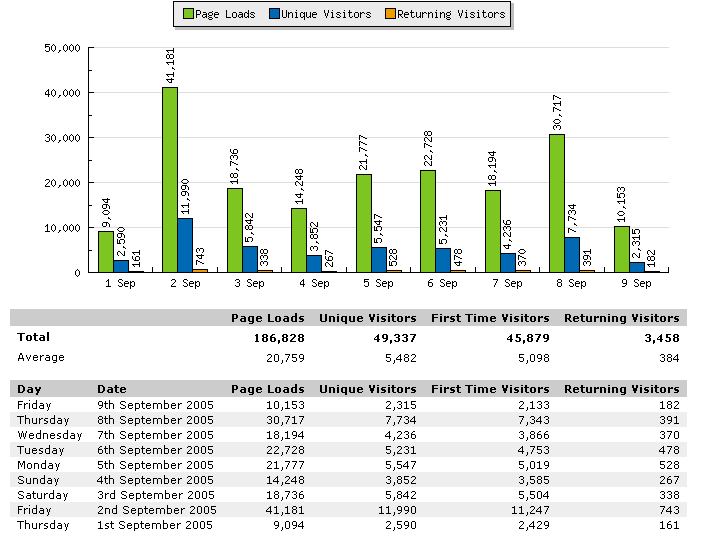 The CSS Tables Gallery is now online for the first week, and I am pretty speechless as to the success it has been. The statistics show that on average about 5800 people clicked the gallery and added up to 22000 hits.
The server, donated by NWU in Germany, had 3.2GB of traffic in the first 9 days of this month, compared to 4.6GB in the whole of August. (more…)
We all love Scott Andrew’s addEvent and how unobtrusive it allows us to add and remove event handlers from and to elements. But now things have turned sour and Peter Paul Koch gathers the forces of good to come up with a better solution:
I just launched the “addEvent() recoding contest”:http://www.quirksmode.org/blog/archives/2005/09/addevent_recodi.html, aimed at producing a new
version of Scott Andrew’s addEvent() and removeEvent() functions.
Script away!
Philipp Lenssen of google blogoscope has published a while ago truth I had known for a long time now Good programmers are lazy and dumb. I keep telling my developers that you don’t impress me by staying in the office late, you impress me by doing the 8 hour job in 6 hours with proper documentation. Then you can go home for all I care.
Most of my development happens because I don’t want to repeat things. EasyCMS was built to allow me quick changes to a prototype, EasyNav to allow clients using contribute to edit the navigation.
 Working with Mint I was missing an option to collapse the different panes when I don’t want to read them.
Some hacking later, I wrote a script that automatically allows you to collapse and expand a table by activating its footer. As a visual indicator, the script adds an image to the footer (this also allows keyboard access).
It is a work in progress and I need your help to fix it for Opera and get rid of a weird Firefox issue.