Die letzten paar Tage war ich im sonnigen Mainz um die JAX Konferenz zu besuchen und den Java Menschen mal etwas von HTML5 und JavaScript zu erzaehlen.
Meine Notizen und links fuer die einzelnen Vortraege muss ich noch zusammenschreiben, aber hier sind schonmal die Slides und die Audio Aufnahmen zum anhoeren:
It is impossible to write a blog post about HTML5 and embed slides in Flash in the same without suffering lots of wisecracking comments that don’t have anything to do with the content. To avoid this, I wrote Slideshare HTML and blogged in detail about how it works.
Well, I hacked and scraped and sooner or later this will always bite you in the bum. As it did when the Slideshare developers changed the URLs of the images of the mobile version which of course broke my embedding tool and got me a lot of emails asking me why oh why I have forsaken people.
Bitching on the developer mailing list of Slideshare helped and now the oEmbed API returns not only the number of slides and urls and all the other goodies but also the right image suffix to use.
So, in short words – it is fixed and as I am now using the API rather than building a ScrAPI it should work smoother.
Hi there, I am Chris. I’ve been doing a lot of web development in my career and also cared a lot about accessibility.
Worries about accessibility
I am a bit worried about accessibility as a community and as an idea in web development.
My main worry is that there still is a massive disconnect between bleeding edge web development and the accessibility world.
The big web re-boot
Right now we are in the middle of reinventing the web. There are so many very cool things happening I would need two hours to tell you all about them.
Accessibility the show-stopper?
Accessibility, however is always considered a bit of a downer. When you start talking about accessibility, then you most likely hear something about “graceful degradation” or even the dead horse that is the “extra version for disabled users”.
Accessibility tech is falling behind
This is to a degree understandable. The technologies we praise in the accessibility world are not up to speed with what is happening right now. Take for example the wonderful concept of caption and figcaption in HTML5. We finally have a way to connect an image with a caption – something every book layout for example needs. In order to make it accessible though we need to add ARIA roles and give each caption a unique ID. This is not maintainable.
ARIA is amazing but frozen in time in interfaces we build in the 90ies. ARIA is a stop-gap solution, true, but if we don’t make it easier to use, people will just not care.
You need to be accessible – it is the law!
Another issue is that accessibility is considered something that needs to be done to a product to make it legal to release – not to make it better or interesting.
Accessible products are better products – tell the world!
And this is where we need to stand up and shout and make a change.
Those crazy kids and their ideas – it’ll never work!
In general I get the feeling that the accessibility community as a whole is not as open to tech evolution as the rest of the web communities. Every new thing is considered a massive step for all of us to take and if it doesn’t work 100% it is discarded as “not ready for use yet” very quickly. After all it is much harder for a person with a disability to upgrade their environment, right?
Painting a wrong image of accessibiliy
This grumpy old men image of the accessibility community doesn’t help us with winning the hearts and minds of the developer community.
Accessibility is everywhere!
If you take a look at the real world, we have a lot of accessibility enhancements (we fought for over the years) that do not only help people with disabilities but make it easier for everybody.
Lowering the kerb for people who want to like accessibility
Kerbs on roads have lower parts to allow for wheelchairs to get onto the sidewalk. This is also very useful for people with pushchairs or cyclists like me who like to celebrate their higher mobility in comparison to cars.
Digitising the world for conversion
OCR scanning allows us to turn printed matter which is deteriorating into formats that can be converted and archived much easier. It was invented for a blind person.
This can apply to anything – a text that is properly structured for assistive technology to understand is also easier to style and to index for a search engine or crawler. It can also – to a degree – be translated on the fly.
Being loud and proud and communicating across borders
The speaker and subsequently the phone was invented for someone who was hard of hearing. Now it allows us to get ourselves heard and to speak people world-wide. I work in London and work with people in 7 countries and 6 time zones. I love that freedom.
Don’t just tell me, show me!
Closed captioning on TVs was originally meant to be for the hard of hearing. If you look at where it is used mostly right now you’ll find that it allows people to follow a TV show without disturbing others. You find TVs with captioning turned on in gyms and in sports bars.
Right now, the web doesn’t work that way
On the web, however we still see accessibility as something that needs to be tacked on. Something that needs extra work and follows rules the normal developer doesn’t understand.
Bad interfaces with broken promises
This leads to us building interfaces that look flashy and promise us some functionality but don’t work. Like the buttons in the lift in Heathrow Airport un London. They are raised, they are big and they are easy to read – and they do exactly nothing.
Accessibilty enhancements as a pacifier
This is a very common thing in lifts though – there is the concept of a pacifier button. This is for example the button that closes the door – which normally does not make the door close faster. What it does though is give people the idea that they are in control and calms them down. After all being in a very small closed space can be scary.
On the web a lot of developers add these kind of enhancements to their web sites to feel that they have done “something” for accessibility. Font resizing widgets for example.
Truth is – accessibility is hot right now
If you stop thinking about building things for the disability community and you consider what it means to build these interfaces you will find that we are already in the middle of a renaissance of accessibility needs.
Mobile devices are hot and cool and they also spell the end of really bad interfaces we used in the past:
Properly structured documents are easy to redesign for different screen sizes.
Larger buttons are needed for touch interfaces.
Hover interaction doesn’t work on mobile devices
Lightboxes are very confusing on small screen devices
Science fiction shows us what could be done
In Sci-Fi movies in the past we dreamt of interfaces that are human. Instead of moving a mouse and typing in cryptic commands computing is ubiquitous. Star Trek had voice recognition. Iron man is a great example of what you could have as amazing interfaces.
Actually none of this is really fiction any longer.
Emerging technologies are human and more accessible
If you haven’t realised it yet – computers are becoming more human accessible.
Speech recognition help us communicate with devices whilst we are on the go.
Touch interfaces are much simpler to grasp (literally) for humans and are becoming a de-facto standard.
Device orientation is already used in games – why not in other interfaces?
Take the example of Glenda Watson Hyatt – a lady bound to a wheel chair who could only communicate with a massively expensive piece of hardware and replaced it with a much cheaper iPad with more flexible software.
The Wii blew the whole concept of gaming out of the water. Instead of pressing a random sequence of buttons and arrows you played tennis to, well, play tennis. This lowers the barrier of entry immensely. The Wii is in use in homes for the elderly to make them move instead of vegetating in front of the TV. Awesome!
The Kinnect goes even further with this. Instead of having to play with any controller it recognises your shape and reacts to your movements. This could be used for accessibility interfaces.
It is true, none of this is free and open, but here is where geeks come in – what isn’t open will be made open.
Hidden functionality for those in the know
I lied though when I said that the close door buttons don’t work. In the US they do have a special functionality. If you go into a lift and press the close door button and then the floor you want to go to whilst keeping the button pressed the lift will go directly to that floor and not stop in between – regardless of people requesting it on other floors. This is for firemen and the police to get there quickly.
On the web this kind of inside knowledge means in most of the cases using an API. Clever companies don’t just build interfaces – they also offer the data of their systems to allow people to build interfaces.
Opening up YouTube
One example of a use of an API that I did in the past is Easy YouTube. This is an interface catered for people with learning disabilities. YouTube now has big friendly buttons and not a lot on the screen. Incidentally and without knowing I also made YouTube available for blind users.
Here are a few of the results this had – a video of a blind user who said she hated the web being happy as punch to be able to control a video and a singer with a learning disability being able to watch music videos for the first time.
Geek pride can be yours
Enabling these people made me very proud indeed. And it only happened because someone with tech knowledge like me got a detailed list of requirements by someone who had a problem with current technology. Antonia Hyde had asked at a conference to build a video player like Easy YouTube and I started building it right away.
Setting technology free
The main issue of YouTube was that it is Flash based and only gives me limited access. Now with open technologies we don’t have that problem.
Native video and audio
Native HTML5 video is by default keyboard accessible and can be styled in any way. You can read out the current time and react to it. This allows you for example to sync HTML content around the video with what is happening in the video. Yes, you might have guessed it – that makes for very simple captioning interfaces.
Native rich interaction and styles
Using technologies like Canvas and SVG you can create beautiful visualisations of data in the current document. Native to the browser, accessible for translation and reading by assistive technology and beautiful.
Input and output
Voice recognition is not far away – same as face recognition. We have cameras and microphones in our computers, why not use them?
Stop thinking in limits
The main thing we need to do to marry the crazy cool innovation we have now in development with accessibility concerns is to stop thinking in limits and use disability needs as an opportunity to build better products. For this, above all, we need to embrace the web.
The web is the platform
Imagine no need to buy Windows and upgrade your JAWS. Imagine not having to worry about security patches. Imagine computers booting up in seconds rather than minutes with dozens of security questions and barriers.
We can have that! Systems like Jolicloud and Chrome OS totally do away with the need for an operating system layer – you boot into the web. If you are offline you can still use the machine to write and store but all your work is on the web.
Let’s not leave this as the playground for a selected few – let’s make this the accessible layer of the web.
People are here to help
Instead of complaining that the people on the web do not care about accessibility let’s use them to make the web more open to everyone. Take Universal Subtitles for example. This is a small JavaScript you can put into any web site that adds a subtitling interface to any video in the page – people can write subtitles for a part of the video and can also translate it.
We need more of these tools – let’s make accessibility a concern for all, not a thing to make a lot of money with by offering bespoke services.
Stop preaching to the choir
Stop staying in your comfort zone of accessibility mailing lists and conferences. Go out and infiltrate the main conference circuit and discussions about cool new technology. Tell the world about our needs and demand them to consider them.
Stand proud and tall – we can be a butterfly!
Accessibility doesn’t have to be the ugly duckling of development and IT solutions. It could be the beautiful butterfly leading us to a much more human interface future. Go for it.
During a meeting of all the Mozilla people last week a few of my colleagues asked me how they could become better at public speaking or as they put it “how do you do all these talks? I could never do that! I am too afraid I’d screw up!”. I took that as a challenge to start a series of talks and trainings on “public speaking for tech geeks” and started with the following talk.
There is a general preconception that geeks are bad presenters. We are awkward and speak in a language nobody understands about things people don’t care about. That is why companies send sales guys to present instead of the engineers who build a certain product.
This breeds a lot of misunderstandings as to how to present. If and when geeks meet each other a lot of the presentations are simply live coding or 40 minutes of tech awesome shown in a terminal. We’ve gone away from believing in presenting as we’ve seen too many sales guys on stage talking uplifting nonsense (in our eyes).
And this is a shame – geeks are awesome presenters – if they understand that they need to present. It is a slight shift in our perception of what we want to achieve. Instead of showing off what you know your task is to inspire people to want to know more.
Step 1: Preparation
The first step to preparing a great talk for your company is CYA (cover your arse). This means talking to your PR and marketing department that you are going to give a talk. That way you know what is currently hot in your company (and maybe get some sponsorship) and more importantly what to avoid stating in public. You might think you are cooler than PR and marketing but the fact is that these are professionals and when you keep a good relationship you can learn a lot and avoid public embarrassment.
Here’s the next thing to do: stop thinking about the presentation. Instead, do your homework – write all the code or interfaces you want to show, learn to use the system you’re trying to cover and document what you have done. A lot of things can go wrong with your presentation. If you have done your homework and you know what you want to talk about inside out, you can still deliver a great talk even when there is no electricity or your computer dies on you.
Find something that excites you – there is no way you can be a good presenter when you are not totally down with the thing you want to present. Sure, you can bring the message across but to win people’s hearts and minds you need to be talking about the fun and excitement you feel about using something.
Prepare a doggy bag – a very important part of a good presentation is to have all the things people want to use after your talk available for them. Host your code examples somewhere for download, have a list of all the links somewhere and upload the slides if you want to share them.
Think of the audience – a lot of speakers think they can write one talk and deliver it over and over again wherever they get invited to speak. If your talk is truly amazing and you are a great speaker this can work. If you want to have the most impact, however, it makes much more sense to write something catered to the audience. This is especially important in countries where your language is not the native one. Cutting down on the spoken part and sticking to facts and code examples works much better there.
Point to the obvious – there is no point to repeat the same resources over and over again. If something is very well documented and written don’t talk about it but instead show a link and tell people they can find all the information there.
Find something that is not obvious to concentrate on – there is some different angle than the obvious one to everything. If you find that angle, you can build a much more compelling argument and cause interest. Instead of looking at what something does, try to see what effects is causes.
Have a story – nothing is more compelling than having a good story. Like a good story, your talk should have an introduction, a buildup to a climax, a climax and a good ending. To make abstract things easier to grasp, try to find real life examples that resonate what you want to bring across.
Piggy back on something current – if you can find something that is very current and on everybody’s radar and you can connect it to what you want to talk about it is a lot easier to have people listen to you. Furthermore it means that people mention your talk when they discuss the other current matter.
Share information from the trenches – nothing makes an abstract matter easier to grasp than examples how to use them in real products and the effects they caused. People have a job to do – show them how they can use cool new things to make it easier for them.
Have fun – be unpredictable – don’t just deliver the info, shake up the audience from time to time by using humour and unexpected references in your talk. Variable names of code examples are a good example to add a dash of “what?” for the audience.
Spread out and back up – this is the web, use it. Tweet about the things you will talk about, show some bookmarks, upload some screenshots of some of your slides. Tease and preview and people will already get interested. Once your slides are done, upload them somewhere for you and also put them on a memory stick. Your computer may get lost or break down, this will keep you in the game.
Step 2: Delivery
Get into the right mindset. This is the hardest bit for a lot of people. You have to find your inner calm before you go on stage. You have to be hungry to deliver a kick-ass talk instead of being scared. A bit of fear is good – it stops you from becoming complacent. My mindset when I enter the stage is that there is nothing I can do now to undo it – I am here, people see me, people expect to learn and be entertained. This is it, I have to do this. I did my homework, I got this. Let’s make it interesting and share with people what got me to get excited about the thing I will talk about.
Some delivery tips
Say “hi” and tell them what’s coming – just don’t keep people guessing. Say who you are quickly, what you are going to cover and where the content can be found. I found that “will these slides be available?” to be a very common first question in the Q&A. You can avoid that by telling upfront that they will be.
Be yourself – It is tempting to imitate other successful speakers or use clever rethorical tricks but in the end it has to be you on stage. If you are not a good actor and you try to be someone else your body language will betray you.
Pace yourself – when we are excited or nervous we tend to go too fast. Give your talk a normal pace. Make breaks and take breaths in between logical units of your talk. If you come across as rushed, the audience will feel rushed, too.
Do not try to gloss over issues – you might be tempted to give an overall positive image of the thing you are presenting about and tell the audience that all of it works. That is a good plan but if something doesn’t work, don’t pretend that it does. Almost everything we talk about in technology can be easily verified. You don’t want to come across as a liar or uninformed, so show the bad with the good.
Speak clearly and use simple language – it is tempting to woo the audience with impressive words, references to great pieces of literature and complex sentence structures but you also assume that people care more about your talk than the content you try to convey. In tech conferences this is a very rare occasion. Focus on being understandable rather than eloquent. This is not a fancy cocktail party.
Roam the audience. This is one of my biggest tricks. Instead of seeing and taking in the whole audience and being overwhelmed by it pick a single person every two slides. Look that person in the eye and speak to her/him instead of the whole crowd. Metaphorically of course, don’t address them by name or compliment them on their shirt – stick to your talk. This has two effects: you don’t get all “oh my god, so many people” and you include the audience much more in your talk – one at a time. I found that people I looked at are also much more likely to ask good questions afterwards as they already feel connected.
Your slides are your backdrop – make sure your slides aid your talk rather than taking it over. The worst example for that is when you show videos and for two minutes you stare at the screen with the audience. This makes you a spectator, not a speaker.
You are the transmitter, not your slides – in general your slides emphasise what you are talking about. It is your job to make the information on them come to life. When you read out your bullet points to the audience you are only an accessory, not the driver.
Screencasts are the safer live demos. – a lot of developers get a kick out of doing live coding on stage showing how easy it is to achieve “a lot in a few lines of code”. While that is hard-core and gives you street-cred with the tech crowd it also can backfire immensely when it doesn’t work. It also has the problem of you doing things whilst talking and people having to concentrate on you and what is happening on screen. Add having to decipher small text on a big screen to that and you overwhelm the audience very quickly. The same applies to playing with complex interfaces and having to enter text and drag things around. You might think you can multi-task but normally it doesn’t come across as smooth – especially when the conference wireless lets you down. Therefore it makes much more sense to record screencasts and narrate over them. That way you know the things you want to show do work and you can concentrate on explaining what you did instead of excusing yourself for things breaking.
Cite and give credit – if you say who did something instead of pretending you did it you can’t be called out as a fraud and it shows that you have the finger on the pulse of technology and that you know people. Everybody wins.
Get simple participation – from time to time it is good to get the audience to take part. Ask a question and get a show of hands. Ask people to guess something, you know, that sort of thing. It shakes things up and shows you that people are taking in what you are saying.
Don’t answer your own questions – this is a pet peeve of mine. Do not ask something and immediately answer it. “How does this work? – Well, I tell you” makes you come across as arrogant and schoolmasterly.
Deal with failure quickly and honestly – if something goes wrong, admit it, fix it and start over. Or skip it and move on. Swift failure is not an issue. You losing your track and coming across as stumped is an issue.
Rinse and repeat – at the end of your talk give a quick recap of what you covered, how people can reach you and where to find more info. Good to remind people.
Step 3: Feedback
Ask people for feedback – both in the Q&A session directly after the talk but also on Speakerrate or via email. Bear in mind though that immediate feedback is normally very polarised – good and bad – whereas reviews done some time later tend to be more in-depth.
Advertise your availability – tell people where they can reach you on the web when they have more questions and if you are going to attend the after party. People pay money to see you, it is just fair to be available for shy people who do not participate in the main Q&A or don’t get the time to ask their question.
Own the Q&A – it is important that you are in control of the Q&A session. Stop people from rambling and ask them to state their question rather than their CV. Repeat questions for the whole audience (and the recording) and answer quickly to move on fast to the next question.
Quick tip about “Clever Trevors” – you will always find someone in the audience who tries to show off their knowledge instead of asking a question. This is a good thing but does prevent others from asking possibly very valuable questions. The way I deal with this is to interrupt them and flat out ask their name. I then welcome them as experts and explain that I won’t be able to answer all questions today and if people need information on a certain topic they can also ask this person. That makes him/her feel good and prevents precious time being wasted or me coming across as arrogant towards other knowledgable people.
Step 4: Follow-up
Share your materials – upload your slides, make them available, publish your notes on your blog and people will use this info when they blog about the conference and mention your talk. It allows you to be known for this talk longer than the one hour at the conference.
Answer emails and convert business cards – if you collect contact info, store it as soon as possible and send out emails to acknowledge that you met and talked. Sending out an email doesn’t cost much time but sitting in front of a massive pile of cards trying to remember who was who does.
Write a post about your feelings and impressions – it is very interesting both to the conference organisers and the people attending the conference to see what the speakers thought. It helps people to pick conferences and organisers to spot things that went well or went wrong.
Be your own judge – above all, try to be better every time you speak. Record your talk using some recording software (Audacity is my weapon of choice). Listen to your talk, see what annoys you and don’t do it next time you speak. This also allows you to release the audio recording for later – a lot of people download my talks and listen to them when they can’t look on a screen (I listen to them in the gym on the cross trainer).
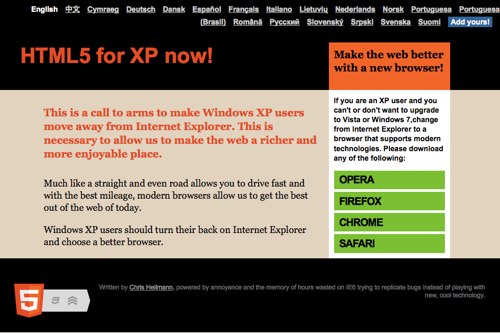
So what is this about? Well, frankly the thing that holds us back when it comes to developing a beautiful and simple to maintain and create web: Internet Explorer not getting upgraded.
Internet Explorer 9 is not available for XP users – you need to have Vista or Seven to get IE9
Upgrading to Vista was not really exciting enough for a lot of businesses when it came out
Upgrading to Seven normally means that you also need to upgrade the hardware (which is actually a very common happening – as a lot of users simply don’t know what a browser is or don’t get the rights to choose an own browser in a corporate environment IE only gets upgraded when they get a new computer)
A lot of Windows XP machines never got upgraded as they had a pirated OS. The Genuine Check of Vista told users “computer says no” and that was that.
Now, I personally want to have HTML5 and CSS3 and other new exciting technologies right now – I am tired of writing code for cool things that browsers should be doing for me.
As Microsoft is spending a lot of time and effort to promote just how cool IE9 is and glosses over the fact that XP users cannot get it, I thought it is time to advertise the fact that users have a choice – even when they stick with XP. For Microsoft this doesn’t make any business sense as they want to sell Seven, and they are right in telling people that systems need upgrades. However, if the upgrade means spending a lot of money on new hard and software then I can also understand people who don’t want to do that. With Apple products being very expensive and Linux just not being as “mom and dad end user friendly” as Windows is this is what we are stuck with.
This is why I built HTML5 for XP, the site that Microsoft should release themselves. Please tell people about it and send it to your clients.
Creating it was the fun part. I wrote it, created a simple web site (fighting the urge to use all kind of CSS3 awesome as it needs to work in IE6…) and then asked for translations and promotion on Twitter. I put up a Google Spreadsheet with the texts for translation and shared it with the world. This was a too hippy an idea as it meant people did the cool h4xx0rrrr! thing of deleting all the content (well done, lads, wait for Trinity to knock on your door really soon). So I made it an invite only document to submit translations and within a day I had 16 languages – now we are up to 20. I also have to thank Prisca for making the CSS pretty as of course the first feedback from designers was that “this is ugly”.
The saga continues – IE6 has to die! Spread the word.