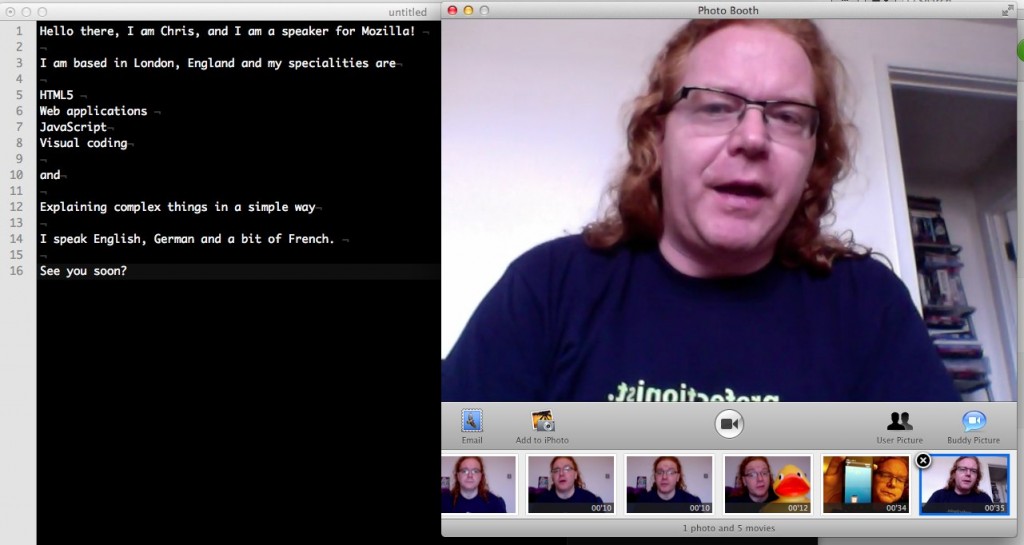
One of the things we want participants in the The Evangelism Reps program to do is give us a quick introduction video of themselves to have a face to connect to a name. This should not be anything big, a simple, “hi, here I am” will suffice. So here is my introduction as an example.
All in all the production and publication time of this was an hour – and that included cycling a mile to find a shop that has Tofu sausages and Babybel cheese. Here’s what I used:
A MacBook Air (could be any laptop with a camera)
Photobooth (or any other tool that can record a camera – this could be on your mobile, too)
The first thing to remember when trying to do something like this is to simply for go for it. So I wrote myself a little script and just had it open next to the recording tool:
Technically, this is not good, but I wanted to do this quickly. You can see my eyes flicking to my script from time to time. I shouldn’t have to as I knew what I wanted to say but humans work that way. Give us a “Linus blanket” and we will always come back to it.
This is the simplest way to record – don’t try to re-start the recording and delete it in between failed takes, just go on and cut the bits that didn’t work afterwards.
You can see that I waved my hand over the screen every time I started again. This is the sign to myself that another take started.
For cutting, I used MPEG Streamclip which couldn’t be simpler:
Go to the hand movement and find the start of the next take
Hit O for “out” – this highlights the video from start to where you are now
Press cmd+x to cut (delete) the video up to the point where you are
Find the end of the video
Press I for “in” to mark the video from there to the end
Be professional (no racism, sexism, calling names)
No political and religious views
Have something to say
Speling duz kount
Doing research and finding gaps to fill
Tone of voice
Use active voice
Use short sentences
Skip the foreplay
Give a full disclosure
Answer the WIIFM - “what is in it for me”
Stick to one thing and explain it well
Give credit where credit is due
Structuring your post
Use proper headings
Tell your story
Use lists
Give away everything at the beginning
Add breathing space
Extra value goes to the end
Linking
Link meaningful text
Links are proof, not context
Know your link targets
Test your links
Provide “read more” resources
Images
Link to the resource
Use absolute image paths
Have a sensible alternative text
Crop what is not needed
Play nice with people’s bandwidth
Multimedia (Screencasts, Audio)
Provide a fallback link
Keep them snappy
Cross-link from the video site
Code examples
Link the original source
Embed readable code (colourcoding, Gists, interactive code examples with JSFiddle/JSBin/Tinker.io/Dabblet)
Make your code work
Write code for the web
Cross-posting and promotion
Do not publish the same blog post on different blogs
Write targeted smaller posts linking to the main one
Link all the resources back to the blog
Find outlets to promote the post
A lot of this might appear basic to the casual observer, but I am constantly amazed just how many simple things are done wrong when posting technical content. So I hope this will help some people get started on solid footing.
Posted in General | Comments Off on [Evangelism Reps] Some tips on Tech Blogging
I am tired of Twitter as a “discussion platform”. It isn’t. It is great to give quick updates about what you do or to tell people about something cool you find (something that was reflected in their old slogan before it got all creepy and corporate with “Find out what’s happening, right now, with the people and organizations you care about.”).
It is annoying as a discussion platform and it breeds far too much discontent. From the very get-go when you want to have an sensible and fruitful argument Twitter (on its own – there are mashups that try to work around that like bonfire) has the cards stacked against you:
It is very quick moving
There is no threading going on
People even don’t reply properly so context is lost
Different people answer at different times (sometimes a “this is so wrong” comes hours later)
There is no proper Twitter archive or search, so the same arguments happen over and over again
The limit of 140 characters should work to phrase your arguments wisely and delete pointless parts but in reality makes people leave out important bits
It invites people to show off and speak in soundbites rather than arguments
In essence, Twitter keeps us on the edge and makes us want to answer fast rather than reasonable. This is its main difference to other services – it is about immediacy, not about reasoning.
With Twitter a-twitter the last few days with a lot of controversies and interesting discussions about the political views of technology spokespeople and alcohol consumption at conferences I found there was a lot of very destructive and pointless bickering back and forth going on. Let’s not even go into the heartbreakingly facepalm-inducing backlash by #teamiphone (what?) to Instagram being released on Android.
I found one thing to be true though when it comes to people reacting to your tweets: it is never about shades of grey or benefit of the doubt. It is going straight for the jugular. And most of the time it is putting words in your mouth or assuming a much more sinister argument than the one you uttered.
People get immediately into the defence and argue against the sweeping statement that surely is behind your argument – even if it isn’t.
When people pointed out that there are great points in Ryan Funduk’s post about alcohol at conferences the majority of the arguments was “not everybody is binge drinking” or “not everybody at conferences is a brogrammer”. True, but that wasn’t the point. The point was that exclusion happens because of social norms and peer pressure. That is the thing to consider and be more aware of.
When Rob Hawkes pointed out that a lot of conferences advertise with having free bars and it is mentioned as an absolute must by conference organisers when organising Remy Sharp got rubbed the wrong way and started challenging Rob how “he knows what conference organisers do”. Weird. I know both people well and love them to bits – people who can cleverly and calmly argue in real life getting stroppy at each other because of lack of context and immediate defensive action. Nobody attacked the guild of conference organisers; there is no such thing and Remy surely would not be the person to want to be spokesperson. But he felt he needs to make a stand and speak for a larger group that probably was attacked with false accusations – someone was wrong on the internet!
This is not a go at Remy; it is a reminder for all of us how we can annoy ourselves without needing to by jumping to conclusions.
This all brings back memories of last year’s JSConf EU with Chris Williams talk on the the end to negativity and that as people who are visible on the web we should stop arguing in public. The “kids in the back of the car” syndrome as he calls it.
A very interesting point but it seems it is not quite transpiring yet as it is too tempting to go on the virtual throwing of quick punches on Twitter bandwagon.
The ever hovering Jim O’Donnell pointed me to a very clever (albeit a bit long for one point) video on Ted about dealing with criticism and arguing topics that are loaded but need discussing (in this case racism).
My favourite simile there is that people think racism is about being good or bad – there is nothing in between. And if you are not racist, then all is fine forever more. Jay calls that the tonsil argument. You have them removed – all is well. You can’t however have your racism removed. You get influenced all the time – like plaque setting on your teeth and rotting them. So we should deal with argumentation and loaded discussions not with the tonsil solution in mind but apply an oral hygiene approach instead.
I for one will do my best to keep out of Twitter arguments from now on. I am tired of leaving “agreeing to disagree” or leave things unsaid. Twitter doesn’t offer a working search or a archive, so it is a bad place to try to argue. Let’s jump on IRC and hash things out there, or have a 1:1 or 1:n on messenger. Actually, as soon as human speech and vision comes into play, most arguments cease to be violent. Hiding behind the perceived anonymity of an online identity makes a lot of people come across much harsher than they are – and even makes some people more aggressive than they will ever be in real life.
Posted in General | Comments Off on Arguments on Twitter are causing more harm than good
I like TED. You find educational, interesting and inspiring stuff there. A lot is timely, some things are there for the “wow” factor and others are just good to learn some tricks from great speakers in case you find yourself in the situation to have to speak in front of people yourself.
Once in a while, however, you come across a talk that just leaves you gaping and feeling a better person after watching it. Not that you did anything yourself, but it changes you thinking that you won’t have to change the world, but it would be a good idea for yourself to be better tomorrow than you were today.
I don’t want to give away too much, but let me tell you that if you listen and you see the consequences of what he says and the differences that he made with what he did (or actually inspired others to do) in these 20 minutes you’ll learn a lot of great things about:
Empowering people
Finding the right sources for information
Gender differences and why women are wonderful
Sustainable systems
Human communication
Group structures and the power of democracy
How every learner is a teacher
Finding solutions within
Why poverty and illiteracy is not the end
Lean back, put on some earphones and go for it:
Isn’t it amazing just how we ended up being bored with literacy, having a free education system (no matter how misguided or broken) and creature comforts? Isn’t it amazing how we arrogantly claim that our scientific endeavours and money will find a way to sustain this planet? The solutions are out there – in the places and communities we think we need to help to get to our level, but in reality we can learn a lot from.
Posted in General | Comments Off on If you have 20 minutes today – use them watching this
Myth: Those with nothing to hide have nothing to fear talks about the dangers of biometric data collection explaining that if a government tries to oppress its citizens knowledge about them is the ultimate power. It is a bit UK centric, but a good point
Collateral Damage is a post by Joa Ebert explaining his unhappiness about the changes in Flash game licensing by Adobe. Unlike other posts, this one doesn’t lament about the money, but the lack of innovation and overdue language enhancements. Come to the HTML5 side, we need folk like you, Joa.
As an answer and to make things more clear for the Flash world, Lee Brimelow released An unofficial premium feature FAQ about Flash, debunking some of the fears of people.
Tech, not toys by the ever prolific Jeremy Zawodny explains his unhappiness about schools giving iPads to students. Jeremy points out that iPads, whilst being obviously superior to books do not teach kids technology but are just another consumption device. Instead of giving out iPads, schools should teach kids how to tinker with programming and build things, as shown in the Mozilla Hackasaurus program. I agree.
Publish what you learn is a nice in-depth explanation of the simple step to start blogging and show up on people’s radar as explained in the Move the Web Forward web site. I find the article wonderful and inspiring but it gets a but overly excited in the end. HTML5 Boilerplate is amazing but not the “most important front-end development project in the Web’s short history” :). Also, the section about commenting forgets that comments over the last years have become tedious to maintain and attract trolls more than real discussion. I agree that people should read a whole article before commenting, but this is not how the web works these days. I turned off comments here for that very reason, it was a waste of my time. There is some great advice in there about updating your posts as a writer, though!
Forbes’ “Women in Tech” series asks if Coding And Tech Skills As The Next Need-to-know Skill Sets? and the article confused me more than anything else. I agree that “tech literacy” needs to be higher, but I don’t think an article stating that “programming, coding and tech skills” are important without explaining what the differences between them are (I am confused about that) helps. I am also pretty annoyed that the US government considers San Francisco the place to find tech volunteers and asks entrepreneurs who build foodspotting and self-branding web2.0 sites as experts. Why not people like Coder Dojo, Codecademy or other programs that try to promote “tech literacy”? Why not use the internet to promote tech literacy rather than trying to pry tech talent from the hands of companies that offer 5 figure sign up bonuses as they are desperate to find people in the South Bay already?
Posted in General | Comments Off on [open tabs] Flash changes, publish what you learn, tech literacy and nothing to hide?