Geo this! A Chrome plug-in to turn any web site into a map
Wednesday, July 21st, 2010 at 8:45 amI’ve just started playing with Google Chrome Extensions heavily inspired by Mark Wubben’s talk at SWDC and of course the first thing I build is something to do with geographical locations.
Geo This! adds a little Earth icon to Chrome that, when pressed, analyses the page and shows a map of the locations it found in the text. If you highlight a part of the page first you only get the locations in this section. Click the screenshot below to go to the download site:
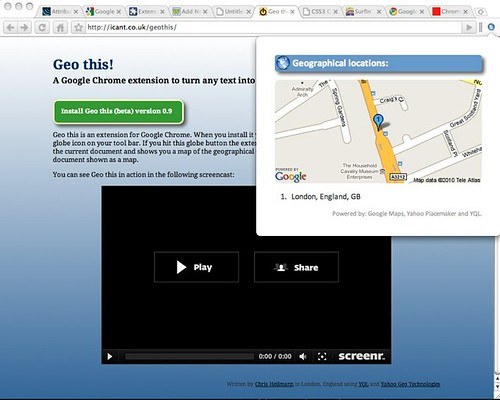
You can also see the extension in action in the following screencast:
Under the hood the extension is more or less a port of my addmap.js hack which in turn works most of its magic by using Yahoo Placemaker and YQL. The source code of the extension is available on GitHub.
Things that will come in future versions are:
Fixing the problem that Google Maps only numbers the first 10 markers on the static maps APIv1.0More details on the found locationsv1.0- Ability to save the map and locations as an image
- Better icons (anyone can paint me one?) – right now I am using one of the Project Icons by Mihaiciuc Bogdan and cruelly resized it in Skitch
What do you think?
Tags: chrome, extension, geo, Google, placemaker, yahoo, yql