How I build my data.gov.uk mashup – UK-House-Prices.com
Thursday, January 21st, 2010 at 12:06 pmUK-House-Prices.com is a web site to see how the prices in a certain area changed over the years using a data set released by the UK government as part of the data.gov.uk initiative.
Here’s a screencast showing the app:

The first step was to get the right data. I was lucky enough to be invited to the initial “hack day” and pre-release of the data and looked around for something to mash up. Initially I wanted to do something with environmental data but I found a lot of it to be very old. Therefore I just did a search for “2009” at data.gov.uk and found that the house prices data from 1996 to now in England and Wales is available. The plan was set. This was it:
- I wanted to build an interface to show this information that was very fast, very portable and show a nice map of the area next to the numbers.
- I wanted to build this as a web app and as an application for the Yahoo homepage (as I needed to build one as a demo anyways)
- Traffic and speed was the most important issue – as this might get huge.
Cleaning and converting data
I got the spreadsheet and was confronted with my old nemesis: Excel. After saving the sheet as CSV and spending some fun time regular expressions and split() I had the data in a cleaner, and more usable version (JSON, specifically). One fun part is that when there was no data available for a certain area the field was either “..”, “n/a” or just empty. Something to work around. The numbers were also formatted like 100,312 which is nice on the eye but needs un-doing when you want to sort them outside Excel.
Once I had the list of locations and their numbers I wanted to turn them into geographical locations to display maps of the area. For this I used Yahoo Placemaker, especially the YQL table (see an example for Rugby in the YQL console). This is the script I ran over the list of locations:
$out = '';
for($i=0;$i<sizeof preg_replace ua curl_init curl_setopt curlopt_url curlopt_returntransfer curl_exec curl_close json_decode echo>query->results->matches->match->place->woeId.'",';
echo '"lat":"'.$data->query->results->matches->match->place->centroid->latitude.'",';
echo '"lon":"'.$data->query->results->matches->match->place->centroid->longitude.'"'."},n";
;
}</sizeof>```
That was that – I had a data set I can work with.
## Adding more information
The next thing I wanted to add was some more information about the area which meant using maps. As both Yahoo and Google maps have static map versions but are rate limited I wondered if there is a free version of that. And there is. [Openstreetmap](http://www.openstreetmap.org/) was the answer, especially the [somewhat unofficial API I found with Google](http://pafciu17.dev.openstreetmap.org/). To play safe, I wrote a script that gets the images and I cache it on my server to avoid killing this API.
I also wanted to show currently available houses in the area in case you are looking to buy. For this the natural choice for me was to use [Nestoria](http://nestoria.co.uk/) as they also have an open YQL table ([see the Nestoria table in the YQL console](http://developer.yahoo.com/yql/console/?q=select%20*%20from%20nestoria.search%20where%20place_name%3D%22Rugby%22&env=store%3A%2F%2Fdatatables.org%2Falltableswithkeys)). So I used YQL and sorted the results by date:
```select * from nestoria.search where place_name="Rugby" \| sort(field='updated_in_days')```
Using this I can get offers in the area live:
```markup$url = 'http://query.yahooapis.com/v1/public/yql?q=select%20*%20from%20nestoria.search%20where%20place_name%3D%22'.urlencode($city).'%22%20\|%20sort%28field%3D%27updated_in_days%27%29&format=json&env=store%3A%2F%2Fdatatables.org%2Falltableswithkeys&diagnostics=false';
$ch = curl_init();
curl_setopt($ch, CURLOPT_URL, $url);
curl_setopt($ch, CURLOPT_RETURNTRANSFER, 1);
$output = curl_exec($ch);
curl_close($ch);
$data = json_decode($output);
if($data->query->results){
$i=0;
$results = array_slice($data->query->results->listings,0,5);
if(sizeof($results)>0){
echo '<div class="listings"><h3>Current property listings (powered by [Nestoria](http://www.nestoria.co.uk/)) <input type="button" class="hide" value="hide"></h3>';
foreach($results as $r){
echo '<li>';
echo '<h4>['.($r->title).'](/2010/01/21/how-i-build-my-data-gov-uk-mashup-uk-house-prices-com/r-lister_url.')</h4>';
echo '<p> Price: '.($r->price_formatted).', Type of property: '.ucfirst($r->property_type).', Updated: '.($r->updated_in_days_formatted).' ('.($r->updated_in_days).' days)
';
echo '<p>Listed at: '.($r->datasource_name).' by '.($r->lister_name).'.
';
echo '';
}
echo '
</div>';
}
}```
## Finding a charting solution
Adding interactive charts was the next step. I had a few issues with that:
- While [Google charts](http://chart.apis.google.com/) are full of win, they are rate-limited and I didn’t want to pull images. As the app was also meant to become a Yahoo application every image would have to be run through Caja for safety reasons which slowed it down.
- Canvas and Flash solutions like [YUI charts](http://developer.yahoo.com/yui/charts/) or [Raphael](http://raphaeljs.com/) were also not possible because of the performance of the YAP app.
So I wrote my own [pure CSS bar charts](http://icant.co.uk/csscharts/) to work around that issue.
## Building the API
I put all these solutions together and built a small API that will give me the search results with three parameters: the location as an id and the start and end of the time range.
```markuphttp://uk-house-prices.com/graphs.php?loc=1&start=10&end=20```
## Building the interface
To build the interface, I went all-out YUI. I took the [YUI grids builder](http://developer.yahoo.com/yui/grids/builder/) to create the main layout, the [AutoComplete demo](http://developer.yahoo.com/yui/examples/autocomplete/ac_basic_array.html), the [dual slider demo](http://developer.yahoo.com/yui/examples/slider/slider_dual_with_highlight.html) and the [button](http://developer.yahoo.com/yui/button/) and put them all together. Add an Ajax call to the form, and you are done. OK, I admit, there was quite a bit of cleaning up to be done :)
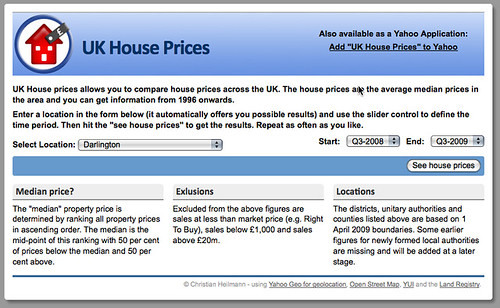
Notice that I am using progressive enhancement all the way. Without JavaScript you get dropdowns:
[](http://www.flickr.com/photos/codepo8/4292914222/)
## That’s it
The next thing I had to do is move the app over to the Yahoo Application Platform which was easy as I based it on an API - but this is another blog post :)
Tags: [datagov](/tag/datagov/), [datagovuk](/tag/datagovuk/), [england](/tag/england/), [government](/tag/government/), [houseprices](/tag/houseprices/), [mashup](/tag/mashup/), [nestoria](/tag/nestoria/), [opendata](/tag/opendata/), [openstreetmap](/tag/openstreetmap/), [uk](/tag/uk/), [ukhouseprices](/tag/ukhouseprices/), [yql](/tag/yql/), [YUI](/tag/yui/)