Disclaimer: this is not a technical post, it is a cultural and personal one. It is also very long, but I talked to a few people and they wanted me to write it to understand some of my actions and reactions.
If you have comments, there are threads happening on Facebook and also on Google+
I just spent a week in India training Evangelism Reps, giving a keynote and a three hour training at a conference, answering dozens of personal requests and posing with people on photos.
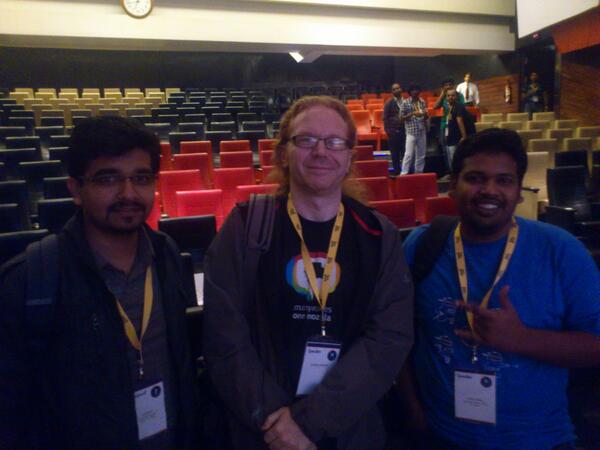
People who see me as a rock star, people who are timid around me and whose eyes light up when they see me and talk to me. People who came far and wide to a conference to meet me. People who both make me feel uncomfortable – as I don’t see myself as an unapproachable rockstar, but at the same time make me feel amazing when I see how much it means for them to meet a guy they learned things from. I am right now in the airport and I am dead tired. I slept about 3-4 hours each day in an incredible luxurious hotel I did not use enough. I didn’t eat regularly the way I normally would and a few times I literally passed out for a quick nap to recover. I did all this voluntarily, because I know I don’t come here often and I see how much it means to people when I do.
Here I will explain why coming to India is tough on me and why I put a lot of effort into training locals to go and speak about technical bits instead of me. Here is the good, the bad, the ugly and my takeaways.
The good
As someone who likes to share information and teach people, India is heaven. The thirst for knowledge is immense and people are very adamant to get to ask questions and understand what you tell them rather than just “being inspired by it”. The “how” is very appreciated but people also strive for the “why” when it comes to learning.
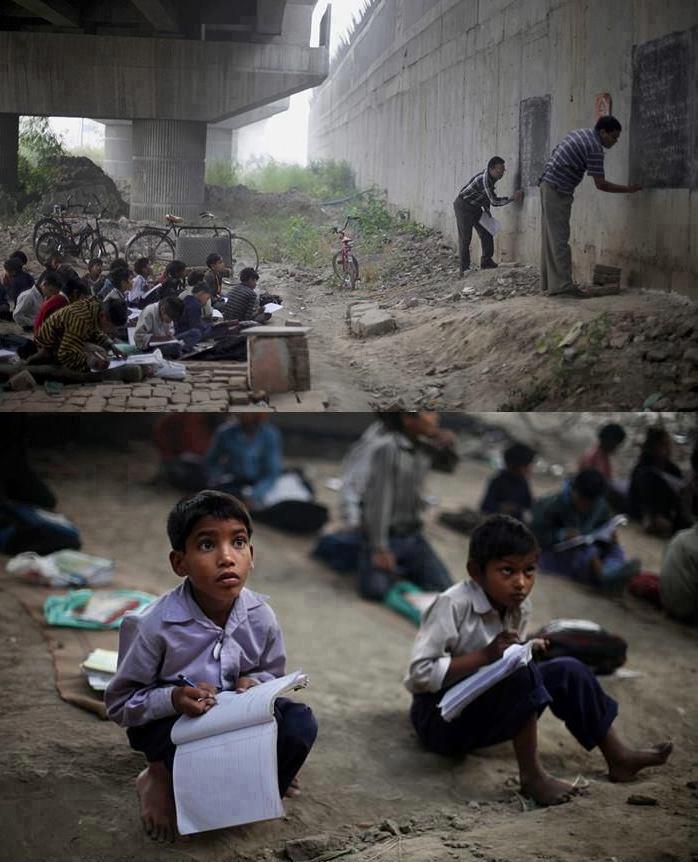
You can feel that people want to use the knowledge they acquired and that knowing more here means getting a better life and having better chances to move ahead in your career. There is no sense at all of fatigue or boredom; people are incredibly hungry. Every single Q&A session following the talks at the conference was full of great questions, people were sticking to one topic and it showed that they had listened to all you had to say. There was no grandstanding or time wasting with bait questions comparing your product to competitors or spouting truisms to show off that you are cleverer than the presenter. It was all about getting the most out of being at the conference. Talking to people I sensed that they really knew a lot already and had amazing insights but utterly failed and even were uninterested in flashing their knowledge in public. This humbleness is commendable but also dangerous, as it means that it is very easy to underestimate our Indian colleagues. It is not the person who shouts the loudest that has the best insights, but it is easy to think that way.
A culture of getting things done
One thing I find fascinating in India is that there is always a way. It might not be the most comfortable or obvious one but there is no stagnation. Whether it is a whole family, their pets and their shopping sharing a motorbike that was meant for two or logistics needing sorting out – there is no large period of complaining: things just move on and solutions are found. This is something the Western world can learn from. We tend to linger on complaining about things being wrong rather than doing something about them as we are used to delegating work.
Honest and unfiltered feedback
Feedback amongst Indian people appears to be brutally honest and immediate. This could come across as shocking for people coming from cultures where you have to wrap criticism in nice words (AKA the shit sandwich – start with appreciation, give the criticism and end with a compliment) and cultures where any critique is seen as a personal attack. Personally I prefer the honesty and to the point criticism. As someone in my course put it:
“I don’t mind that the other person hates me right now for pointing out what was obviously wrong in their work. I just know that they will think about it later and turn that hate towards their own mistakes and remedy them. I just want them to get better.”
I hope that really is the result and I wished more people had the same courage and honesty.
The best hosts you can hope for
Another good thing about India is that people are genuinely excited about little things and incredibly good hosts. You really feel welcomed as a visitor by the people who invited you. You see them bending backwards to sort problems out for you and make your visit as convenient as possible. In many cases this can be seen as not enough effort as the country is just so different to what we are used to. Yes, the car that picks you up might be smelling of cigarettes and the seats are threadbare and not the cleanest. But it was on time and it gets you were you need to go without delay and that is a very uncommon thing here.
This helpfulness is very much ingrained in the culture in India which brings me to the bad part.
The bad
The bad things about India for me are first of all the obvious ones: getting there (visa fun, time difference, distance), the heat, the rain, the crowds, the “air”, not being 100% sure about food and water, the bureaucracy, things hardly ever happening on time and following the original plan. A lot of those can’t be helped and you just have to grit your teeth and bear with it.
How I came to be who I am and how I see people
The big issues for me are those that culturally rub me the wrong way because of my upbringing. My mother was a housewife, my father a coal miner and then a factory worker. I have two siblings, one a former factory worker and now fireman and another who works in the unemployment office trying to give people work who want to. You can see that helping other people and having to work for good things happening to you is very much ingrained in us. We never were rich, but we never were poor. We just learned to make the best out with what we had. My dad being a big union man he was firm in his belief that everyone “up there in management” is a corrupt bastard.
I grew up not to admire anyone by their cultural standing or by how rich they are. On the contrary, the common view was that people who are rich are never that way because of what they put into it. Instead, they were either born that way or achieved it by immoral means. Of course I rectified that world-view of my dad a bit – as is the task of the next generation – but deep down it is still there. I feel like a fraud when people see me as a rich person who has a better standing and deserves being served because of that.
My personal view is that people are equal and deserve the same chances. The only way to lose my respect is being close-minded, genuinely mean or deliberately unwilling to learn or improve, and that is independent of how rich you are, where you come from or how impressive your background is.
Service on demand, please
That’s why I feel uncomfortable with being continuously served and seeing the obvious class differences you still feel in India. I guess the latter is to a degree necessary to make a country this big and overcrowded work (and to maintain its “delivery” role in the world market). The former, however, drives me crazy.
I am not used to people opening me doors, I feel very odd being in a gym and having two trainers hover about asking me if I need anything every two minutes (which actually makes me wonder if I do things wrong and feel bad for not letting them help me). I want to go into a place and look and discover things on my own account rather than being immediately given my personal helper who beelines towards me as soon as I cross the doorstep. I much more prefer being left alone and having to do things myself until I get stuck and get quick help when that happens.
I am OK with asking for assistance, but I am bad at refusing it when I don’t need it but get it offered to me. It is a very strange feeling being pampered all the time and being asked the same questions over and over again, especially when they are of the “how are you sir?” kind. It feels like an inflation of helpfulness. Service, to me, should be on demand and not continuously in your face. I should be happy about this, but it really is disturbing to not be able to look at anything without someone dedicated only to me hovering about. I feel continuously bad for wasting that person’s time although I probably do not at all.
The Ugly
Which leads me to the really horrible bit: as someone like me, who very obviously is not local, many times in India to be able to get something done or to just have your peace you need to be a horrible person.
I love people. I love to talk with them, I love to recognise body language and see people being happy. Someone approaching me and greeting me is a thing I enjoy and love. Were I a puppy, I’d be wagging my tail all the time.

I know you are interesting, I know you have a story I’d love to hear, I know you have an idea that could be the spark for my next impressive published insight. I am a sponge for human interaction.
I don’t want to be an armoured car
That is why it pains me that I can not go down the road without having to repeatedly shout “no” at people or avoid eye contact at all cost or just be rude and push people out of the way. Or having to stay safe in artificial, protected environments like hotels and malls. I want to explore, I want to see and I want to learn. In order to go where I want to go and not take the services of “my dedicated driver” or having to ask people who brought me here to accompany me (whilst they might have better things to do) I need to deliberately treat people as if they don’t exist. This hurts me deeply. Beggars coming to you asking for food and money. Very young kids in horrible physical states (in some cases inflicted on them to appear more pitiful and thus more effective as beggars) – it breaks my heart having to shout at them or move on as if they are not there. But the worst, to me, is when this is used against me in a manipulative way.
A new kind of cab scam
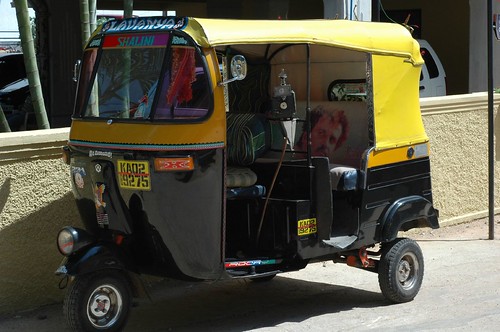
Getting around the city used to be simple when I went to India in the past: you got a Rickshaw and paid five times as much for the ride as local people would. That I totally don’t mind. It is still dirt cheap and once you came to terms that the imminent violent death you’ll suffer the way the guy drives never happens you just lean back and submit to the inevitable. Sooner or later you will be dropped where you needed to be. However, lately some drivers are resorting to emotional blackmail. It goes like this:
You walk down the street and someone will approach you and ask how you are. When you explain that you are feeling excellent, without a single care in the world and all that stops you from feeling ecstatic is to be able to walk to where you want to go on your own terms and power, creativity kicks in. The person approaching you introduces themselves a cab driver who can easily get you where you want to go with much less hassle. If that doesn’t work it gets more aggressive: the driver will tell you that there is no way you can reach your destiny on your own account as there is “a riot and the police blocked off some streets”. The driver then offers a ridiculously small price (actually the price locals would get) and you start considering it. When you cave in and get to their car or Rikshaw the driver is very chatty, very knowledgeable about everything and tells you about their wife and children. They also tell you that to kill the time until the roads are free again you can take a look at a great shop that has amazing prices – only today, no less.
And thus you end up in some store that obviously has a deal with the driver. These shops are full of confused westerners looking at things they don’t want and don’t need but feeling guilty as the very helpful driver was so nice. The products in these shops are – to keep it simple – shit. You get shown jewelry that is “amazing high quality stones in silver plated with white gold” with the glue sticking out in the back where the plastic stone was shoddily put in. You get stoles and other things that start at 6000 Rupees and can easily – if you care to put the effort in – be haggled down to 1000. You feel the scam, it oozes out of every moment, and yet you feel kind of obliged to the driver to do something. It is lies after lies on top of hyperboles and false appreciation and chumminess (“I can see that you have an honest face, my friend, so I can do you a special price” – it sickens me).
This can repeat itself. I had a driver that dropped me at three places until I lost my temper and told him to go back to my hotel immediately or I will stop the next policeman and tell him I am being held against my will. “OK, sir, if that’s what you want, sorry sir, I just wanted to help use the time until the riot is over” is the answer. Also, you will hear that it is the driver’s wedding day and he works to get some extra money and will have an argument with the wife. Whatever you pay when you finally get to your hotel will be greeted with a disappointed face and a very quick depart by the driver without another word.
This scam makes you end up probably having something you didn’t want and feeling like a terrible person at the same time. And it is not uncommon. And it really is the worst to me. The fact that I feel ripped off is OK, that happens, but the dishonesty of it all is just shattering to me.
You can only get out of it by leaving the driver behind and taking another one once he stops at the shop. Or answering anyone obviously local with a key in their hands in the street in languages they don’t understand. I resorted to German and French and pretended not to understand any of their attempts and just moved on pretending to be scared.
The reward you get
These are the things that make traveling for work in India very daunting to me. Maybe I overreact but I am very happy being in control of my life without being in command. I enjoy my independence, and it is very, very hard to have it when you are in between people offering you services you feel menial for anyone to do for you and having to spend a lot of energy fighting off people who single you out to take advantage of you financially. Of course you can afford the latter but it also feels very wrong that these scams succeed seeing that vast amount of immensely poor, honest people around. You can not really hate the scammers as they just found a very effective way to get more money that probably to us is still a ridiculously low amount. All in all, you can not win either way unless you shutter yourself emotionally. And to me being emotional is being alive, being human.
That’s where I am lucky that I meet people who work with me, or invited me over, who shield me from the ugly and the bad and make me feel very hopeful for India. People whose warmth is written on their faces, their gestures and their actions. People who commit to what they do 100%. And those are the ones that make me come back and burn myself out during the short time I am here and make me try to share as much as I can to ensure they get what they deserve from me during the time we have. It is worth it, because of that, but it really takes a lot out of me.
I tried my best to thank anyone who helped me, I invited my friends for a nice fancy dinner and I answered all the emails and followed all the connections I got. I will be busy tomorrow with other stuff and will be unable to answer new questions and contact requests. I am sorry about this, but I am burning my candle on both ends as it is.
I am right now writing this in the first class cabin of my flight back to London. The lushness of this seems surreal and I got here by recycling and doing a nice thing. The hotel gave me a lovely bouquet of flowers as a thank you for staying with them. Something beautiful on the way. Now, taking flowers on a 13 hour trip home is kind of tough and I actually am allergic to flowers. Of course there was no way for me to tell them that without feeling like an ungrateful ass-hat. So I took the flowers with me to the airport (sniffling in the cab) and gave them to the lady who checked me into my flight as a surprise present. She was speechless and I am quite sure my current state of travel (and the 7 hours of deep sleep I just had because I could lie down) is the result of finding a way to spread the joy I was supposed to get exclusively.
I will be in my flat in London soon. I will be excited about taking public transport home, I will be amazed to remember just how lucky I am being able to pour myself a glass of water from my tap and go on my balcony and see a busy but clean street with no continuous sound of horns and people zig-zagging within hairline distance from another. I will enjoy having personal space. I will now have a few weeks of utter humbleness and a wonderful feeling of not giving a hoot about the internet and media drama we create for ourselves in the West. I will be thankful and grateful for what I have. I will take stuff I don’t need but have and share it with those who need it. I am reminded of how privileged I am having gotten to where I am by being fierce in wanting to learn and taking in all I can get and share it. And I am appreciating the little things we consider a given but so not are everywhere in this world. I went once again through the emotional washing machine with a high spin cycle that is India, but – as always – I feel coming out a bit cleaner.
If you have comments, there are threads happening on Facebook and also on Google+