Generative AI is only as good as its integration in your work environment. GitHub Copilot Chat in Visual Studio Code is a great example how to do that right.
You can highlight code in the editor and press `CMD + I` on Mac or `Ctrl + I` on Linux/Windows and you get a text box to chat about this piece of code. For example, you can ask Copilot to explain it.
If you ask Copilot to modify the code, for example by asking it to add step-by-step instructions, it won’t replace the code immediately, but give you a diff view to see and change the recommendations before applying them.
Together with an extension to verify the validity of your code, like webhint this becomes a safe and thoroughly enjoyable way of working.
Generative AI is amazing – but good UX makes it even better.
Posted in General | Comments Off on GitHub Copilot is a great example for in-context AI chat
As part of the WeAreDevelopers World Congress 2023, we did a quick session on starting out as a public speaker. To this end, I was asked to do a “Five things about public speaking” video. Here is the video and a write-up about the tips.
In the world of public speaking, engaging, informing, and delighting an audience is both an art and a science. If you’re a novice speaker ready to step onto the stage and into the spotlight, here are some tips.
Share Your Story
Every aspect of your talk should reflect who you are as an individual. Your slides, while offering informative visuals, are merely wallpaper lending a backdrop to your core message. Therefore, presentation success lies largely in your personal connection to the topic at hand.
Share your enthusiasm by explaining why the subject excites you, how you discovered it, and what resources you’ve used—all of which your audience can use later when they want do learn more about the topic.
How you learned about a topic, why it matters to you, and why it should matter to the audience, is the best way to bring something across.
Dealing with Nerves
While it’s perfectly natural to be nervous before a talk, it’s crucial to manage these emotions productively. Use this energy to fuel your performance on stage. If the anxiety feels overwhelming, open up about it—authenticity resonates with people.
Redirect your focus from potential judgement to your fundamental purpose: to show excitement and share knowledge.
Preparing for your Talk
Primarily, prepare by conducting thorough research to master your content. Find something current and relative to your topic to serve as a hook for your audience, demonstrating the immediacy and relevance of what you’re discussing.
Secure your presentation by making sure all your demos and materials function offline and are accessible to your audience afterwards. Familiarise yourself with the technological equipment available to avoid overcomplicating or failing demonstrations.
It is highly important to learn about your audience and cater your presentation to their needs. Aim to provide them with a key takeaway they can use to impress their superiors.
Do’s and Don’ts
Do’s
1. Tell Stories. Make the subject human and exciting, and point to materials where your audience can learn more.
2. Limit Yourself. Instead of overwhelming the audience with excessive amounts of information, focus on delivering one key point exceptionally well.
3. Use Clear and Simple Language. Avoid showing off your mastery over sophisticated vocabulary and instead strive to be comprehensible to your audience.
Don’ts
1. Take all the credit. Give credit where it’s due, acknowledging the people from whom you’ve learned.
2. Read out your slides to the audience. You’re not an audience member but the show-runner. The human factor in a presentation is what can’t be digested from simply reading a slide.
3. Try to be funny for the sake of being funny. Humor is great, but only when it doesn’t become a distraction from your main message.
Harness the Unexpected
During one of my keynotes on machine learning, a power outage left me delivering my message in the dark, and later, my slides appearing in an unintended random order. Instead of panicking, I leveraged these mishaps to emphasise the unreliability of machines—ironically, the exact message I had come to share.
Remember, when unexpected situations arise during your talk, flip them to your advantage. Owning your story and being an expert on your content equips you for effectively dealing with any hurdles that may occur on stage.
In conclusion, successful public speaking requires substantial preparation, an understanding of your audience, and most importantly, a genuine passion for your topic. Serve as a guide to your audience by threading a story throughout your presentation, and never lose sight of why the subject holds significance for both you and your listeners.
We are looking for presenters!
If you want to start as a public speaker, remember that WeAreDevelopers has a “live” video series and we are looking for presenters. Check out the WeAreDevelopers live site and the call for papers .
This post has partly been created using VideoTap .
Posted in General | Comments Off on Five things about public speaking
In dem circa eine Stunde langem Kurs erkläre ich, wie man die Entwicklerwerkzeuge in den gängigen Browsern benutzt, um Webinhalte zu analysieren und zu verändern. Der Kurs richtet sich an alle, die sich für Webinhalte interessieren, aber keine Entwickler:innen sind. Stattdessen zeige ich wie man:
Bilder auf Webseiten herunterladen kann (auch wenn es keinen Download-Button gibt)
Videos einfacher anzeigen lassen kann
Nervige Elemente auf Webseiten ausblenden kann
Webseiten auf verschiedenen Geräten simulieren kann um eine einfachere Darstellung zu bekommen
Funktionalität, die nur auf dem Handy angeboten wird auch auf dem Rechner zu nutzen
Webseiten auf Fehler untersuchen kann
Cookies anzeigen und verändern kann
und vieles mehr
Hier sind alle Videos mit den jeweiligen Zeiten:
1. Was sind Browser-Entwicklerwerkzeuge?
Entwicklerwerkzeuge öffnen (1m 22s)
Worauf kann ich zugreifen? (1m 37s)
Ist das überhaupt erlaubt? (48s)
2. Wie benutze ich die Entwicklerwerkzeuge?
Navigation in den Entwicklerwerkzeugen (2m 49s)
Ein- und Ausschalten verschiedener Werkzeuge (1m 13s)
3. Entwicklerwerkzeuge den eigenen Bedürfnissen anpassen
Wo sollen die Werkzeuge angezeigt werden? (1m 4s)
Schriftgröße und Farbe (1m 58s)
4. Werkzeuge für verschiedene Aufgaben
Webinhalte mit dem Inspektor analysieren (6m 13s)
Webinhalte mit dem Elemente-Werkzeug verändern (7m 38s)
Datenanalyse und einfacher Zugang zu Bildern und Videos mit dem Netzwerk-Werkzeug (5m 39s)
Verschiedene Geräte simulieren (9m 56s)
Screenshots erstellen (4m 2s)
Probleme in Webinhalten erkennen und analysieren (4m 54s)
Cookies anzeigen und verändern (2m 53s)
5. Königsdisziplin: Webinhalte per Konsole
Was ist die Konsole? (4m 3s)
Zugang zu Webinhalten mittels der Konsole (3m 27s)
Scriptbeispiele: Bilder (4m 7s)
Scriptbeispiele: Links und URLs (3m 21s)
Tipps zur Konsole (1m 41s)
Abschluss
Nächste Schritte (1m 13s)
Posted in General | Comments Off on Browser-Entwicklerwerkzeuge für Nicht-Entwickler:innen – neuer Kurs auf LinkedIn Learning
Going through the bargain bin at a local store I came across the novel NSA by Andreas Eschbach. It is based on the intriguing idea what would have happened if the Nazis had access to the internet, social media, mobile devices and card payment systems. The NSA is a state-owned department of the government before the Nazi takeover that is data-mining the internet and storing all the information.
One of the first bits in the book is a fast forward to when the Nazis had taken over and WW2 is already in its desperate end phase. The NSA department tries to show off to the Nazi regime by proving that they can find out who is hiding Jews. They do this by tracking all the food people bought over a period of time and how many people live in their flats. A huge discrepancy in those numbers indicates that there are probably more people living there than are in the official registry. The Nazis then go on to verify this by dispatching inspectors to a house in Amsterdam. At first they don’t find anyone, but after adding another datapoint by looking up the blueprints of the house they find a hidden family and send them to the death camps. After burning the daughter’s diary as its contents should be a problem if it gets distributed.
The book also goes on to describe how the Nazis used computers, mobile devices and online forums to track people, spread misinformation and fire up groups to gang up on people who write about topics that aren’t about purity of race or nationalism.
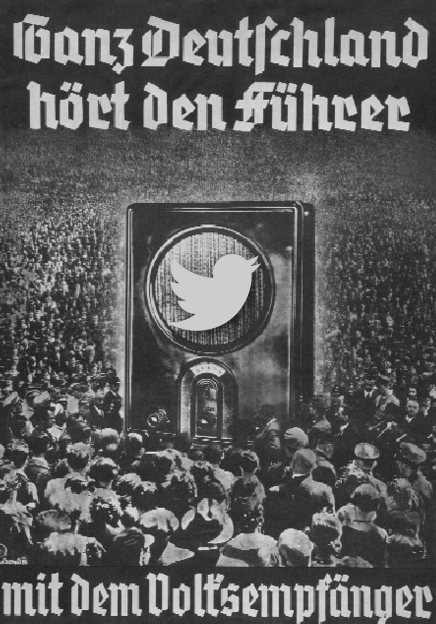
It is a chilling read, and – if you think about it – not far from what has happened, albeit only with other media. The Nazis were excellent at using Radio and TV to hide the sheer evil they represent with positive messages that pandered to people’s pride. This went as far as creating and distributing highly affordable radio sets into homes called Volksempfänger.
In essence, controlling the media means controlling the masses. And the book describes how having information is as powerful as having heavy weapons. That’s no new insight, of course. George Orwell’s 1984 had similar ideas, after all, and many people, including me, have warned about oversharing for quite a while.
Anti-social media
Why am I writing about this? Because we are not far from a world like that. Social media has become anything but social. People either drown in a river of generated and opinionated content or recede into their own, smaller bubbles where they can talk with likeminded folk without fear of being ganged up on by louts and trolls.
The big elephant in the room, of course, is Twitter and what happens to it now that a single person was able to buy it and change it to their ideals. A lot of people who have been preaching about privacy and evil corporations are now quick to utterly disregard it and move away to other places. None of these places having the same size or impact though. Maybe it is a good thing that Twitter’s monopoly is dwindling, but it is dangerous to assume that people who just want a daily information fix will stop using it and move to other platforms. Platforms that appear much harder to use or only get rolled out in certain locales.
Twitter has become rough and annoying. It is easy to feel smug about that and wave a huge “we told you so” banner, but that does not change the fact that people still read Twitter and if the calmer and more enlightened voices leave, the hooligans and their puppet masters take over.
The other day someone told me that Twitter is a fascist platform and anyone still using it is a fascist. What a bunch of elitist and defeatist nonsense. If you march alongside fascists in the street without distancing yourself I agree – that makes you a supporter. If you donate money to a platform or a cause that is inherently against people’s rights or freedoms, that’s even worse. I won’t pay for Twitter, that much is for sure. But I keep using it the way I always used it. To me, it’s a publication channel. I don’t go there for information, as the algorithmic timeline made that pointless some time ago. I do comment on people who attack others or point out wrong information and I use it to direct message people and answer incoming messages.
Leaving a place when it gets rough and people spout hatred instead of standing up to them is not that much better than endorsing it. The fact remains that Twitter, much like Facebook, has a huge impact in the media and people do use it. And they are being manipulated by others on these platforms. I see Twitter as a pub that has had an influx of rough folk that shout racist and sexist paroles with an innkeeper that’s asleep at the wheel. If that pub is your hangout, it’s up to you to stay there and work against that takeover. Much like football clubs need to distance themselves from hooligans to ensure that fans of the sport and the team can still safely attend a match.
Fascism works through intimidation. Civil courage is needed to prevent it from becoming the norm.
Posted in General | Comments Off on What if the Nazis had the internet and social media?
I’ve been using WordPress here since the beginning and I am still happy with what it does for me. One thing that drives me bonkers though is a UX bug in the media tool. Almost every time I upload an image to WordPress, I start typing in alternative text. The problem is that the editor refreshes completely when the image has uploaded and all I entered is lost. Here is a screencast showing the issue: