Adding a world globe and location information to your site with YQL
Sunday, August 1st, 2010 at 1:34 pmWhilst looking around the open tables in YQL I found a table with earthquake information released by the United States Geological Survey. One thing the RSS feeds returned from that service had was quite a cool picture of Earth with the location as a star:
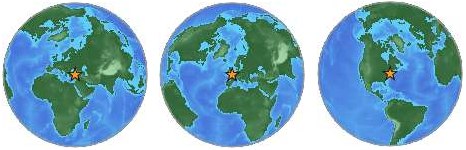
Looking at the source I realised that the image URL has a certain logic to it:
http://earthquake.usgs.gov/images/globes/50_40.jpg

The first number is the latitude, the second the longitude of the location. Each of them need to be multiples of 5 to result in an image. Try it out by changing the values.
Using this, I put together an open YQL table to render some HTML that shows a the globe image and the information the Yahoo GeoPlanet web service has available about that location.
You can use the table with the following YQL statement:
select * from geo.globeimage where place="sfo" and type="data" and location="true"Open this in the console here or see the results as XML.
The different parameters are:
place- The geographical location, like SFO for San Francisco Airport or London, UK for London, England
type- the type of the image. If you provide
dataas the parameter the image gets returned as inline data. This renders the badge much faster as the image doesn’t need to get loaded from the USGS server. location- A Boolean if want to show the list of location information or not
The above statement would render the following HTML:

- Name: San Francisco International Airport
- Placetype: Airport
- Country: United States
- Latitude: 37.614761
- Longitude: -122.391876
- WOEID: 12521721
In order to use this without going through YQL, I’ve put together a small JavaScript:
globebadge.init({
element:’ID or reference of element to add the badge to‘,
location:’the geographical location you want to show‘,
showlist:true or false – if set to true the script displays the place information as an HTML list.
});
For example:
globebadge.init({
element:'badge',
location:'Batman',
showlist:true
});
This will render in your browser like the following image:

You can find the source of the badge script on GitHub:
Notice that I am testing for the browser. If we have IE6 I do not return the image as a data URI, otherwise I do.
If you want to see it in action and try it out with a few locations, check out the demo page for Geoglobes.
You can see the globeimage open table for YQL at the YQL table repository:
Another example how you can find cool stuff and then turn it into a web service with YQL :)
Tags: datauri, images, opentables, usgs, yql