Browsers have a presenter mode: console info!
Wednesday, August 15th, 2012 at 7:55 pmWorking on creating a re-usable slide deck for the Mozilla Evangelism Reps I played with HTML slides, this time using Shower as I like the list view of it. And once again as explained in the past I found myself in the pickle of adding presenter notes to the slides that presenters could look up when rehearsing the slides and whilst presenting. This is a use case that HTML is not quite meant to cover – especially multi-screen.
Paul Rouget and Anthony Ricaud’s DZSlides solve that problem by embedding the slide deck in a “presenter” page that sends post messages from one window to another. This is totally sexy from a JS geek point of view but I found it tough to set up.
Analysing what we use to present I realised that there is no need for any extras, really, as browsers these days come with an amazing thing called console.
You can use the console of browsers to have messages on a second screen not visible to the audience as debuggers can be in own windows. It is as simple as that :)
So I extended shower a bit. Every slide now gets a footer with notes:
<div id="morethanfirefox" class="slide"><div> <section> <header> <h2>Ongoing work…</h2> </header> <img src="pictures/mozillamore.png" class="middle" alt="Mozilla is more than Firefox"> <footer class="notes"> Mozilla is much more than Firefox though. We are a not-for-profit organisation to promote the open web. This means we educate people on how to publish content and we protect people's privacy and identity and choice on the web. </footer> </section> </div></div> |
I hide the notes in full mode and for rehearsal in list mode I just added a hover state:
/* Notes */ .full .notes { display:none; } .list .notes { background: #fff; padding: 5px 10px; z-index: 10; display: block; position: absolute; bottom: -500px; left: 50px; right: 50px; -webkit-transition: bottom .5s; -moz-transition: bottom .5s; -ms-transition: bottom .5s; -o-transition: bottom .5s; transition: bottom .5s; } .list .slide:hover .notes { bottom: 15px; } |
During viewing the script then reads the notes and adds them to the console as an info. As an extra I also read the next heading as a “coming up”:
function lognotes(slideNumber) { if (window.console && slideList[slideNumber]) { var notes = document.querySelector('#'+ slideList[slideNumber].id + ' .notes'); if (notes) { console.info(notes.innerHTML.replace(/\n\s+/g,'\n')) } if (slideList[slideNumber+1]) { var next = document.querySelector('#'+ slideList[slideNumber + 1].id + ' header'); if (next) { next = next.innerHTML.replace(/^\s+|<[^>]+>/g,''); console.info('NEXT: ' + next); } } } } |
During presenting you can now just open the console and move it to the other screen. As the main screen will be the one you show on the wall you also have no issue recording the session (something that keynote gets wrong).
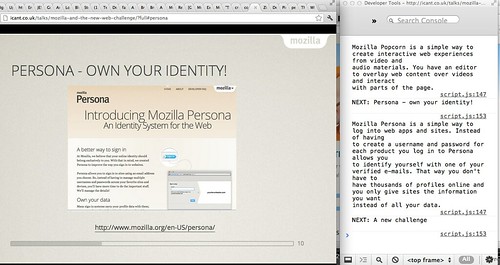
This trick could be used for any of your scripts – just add the infos and have the debugger open on your laptop while your boss marvels at you presenting the product. You can read the hints you add on every click in the interface.
The revelation to me in this case was that the console and debugger are exactly the other screen we need for presenting and a very easy way to keep the interaction in the main window and get information in the other. You got to love browsers these days.
Check it out in action in this screencast:
Tags: console, debugger, presenting